





hexen11
Members
-
Joined
-
Last visited
Everything posted by hexen11
-
Workaround Identified : Setting the MTU to 1400 in both the servers seems to have solved the issue for now. This seems to be a known bug. I had originally set the MTU at 9014.
-
This is what I get when I do ssh -v. It gets stuck at that last line and then times out. root@Hades:~# ssh -v root@zeus OpenSSH_8.8p1, OpenSSL 1.1.1o 3 May 2022 debug1: Reading configuration data /root/.ssh/config debug1: Reading configuration data /etc/ssh/ssh_config debug1: Authenticator provider $SSH_SK_PROVIDER did not resolve; disabling debug1: Connecting to zeus [zeus] port 22. debug1: Connection established. debug1: identity file /root/.ssh/id_rsa type 0 debug1: identity file /root/.ssh/id_rsa-cert type -1 debug1: identity file /root/.ssh/id_dsa type -1 debug1: identity file /root/.ssh/id_dsa-cert type -1 debug1: identity file /root/.ssh/id_ecdsa type -1 debug1: identity file /root/.ssh/id_ecdsa-cert type -1 debug1: identity file /root/.ssh/id_ecdsa_sk type -1 debug1: identity file /root/.ssh/id_ecdsa_sk-cert type -1 debug1: identity file /root/.ssh/id_ed25519 type -1 debug1: identity file /root/.ssh/id_ed25519-cert type -1 debug1: identity file /root/.ssh/id_ed25519_sk type -1 debug1: identity file /root/.ssh/id_ed25519_sk-cert type -1 debug1: identity file /root/.ssh/id_xmss type -1 debug1: identity file /root/.ssh/id_xmss-cert type -1 debug1: Local version string SSH-2.0-OpenSSH_8.8 debug1: Remote protocol version 2.0, remote software version OpenSSH_8.8 debug1: compat_banner: match: OpenSSH_8.8 pat OpenSSH* compat 0x04000000 debug1: Authenticating to zeus:22 as 'root' debug1: load_hostkeys: fopen /root/.ssh/known_hosts2: No such file or directory debug1: load_hostkeys: fopen /etc/ssh/ssh_known_hosts: No such file or directory debug1: load_hostkeys: fopen /etc/ssh/ssh_known_hosts2: No such file or director y debug1: SSH2_MSG_KEXINIT sent debug1: SSH2_MSG_KEXINIT received debug1: kex: algorithm: curve25519-sha256 debug1: kex: host key algorithm: ssh-ed25519 debug1: kex: server->client cipher: aes128-ctr MAC: [email protected] comp ression: none debug1: kex: client->server cipher: aes128-ctr MAC: [email protected] comp ression: none debug1: expecting SSH2_MSG_KEX_ECDH_REPLY
-
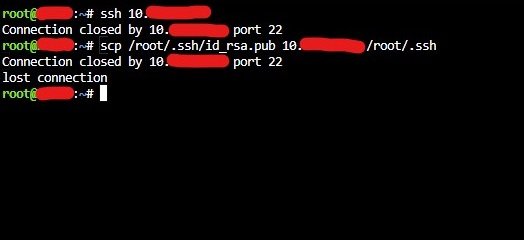
I am unable to SSH From the terminal of one unraid server to another. I was trying to follow the guide at https://unraid.net/blog/unraid-server-backups-with-luckybackup to set up luckybackup to sync 2 unraid servers. I'm unable to ssh from either the luckybackup container or from the unraid host terminal. This is what i gett. I am able to ssh to both the unraid hosts from other windows and linux servers.
-
Fresh Install of Unraid 6.6.0 in a system System Config : Issue : Created a share named media and set security to private. Unable to see controls for changing share permissions. This was observed in version 6.6.0 as well as 6.6.1. See below for screenshots. SMB Configuration : tower-diagnostics-20180928-2338.zip
