





Machine4130
Members
-
Joined
-
Last visited
Everything posted by Machine4130
-
Amazing, fixed it, thank you!
-
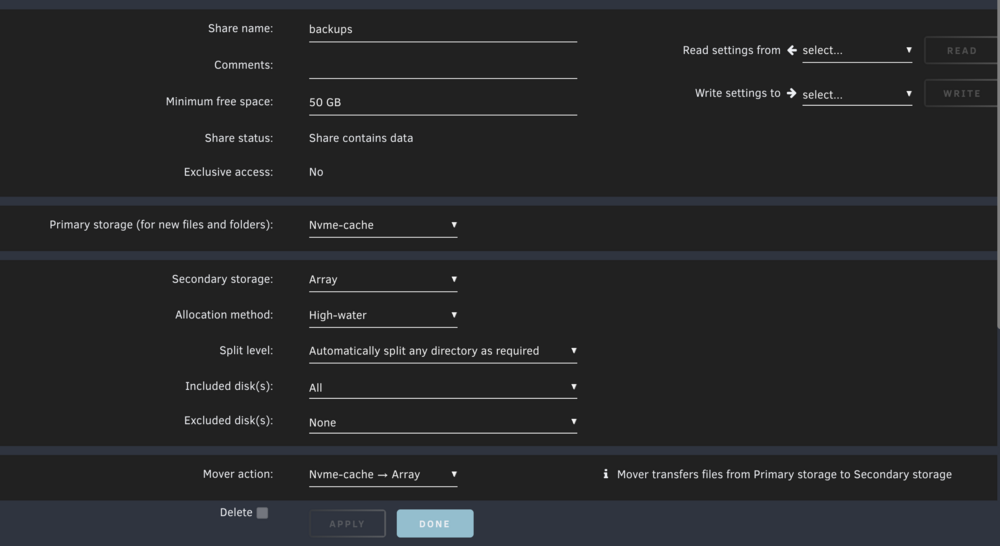
I have my appdata backups running weekly using [Plugin] Appdata.Backup and backing up to a folder within a share that's primary storage is a cache pool and secondary is my array, set to move from the cache pool to the array. Mover is generally working except it won't move any of the backup files to the array, they just sit on the cache pool. Really struggling to understand why mover refuses to move these files specifically. I have double check using the file activity and open files plugins to confirm that they are no longer active but still mover seems to just ignore them entirely. Any help would be grately appreciated. Brok Diagnostics Feb 10 2025.zip
-
Hi, Thanks for all the hard work that you put in here on the forums. I have been having some issues recently with my docker install of Duplicati using this docker image through the community apps plugin. The container starts up fine and the backups run fine but at some the container becomes unreachable through the web ui. I have the container mappings setup as follows: /backups -> /mnt/user/duplicati/backups /source -> /mnt/user /config -> /mnt/user/appdata/duplicati /tmp -> /tmp with the network type set as host. I have successfully accessed the container previously through the local ip address and port, and am trying with the same again. I haven't been able to recover from this state of unreachable web ui, the only way around it I have found is by removing and reinstalling the container (I needed to delete all files in appdata to get this to work). Not sure what is going on here as seemingly nothing has changed from when it is working to when it stops working (as far as settings etc) but obviously something has. I also tried restarting the container and the server but neither of these seemed to fix the issue. Any help diagnosing and fixing this is would be greatly appreciated. Edit: Have been able to do some more digging, appears to be something with brave as working fine on Firefox.

