





buccadebeppo
Members
-
Joined
-
Last visited
-
This worked perfectly. Thank you so much for the help!
-
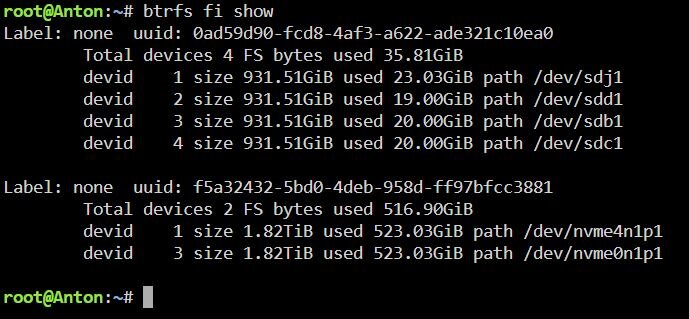
Physically removing the prior NVMe device appears to have fixed the issue. I have also attached the output following the removal of the NVMe device. Thank you for the idea! However, I am still trying to understand this. The device I removed wasn't added to any pool. Would there be a way to remove this device from the btrfs pool history to prevent this from happening again? My hope is to somehow wipe the old NVMe and try to get some use out of its remaining life.
-
I'll give that a try. I'm physically away from my server until Sunday but will do this and post the results then. Thank you!
-
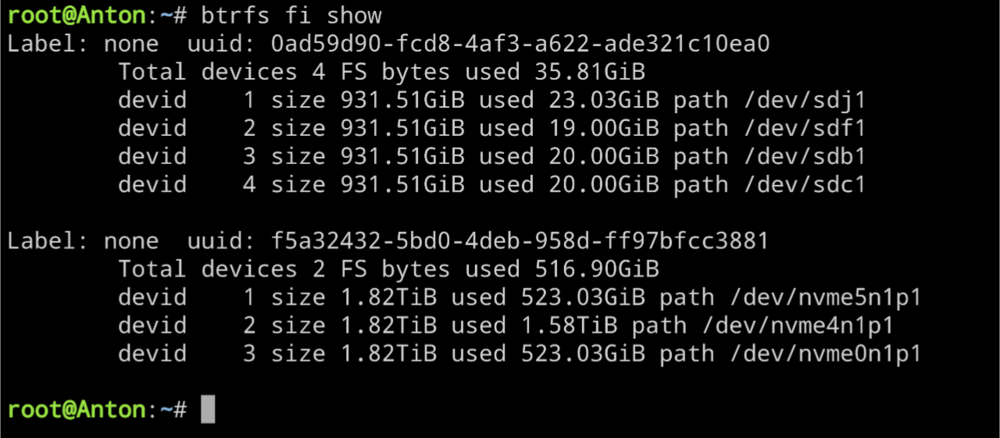
Attached. Thanks!
-
Hello! Thank you for taking the time to read! A couple of weeks ago I noticed my docker containers went offline. After looking everything over I noticed my btrfs NVMe pool named "Nvme_cache" was in a degraded state (2 drives in raid 1). It appeared that one of the drives had failed. I have extra NVMe drives in my server so I stopped the array and removed the one NVMe and replaced it with another. Everything appeared fine and it looked like the btrfs was working on rewriting the mirror to the new drive. A day later it appeared to have finished successfully and everything was working. But less than a week later I'm alerted to my dockers going offline and see the Nvme_cache pool saying "Unmountable: Unsupported or no file system". I have tried some basic trouble shooting but have not been able to get the pool back online. Any ideas would be greatly appreciated! My diagnostics file is attached. anton-diagnostics-20250102-1622.zip
-
Through trail and error off pulling hardware, booting, and checking logs, I believe I found the issue. It appears to have been my cheap NVME to PCIe cards.
-
Hello! Thank you for taking the time to read! I could use some help trying to figure out the source of the below hardware error. It seems to indicate PCIe but I was trying to figure out the specific device(s). Any ideas of where I should start? Nov 29 04:36:54 Anton kernel: {7811}[Hardware Error]: Hardware error from APEI Generic Hardware Error Source: 514 Nov 29 04:36:54 Anton kernel: {7811}[Hardware Error]: It has been corrected by h/w and requires no further action Nov 29 04:36:54 Anton kernel: {7811}[Hardware Error]: event severity: corrected Nov 29 04:36:54 Anton kernel: {7811}[Hardware Error]: Error 0, type: corrected Nov 29 04:36:54 Anton kernel: {7811}[Hardware Error]: section_type: PCIe error Nov 29 04:36:54 Anton kernel: {7811}[Hardware Error]: port_type: 0, PCIe end point Nov 29 04:36:54 Anton kernel: {7811}[Hardware Error]: version: 0.2 Nov 29 04:36:54 Anton kernel: {7811}[Hardware Error]: command: 0x0406, status: 0x0010 Nov 29 04:36:54 Anton kernel: {7811}[Hardware Error]: device_id: 0000:04:00.0 Nov 29 04:36:54 Anton kernel: {7811}[Hardware Error]: slot: 0 Nov 29 04:36:54 Anton kernel: {7811}[Hardware Error]: secondary_bus: 0x00 Nov 29 04:36:54 Anton kernel: {7811}[Hardware Error]: vendor_id: 0x144d, device_id: 0xa80a Nov 29 04:36:54 Anton kernel: {7811}[Hardware Error]: class_code: 010802 Nov 29 04:36:54 Anton kernel: {7811}[Hardware Error]: bridge: secondary_status: 0x0000, control: 0x0000 Nov 29 04:36:54 Anton kernel: {7811}[Hardware Error]: Error 1, type: corrected Nov 29 04:36:54 Anton kernel: {7811}[Hardware Error]: section_type: PCIe error Nov 29 04:36:54 Anton kernel: {7811}[Hardware Error]: port_type: 0, PCIe end point Nov 29 04:36:54 Anton kernel: {7811}[Hardware Error]: version: 0.2 Nov 29 04:36:54 Anton kernel: {7811}[Hardware Error]: command: 0x0406, status: 0x0010 Nov 29 04:36:54 Anton kernel: {7811}[Hardware Error]: device_id: 0000:82:00.0 Nov 29 04:36:54 Anton kernel: {7811}[Hardware Error]: slot: 0 Nov 29 04:36:54 Anton kernel: {7811}[Hardware Error]: secondary_bus: 0x00 Nov 29 04:36:54 Anton kernel: {7811}[Hardware Error]: vendor_id: 0x144d, device_id: 0xa80a Nov 29 04:36:54 Anton kernel: {7811}[Hardware Error]: class_code: 010802 Nov 29 04:36:54 Anton kernel: {7811}[Hardware Error]: bridge: secondary_status: 0x0000, control: 0x0000 Nov 29 04:36:54 Anton kernel: {7811}[Hardware Error]: Error 2, type: corrected Nov 29 04:36:54 Anton kernel: {7811}[Hardware Error]: section_type: PCIe error Nov 29 04:36:54 Anton kernel: {7811}[Hardware Error]: port_type: 0, PCIe end point Nov 29 04:36:54 Anton kernel: {7811}[Hardware Error]: version: 0.2 Nov 29 04:36:54 Anton kernel: {7811}[Hardware Error]: command: 0x0406, status: 0x0010 Nov 29 04:36:54 Anton kernel: {7811}[Hardware Error]: device_id: 0000:82:00.0 Nov 29 04:36:54 Anton kernel: {7811}[Hardware Error]: slot: 0 Nov 29 04:36:54 Anton kernel: {7811}[Hardware Error]: secondary_bus: 0x00 Nov 29 04:36:54 Anton kernel: {7811}[Hardware Error]: vendor_id: 0x144d, device_id: 0xa80a Nov 29 04:36:54 Anton kernel: {7811}[Hardware Error]: class_code: 010802 Nov 29 04:36:54 Anton kernel: {7811}[Hardware Error]: bridge: secondary_status: 0x0000, control: 0x0000 Nov 29 04:36:54 Anton kernel: {7811}[Hardware Error]: Error 3, type: corrected Nov 29 04:36:54 Anton kernel: {7811}[Hardware Error]: section_type: PCIe error Nov 29 04:36:54 Anton kernel: {7811}[Hardware Error]: port_type: 0, PCIe end point Nov 29 04:36:54 Anton kernel: {7811}[Hardware Error]: version: 0.2 Nov 29 04:36:54 Anton kernel: {7811}[Hardware Error]: command: 0x0406, status: 0x0010 Nov 29 04:36:54 Anton kernel: {7811}[Hardware Error]: device_id: 0000:82:00.0 Nov 29 04:36:54 Anton kernel: {7811}[Hardware Error]: slot: 0 Nov 29 04:36:54 Anton kernel: {7811}[Hardware Error]: secondary_bus: 0x00 Nov 29 04:36:54 Anton kernel: {7811}[Hardware Error]: vendor_id: 0x144d, device_id: 0xa80a Nov 29 04:36:54 Anton kernel: {7811}[Hardware Error]: class_code: 010802 Nov 29 04:36:54 Anton kernel: {7811}[Hardware Error]: bridge: secondary_status: 0x0000, control: 0x0000 Nov 29 04:36:54 Anton kernel: {7811}[Hardware Error]: Error 4, type: corrected Nov 29 04:36:54 Anton kernel: {7811}[Hardware Error]: section_type: PCIe error Nov 29 04:36:54 Anton kernel: {7811}[Hardware Error]: port_type: 0, PCIe end point Nov 29 04:36:54 Anton kernel: {7811}[Hardware Error]: version: 0.2 Nov 29 04:36:54 Anton kernel: {7811}[Hardware Error]: command: 0x0406, status: 0x0010 Nov 29 04:36:54 Anton kernel: {7811}[Hardware Error]: device_id: 0000:82:00.0 Nov 29 04:36:54 Anton kernel: {7811}[Hardware Error]: slot: 0 Nov 29 04:36:54 Anton kernel: {7811}[Hardware Error]: secondary_bus: 0x00 Nov 29 04:36:54 Anton kernel: {7811}[Hardware Error]: vendor_id: 0x144d, device_id: 0xa80a Nov 29 04:36:54 Anton kernel: {7811}[Hardware Error]: class_code: 010802 Nov 29 04:36:54 Anton kernel: {7811}[Hardware Error]: bridge: secondary_status: 0x0000, control: 0x0000 anton-diagnostics-20221201-1010.zip
-
@JorgeB I was afraid that was going to be the answer but thank you for confirming. As a prep for re-formatting I am trying to move the data I can off of the NVMe pool. After reading other threads it seemed the best method to do this was to set the shares on the NVMe pool from "Prefer" to "Yes" for the pool. Following this I ran the mover which took a full day to run. However, the pool is still showing the same used storage quantity (1.34TB). If I'm understanding this correctly, this is a result of the NVMe pool being read only. So how can I verify if the shares were written to the array? Should I be using another method of backing up? Thanks!
-
Thank you for ideas! I have two cache pools, one is 4x1TB SATA SSDs and the other is 2x2TB NVME SSDs. For the SATA pool (named cache) the output of the scrub is: UUID: 0ad59d90-fcd8-4af3-a622-ade321c10ea0 Scrub started: Sat Sep 17 10:07:52 2022 Status: finished Duration: 0:07:15 Total to scrub: 416.91GiB Rate: 981.42MiB/s Error summary: no errors found Running the command from your post here is the output: root@Anton:~# btrfs dev stats /mnt/cache [/dev/sdc1].write_io_errs 0 [/dev/sdc1].read_io_errs 0 [/dev/sdc1].flush_io_errs 0 [/dev/sdc1].corruption_errs 317 [/dev/sdc1].generation_errs 0 [/dev/sdb1].write_io_errs 0 [/dev/sdb1].read_io_errs 0 [/dev/sdb1].flush_io_errs 0 [/dev/sdb1].corruption_errs 901 [/dev/sdb1].generation_errs 0 [/dev/sde1].write_io_errs 0 [/dev/sde1].read_io_errs 0 [/dev/sde1].flush_io_errs 0 [/dev/sde1].corruption_errs 992 [/dev/sde1].generation_errs 0 [/dev/sdaf1].write_io_errs 0 [/dev/sdaf1].read_io_errs 0 [/dev/sdaf1].flush_io_errs 0 [/dev/sdaf1].corruption_errs 886 [/dev/sdaf1].generation_errs 0 For the NVME pool (named Nvme_cache) the output of the scrub is: UUID: 94c08dd5-7765-4b75-8d62-7c23c4b37b3f Scrub started: Sat Sep 17 10:08:20 2022 Status: aborted Duration: 0:00:00 Total to scrub: 2.44TiB Rate: 0.00B/s Error summary: no errors found Running the command from your post here is the output: root@Anton:~# btrfs dev stats /mnt/nvme_cache [/dev/nvme0n1p1].write_io_errs 80548 [/dev/nvme0n1p1].read_io_errs 0 [/dev/nvme0n1p1].flush_io_errs 79438 [/dev/nvme0n1p1].corruption_errs 276 [/dev/nvme0n1p1].generation_errs 0 [/dev/nvme1n1p1].write_io_errs 0 [/dev/nvme1n1p1].read_io_errs 0 [/dev/nvme1n1p1].flush_io_errs 0 [/dev/nvme1n1p1].corruption_errs 0 [/dev/nvme1n1p1].generation_errs 0 It appears I cannot run the scrub on the Nvme_cache. It immediately reports a status of "aborted". Any ideas on how to correct this? Is this the point of hardware failure and replacement? Thanks!
-
Hello! I could really use some help. I recently discovered my docker containers were offline and went to look why. When pulling up the Docker tab on Unraid I get the error "Docker Service failed to start.". Digging further I have also found the error "Unable to write to nvme_cache" from fix common problems. I have tried to fix this the ways I know but am not sure how to proceed without potential causing more harm than good. Things I have tried so far: Deleting the Docker vDisk file (did not work) Running a BTRFS Scrub on the nvme_cache (gets aborted immediately) Notable recent occurrences: This occurred days before I had to move houses. So I had to shut down the server and come back to it. I have attached the diagnostics file from my server (pulled just now) to hopefully provide better details than I can. Any ideas on how to fix this and get my docker services running properly again? Thanks! anton-diagnostics-20220916-2213.zip
-
Thank you all for the help! My issue seems to be resolved now. Just wanted to provide what I did for anyone who may find this in the future. I ran the BTRFS scrub as indicated above. It returned the following results: Scrub started: Thu Mar 10 00:41:11 2022 Status: finished Duration: 1:01:12 Total to scrub: 601.48GiB Rate: 1.01GiB/s Error summary: csum=8 Corrected: 0 Uncorrectable: 8 Unverified: 0 While this may have helped some, I did not perceive any improvement. After this I went back to the Sys Log and sorted by Red Errors. I then deleted all files that were showing up as errors and re-downloaded them. This included my Appdata backup, which I changed the settings for to exclude Plex before rerunning. With Plex excluded the Appdata Backup runtime dropped from 12+ hours to ~1 hour to complete. Since removing and re-adding all of these files everything appears to be working as intended.
-
Thanks for taking a look! I'm a bit of a noob (and hope this can help those who may need it in the future), so here's what I have looked up for this. For the Scrub I found this link: https://wiki.unraid.net/Check_Disk_Filesystems#btrfs_scrub Backlink from: https://wiki.unraid.net/index.php/Check_Disk_Filesystems#Drives_formatted_with_BTRFS https://www.reddit.com/r/unRAID/comments/qbwoa8/how_do_i_get_rid_of_the_btrfs_error_device_sde1/ Looks like I should run this on the terminal, correct?: btrfs scrub start -B /dev/cache Then how would I delete/restore any corrupt files? Would krusader work for deletion or is this a command line process? Ultimately this is just a temporary cache before the data is written to the array and everything currently on it is very replaceable. My main goal with this is to restore full operation, even if that includes data loss.
-
Thank you for pointing me to that link. I activated Mover logging (duh! don't know why I didn't do that already). Here's the errors I'm seeing: Mar 9 02:50:21 Anton kernel: BTRFS warning (device sdc1): csum failed root 5 ino 292877677 off 10958700544 csum 0xdc3c8e5e expected csum 0x58e40fb6 mirror 1 Mar 9 02:50:21 Anton kernel: btrfs_dev_stat_print_on_error: 2 callbacks suppressed Mar 9 02:50:21 Anton kernel: BTRFS error (device sdc1): bdev /dev/sdc1 errs: wr 0, rd 0, flush 0, corrupt 305, gen 0 Mar 9 02:50:21 Anton kernel: BTRFS warning (device sdc1): csum failed root 5 ino 292877677 off 10958700544 csum 0xdc3c8e5e expected csum 0x58e40fb6 mirror 2 Mar 9 02:50:21 Anton kernel: BTRFS error (device sdc1): bdev /dev/sdaf1 errs: wr 0, rd 0, flush 0, corrupt 849, gen 0 Mar 9 02:50:21 Anton kernel: BTRFS warning (device sdc1): csum failed root 5 ino 292877677 off 10958700544 csum 0xdc3c8e5e expected csum 0x58e40fb6 mirror 1 Mar 9 02:50:21 Anton kernel: BTRFS error (device sdc1): bdev /dev/sdc1 errs: wr 0, rd 0, flush 0, corrupt 306, gen 0 Mar 9 02:50:21 Anton kernel: BTRFS warning (device sdc1): csum failed root 5 ino 292877677 off 10958700544 csum 0xdc3c8e5e expected csum 0x58e40fb6 mirror 2 Mar 9 02:50:21 Anton kernel: BTRFS error (device sdc1): bdev /dev/sdaf1 errs: wr 0, rd 0, flush 0, corrupt 850, gen 0 Mar 9 02:50:21 Anton kernel: BTRFS warning (device sdc1): csum failed root 5 ino 292877677 off 10958700544 csum 0xdc3c8e5e expected csum 0x58e40fb6 mirror 1 Mar 9 02:50:21 Anton kernel: BTRFS error (device sdc1): bdev /dev/sdc1 errs: wr 0, rd 0, flush 0, corrupt 307, gen 0 Mar 9 02:50:21 Anton shfs: copy_file: /mnt/cache/Media/4K Movies/Full Metal Jacket (1987)/Full Metal Jacket (1987) Remux-2160p h265.mkv /mnt/disk20/Media/4K Movies/Full Metal Jacket (1987)/Full Metal Jacket (1987) Remux-2160p h265.mkv (5) Input/output error I've been trying to track down what this means exactly. Is this an indication of a failed SSD in the cache BTRFS pool?
-
Hello! I've been beating my head against my desk trying to figure this one out. Mover is stopping consistently short of the full data move I am expecting. My cache pool is 4x1tb sata SSDs set up with the default raid 1 btrfs, leaving 2tb of unsalable space. Of this 2tb only about 550gb gets moved by the mover and the other roughly 1.5tb stays behind. Things I have tried so far: Repeatedly manually triggering Mover Clean rebooting the server Redownloading CA Mover Tuning (I had used it before but removed it when I didn't need it (long before this issue started)) Defined "Minimum free space" for each share (using 10MB as the value for each) (found idea from the link below) Notable recent occurrences: Had an unclean shut down CA Backup/Restore Appdata ran a full backup (which is still on the cache) This backup is quite large (1.13TB) as it contains the Appdata for my plex server. This was something I had been intending to remove from the CA Backup/Restore Appdata backup but haven't got around to yet. I have attached the diagnostics file from my server (pulled just now) to hopefully provide better details than I can. Any ideas on how to get Mover functioning properly again? Thanks! anton-diagnostics-20220307-1900.zip



