





GiesJarr779
Members
-
Joined
-
Last visited
-
I was able to confirm the HBA-9500-16i that i was using was indeed defective, im currently waiting for the replacement card to arrive and will update the post
-
The 8 bay 2.5" drive cage has been in operation for 4 years. Using a 9207-8i when I swap the data cables back to the old mini-sas style for the 9207 all the errors go away. My assumption is that proves no power issues exist?
-
Ok, thanks. I've ordered a 4th cable set. This time from a different vendor. That will be here this sunday and hopefully that's the issue. If not, I guess I'll be exchanging the card.
-
I have used 3 separate cable sets, And the btrfs errors stayed the same. Although they aren't broadcom cables, Everything I've read shows these cards are picky with cables when used with NVMe drives but no info yet on SATA. So it's probably a cable issue and not a card/driver/ firmware issue? The company that sold me the card has offered to send me another after I send this one back just to be sure but that is a bit of a hassle.
-
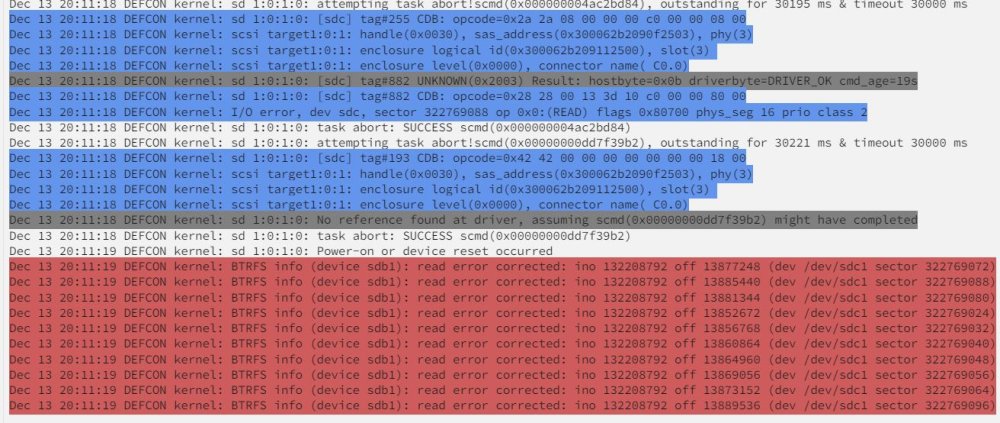
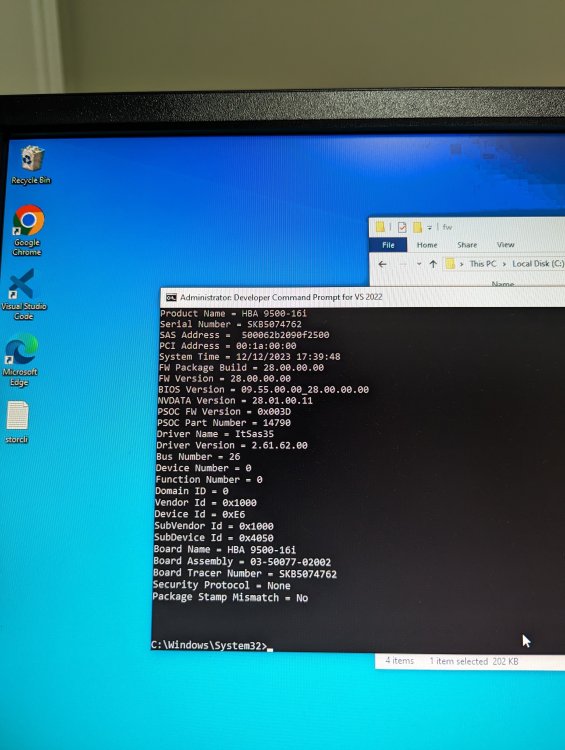
I cant seem to figure this one out. The HBA 9500-16i arrived with FW version 14.x which had so many read errors docker applications crashed so i spent 8 hours getting storcli to work properly and updated the fw to the latest 28.x. Now with the latest firmware i am still getting read errors however significantly fewer. does anyone know of a FW version for that card that is stable with urnaid? defcon-diagnostics-20231213-2041.zip
-
HBA 950016i update procedure for windows 10: Download and install visual studio 2022 with windows 10 sdk then go to apps>visual studio>modify and ensure oneclick is installed for the required signtool.exe download FW from broadcom and also the storcli tool place the storcli64.exe in the same folder the command prompt is in open the developer command prompt for VS with admin priv signtool.exe verify /v /pa storcli64.exe once that completes successfully run this command: storcli64.exe /c0 show it should list controller 0 and its information if you have more than one controller change 0 to the controller you want. at this point you can verify the firmware on the card to load the new fw. i created a fw folder in the c drive and renamed the fw file to make it simple storcli64.exe /c0 downloadfile=c:/fw/hba9500.bin that command will send the firmware to the HBA you can then do the same for the hba bios after rebooting
-
To add to this, could someone show me how to update the firmware on the card? ive spent a couple hours in efi with storcli and cant seem to get the commands right to update the firmware to p28 and i cant find a guide anywhere. this is apparently the command that needs to be used but cant get past the file path: rcli /cx download file=filepath [fwtype=] [nosigchk] [noverchk] [resetnow] file path i used is fs1:/efi/firmware but returns syntax error filepath Not sure if this would fix my issue but its atleast a start if anyone could help me with that Thanks!
-
I recently swapped all my server hardware into a new chassis and added a broadcom 9500 16i with slimsas 8i to 8x sata cables. every drive that is connected to that hba is showing errors. I have tried using a second cable set and a different port on the controller but the problem remains. Did i receive a bad HBA? or is their some kind of driver issue. kernel: sd 15:0:1:0: attempting task abort!scmd(0x00000000d88fb780), outstanding for 30167 ms & timeout 30000 ms I/O error, dev sdc, sector 246143528 op 0x0:(READ) flags 0x84700 phys_seg 115 prio class 2 kernel: blk_print_req_error: 13 callbacks suppressed kernel: BTRFS info (device sdc1): read error corrected: ino 132224524 off 739028992 (dev /dev/sdc1 sector 246143488) defcon-diagnostics-20231209-1610.zip


