




Skip to content
View in the app

A better way to browse. Learn more.

Unraid

A full-screen app on your home screen with push notifications, badges and more.

To install this app on iOS and iPadOS
  1. Tap the Share icon in Safari
  2. Scroll the menu and tap Add to Home Screen.
  3. Tap Add in the top-right corner.
To install this app on Android
  1. Tap the 3-dot menu (⋮) in the top-right corner of the browser.
  2. Tap Add to Home screen or Install app.
  3. Confirm by tapping Install.

TheMysticle

Members
  • Joined

  • Last visited

  1. TheMysticle changed their profile photo
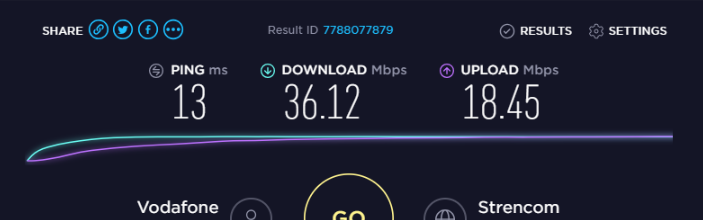
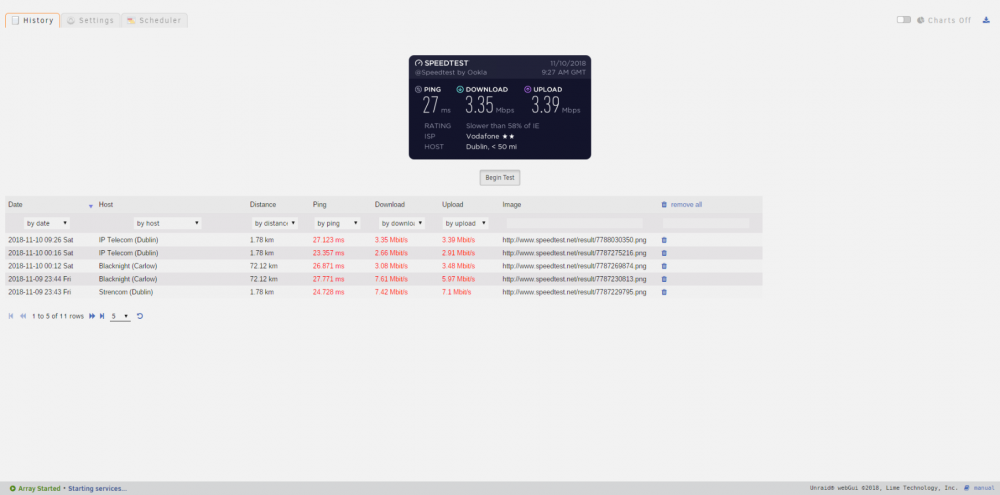
  2. Hi, Im running this plugin and it seems to be runnnig fine and I love the idea of it but the resulta are very bad and I mean very. Im getting somewhere in the 2mbps for download and the same for upload when on my laptop and pc im getting in the 40s and 50s and they are wireless. When I run a docker speedtest I get on the 30s which is better so I don't think it's the cable or port. Any idea what might be happening? Thanks
Account

Navigation

Search

Search

Configure browser push notifications

Chrome (Android)
  1. Tap the lock icon next to the address bar.
  2. Tap Permissions → Notifications.
  3. Adjust your preference.
Chrome (Desktop)
  1. Click the padlock icon in the address bar.
  2. Select Site settings.
  3. Find Notifications and adjust your preference.