





creesy
Members
-
Joined
-
Last visited
Everything posted by creesy
-
My server has been crashing at random intervals anywhere between 12 hours and several days. The server doesnt shut off completely but becauses inaccessible from the gui and ssh. I enabled the syslog server but the log from the latest crash doesnt reveal much to my untrained eye (ive attached it here for someone more educated to look at). Ive also attached my diagnostics. I think this started happening around the time i updated to the latest unraid but that is just a guess it might be completely unrelated. Can anybody give me some ideas on what to try next to diagnose the problem? I have gotten a warning about the docker image becoming full, im not sure if this is related or how to fix that either. tower-diagnostics-20250413-0044.zip syslog-192.168.1.2.log
-
Thankyou, I've now added the server address. Ill now patiently wait for the next crash. Thanks again
-
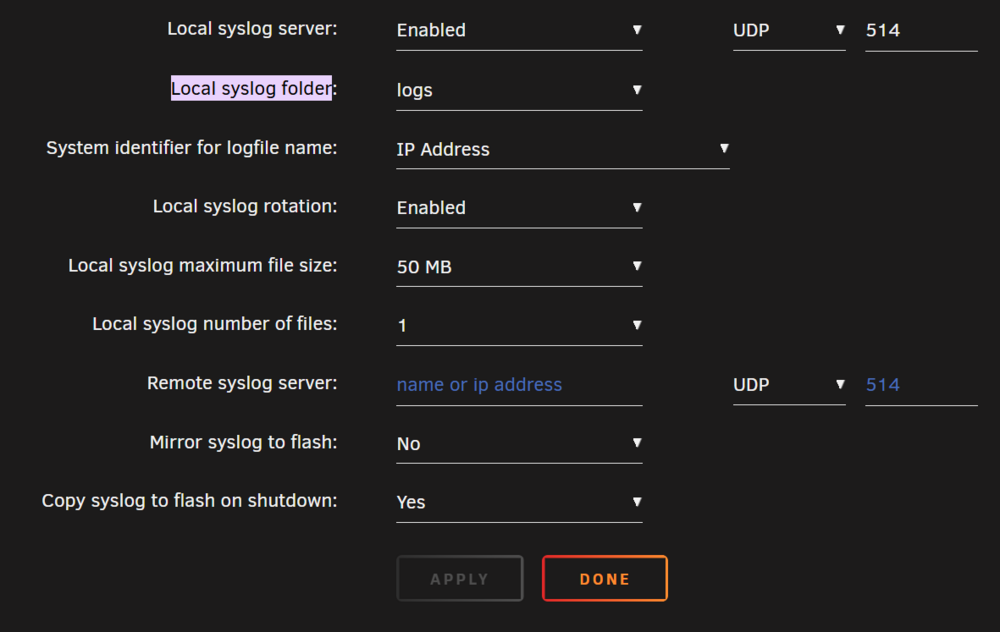
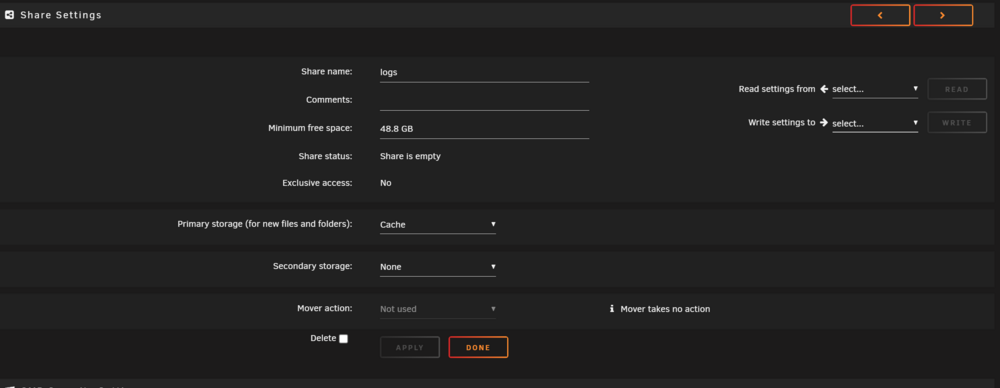
Hello, ive had an issue with random crashes on my server lately. The server stays powered on but is unresponsive and cannot be accessed through GUI or SSH and I run headless so cant look at the console (uptime varies from 24 hours to 2 weeks or more). To try and diagnose this I tried to setup the syslog server hoping that when it crashed i could look at the logs to see what the cause is. the server crashed earlier today but when i went to check the logs from the syslog server there was nothing in the share i set up on the cache for the logs. So the first step for me diagnosing this is making sure the syslog server works. Ive attached a screen shot of the syslog settings can anybody please have a look and tell me if i have it setup correctly. Ive also attached a picture of the config of the logs share i created for this purpose. I was patiently waiting for the server to crash so i could check the logs so was very dissapointed when i couldnt 😞
-
Hello, I am wondering if someone can take a look at my diagnostics. What happened is that I followed the parity swap procedure and removed an old 4TB drive, which hadn't failed but was starting to get errors. I replaced the drive with a 16TB HDD, which is bigger than my 12TB parity. So I had to do the parity swap (removed disk 3, moved parity to disk 3, and assigned the new drive to parity). I then started the copy procedure and waited 22 hours. When it completed, I am not sure why, but I think the "new" parity drive had a red X next to it, and next to the "Start array" button was a checkbox to start the copy again (I rushed this part; I should have read and tried to figure out what happened). I checked the syslog, which says "Disk 3 copy to disk 0 complete." I have restarted the process, and it is at 32%. I have attached my diagnostics; I am hoping someone can tell me if it failed due to errors on the new disk or something else (I didn't pre-clear it; not smart, I know). tower-diagnostics-20250322-2324.zip
-
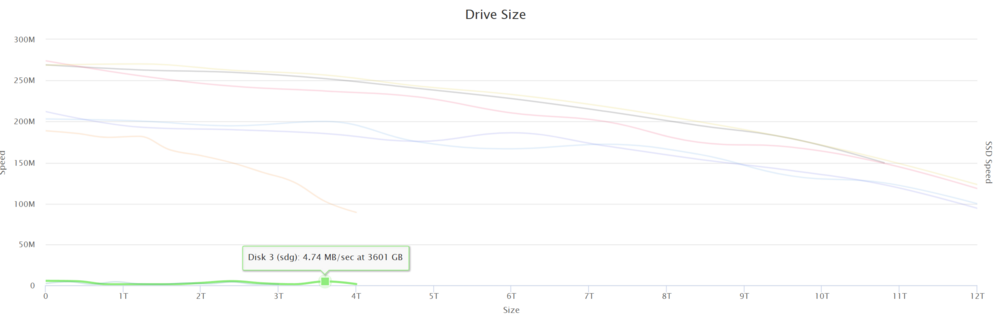
thanks for the reply Ive attached the new diagnostics but I think I may discovered the drive that is causing the issues. I ran disk speed and disk 3 had an average speed of around 5MBps avg across the test. Im not entirely sure what this means though, if the drive was failing wouldn't I have been getting errors from it? where should I go from here? tower-diagnostics-20250305-0146.zip
-
My array has been having a lot of issues since having a failed disk which I copied the files off when they were emulated and removed it from the array without replacing it using new config option. I'm honestly not sure what could be the cause of the issues, files seem to be accessible (obviously can't check every file but the ones i checked randomly were fine). I copied ~12,000 really important documents, images etc. off the array to another computer on my network with no issues. Most issues seem to be with writing files to the array. For example, when downloading with sabnzbd files will download fine for about 15-30 seconds at 100MBps then the speed will drop to under 1MBps and stay there. The behavior is the same in qbittorrent. If I change my download share to use the cache drive files will download as normal. I started a parity check and the maximum speed it achieved after running for an hour was 1MBps avg I also cannot power down or reboot the server from the GUI or SSH. I'm honestly at a loss with where to start with diagnosing this. I've attached my diagnostics to this post and any help would be greatly appreciated as I have a lot of data at stake. tower-diagnostics-20250305-0059.zip
-
Solved my own issue by running check/repair. instructions here Storage https://docs.unraid.net/unraid-os/manual/storage-management/#drive-shows-as-unmountable
-
Im not really sure what is going on now. I had to reboot the server and when i booted it back up another disk showed as missing, so i opened up the server and check connections and switched two sata cables around. booted back up and the "missing" disk was back. So i went to copy the data off the broken disk "disk 1" using MC through SSH but there are no files or folders on that disk? am i doing something wrong directory im looking at it /mnt/disk1
-
Thankyou for the reply. Is it just a matter of copying all files on "disk 3" for example to "disk 4" or any of the other disks. Then stop array, unassign and rebuild parity?
-
Hello all, I've just had a disk failure and im wondering if it is possible to remove the drive from the array and not replace with without losing any data. I know that I have to copy the files off the drive before I remove it from the array, is this possible while the drive is being emulated? I've attached diagnostics, is anyone able to tell me what's possible and help me through the process? If replacing the drive is my only shot I will be would prefer not to as I dont need the space so it's a wasted expense. Thank you tower-diagnostics-20250301-1701.zip
-
Thanks for the reply. I did update all dockers and plugins to the latest versions before updating the OS so it must be something else. the latest versions of the dockers are all running on v6.9.2 at the moment with no issues. I am happy to stay on v6.9.2 but I'm intrigued as what breaks in the config after updating the OS especially seeing as just reverting with no other steps fixes it
-
Hey fellas, I rarely update my unraid server because of the old saying "if it aint broke dont fix it". But i had a couple of new drives to install so thought I might as well. After updating from v6.9.2 to v6.11.5 sonarr, radarr and plex all would not allow connections to the webgui (ERR_CONNECTION_REFUSED) every other docker worked as normal after the update. After trying a few things like changing DNS and reinstalling dockers, restored appdata. I still couldnt get those three dockers to work on v6.11.5 so ive reverted to v6.9.2 and all is well again. Is there a known issue or something i have to change in config to avoid breaking these things when i update? EDIT: I've attached diagnostics from v6.11.5 where it wasnt working and v6.9.2 where the three dockers all work. Please let me know if other information is needed tower-diagnostics-20221204-1603.zip tower-diagnostics-20221204-1625.zip


