caoc10
Members
-
Joined
-
Last visited
-
Hi JorgeB. I've already received the new disk and now it is way better. It completed the parity sync in 18h and 30m at an average speed of 120mb/s. My parity drive has 8TB. Do you think that those values are good, or is there any improvement to do? Thank you.
-
Thank you JorgeB. I will try to return this disk and replace it by a Toshiba N300 also with 8TB (Serial No. HDWG480UZSVA). I think that this one is CMR. Once I receive the disk and test it, I will update the thread!
-
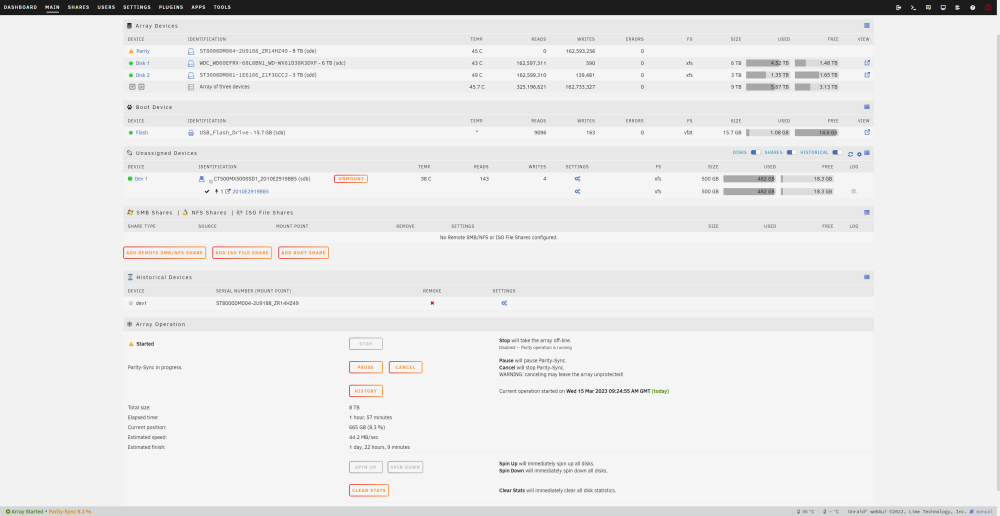
Hi everyone, I bought recently a new drive with 8TB to use as parity (until now, my unraid server had no parity) Well, I mounted it, and started the parity sync. The speed of parity sync is, in my opinion, really bad, around 35MB/Sec, which will take days to finish. I've read some posts and did some changes (disabled VM manager and docker, and assure that cache write was turned on). Now, when I start the parity sync, it goes fine (around 170MB/Sec) until aprox. 8%. At this moment, the speed drops to 35MB/Sec. I've identified that at the beginning, the disks are rarely written. When the speed drops, the disk 2 (sdd) is written almost every second. You can find attached the diagnostics, and a print screen of my array. Anyone can give me some hints on how to speed up things? weebuzserver-diagnostics-20230315-1122.zip