





deepthought
Members
-
Joined
-
Last visited
Everything posted by deepthought
-
Sonarr was running well for over a year, but recently it has been unable to connect to qbittorrent. I did recently update to qbittorrent 4.3.x after staying on an older version for quite some time, but I can't say for certain if that is when things went wrong. Oddly enough, I have radarr configured (as far as I can tell) identically to sonarr and that continues to work without issue. Below is a snip from my logs when I try to test the download client connection: Any advice? *edit* also attaching supervisord.log supervisord.log *edit again* It was the proxy settings, duh. Disabled, works.
-
I can't log in to mariadb using mysql -uroot -p. I seem to have made an error during setup, as the password in my password manager (which matches what I have set for MYSQL_ROOT_PASSWORD) doesn't work. Is there a way to reset the root mysql password? Alternatively, can I just nuke my existing mariadb install but maintain my nextcloud database by backing up /mnt/user/appdata/mariadb/databases/nextcloud/ and replacing it after setting up a new mariadb container?
-
Ombi doesn't seem to be applying the correct quality profile when movie requests are passed to Radarr and my download client. Movies default to the "Any" profile, even though I have a profile named "HD - 720p/1080p" selected under Settings > Movies > Radarr > Quality Profiles. This profile works correctly when movies are manually added through Radarr. Any suggestions for how I can troubleshoot this? *edit* Welp I asked too soon. I noticed that other working profiles didn't have spaces in their names, so I removed them and the newly named "HD-720p/1080p" profile works a treat. Gonna leave this up just in case it's helpful to anyone else.
-
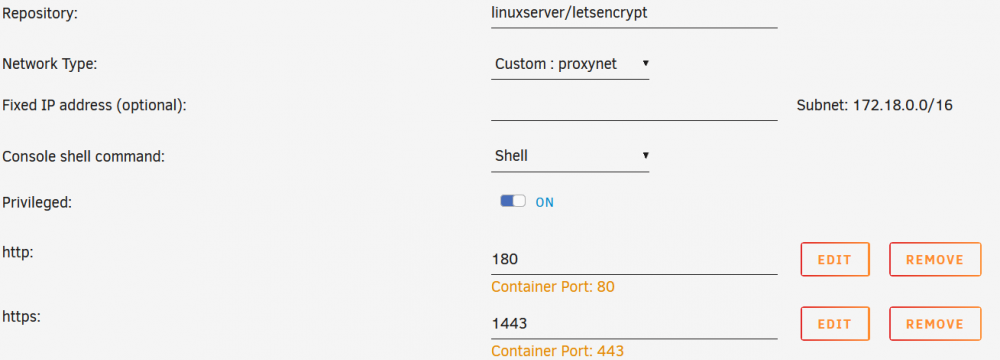
@kelmino See below for my edgeos config and letsencrypt settings. Might be helpful to compare our edgeos configs - mine is only very mildly modified from the default config created via the Basic Setup wizard. One thing I notice is that your network type for letsencrypt differs from mine - you're using the default bridge mode instead of a custom proxy network. The Spaceinvader One tutorial I followed had a section on this, and while I won't pretend to understand the specifics of it, here is the link for that portion of the video: https://youtu.be/I0lhZc25Sro?t=692. Might be worth checking out. firewall { all-ping enable broadcast-ping disable ipv6-name WANv6_IN { default-action drop description "WAN inbound traffic forwarded to LAN" enable-default-log rule 10 { action accept description "Allow established/related sessions" state { established enable related enable } } rule 20 { action drop description "Drop invalid state" state { invalid enable } } } ipv6-name WANv6_LOCAL { default-action drop description "WAN inbound traffic to the router" enable-default-log rule 10 { action accept description "Allow established/related sessions" state { established enable related enable } } rule 20 { action drop description "Drop invalid state" state { invalid enable } } rule 30 { action accept description "Allow IPv6 icmp" protocol ipv6-icmp } rule 40 { action accept description "allow dhcpv6" destination { port 546 } protocol udp source { port 547 } } } ipv6-receive-redirects disable ipv6-src-route disable ip-src-route disable log-martians enable name WAN_IN { default-action drop description "WAN to internal" rule 10 { action accept description "Allow established/related" state { established enable related enable } } rule 20 { action drop description "Drop invalid state" state { invalid enable } } } name WAN_LOCAL { default-action drop description "WAN to router" rule 10 { action accept description "Allow established/related" state { established enable related enable } } rule 20 { action drop description "Drop invalid state" state { invalid enable } } } receive-redirects disable send-redirects enable source-validation disable syn-cookies enable } interfaces { ethernet eth0 { address dhcp description Internet duplex auto firewall { in { ipv6-name WANv6_IN name WAN_IN } local { ipv6-name WANv6_LOCAL name WAN_LOCAL } } speed auto } ethernet eth1 { description Desktop duplex auto speed auto } ethernet eth2 { description Server duplex auto speed auto } ethernet eth3 { description unplugged duplex auto speed auto } ethernet eth4 { description "WiFi AP" duplex auto poe { output off } speed auto } loopback lo { } switch switch0 { address 192.168.1.1/24 description Local mtu 1500 switch-port { interface eth1 { } interface eth2 { } interface eth3 { } interface eth4 { } vlan-aware disable } } } port-forward { auto-firewall enable hairpin-nat enable lan-interface switch0 rule 1 { description plex forward-to { address 192.168.1.38 port 32400 } original-port 32400 protocol tcp_udp } rule 2 { description openvpn forward-to { address 192.168.1.38 port 1194 } original-port 1194 protocol udp } rule 3 { description "letsencrypt 80" forward-to { address 192.168.1.38 port 180 } original-port 80 protocol tcp_udp } rule 4 { description "letsencrypt 443" forward-to { address 192.168.1.38 port 1443 } original-port 443 protocol tcp_udp } wan-interface eth0 } service { dhcp-server { disabled false hostfile-update disable shared-network-name comnetdhcp { authoritative disable subnet 192.168.1.0/24 { default-router 192.168.1.1 dns-server 192.168.1.1 lease 86400 start 192.168.1.100 { stop 192.168.1.199 } static-mapping cc-ultra { ip-address 192.168.1.40 mac-address } static-mapping ipad1 { ip-address 192.168.1.52 mac-address } static-mapping lap1 { ip-address 192.168.1.53 mac-address } static-mapping phone2 { ip-address 192.168.1.51 mac-address } static-mapping server { ip-address 192.168.1.38 mac-address } static-mapping desktop { ip-address 192.168.1.69 mac-address } static-mapping phone1 { ip-address 192.168.1.61 mac-address } static-mapping vm { ip-address 192.168.1.42 mac-address } static-mapping wifi-ap-1 { ip-address 192.168.1.10 mac-address } } } static-arp disable use-dnsmasq disable } dns { forwarding { cache-size 150 listen-on switch0 } } gui { http-port 80 https-port 443 older-ciphers enable } nat { rule 5010 { description "masquerade for WAN" outbound-interface eth0 type masquerade } } ssh { port 22 protocol-version v2 } unms { connection } } system { host-name comnet ipv6 { disable } login { user admin { authentication { encrypted-password plaintext-password "" } level admin } } name-server 1.1.1.1 ntp { server 0.ubnt.pool.ntp.org { } server 1.ubnt.pool.ntp.org { } server 2.ubnt.pool.ntp.org { } server 3.ubnt.pool.ntp.org { } } syslog { global { facility all { level notice } facility protocols { level debug } } } time-zone America/New_York }
-
I was experiencing similar redirections before I got this working, so it still sounds like a similar issue. My first thought was to have you delete and re-create the port forwards while the LAN interface option is set correctly - I'm not sure if the loopback stuff is set correctly if the rules are created while other parameters are bad. But if you started from a fresh default config then there's no point in trying again I guess. I'll post my edgeos and docker configs later this evening and you can compare yours to mine.
-
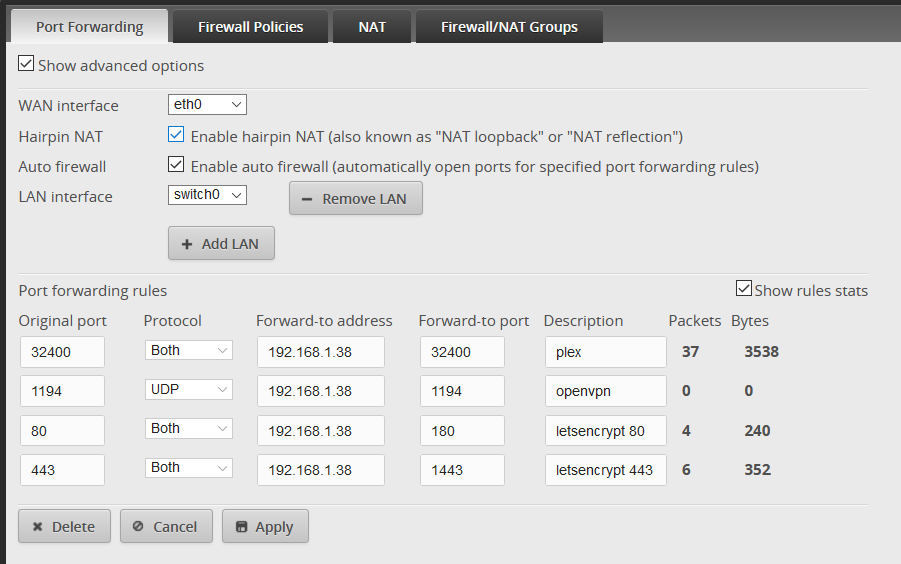
Solved my problem with regard to accessing nextcloud (and other letsencrypt'd containers) from within the same LAN on a ubiquiti edgerouter setup. Posting here in case it might be of any use to others, including @kelmino I'm pretty sure that the issue was the "LAN interface" setting under Port Forwarding options in EdgeOS. This setting needs to be "switch0" and nothing else on an edgerouter. Both myself and kelmino had several LAN interfaces set to various ethernet ports here, which seems to make sense at first and doesn't cause any issues with port forwarding when dealing with incoming connections from the outside internet. After reading ubiquiti's edgerouter port forwarding documentation and especially this ubiquiti forum post linked therewithin, I now realize that was incorrect. Having "LAN interface" set incorrectly prevents the hairpin NAT feature from working with the auto firewall rules, preventing local access. For transparency, I'm guilty of changing too many variables at once here and it is entirely possible that the fix was actually starting from a fresh config on edgeos v2.0.3 rather than using an old config migrated from v1.10.5. I doubt that is the case though, as the only functional differences between my current config and a backup of the old config is the LAN interface options. While troubleshooting this I updated my firmware to v2.0.3. After that I reverted to the default config, ran the basic setup wizard, then manually re-created my small amount of port forwarding rules exactly as they were aside from the above mentioned change to the LAN interface list. If any ubiquiti users are still having issues with this specific issue (external access works, local access doesn't) after making this change, @ me and I'll try to help (even though I'm far from an expert) See below for a screenshot of the port forwarding screen from my now-functioning setup:
-
I'm having issues accessing Nextcloud from the same LAN that the server is on. I know that this is a common issue and I have read the last ~dozen or so pages of this thread prior to posting. My setup was created following the spaceinvader one "How to Setup and Configure a Reverse Proxy on unRAID with LetsEncrypt & NGINX" video. Everything is working fine (certs, outside access) aside from local network access. Hairpin NAT is enabled in my edgerouter, I have restarted the router and server, and cleared my local machines DNS cache since enabling it. At this point, I just need to confirm if hairpin NAT is related to my issue or if something else is the case. The ubiquiti docs for hairpin NAT are pretty hefty and I don't want to dig through it without cause. When connecting, I get the following: Error: 404 Not Found Sorry, the requested URL 'https://[mydomain].duckdns.org/index.php/login' caused an error: Not found: '/index.php/login' Does this sound like a hairpin nat issue?


