





oh-tomo
Members
-
Joined
-
Last visited
Everything posted by oh-tomo
-
Just upgraded the unRAID OS for the first time in ages (to 6.12.6 from 6.9.2) and now Activate Windows is nagging me in Windows 10. (product key already used it claims) So I guess the upgrade affected Windows perception of the VM hardware environment? Do I have to call Microsoft (it's new years day I don't think they are open) or is there a quick fix within unRAID OS or the VM settings? Is it the change of the Network MAC address when trying out the different VM settings the cause? I was trying to tweak the VM performance through creating new VM settings and I noticed that the MAC address changes each time a VM setting is added. I guess a warning for others if that is the case.
-
Also when I shut down I do hear a clicking in my speakers connected to the HDMI GPU audio device. But still a black screen. Old VM setting gives me a UNRAID boot up screen instead of the old TianoCore and so passthrough GPU is working. Audio is working as well but it was never 100% before as I hear occasional audio ticks so I have to work out my latency issues there. Main difference between new VM setting and this old working one was QT35-7.2 vs QT35-5.1. Anyway old VM setting works so I guess I'll stick with that.
-
Just upgrades to unRAID OS in the first time in ages (to 6.12.6 from 6.9.2) and thought I'd refresh the VM settings for Windows 10 with "Add VM" and am seeing some settings I've never seen previously. Do I just leave them blank or as they autofill when a new VM is added or is there documentation for them? I notice on first boot that the passthrough GPU is just displaying black so I'll restart and see if I at least see the TianoCore screen. (Was able to remote in with Chrome Remote Desktop) No TianoCore screen on reboot but Device Manager is seeing the NVIDIA GeForce GT 710 and Windows reports it is using the best drivers for it. Maybe I'll try my old VM settings.
-
Darn, I asked too many questions. I was hoping the core question (how to expedite the process) would garner answers. Or more specifically, if I want to run ddrescue to clone from drive to drive and I have only 1 spare SATA connection available (because the array is taking up all the other SATA connections in the unRAID PC) how do I free up a SATA port and avoid later paying the cost of a long parity re-build after? (Background: ddrescue cloning requires a source and a destination -- that's two SATA ports!) Instead of parity 2 (which I removed because I thought it was redundant) should I swap out the fullest data drive (because it would be the least likely to be added to) and then hope restoring the full data drive back to the array won't initiate a full parity rebuild? (Ohhhhh, second guessing how unRAID is gonna react is so fraught with doubt.. I just wanna clone a drive.)
-
Diagnostics posted server2018-diagnostics-20230923-0808.zip
-
Hello Unraid community, I hope you're all doing well. I recently encountered a situation with my Unraid server that has left me seeking some guidance. Here's the scenario: I needed to perform a drive clone operation (ddrescue) using a spare SATA port, so I temporarily removed my Parity 2 drive to free up the port. After completing the clone operation, I reconnected the same Parity 2 drive to its original SATA port. Upon powering up my Unraid server with the Parity 2 drive restored, I noticed that it appeared with a blue icon in the Unraid webGUI. The blue icon seems to indicate that the drive is being emulated or that some sort of background operation is taking place. However, I'm not entirely sure why this is happening, especially since I'm using the same drive that was previously part of my array. My questions are as follows: Is it normal for a Parity drive to go through an emulated rebuild process when it's temporarily removed and then reconnected to the same port? The estimated time for this emulated rebuild is quite long, around 19 hours. Is such a lengthy rebuild necessary for the same drive, or is there a way to expedite this process? Should I be concerned about data integrity during this process, or is there anything specific I should check or monitor? I'd greatly appreciate any insights or advice from the community regarding this situation. I want to ensure that my server is operating smoothly and that my data remains safe. Thank you in advance for your help!
-
VM wasn't starting so I: - disconnected USB connections to passthrough card - shut down the unRAID - started the unRAID - started the VM - re-connected all the USB connections - VM froze - shut down the unRAID again - restarted the unRAID again - started the VM and waited for the login screen - re-connected just one of the USB connections (the hub to which the mouse & keyboard are attached) So is this an issue with the passthrough card? -- too hot? -- incompatible? -- the card is dying? The USB 3.0 passthrough device in the VM settings is listed as: VIA Technologies VL805/806 xHCI USB 3.0 Controller | USB controller (02:00.0) Which is either (haven't looked inside to check which yet): - Inateck KT5001 PCI-E to USB 3.0 5-Port PCI Express Card and 15-Pin Power Connector, Red or - Rivo PCI Express Riser USB 3.0 Card 5-Port PCI Extender Card and 4 Pin Power Connector VM is working now, but for how long before another freeze during reboot. Please advise next steps.
-
I restart the Windows VM (because it's getting sluggish at 99% RAM utilization), I go out to do some errands, come back two hours later and the VM is still offline. This is why I'm reluctant to restart the VM. Because it gets hung for some mysterious reason while restarting. Is there another way to reset the VM and get the RAM back without restarting? Why is it stuck? Is it an attached USB periferal? Does it just hate me? Why does this keep happening randomly without reason?
-
I set the Win10 VM to restart and left the site of the unRAID and from my remote location I am not seeing any sign of it having come back online 6h50m later. I only restarted because RAM usage in the Win10 VM was at 100% and restarting seems to be the only way to get it out of that sluggish state.
-
I don't know. The Win10 was the only one I was using (why would the size suddenly change?) so I deleted the others and eventually was able to boot back in. I also had to disable the GPU passthrough and boot in using VNC. Once the Windows repairs were done and I got back in, I shut down the Win10 VM, re-added the GPU and booted in again. It seemed faster once I was back in but now after a few days Win10 seems less responsive. Wonder if it's the downloading of Win10 updates that is slowing things down. Space used is still only around 437 GB of out of 899 GB.
-
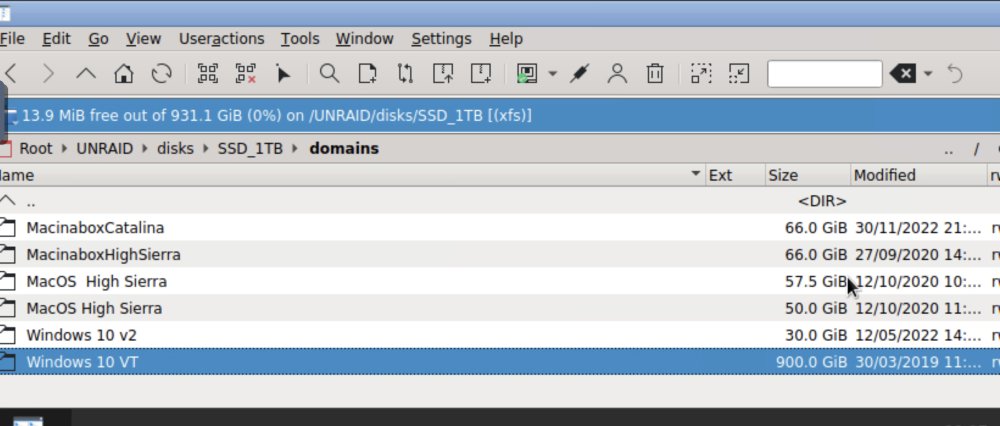
Booted into Windows and there's 437 GB of free space out of 899 GB. Why was VM boot up pausing if there's all this space?
-
I used command line instead ‘rm -rf Mac*’ and was able to make 48GB of space. Still don’t know why Krusader wouldn’t do the same.
-
My Win10 VM froze 26 hours ago and after several attempts to reboot have been unsuccessful i thought the issue might be due to the lack of space on the drive it is located on. I tried removing other MacOS VMs from the drive using Krusader (after deleting them using the unraid VM control panel) but the folders and files remain in place. How do I get Krusader to actually make room? And why didn’t Windows warn me it was running out of space? If I could get past pause I could see what’s taking up all the space in windows and delete stuff but I’m locked out.
-
Experienced a fourth "Remaining battery runtime below limit on UPS" shutdown yesterday.... just as UPS (the courier) was supposed to deliver the APC 1500VA... only they didn't deliver it. Hope they come back. When I powered the unRAID back up I checked the APC power cords connection to the wall. It wasn't completely pushed into the socket, but that wouldn't cause a shutdown, would it? I pushed it in before powering unRAID back on.
-
Saw this thread and ordered the APC 1500VA. Hope it solves things.
-
Between today and 15 days ago I've had the unRAID message "Remaining battery runtime below limit on UPS" followed by a shutdown on three occasions. On those occasions I've been either away or asleep so have no other evidence that a power failure occurred other than a powered off unRAID (and this notification). In the four year life of this server prior to 15 days ago, this message never appeared. Should I get a new battery? https://www.amazon.ca/dp/B0002QLDLC?tag=pricespiderco553-20&ascsubtag=wtbs_63379b9485be32685487867b Should I get a UPS with a larger capacity battery? Key Value APC 001,034,0847 HOSTNAME Server2018 UPSNAME Server2018 DRIVER USB UPS Driver STARTTIME 2022-09-30 20:17:14 -0400 STATUS Online LOADPCT 59.0 Percent TIMELEFT 8.6 Minutes MINTIMEL 10 Minutes SENSE High HITRANS 139.0 Volts BATTV 13.7 Volts NUMXFERS 0 CUMONBATT 0 Seconds STATFLAG 0x05000008 BATTDATE 2018-03-23 NOMBATTV 12.0 Volts END APC 2022-09-30 21:20:16 -0400 DATE 2022-09-30 21:19:27 -0400 VERSION 3.14.14 (31 May 2016) slackware CABLE USB Cable UPSMODE Stand Alone MODEL Back-UPS ES 650G1 LINEV 122.0 Volts BCHARGE 100.0 Percent MBATTCHG 10 Percent MAXTIME 0 Seconds LOTRANS 92.0 Volts ALARMDEL 30 Seconds LASTXFER Unacceptable line voltage changes TONBATT 0 Seconds XOFFBATT N/A SERIALNO X NOMINV 120 Volts FIRMWARE 906.W1 .D USB FW:W1
-
So I forced stop and shut down the unRAID and waited 10 seconds and powered the unRAID back on and then started the VM and saw TianoCore spinning dots accompanied by (timestamps in mm:ss included): 00:01 "Preparing Automatic Repair" 00:06 "Diagnosing your PC" 00:28 "Attempting repairs" 00:39 black screen 00:51 TianoCore spinning dots 01:15 "Getting Windows ready. Don't turn off your computer" (white text blue screen) 01:25 Windows login screen So that was faster than 12 hours. Is powering down the unRAID then always the answer? I don't know. It seems kind of extreme. Repair suggests that some kind of damage happened. Was the damage caused because I forced stop during some important process that the spinning dots were hiding from my view?
-
So I forced stop and restarted the VM at 9:50pm and the dots are still spinning at 10:19pm. Do I continue waiting or reboot the unRAID. These spinning dots are so uncommunicative as to what is going on and the progress of the boot up. They just spin and spin and keep their secrets to themselves. Windows login screen could pop up any minute or I could be looking at 12 hours of spinning still. I just don’t know. I. Just. Don’t. Know.
-
Chrome Remote Desktop reports at 9:15pm today that my Win10 VM was last online yesterday at 11:22pm. This morning I saw the spinning dots TianoCore screen at 11:09am. So letting the dots do their thing for 10 hours didn't seem to work. Even when disconnecting the usb hub from the usb card assigned to the VM. I wish there was a way to understand the magic of the spinning dots.
-
It’s is 11:20am and I see the TianoCore spinning dots. Around 11 hours ago I restarted Windows 10 to apply updates. And went to bed. So I don’t know what’s been going on in the past 11 hours. I just see the spinning dots now. Damn. Presumably at some point during the past 11 hour the Windows update finished? But I don’t know when. Unless the spinning dots is masking part of the Windows update process? I’ve unplugged my USB hub from the USB card assigned to this VM if that’s what is keeping the spinning dots occupied. But the dots still spin six minutes later. i just want to add that Windows has been nagging me about restarting to apply updates for some weeks. And these spinning dots remind me why I was so reluctant to restart.
-
Is there a plugin or app or something that looks up the temperature thresholds for each disk's model and auto-populates the temperature threshold settings in unRAID? For those of us too lazy to look up each model's thresholds and manually type them in.
-
Saw JDK's November post above suggesting to manually start indexing so ran this command: docker exec -u abc -d diskover python3 /app/diskover/diskover.py /data Then checked http://192.168.0.36:9200/_cat/indices?v but no activity present. ???? I've also uncommented the crontab entry as suggested in an earlier post. Maybe it would be easier to just upload everything to Google Drive and search there. Google used to have a desktop search product from 2004-2011, but alas it went to the graveyard of useful products. https://en.wikipedia.org/wiki/Google_Desktop
-
New error: "No completed indices found in Elasticsearch. Run a crawl and after it finishes reload select indices page."
-
Thanks for the quick reply. I've set elasticsearch variable to the IP. I didn't have elasticsearch installed. Now it is installed and running. Also set up the vm.max_map_count user script. Stopped and started diskover and still see the same "Oops something went wrong, Unable to connect... localhost:9200" error. Then stopped and restarted elasticsearch and stopped and restarted diskover. Same error.
-
Oops something went wrong Unable to connect to Elasticsearch host localhost:9200. Error: Failed to connect to localhost port 9200 after 0 ms: Connection refused Reload index page Logout Getting this after logging into webui.
