





oh-tomo
Members
-
Joined
-
Last visited
Everything posted by oh-tomo
-
I switched the VM setting from Nvidia to VNC and was finally able to login to windows. Couldn't tell if the update it was working on went through, so I shut down and re-enabled Nvidia and started again. Spinning dots.
-
Does the spinng dots animation indicate that windows is doing something? Should I just let it spin for two hours? Or should I force stop it again and adjust the allocated ram setting?
-
This time I forced stop, unplugged all usb devices from the usb controller assigned to the VM, then started again, briefly connecting a usb keyboard to hit "enter" when the blue boot up screen asked for a restart selection.
-
This time I forced stop, restarted unRAID and started the VM again. Are the spinning dots masking the windows update progress and it just needs an hour to finish, which my impatience has been denying it?
-
How long has it been since my last post? Must be 30 minutes. Still spinning the dots are. I could try another force stop.
-
Forced stop and restarted VM and staring at spinning dots for 12 minutes. Could it be the camera attached via usb that is keeping the spinning dots on so long or do I just have to be patient?
-
Just did a Google search and concluded that "spinning dots" was as official a name as could be found amongst the top search results. When Windows 10 asks to restart for an update and you restart and then see TianoCore and the spinning ( or as autocorrect likes to call it "SP mining") dots going for fifteen minutes, what exactly is happening? Is the external USB dock I have connected to the VM delaying the startup process? I've turned it off but the dots continue to spin. The dots don't communicate specific information. Should I force a VM shutdown so the VM startup process can start clean without any superfluous USB drives attached? I guess I'll do that because the spinning dots have been going on for 26 minutes. Long enough for me to struggle through autocorrect while touch typing this post on my iPhone. (I prefer real keyboards, but my keyboard is attached to the spinning dots OS)
-
I'm looking for this too. Following.
-
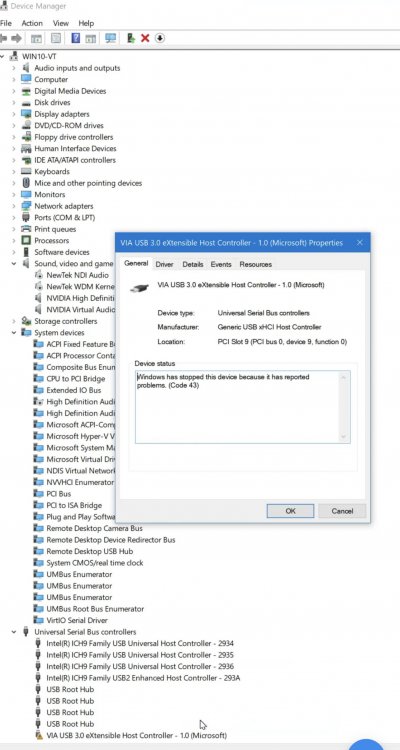
File move operation over USB finished this time and Error 43 has not reappeared, so maybe it was a loose power connection that needed resetting.
-
Found the box. The controller is a Orico PVU3-4P USB 3.0 PCI-E Express Card which has been part of the VM since April 2019. I paid $20 for it. Is 30 months just the lifespan of a USB Card and I should get another? I shut down and checked that the molex power into the card was seated and the rest of the power cable was secure at the other end. I've started a file move operation within Windows from the unRAID storage to an external USB dock connected to the Orico. I've done this many times over the past 30 months but only today has the move been interrupted by this Windows code 43 error. At first I thought it was due to a Windows update that occured yesterday so I tried rolling back to the system restore point on October 31. Or maybe something got jostled in the PC case when I swapped out one of the data drives yesterday. Maybe pulling and reseating the molex power back into the Orico will help.
-
My USB controller stops working after about 40 minutes after booting Win10 VM. Is this an unRAID VM thing or a hardware failure on the USB controller? How do I diagnose the issue?
-
What does that mean? I can stub a toe. Or a cigarette. But stub a card?
-
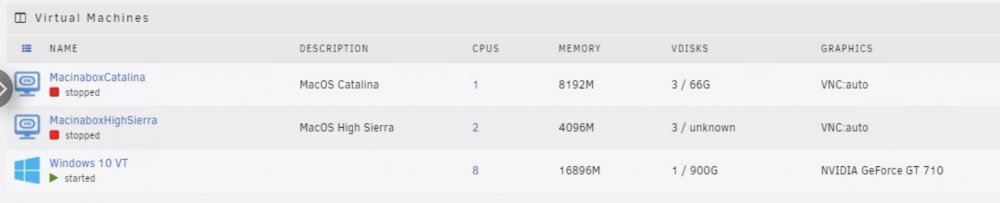
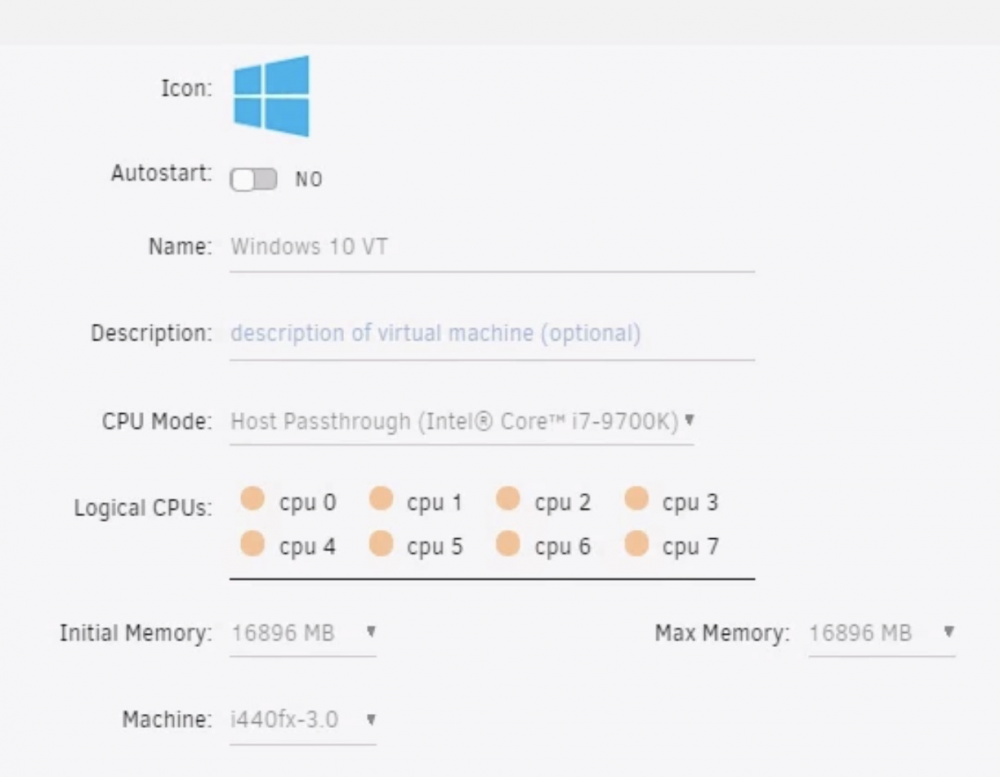
So I upgraded the CPU to a Intel Core i7-9700K and it has helped the Win10 VM significantly. It took quite a few reboots and unplugging of USB and HDMI to get the VM to get past the Tianocore screen but it finally got into Windows. But since upgrading the CPU there have been five "Cache disk is hot" notifications (53, 51, 53, 54, 50 C -- one yesterday and four so far today. So I raised the warning temperature for that drive to 70 C. How should I set the Logical CPUs for a MacOS VM? I've allocated all 8 cores to Windows 10. When I try to start MacOS Catalina VM while Win10 VM is running, audio playback becomes garbled in Win10. Is there a specific balance of Logical CPUs between MacOS VM and Wind10 VM that won't result in warbly Windows audio?
-
Ran a PC test. Result: "PC Performing below expectations (23rd percentile)": https://www.userbenchmark.com/UserRun/44921725 Would upgrading the unRAID's i3-8100 CPU help the VM significantly? Chrome tabs are no longer crashing but apps do become temporarily non-responsive.
-
DNS change to 8.8.8.8, 8.8.4.4 and 1.1.1.1 didn't do it for me. Trying an update to 6.9.2 from 6.8.3.... update: after updating unRAID to 6.9.2, checked Docker and still found "not available", so then checked "/usr/local/emhttp/plugins/dynamix.docker.manager/include/DockerClient.php" and saw it already had the "@i" edit mentioned in the other thread, then checked Docker again and "not available" was gone and replaced with a mixture of "apply update" and "up-to-date" Hope everything else still works in 6.9.2...
-
How do I edit my.cnf file?
-
My Nvidia Shield auto-updated to Kodi 19. I noticed this because when I launched Kodi the launch screen is different and at the bottom of the screen there's the message "Database migration in progress - please wait." I guess I have to uninstall 19 and manually install 18.9 until there's a headless update to support Kodi 19? Or maybe Kodi isn't stuck I'm just not waiting long enough. But the current compatibility notes for headless don't mention compatibility beyond 18.
-
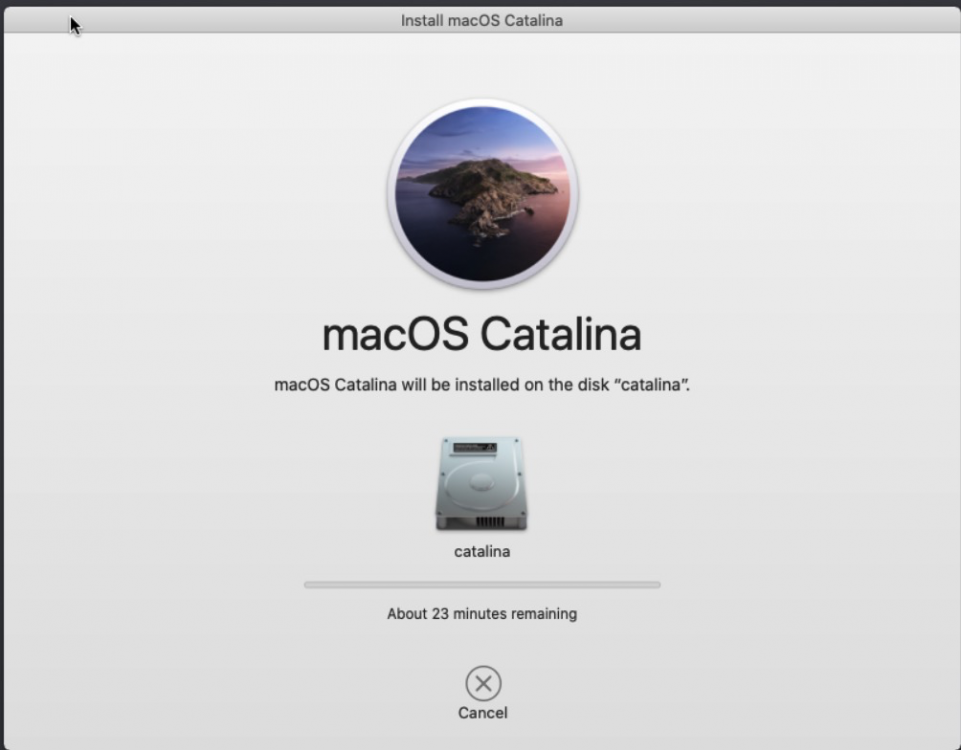
Thanks! Trying this: <os> <type arch='x86_64' machine='pc-q35-3.1'>hvm</type> <loader readonly='yes' type='pflash'>/mnt/disks/SSD_1TB/domains/MacinaboxCatalina/ovmf/OVMF_CODE.fd</loader> <nvram>/mnt/disks/SSD_1TB/domains/MacinaboxCatalina/ovmf/OVMF_VARS.fd</nvram> </os>
-
I tried deleting the topology line. Changing the CPU and RAM. Still distorted. Any other suggestions? <?xml version='1.0' encoding='UTF-8'?> <domain type='kvm' xmlns:qemu='http://libvirt.org/schemas/domain/qemu/1.0'> <name>MacinaboxCatalina</name> <uuid>bf4c91f6-cd91-464a-a7dc-f01d09138e03</uuid> <description>MacOS Catalina</description> <metadata> <vmtemplate xmlns="unraid" name="Windows 10" icon="default.png" os="Catalina"/> </metadata> <memory unit='KiB'>8388608</memory> <currentMemory unit='KiB'>8388608</currentMemory> <memoryBacking> <nosharepages/> </memoryBacking> <vcpu placement='static'>1</vcpu> <cputune> <vcpupin vcpu='0' cpuset='0'/> </cputune> <os> <type arch='x86_64' machine='pc-q35-3.1'>hvm</type> <loader readonly='yes' type='pflash'>/usr/share/qemu/ovmf-x64/OVMF_CODE-pure-efi.fd</loader> <nvram>/etc/libvirt/qemu/nvram/bf4c91f6-cd91-464a-a7dc-f01d09138e03_VARS-pure-efi.fd</nvram> </os> <features> <acpi/> <apic/> </features> <cpu mode='host-passthrough' check='none'> <cache mode='passthrough'/> </cpu> <clock offset='utc'> <timer name='rtc' tickpolicy='catchup'/> <timer name='pit' tickpolicy='delay'/> <timer name='hpet' present='no'/> </clock> <on_poweroff>destroy</on_poweroff> <on_reboot>restart</on_reboot> <on_crash>restart</on_crash> <devices> <emulator>/usr/local/sbin/qemu</emulator> <disk type='file' device='disk'> <driver name='qemu' type='qcow2' cache='writeback'/> <source file='/mnt/disks/SSD_1TB/domains/MacinaboxCatalina/Clover.qcow2'/> <target dev='hdc' bus='sata'/> <boot order='1'/> <address type='drive' controller='0' bus='0' target='0' unit='2'/> </disk> <disk type='file' device='disk'> <driver name='qemu' type='raw' cache='writeback'/> <source file='/mnt/disks/SSD_1TB/domains/MacinaboxCatalina/Catalina-install.img'/> <target dev='hdd' bus='sata'/> <address type='drive' controller='0' bus='0' target='0' unit='3'/> </disk> <disk type='file' device='disk'> <driver name='qemu' type='raw' cache='writeback'/> <source file='/mnt/disks/SSD_1TB/domains/MacinaboxCatalina/macos_disk.img'/> <target dev='hde' bus='sata'/> <address type='drive' controller='0' bus='0' target='0' unit='4'/> </disk> <controller type='usb' index='0' model='ich9-ehci1'> <address type='pci' domain='0x0000' bus='0x00' slot='0x07' function='0x7'/> </controller> <controller type='usb' index='0' model='ich9-uhci1'> <master startport='0'/> <address type='pci' domain='0x0000' bus='0x00' slot='0x07' function='0x0' multifunction='on'/> </controller> <controller type='usb' index='0' model='ich9-uhci2'> <master startport='2'/> <address type='pci' domain='0x0000' bus='0x00' slot='0x07' function='0x1'/> </controller> <controller type='usb' index='0' model='ich9-uhci3'> <master startport='4'/> <address type='pci' domain='0x0000' bus='0x00' slot='0x07' function='0x2'/> </controller> <controller type='pci' index='0' model='pcie-root'/> <controller type='pci' index='1' model='pcie-root-port'> <model name='pcie-root-port'/> <target chassis='1' port='0x10'/> <address type='pci' domain='0x0000' bus='0x00' slot='0x02' function='0x0' multifunction='on'/> </controller> <controller type='pci' index='2' model='pcie-root-port'> <model name='pcie-root-port'/> <target chassis='2' port='0x11'/> <address type='pci' domain='0x0000' bus='0x00' slot='0x02' function='0x1'/> </controller> <controller type='pci' index='3' model='pcie-root-port'> <model name='pcie-root-port'/> <target chassis='3' port='0x12'/> <address type='pci' domain='0x0000' bus='0x00' slot='0x02' function='0x2'/> </controller> <controller type='pci' index='4' model='pcie-root-port'> <model name='pcie-root-port'/> <target chassis='4' port='0x13'/> <address type='pci' domain='0x0000' bus='0x00' slot='0x02' function='0x3'/> </controller> <controller type='virtio-serial' index='0'> <address type='pci' domain='0x0000' bus='0x02' slot='0x00' function='0x0'/> </controller> <controller type='sata' index='0'> <address type='pci' domain='0x0000' bus='0x00' slot='0x1f' function='0x2'/> </controller> <interface type='bridge'> <mac address='52:54:00:de:ec:a2'/> <source bridge='br0'/> <model type='vmxnet3'/> <address type='pci' domain='0x0000' bus='0x01' slot='0x00' function='0x0'/> </interface> <serial type='pty'> <target type='isa-serial' port='0'> <model name='isa-serial'/> </target> </serial> <console type='pty'> <target type='serial' port='0'/> </console> <channel type='unix'> <target type='virtio' name='org.qemu.guest_agent.0'/> <address type='virtio-serial' controller='0' bus='0' port='1'/> </channel> <input type='tablet' bus='usb'> <address type='usb' bus='0' port='1'/> </input> <input type='mouse' bus='ps2'/> <input type='keyboard' bus='ps2'/> <graphics type='vnc' port='-1' autoport='yes' websocket='-1' listen='0.0.0.0' keymap='en-us'> <listen type='address' address='0.0.0.0'/> </graphics> <video> <model type='qxl' ram='65536' vram='65536' vgamem='16384' heads='1' primary='yes'/> <address type='pci' domain='0x0000' bus='0x00' slot='0x01' function='0x0'/> </video> <memballoon model='virtio'> <address type='pci' domain='0x0000' bus='0x03' slot='0x00' function='0x0'/> </memballoon> </devices> <qemu:commandline> <qemu:arg value='-usb'/> <qemu:arg value='-device'/> <qemu:arg value='usb-kbd,bus=usb-bus.0'/> <qemu:arg value='-device'/> <qemu:arg value='************************'/> <qemu:arg value='-smbios'/> <qemu:arg value='type=2'/> <qemu:arg value='-cpu'/> <qemu:arg value='Penryn,kvm=on,vendor=GenuineIntel,+invtsc,vmware-cpuid-freq=on,+pcid,+ssse3,+sse4.2,+popcnt,+avx,+aes,+xsave,+xsaveopt,check'/> </qemu:commandline> </domain>
-
Tried doing MacinaboxCatalina and see the distorted 4/12 screens (don't know the technical term for this video anomaly) during the boot of the MacOS recovery stage. Maybe I should try High Sierra?


-
So I guess MediaElch doesn't work for TV anymore because it uses thetvdb ? MediaElch 2020-09-04 23:29:04.901 WARN : [TheTvDb][ApiRequest] Network Error: "Error downloading https://api.thetvdb.com/episodes/ - server replied: Not Found" for URL QUrl("https://api.thetvdb.com/episodes/")
-
Just installed this to see if I could get the VisualEditor to work but I'm getting this error when I try to invoke it when editing my first page: Any hint at getting this to work? I see there's a /mnt/user/appdata/mediawiki/parsoid folder -- parsoid is what I understand is necessary for VisualEditor to work. Is there additional configuration necessary? My version page lists VisualEditor 0.1.1 as one of the editors. Update: stopping and starting MediaWiki in Docker seemed to fix it.
-
Google Backup and Sync is another heavy CPU user. Plus I run Evernote & Picasa, whose databases are saved on "symlinks" to unRAID shares created using Directory Linker, an app outlined in SpaceInvader's VM tutorial video. Is 15 above average for tabs open? On tech podcasts, the journalists claim they have so many tabs open that they can no longer read the names of the websites or see the icons. So I thought 15 seemed low by comparison. Going back to the 90's, I've used lynx, Navigator, Internet Explorer, and Firefox before settling on Chrome. I like Chrome. It lets me install handy extensions like Context Menu Search and saves my settings and history across devices. Also nowadays, whenever website tech support reps recommend a browser for optimal experience of their website, it's Chrome.
-
I've been getting daily Chrome crashes in my Win10 VM ( ~15 tabs open). Would a CPU upgrade fix that? Current CPU is Intel Core i3-8100 3.6 GHz Quad-Core Processor which I paid $159 for 14 months ago. Current RAM is G.Skill Ripjaws V Series 32 GB (2 x 16 GB) DDR4-3000 Memory. How much would I have to spend to stop the Chrome crashes? CPU usage in Win10 VM goes as high as 90 to 99% and Physical RAM looks around 50%.
-
I get "forwarding not set" when activated. OpenVPN works but can't get WireGuard to work in its place. Am I supposed to remove OpenVPN before WireGuard can work? They have different port settings.


