





musicking
Members
-
Joined
-
Last visited
Everything posted by musicking
-
No problem! Looks like someone submitted the issue: https://github.com/janeczku/calibre-web/issues/1477
-
YES! I'm not the only one! Just edit the docker and use the 0.6.7 flag like shown in the picture

-
Anyone experiencing issues with 068 update and nginx? The update seems to have broke things for me. Doesn't look like an issue with the docker image so much as 068 as when I downgrade the container it works and then if I upgrade within the container it breaks again.
-
Anyone able to get the new document CODE server working in nextcloud 19 behind letsencrypt/nginx? I added the location ~ ^\/nextcloud\/(?:index|remote|public|cron|core\/ajax\/update|status|ocs\/v[12]|updater\/.+|oc[ms]-provider\/.+|.+\/richdocumentscode\/proxy)\.php(?:$|\/) { But still couldn't connect
-
If anyone is having issues with the latest build, try updating 0.6.5-ls50 via the web interface and then use the latest docker image. This is working for me now, not sure if the docker image was fixed or if this fixed it.
-
Anyone have any issues running the 0.6.6 version that just came out? Mine won't start and have since went back to 0.6.5 and was able to upgrade through the web UI. I can post logs and more info later if I'm the only one experiencing this.
-
I don't think it's the router, I see the router logs passing the connection using the port forwarding rule...but then nothing. Edit: What is strange is the Wireguard Clients appear to connect just fine (no issue in the log). I'm not seeing anything connected via Unraid though (no handshake). I tried locally through a VM and it appears to work, but no updated handshake in Unraid. More Edits: Son of a B*tch....handshake just updated in the Plugin page and it's working. I have no idea what the "fix" was. This will forever bug me now that I don't know why it started working. Also, thank you everyone, you are all awesome for helping me.
-
Not yet, I'm not home until later tonight. I will definitely test this though.
-
net.ipv4.conf.wg0.accept_local = 0 net.ipv4.conf.wg0.accept_redirects = 1 net.ipv4.conf.wg0.accept_source_route = 1 net.ipv4.conf.wg0.arp_accept = 0 net.ipv4.conf.wg0.arp_announce = 0 net.ipv4.conf.wg0.arp_filter = 0 net.ipv4.conf.wg0.arp_ignore = 0 net.ipv4.conf.wg0.arp_notify = 0 net.ipv4.conf.wg0.bc_forwarding = 0 net.ipv4.conf.wg0.bootp_relay = 0 net.ipv4.conf.wg0.disable_policy = 0 net.ipv4.conf.wg0.disable_xfrm = 0 net.ipv4.conf.wg0.drop_gratuitous_arp = 0 net.ipv4.conf.wg0.drop_unicast_in_l2_multicast = 0 net.ipv4.conf.wg0.force_igmp_version = 0 net.ipv4.conf.wg0.forwarding = 1 net.ipv4.conf.wg0.igmpv2_unsolicited_report_interval = 10000 net.ipv4.conf.wg0.igmpv3_unsolicited_report_interval = 1000 net.ipv4.conf.wg0.ignore_routes_with_linkdown = 0 net.ipv4.conf.wg0.log_martians = 0 net.ipv4.conf.wg0.mc_forwarding = 0 net.ipv4.conf.wg0.medium_id = 0 net.ipv4.conf.wg0.promote_secondaries = 0 net.ipv4.conf.wg0.proxy_arp = 0 net.ipv4.conf.wg0.proxy_arp_pvlan = 0 net.ipv4.conf.wg0.route_localnet = 0 net.ipv4.conf.wg0.rp_filter = 0 net.ipv4.conf.wg0.secure_redirects = 1 net.ipv4.conf.wg0.send_redirects = 0 net.ipv4.conf.wg0.shared_media = 1 net.ipv4.conf.wg0.src_valid_mark = 0 net.ipv4.conf.wg0.tag = 0 net.ipv4.ip_default_ttl = 64 net.ipv4.ip_dynaddr = 0 net.ipv4.ip_early_demux = 1 net.ipv4.ip_forward = 1 net.ipv4.ip_forward_update_priority = 1 net.ipv4.ip_forward_use_pmtu = 0 net.ipv4.ip_local_port_range = 32768 60999 net.ipv4.ip_local_reserved_ports = net.ipv4.ip_no_pmtu_disc = 0 net.ipv4.ip_nonlocal_bind = 0 net.ipv4.ip_unprivileged_port_start = 1024 net.ipv4.neigh.wg0.anycast_delay = 100 net.ipv4.neigh.wg0.app_solicit = 0 net.ipv4.neigh.wg0.base_reachable_time_ms = 30000 net.ipv4.neigh.wg0.delay_first_probe_time = 5 net.ipv4.neigh.wg0.gc_stale_time = 60 net.ipv4.neigh.wg0.locktime = 100 net.ipv4.neigh.wg0.mcast_resolicit = 0 net.ipv4.neigh.wg0.mcast_solicit = 3 net.ipv4.neigh.wg0.proxy_delay = 80 net.ipv4.neigh.wg0.proxy_qlen = 64 net.ipv4.neigh.wg0.retrans_time_ms = 1000 net.ipv4.neigh.wg0.ucast_solicit = 3 net.ipv4.neigh.wg0.unres_qlen = 101 net.ipv4.neigh.wg0.unres_qlen_bytes = 212992 net.ipv6.conf.wg0.accept_dad = -1 net.ipv6.conf.wg0.accept_ra = 1 net.ipv6.conf.wg0.accept_ra_defrtr = 1 net.ipv6.conf.wg0.accept_ra_from_local = 0 net.ipv6.conf.wg0.accept_ra_min_hop_limit = 1 net.ipv6.conf.wg0.accept_ra_mtu = 1 net.ipv6.conf.wg0.accept_ra_pinfo = 1 net.ipv6.conf.wg0.accept_redirects = 1 net.ipv6.conf.wg0.accept_source_route = 0 net.ipv6.conf.wg0.addr_gen_mode = 1 net.ipv6.conf.wg0.autoconf = 1 net.ipv6.conf.wg0.dad_transmits = 1 net.ipv6.conf.wg0.disable_ipv6 = 0 net.ipv6.conf.wg0.disable_policy = 0 net.ipv6.conf.wg0.drop_unicast_in_l2_multicast = 0 net.ipv6.conf.wg0.drop_unsolicited_na = 0 net.ipv6.conf.wg0.enhanced_dad = 1 net.ipv6.conf.wg0.force_mld_version = 0 net.ipv6.conf.wg0.force_tllao = 0 net.ipv6.conf.wg0.forwarding = 0 net.ipv6.conf.wg0.hop_limit = 64 net.ipv6.conf.wg0.ignore_routes_with_linkdown = 0 net.ipv6.conf.wg0.keep_addr_on_down = 0 net.ipv6.conf.wg0.max_addresses = 16 net.ipv6.conf.wg0.max_desync_factor = 600 net.ipv6.conf.wg0.mldv1_unsolicited_report_interval = 10000 net.ipv6.conf.wg0.mldv2_unsolicited_report_interval = 1000 net.ipv6.conf.wg0.mtu = 1420 net.ipv6.conf.wg0.ndisc_notify = 0 net.ipv6.conf.wg0.ndisc_tclass = 0 net.ipv6.conf.wg0.proxy_ndp = 0 net.ipv6.conf.wg0.regen_max_retry = 3 net.ipv6.conf.wg0.router_solicitation_delay = 1 net.ipv6.conf.wg0.router_solicitation_interval = 4 net.ipv6.conf.wg0.router_solicitation_max_interval = 3600 net.ipv6.conf.wg0.router_solicitations = -1 net.ipv6.conf.wg0.seg6_enabled = 0 net.ipv6.conf.wg0.suppress_frag_ndisc = 1 net.ipv6.conf.wg0.temp_prefered_lft = 86400 net.ipv6.conf.wg0.temp_valid_lft = 604800 net.ipv6.conf.wg0.use_oif_addrs_only = 0 net.ipv6.conf.wg0.use_tempaddr = -1 net.ipv6.neigh.wg0.anycast_delay = 100 net.ipv6.neigh.wg0.app_solicit = 0 net.ipv6.neigh.wg0.base_reachable_time_ms = 30000 net.ipv6.neigh.wg0.delay_first_probe_time = 5 net.ipv6.neigh.wg0.gc_stale_time = 60 net.ipv6.neigh.wg0.locktime = 0 net.ipv6.neigh.wg0.mcast_resolicit = 0 net.ipv6.neigh.wg0.mcast_solicit = 3 net.ipv6.neigh.wg0.proxy_delay = 80 net.ipv6.neigh.wg0.proxy_qlen = 64 net.ipv6.neigh.wg0.retrans_time_ms = 1000 net.ipv6.neigh.wg0.ucast_solicit = 3 net.ipv6.neigh.wg0.unres_qlen = 101 net.ipv6.neigh.wg0.unres_qlen_bytes = 212992
-
I will have to test shutting down eth1 and eth0 when I get home, don't want to via SSH in case I get disconnected. I am having 0 port forwarding issues with my other rules, so it would be strange if UPNP fixed the issue. I might try it though, just for the reporting. I wasn't able to see any issues in the logs when I checked my port forwarding logs

-
Tried a different tunnel on a different port, removed the config and plugin completely and then reconfigured everything from scratch, still no go
-
Router reboot did not solve the issue. I might just remove the Wireguard plugin completely and re-configure using the same keys.
-
This hasn't changed and can confirm working as I'm tunneled into my network through a VM right now. I just have the FQDN in there right now.
-
udp 0 0 0.0.0.0:51820 0.0.0.0:* udp6 0 0 :::51820 :::* I'm also going to reboot my Unifi Gateway as it's doing a couple strange things.
-
Yes to Static IP in Unraid as per the pictures above. Other ports (docker containers are reachable via letsencrypt docker/reverse proxy) I am enabling logging on the router now, but other rules are working fine. Did you have the Intel reboot issue on 6.8.1? I'm wondering if the change to fix this broke my wireguard in 6.8.2
-
Above is the router config and as for the Remote Peer config I just scanned the QR code. It is no longer working on Windows, iPad and Google Pixel. I don't think it's the peer and I think it might have started acting up around the 6.8.2 update for Unraid.
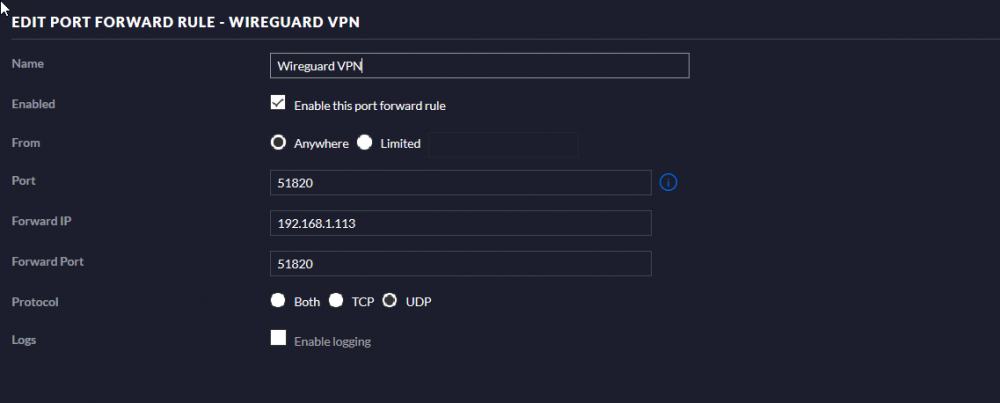
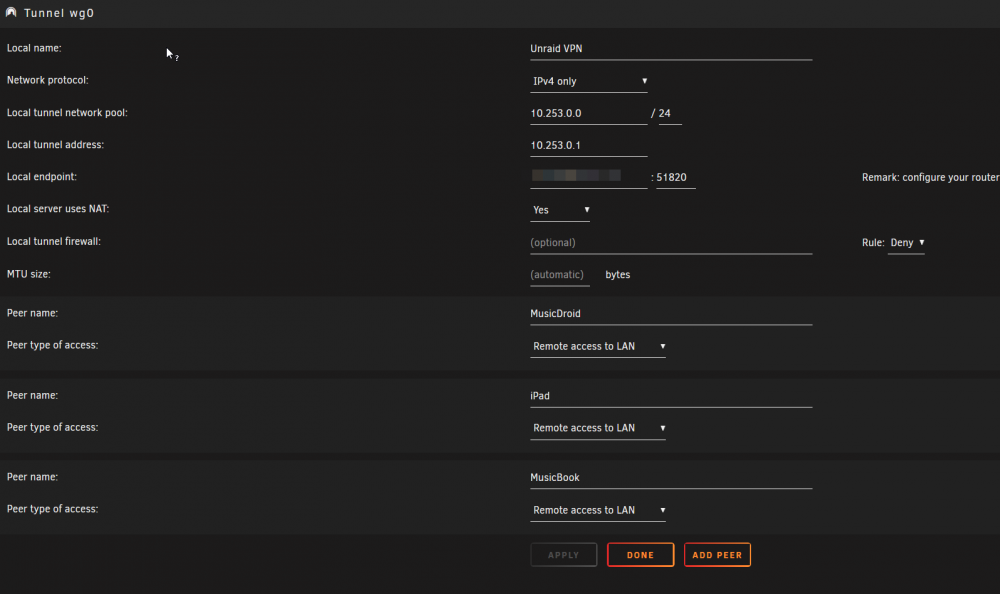
-
interface: wg0 public key: ************* private key: (hidden) listening port: 51820 peer: ************* preshared key: (hidden) allowed ips: 10.253.0.2/32 peer: ************* preshared key: (hidden) allowed ips: 10.253.0.3/32 peer: ************* preshared key: (hidden) allowed ips: 10.253.0.4/32

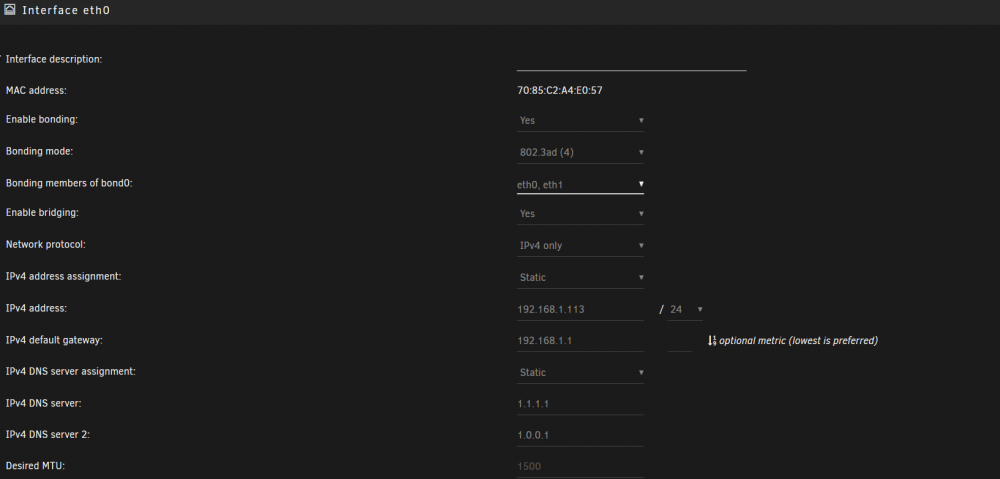
-
Anything else I should be checking?
-
Wireguard server is running, at least it appears to be. Online tool is showing port is closed, but I don't think the router is at fault as other open port rules are working just fine. Pretty sure I'm having issues with the Wireguard service itself I guess I could reboot at some point today. Edit: wg-quick up wg0 results in [#] ip link add wg0 type wireguard [#] wg setconf wg0 /dev/fd/63 [#] ip -4 address add 10.253.0.1 dev wg0 [#] ip link set mtu 1420 up dev wg0 [#] ip -4 route add 10.253.0.4/32 dev wg0 [#] ip -4 route add 10.253.0.3/32 dev wg0 [#] ip -4 route add 10.253.0.2/32 dev wg0 [#] logger -t wireguard 'Tunnel WireGuard-wg0 started' [#] iptables -t nat -A POSTROUTING -s 10.253.0.0/24 -o br0 -j MASQUERADE I do a port scan locally and it shows 51820 as closed. Edit number 2: Reboot did not fix the issue
-
Nope, external and internal IPs are the same, nothing has changed there. I agree that things aren't connecting though
-
Hey Everyone, My Wireguard appears to connect, but doesn't show on my Dashboard in Unraid as connected. I see that on my remote device I am behind my home IP, but I can't access my Unraid Web UI from my device. Nothing has changed with my config and this just started happening. Anyone else experiencing something similar? Thanks
-
Anyone else have high CPU with Lazylibrarian lately? I haven't changed a thing and recently it's been pretty aggressive CPU usage





