Skip to content
View in the app

A better way to browse. Learn more.

Unraid

A full-screen app on your home screen with push notifications, badges and more.

To install this app on iOS and iPadOS
  1. Tap the Share icon in Safari
  2. Scroll the menu and tap Add to Home Screen.
  3. Tap Add in the top-right corner.
To install this app on Android
  1. Tap the 3-dot menu (⋮) in the top-right corner of the browser.
  2. Tap Add to Home screen or Install app.
  3. Confirm by tapping Install.

QAZT

Members
  • Joined

  • Last visited

Everything posted by QAZT

  1. Sooo.... Reason it didnt work. I had not changed SMB SETTING "Yes" to workgroup. I had it set as an active directory and that wouldnt work...
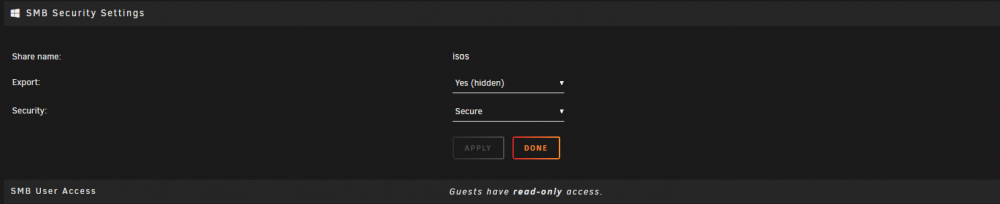
  2. I have already completed both of these tasks before asking for assistance. this is the reason why i am stuck. Screen cap to show the settings

  3. I have followed these instructions and I still am having issues connecting to the share via Network explorer in win 10. Iv previously been able to connect to SMB shares on a FREENAS 11.2 server. Any ideas? I also noticed in the shares section under the SMB column there is simply a dash "-". Refer to image.

Account

Navigation

Search

Search

Configure browser push notifications

Chrome (Android)
  1. Tap the lock icon next to the address bar.
  2. Tap Permissions → Notifications.
  3. Adjust your preference.
Chrome (Desktop)
  1. Click the padlock icon in the address bar.
  2. Select Site settings.
  3. Find Notifications and adjust your preference.