





david_w
Members
-
Joined
-
Last visited
-
Looks like there was another error a couple of minutes after I ran the last diagnostics. Does this still look like a cable issue? I replaced the SATA cable, could there be a problem with the drive itself? Oct 26 11:34:44 Tower kernel: ata5: SATA max UDMA/133 abar m131072@0xf7680000 port 0xf7680300 irq 59 Oct 26 11:34:44 Tower kernel: ata5: SATA link up 6.0 Gbps (SStatus 133 SControl 300) Oct 26 11:34:44 Tower kernel: ata5.00: ATA-9: ST3000DM008-2DM166, CC26, max UDMA/133 Oct 26 11:34:44 Tower kernel: ata5.00: 5860533168 sectors, multi 16: LBA48 NCQ (depth 32), AA Oct 26 11:34:44 Tower kernel: ata5.00: configured for UDMA/133 Oct 26 11:34:44 Tower kernel: sd 5:0:0:0: [sde] 5860533168 512-byte logical blocks: (3.00 TB/2.73 TiB) Oct 26 11:34:44 Tower kernel: sd 5:0:0:0: [sde] 4096-byte physical blocks Oct 26 11:34:44 Tower kernel: sd 5:0:0:0: [sde] Write Protect is off Oct 26 11:34:44 Tower kernel: sd 5:0:0:0: [sde] Mode Sense: 00 3a 00 00 Oct 26 11:34:44 Tower kernel: sd 5:0:0:0: [sde] Write cache: enabled, read cache: enabled, doesn't support DPO or FUA Oct 26 11:34:44 Tower kernel: sd 5:0:0:0: [sde] Preferred minimum I/O size 4096 bytes Oct 26 11:34:44 Tower kernel: sde: sde1 Oct 26 11:34:44 Tower kernel: sd 5:0:0:0: [sde] Attached SCSI disk Oct 26 11:35:14 Tower emhttpd: ST3000DM008-2DM166_Z505FPT1 (sde) 512 5860533168 Oct 26 11:35:14 Tower kernel: mdcmd (2): import 1 sde 64 2930266532 0 ST3000DM008-2DM166_Z505FPT1 Oct 26 11:35:14 Tower kernel: md: import disk1: (sde) ST3000DM008-2DM166_Z505FPT1 size: 2930266532 Oct 26 11:35:14 Tower emhttpd: read SMART /dev/sde Oct 26 11:36:11 Tower emhttpd: shcmd (80): echo 128 > /sys/block/sde/queue/nr_requests Oct 26 11:36:32 Tower kernel: ata5.00: exception Emask 0x50 SAct 0x802000 SErr 0xb0802 action 0xe frozen Oct 26 11:36:32 Tower kernel: ata5.00: irq_stat 0x00400000, PHY RDY changed Oct 26 11:36:32 Tower kernel: ata5: SError: { RecovComm HostInt PHYRdyChg PHYInt 10B8B } Oct 26 11:36:32 Tower kernel: ata5.00: failed command: READ FPDMA QUEUED Oct 26 11:36:32 Tower kernel: ata5.00: cmd 60/20:68:b0:6a:89/00:00:b0:00:00/40 tag 13 ncq dma 16384 in Oct 26 11:36:32 Tower kernel: ata5.00: status: { DRDY } Oct 26 11:36:32 Tower kernel: ata5.00: failed command: READ FPDMA QUEUED Oct 26 11:36:32 Tower kernel: ata5.00: cmd 60/20:b8:f8:64:21/00:00:5c:00:00/40 tag 23 ncq dma 16384 in Oct 26 11:36:32 Tower kernel: ata5.00: status: { DRDY } Oct 26 11:36:32 Tower kernel: ata5: hard resetting link Oct 26 11:36:38 Tower kernel: ata5: SATA link up 6.0 Gbps (SStatus 133 SControl 300) Oct 26 11:36:38 Tower kernel: ata5.00: configured for UDMA/133 Oct 26 11:36:38 Tower kernel: ata5: EH complete Oct 26 15:47:48 Tower emhttpd: spinning down /dev/sde
-
New diagnostics attached tower-diagnostics-20241026-1139.zip
-
At this point would I be able to delete the bad disk2 rebuild and rebuild again? Or was the parity updated and is that corrupt now too?
-
So, I decided to put in a new drive instead of rebuilding the old one (I had a new drive available that was larger). I put it in and selected it as the drive2 were the problem was. Chose the option to start the array and rebuild. Now the it says the following for the last parity check: Last check completed on Fri 25 Oct 2024 04:41:13 AM EDT (today) Duration: 5 hours, 34 minutes, 3 seconds. Average speed: 199.6 MB/s Finding 732566633 errors When I go to /mnt disk2 is not showing up Do I need to run parity check again with the write corrections enabled? All 3 drives are showing as green and it says parity is valid. If the rebuild was not really successful, not sure that I want to write to parity and mess up the parity. The instructions at https://docs.unraid.net/legacy/FAQ/replacing-a-data-drive/ do not say anything about needing to run parity again. I also had an issue with disk1 apparently going offline again. So, I guess I might need to replace cables for that drive too. Disconnected cables and reconnected and it is currently back. Before doing the rebuild, I did a fresh backup in case something went wrong with the rebuild. So I do have a new fresh backup available, if unable to get the rebuild process to work. I have attached a new diagnostics file. tower-diagnostics-20241025-2000.zip
-
@JorgeB Okay, that is very helpful. Thank you for all you help!
-
I just noticed that my dockers are all now missing. Is there a way to get these back?
-
After running the Check Filesystem with the -L and restarting the array, my shares are back and and can now browse disk 1! New diags attached. For disk 2, I have a replacement disk available (4tb instead of 3tb). Would it be best to change this disk out before rebuilding? Also, Is it better to do a backup now before doing a rebuild (my last backup is kind of old). Any idea what caused this issue and anyway to help prevent it in the future? tower-diagnostics-20241018-1111 - after xfs repair.zip
-
I am getting the following error: Phase 1 - find and verify superblock... Phase 2 - using internal log - zero log... ERROR: The filesystem has valuable metadata changes in a log which needs to be replayed. Mount the filesystem to replay the log, and unmount it before re-running xfs_repair. If you are unable to mount the filesystem, then use the -L option to destroy the log and attempt a repair. Note that destroying the log may cause corruption -- please attempt a mount of the filesystem before doing this. Is it safe to run with the -L option? I tried exiting the maintenance mode, starting / stopping the array in normal then going back to maintenance mode and still received the same message. How do I "replay" the log to prevent needing to use the -L option?
-
Diagnostics attached. I also completed a full SMART test on disk 2 and it passed without errors. Thanks, David tower-diagnostics-20241015-2113.zip
-
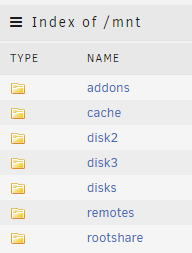
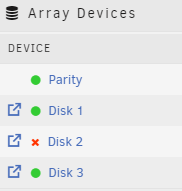
I recently shutdown my server so that it was not running during the hurricane. I believe everything was fine when I shut it down. My last parity check was on October 1st and completed with 0 errors. When I started up the server today, it was showing a drive as disabled. I started the array with the drive emulated and all of my shares are not showing up. I figured with it emulated, I should still see my shares, and I could do a backup prior to trying to rebuild the drive. Why are the shares not showing up if the drive is emulated? Is this normal? I ran a SMART short self-test and the disabled drive passed. I have not run a full self test yet. What's my best course of action from here? This is my first time having a drive show up as disabled. I was considering running a full SMART test and then doing the following: https://docs.unraid.net/unraid-os/manual/storage-management/#rebuilding-a-drive-onto-itself Should I first open the server and reseat all the connectors before doing SMART test and rebuilding? Will my shares show back up after I rebuild the disabled drive? When I go to /mnt disk1 is not showing up, but it shows up on the main tab Thanks!
-
I am trying to get my Tripp Lite SMART1500LCDT to work with the NUT plugin. I am able to pass through the UPS's USB and get it to work on a Mint VM using NUT installed on the VM. But I cannot get it to work directly within Unraid with the NUT plugin. On the VM I have to change the /lib/udev/rules.d/62-nut-usbups.rules to just contain the following: SUBSYSTEM!="usb", GOTO="nut-usbups_rules_end" # TrippLite # e.g. TrippLite SMART1500LCD - usbhid-ups ACTION=="add|change", SUBSYSTEM=="usb|usb_device", SUBSYSTEMS=="usb|usb_device", ATTR{idVendor}=="09ae", ATTR{idProduct}=="3016", MODE="664", GROUP="nut", RUN+="/sbin/upsdrvctl stop; /sbin/upsdrvctl start" LABEL="nut-usbups_rules_end" However, unraid overwrites the udev folder on boot. So this is not an option. Is there some way for me to update this file and not have it overwritten? The plugin adds this file somehow (it's not in the udev folder when the plugin is uninstalled), how is the file added by the plugin?

