Maora
Members
-
Joined
-
Last visited
Everything posted by Maora
-
Yeah, I placed the old hard drive back in and the server said that the old drive was smaller than what I tried to replace it with. So I just went with the New Config and started rebuilding the parity from there.
-
No superblock found and memtest found no errors, so I'm just gonna start the rebuilding of the parity, and do what you said. Thank you for your time.
-
Noted, thank you.
-
Ah, yes. Thank you. Forgotten about the emulated disk bit. Well, I'll let it run overnight and will get some rest. Will reply when there's any updates.
-
Quick question, what would happen if I were to skip the process of doing the check disk and all that, and went with formatting the disk? Just curious as the data is all backed up and stuff.
-
Yeah, I still have the original disk, and I'll do a memtest after the check is completed, to avoid future complications.
-
Noted. Hopefully it finds the secondary superblock. If not, most of the stuff has been backed up off-site. I have not done a memtest recently. If the secondary superblock isn't found, should I just format the hard drive and copy across the missing stuff from the backup?
-
I followed the steps (Maintenance Mode, clicking Disk 2 and clicked on Check). No command line was used.
-
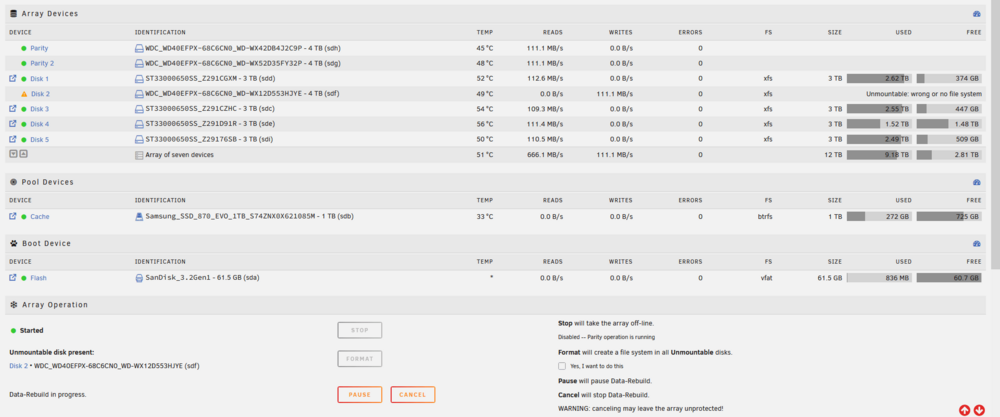
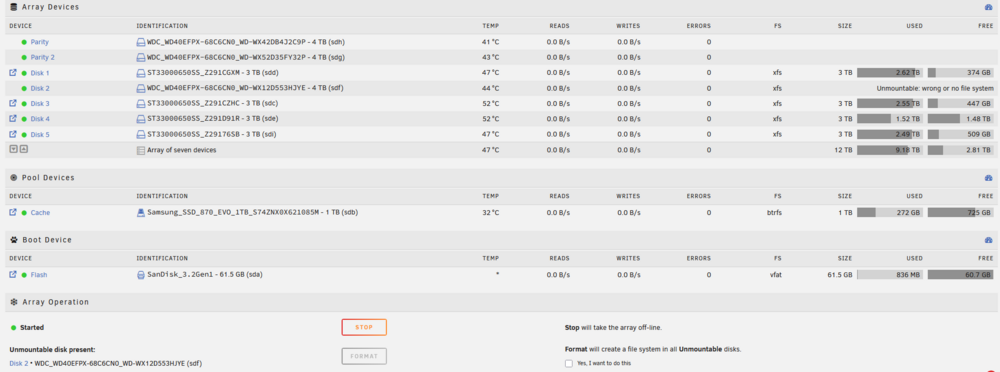
Recently replaced a drive and did the data rebuild to write the missing data to the new hard drive. While doing the data rebuild, I noticed a format option and mentioned in support at Discord, continued the data rebuild without formatting. Once the data rebuild was completed, Unraid still says that the disk is unmountable. Currently, the array is in maintenance mode, and I'm doing a check of the disk, and it mentions: Phase 1 - find and verify superblock... couldn't verify primary superblock - not enough secondary superblocks with matching geometry !!! attempting to find secondary superblock...Support mentioned to make a post here, so here I am. What should I do to resolve this issue? I added the diagnostics as well as screenshots of what I saw for clarity’s sake. tower-diagnostics-20251030-2228.zip