mchus
Members
-
Joined
-
Last visited
-
mchus changed their profile photo
-
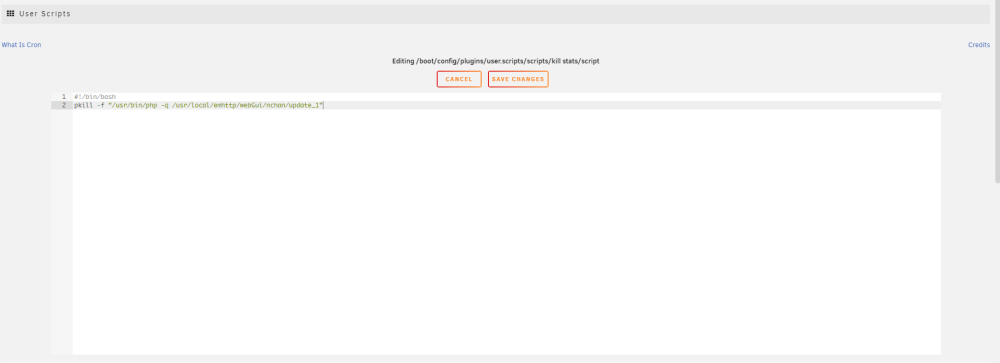
Hi all, i have unraid on very old and weak hardware and "lsof" problem is bothering me too. I tried to delete the line from "/usr/local/emhttp/webGui/nchan/update_1" file, which is invoking this command, but i think web server needs to be restarted or something, because this is changing nothing. I came with next solution to stop lsof using my old cpu: just kill it and watch what will broke. pkill -f "/usr/bin/php -q /usr/local/emhttp/webGui/nchan/update_1" So far everything works fine. Not spotted any difference. Another observation that I made: If you reboot the NAS and do not login in WebUI there is no periodic lsof process and no "/usr/bin/php -q /usr/local/emhttp/webGui/nchan/update_1" process too. root@box3:~# ps -aux | grep update root 7345 0.0 0.0 4048 2288 pts/0 S+ 16:29 0:00 grep update As you log in and open "Dashboard" tab all updates comes up and never stops. root@box3:~# ps -aux | grep update root 7390 1.5 0.1 91896 28628 ? SL 16:29 0:00 /usr/bin/php -q /usr/local/emhttp/webGui/nchan/update_1 root 7392 2.5 0.1 92140 29196 ? SL 16:29 0:00 /usr/bin/php -q /usr/local/emhttp/webGui/nchan/update_2 root 7394 2.0 0.1 92076 29472 ? SL 16:29 0:00 /usr/bin/php -q /usr/local/emhttp/webGui/nchan/update_3 root 7489 0.0 0.0 4048 2228 pts/0 S+ 16:29 0:00 grep update Now you can kill just "udate_1" that envokes lsof command with it's id or kill all /usr/bin/php processes with killall /usr/bin/php and they will not come up until reboot. So i came out with this "user script" runing once-a-day: