





timekiller
Members
-
Joined
-
Last visited
Everything posted by timekiller
-
I am unable to run the mover. I'm trying to move data off a dying disk and when I clock the "Move" button the page just reloads and the button is not grayed out. I have noticed when the system boots I get an error saying "/usr/local/bin/mover not found". Logging in I can see /usr/local/sbin/mover. I'm not sure why the system is looking int he wrong place. I can manually move the binary, but I want to know the "right" way to fix this. quick update, I just took a closer look at /usr/local/sbin: root@Storage:~# ls -lh /usr/local/sbin/move* lrwxrwxrwx 1 root root 19 Mar 17 09:33 /usr/local/sbin/move -> /usr/local/bin/move -rwxr-xr-x 1 root root 161 Mar 17 09:33 /usr/local/sbin/mover* -rwxr-xr-x 1 root root 4.6K Mar 17 09:33 /usr/local/sbin/mover.old* since /usr/local/bin/move doesn't exist, /usr/local/sbin/move is a broken symlink Edit (again): This is on Unraid 7.0.0, which has been through many updates
-
In full panic mode right now. Both of my parity drives are disabled. In the SMART report I can see Smartctl open device: /dev/sds failed: No such device in dmesg I see [2118735.635675] mpt2sas_cm1: log_info(0x31110d01): originator(PL), code(0x11), sub_code(0x0d01) [2118735.644150] sd 13:0:7:0: [sds] tag#4096 UNKNOWN(0x2003) Result: hostbyte=0x00 driverbyte=DRIVER_OK cmd_age=3s [2118735.644164] sd 13:0:7:0: [sds] tag#4096 Sense Key : 0x2 [current] [2118735.644171] sd 13:0:7:0: [sds] tag#4096 ASC=0x4 ASCQ=0x0 [2118735.644178] sd 13:0:7:0: [sds] tag#4096 CDB: opcode=0x88 88 00 00 00 00 04 dd 3d 00 f8 00 00 04 00 00 00 [2118735.644184] I/O error, dev sds, sector 20891631864 op 0x0:(READ) flags 0x0 phys_seg 128 prio class 0 [2118735.644195] md: disk0 read error, sector=20891631800 [2118735.644204] md: disk0 read error, sector=20891631808 [2118735.644209] md: disk0 read error, sector=20891631816 [2118735.644213] md: disk0 read error, sector=20891631824 [2118735.644218] md: disk0 read error, sector=20891631832 I can't spin up the drive (expected). Server has been running fine until today. I want to power it down and check the cabling, see if the drives come back on reboot, but before that is there anything else I should do? (diagnostic report attached) storage-diagnostics-20250313-1059.zip
-
I previously bought a license, but stopped using it for a while. Now I have built a new server but don't have the usb drive I used, and can't find a way to re-use my license. Can someone help, or will I be forced to buy a new license?
-
That worked, thank you!
-
Bump for visibility
-
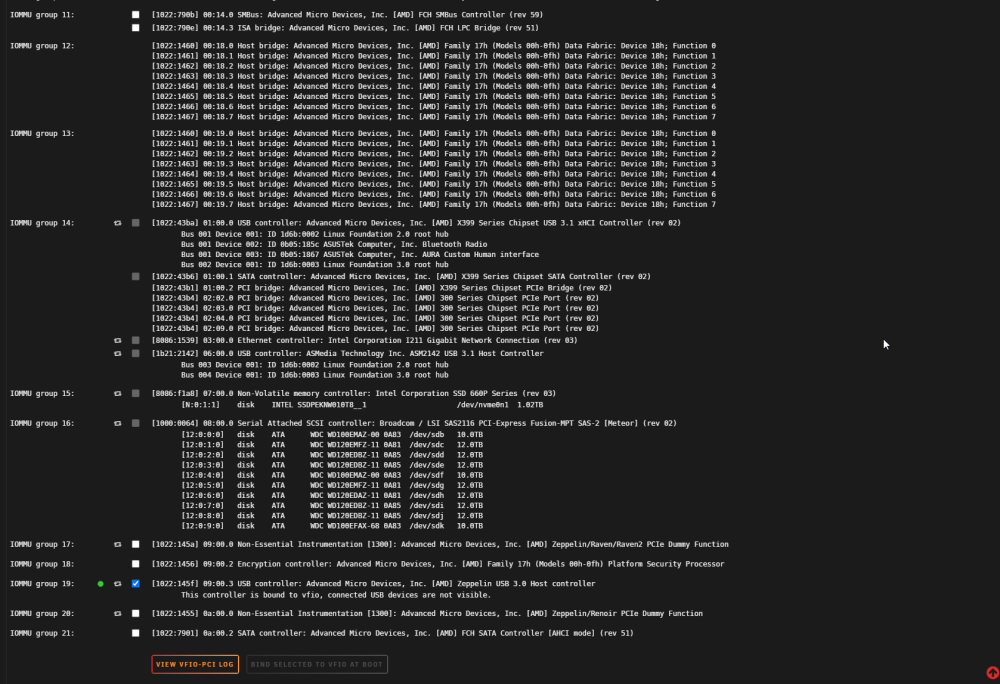
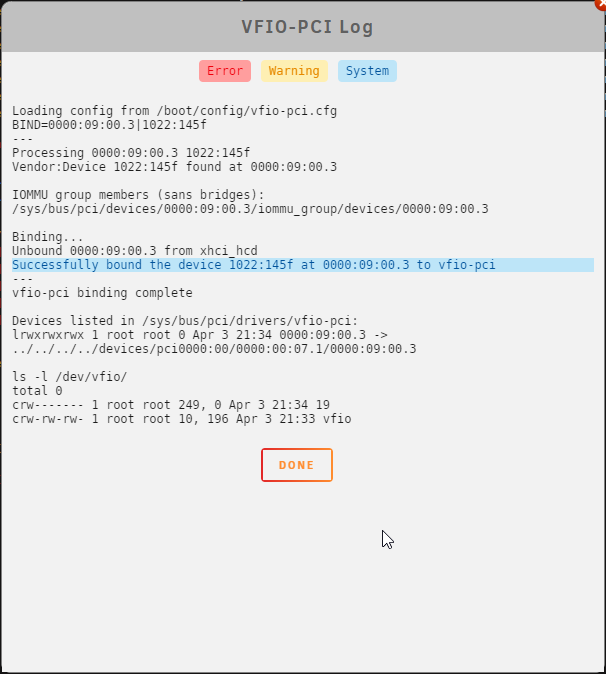
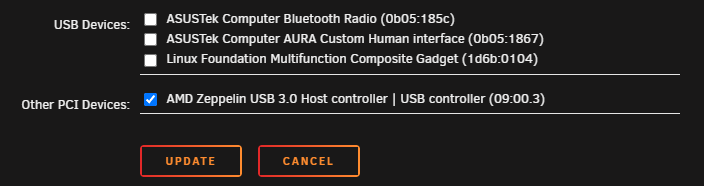
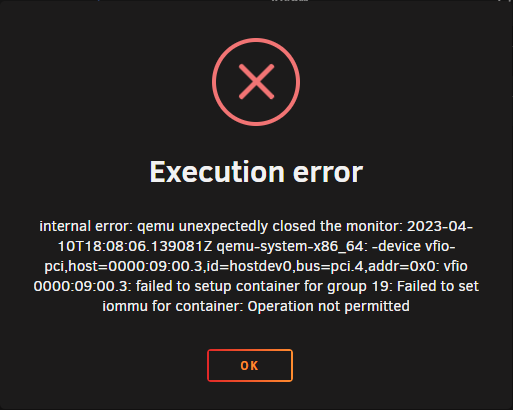
I have a Home Assistant VM that I am trying to pass a USB controller to. I have to pass the whole controller because I have a Coral AI accelerator which changes device ids when it's initiated, so I can't pass just the device. I have the controller bound in System Tools: When I view the VFIO-PCI Log it says it was successfully bound: When I try to attach it to the VM and start I get the error Execution error internal error: qemu unexpectedly closed the monitor: 2023-04-10T18:08:06.139081Z qemu-system-x86_64: -device vfio-pci,host=0000:09:00.3,id=hostdev0,bus=pci.4,addr=0x0: vfio 0000:09:00.3: failed to setup container for group 19: Failed to set iommu for container: Operation not permitted Diagnostics file attached. Thanks in advance. storage-diagnostics-20230410-1359.zip
-
Posting an update in case it's helpful to others. I believe I have this solved. I realized that the drive issues I was having were all on drives in this drive cage I bought to try and squeeze an extra drive into the server. I removed the cage, rearranging drives to get everything mounted securely and started yet another parity rebuild. This one took about 37 hours and completed successfully last night. The array has been online and stable since then. Hopefully That was the source of all my issues and I can move on. Thank you everyone who gave advice, even if I didn't necessarily take all of it.
-
of the 24 drives, there is a grand total of 2 splitters (not daisy chained, and not on the same line). Again, I don't believe this is causing the issue.
-
a couple, just due to the runs I have. Not as many as you might be thinking. It's a 1,000 watt PSU so there are plenty of ports for peripherals. I really on't think the PSU or the way I have the power wired is the issue.
-
Yup. My mistake. The data drive was marked unmountable, not disabled. The 2 parity drives were still online and the data on the unmountable drive was missing fromt he array. That was 3 weeks ago and I've been dealing with so many issues since then I forgot the specific error for the drive. This doesn't answer my current problem though. New drives, new cables, new controller cards, and I still can't get a successful parity rebuild.
-
Evenly split. PSU is more than capable of handling the load.
-
I understand how it's supposed to work. Both parity drives were online. The disabled drive was no emulated. Don't know what else to tell you on that. Doesn't really matter since this was like 3 weeks ago and not relevant to my current issues.
-
...with the power supply?
-
No. The drive was "disabled" and all of it's contents were removed from the array. Not emulated.
-
New. EVGA SuperNOVA 1000 G+, 80 Plus Gold. Bought it in May
-
I have a very large array - 24 drives, all 10,12, or 14 TB. A couple of weeks again I started having issues with the parity drives getting disabled. I was told to ditch my Marvel based controllers, which I did. I bought two LSI 9201-16i cards and installed them. I still had issues. I was told my firmware is very old, so I updated to the latest. I thought maybe the drives were faulty, so I bought new 14TB drives for parity. I've swapped my cables I don't even know how many times at this point. I moved the server out of my network closet to a cooler room. Every time I made a change I had to start the parity build over. With this many drives it takes several days to complete. Most of the time, it doesn't complete. It did complete once, and a few hours after completion a data drive was disabled, taking all it's data offline. Yesterday I moved the server and updated the controller firmware. Now I have read errors on 3 drives and unraid has disabled one of the parity drives. I'm pulling my hair out with frustration. I've swapped out all the hardware short of building a new server from scratch. I need to nail down the actual issue and get my server back. Please help! diag attached storage-diagnostics-20211121-1156.zip
-
Firmware is updated, I also moved the server to another room because it was getting pretty hot where it was. Parity is rebuilding AGAIN 🤞
-
Pulling my hair out with this server for weeks now. Was having a ton of issues that seemed to be caused by my Marvel based sata controllers. I took this community's advice and replaced both 16 port cards with LSI 9201-16i cards. I wound up having to rebuild parity, which finally finished yesterday with no errors and I thought I was in the clear. This morning I woke up to errors on both parity drives and both parity drives disabled. Now I assume I need to do a new config to trigger a parity rebuild AGAIN. But I need to fix the underlying problem. I have swapped sata cables, and both of these parity drives are brand new because I was having the same issue with another set of parity drives, so I pulled them and both 2 new 14TB drives. I have also tried a number of sata cables. I'm extremely frustrated at this point and just want my data reliably protected. At this point I have swapped out the controllers, the sata cables, AND the parity drives. What is going on here? diag attached. storage-diagnostics-20211120-1059.zip
-
yup, saw the call trace and my eyes skimmed right past the nfsd stuff - thanks!
-
Thanks, at least it's not hardware related this time! So I can better diagnose in the future, where did you find this? I'm looking through the diagnostics file and don't see it.
-
My desktop is Linux, so definitely need NFS. Never seen NFS cause the array to go offline before, any idea how this happened?
-
So I finally took everyone here's advice and replaced my Marvell based controller cards (IO Crest 16 Port) with 2 LSI 9201-16i cards. In addition I needed to shuffle some disks around, so when I installed the new cards I also wound having to do a new config and start a parity rebuild. It's been running for about 33 hours and everything was going great until about 30 minutes ago when I got an error deleting a file. Investigation shows that I lost /mnt/user - "Transport endpoint is not connected". Interestingly, /mnt/user0 is still connected and the array is accessible from there. Of course all of my docker container and shares use /mnt/user, so now the entire server is effectively offline. I stopped all my docker containers to hopefully avoid further issues there. I assume a reboot will fix this, but 1) I'd like to know what happened here, and 2) I don't want to have to restart the parity rebuild. There is currently an estimated 9 hours left and it appears to be running fine. Do I have any options beyond reboot and start over, or go 9 hours or more without my server? Diagnostics attached storage-diagnostics-20211119-0937.zip
-
Thank you
-
I'm open to recommendations for a replacement. I've asked for suggestions more than once, but haven't received a straight answer. I have 21 drives, so need 16 port cards.
-
Another update: I restarted the array in maintenance mode so I could repair the now missing, emulated drive. I ran xfs_repair on /dev/mapper/md1 and it did it's thing. What I did not expect is that it xfs_repair moved every single file/directory on the drive to lost+found. This is especially confusing because running the same command on the real drive did not do this. Since the original drive is fine, I'm just going to do a new config and let parity get rebuilt. I realize I did not handle this the "right" way from the beginning, but I can't help but wonder if I had run the repair against the real drive in the first place if I would now be forced to manually go through 10TB worth of lost+found files and manually move/rename them.


