



Skip to content
View in the app

A better way to browse. Learn more.

Unraid

A full-screen app on your home screen with push notifications, badges and more.

To install this app on iOS and iPadOS
  1. Tap the Share icon in Safari
  2. Scroll the menu and tap Add to Home Screen.
  3. Tap Add in the top-right corner.
To install this app on Android
  1. Tap the 3-dot menu (⋮) in the top-right corner of the browser.
  2. Tap Add to Home screen or Install app.
  3. Confirm by tapping Install.

Aloja

Members
  • Joined

  • Last visited

Everything posted by Aloja

  1. Solved! GPU and RAID card were not in the same PCI port as I had it before. I guess that messed up something in the configuration. THANKS anyway for your responses.
  2. That was the first thing that I did.
  3. tower-diagnostics-20220703-1416.zip
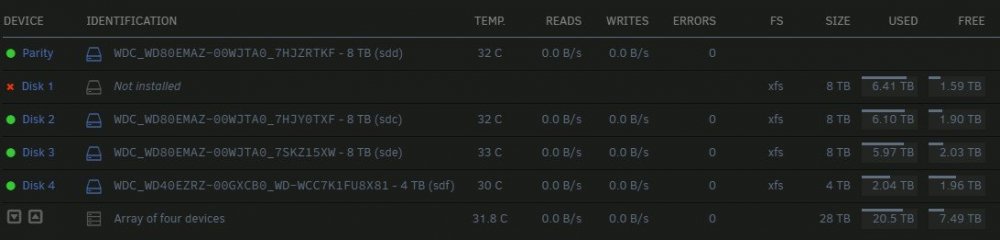
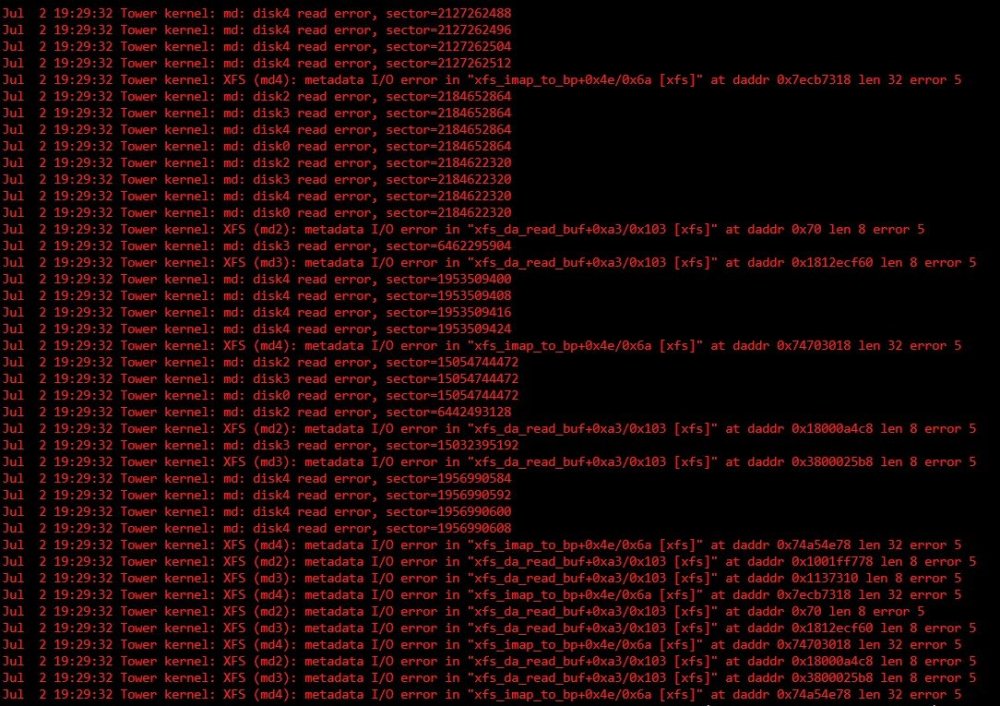
  4. HI team. One day ago I shotted down my Unraid to upgrade the GPU and cleaning. Once I put everything back together, now I have problems with my array. At the beginning was showing me that disk 1 had multiple errors, now is missing. I took it out and test it and there was no errors with it when I analyzed. Also I cant stop the array, restart or shut down Unraid. I will appreciate your help, thanks.
Account

Navigation

Search

Search

Configure browser push notifications

Chrome (Android)
  1. Tap the lock icon next to the address bar.
  2. Tap Permissions → Notifications.
  3. Adjust your preference.
Chrome (Desktop)
  1. Click the padlock icon in the address bar.
  2. Select Site settings.
  3. Find Notifications and adjust your preference.