





mrmagoo_83
Members
-
Joined
-
Last visited
Everything posted by mrmagoo_83
-
Date command returns: "Sat Aug 23 15:23:56 CDT 2025" Sorry, I was traveling this past week taking my kiddo to college. Should I run a parity check with corrections or what should be my next steps before I return to BAU?
-
Ok, did that, and now it no longer has the error, but is empty. The bottom says parity is valid, but still gives me the warning it hasn't been checked since 2018, and has the Write Corrections to Parity checked. What should I do at this point?
-
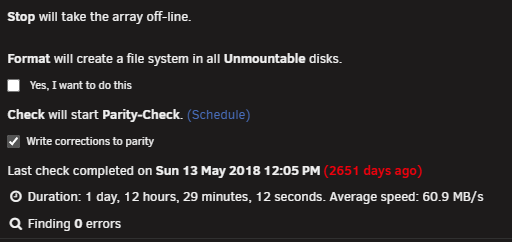
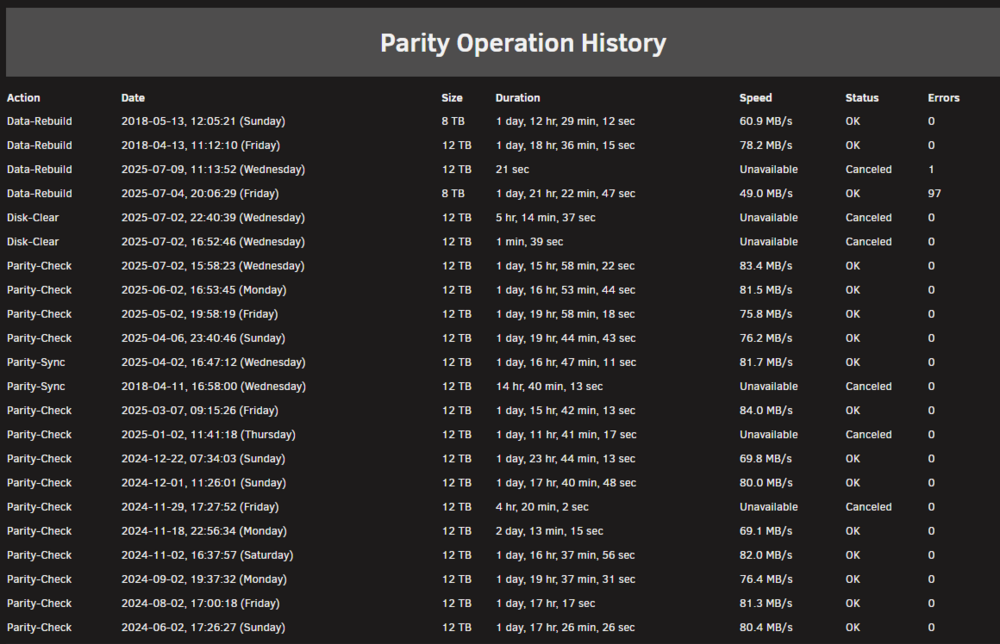
Alright, I'm back. That took a while, but I managed to run a recovery app on every drive and get back some of my missing data. I have attached the diagnostics record, and a screenshot of two drives in the array, both of which are original drives, and are both 'lost' I guess. Upon firing the server back up it did a parity check, but I have attached an image of the message where it says it has not done once since 2018. I do not want to hit "Yes, I want to do this" and format the drive unless I have to, nor do I want to execute a "Write corrections to parity" until I understand that that will do. This history shows a good parity was done back in May, June, and July as I have it set to do a complete parity check every month. What are my next steps here? I assume the 12TB drive data is just lost, but what about the 8tb? Should I execute the format, or the parity write? Once this is all done I have a 12TB drive to add to the array. magoosserver-diagnostics-20250815-0806.zip

-
I'll get back to y'all. I've been traveling for work. I have currently shut the server down and I am pulling each drive and doing a recovery attempt on each one to pull off both the current active files, but as well as anything lingering that hasn't been fully wiped. Using a Linux recovery program and not actually doing anything to the device, so it shouldn't screw up the filesystem or structure. This will take me a few days to go through 18 drives ranging from 3TB to 12TB. Once I have done that I will restart the array and let it do what its going to do, at least I will have recovered everything I could, so if it doesn't rebuild the other drive, then so be it. I will be installing a few backup solutions going forward for my important pictures and documents, an external 12TB drive, a 4TB SSD, and my GCS account. I will have extra protection, but better be safe than sorry again. I do not care about my music, movies, or television files, just my docs, pictures/videos, and business files.
-
Negative. I have not checked that box. And yes that is the method I used to go in and view what was 'on' the drive. And all it has is "Parent Directory". I am confused though, what did it rebuild if it wasn't rebuilding from parity what should have been on the drive? Isn't that how it updates when I replace a drive? And how is it every other folder I have shows up across multiple drives, but these three latest folders were all on this single drive? That seems very odd to me, shouldn't there be some lingering of the contents on a different drive?
-
But even if that is the case, shouldn't the rebuild have used the data from parity and elsewhere to rebuild the data on the drive? Isn't that how it works if I had replaced that drive with a fresh one? It does show 250GB used, which is a lot to have no files on it, is it not?
-
I am not sure how to answer that question. I thought the drive was cleared as part of the rebuild process before it started reassembling it from parity? I did not force format the drive if that is the question.
-
Correct, I was trying to mount a disk I had not formatted yet, that was my fault. But all of that was in efforts to find these 3 missing folders. I installed the original, correct 12TB drive, the array spent the last two days 'rebuilding' the drive...to nothing. The drive is blank after the rebuild. Still zero sign of the three folders with my pictures in them.
-
I was looking within the Unraid UI and terminal for these folders. They were there, full of data, then they were not. Very confused by it. The server is running a rebuild right now, which may blow everything up, not really sure, but when I put the 12TB drive back in it started, I have little faith it will restore anything though. Once that is done, if it fails to restore the folders, then I'll run diagnostics again. It just makes zero sense to "lose" 3 folders at once. diagnostics-20250704-2312.zip
-
I messed around a noticed the other day that I had at least 3 folders in my Pictures archive missing, 2023,2024, and 2025. I had a drive having problems, so I assumed that was the issue, but not so sure now. I have 15 drives in my array, so the odds of all 3 of those folders being 100% on the failing drive would be nearly impossible as every other folder I have is spread across multiple drives. I even started the array without the drive, and the three folders showed up in the shares, but then after a refresh they disappeared. So I'm scratching my head. I did a full data recovery on the drive, recovered tons and tons of data, but none that seems to be from those 3 folders. So I am really confused. I've seen a single folder with little data wind up on a single drive, but the majority of my folders I see get split across multiple drives, so I am confused as to how all three of these folders would wind up together on the same drive, and not a single file from any of the 3 being recovered? Any thoughts?
-
Well...I'm an idiot. So sdn has no filesystem because its the brand new drive. Sitting here with it in an external docking station I glanced over and saw the damn manufacturing date...5/2025 SOB! So I went looking for the 'other' 12 TB drive, SN M4B, it had been added to the array, but never drove a rebuild, so not real sure what is the status of it. Luckily I have a data recovery software tool, and it is currently running to pull whatever data I can from it, so far it is recovering a lot, probably not everything, but some is better than nothing. I originally thought I'd only lost 3 years worth of pictures/videos of the family, but it turns out there was data from numerous years on that drive. So even if I can't get them all back, I'm happy to get what I can. After this, I'm going to duplicate the drive onto another newer drive I have, just as a backup. I am then going to put it back in and bring the array online and see if it will rebuild the full drive, or if something else is wrong and it only rebuilds a portion, or at all. I am open to additional safety backup suggestions. I am thinking about an NVME drive to store critical docs and files on as a redundancy, just in case. Figure out how to have Unraid push new data to it weekly or something. I am willing to pay extra money to keep these files safe, so I'll figure something out. I used to have a backup to a 4TB external, but I forget what and how that was working and if it was a 1:1 backup. Hopefully I get lucky and Unraid rebuilds the drive like nothing happened, but normally I'm not lucky.
-
Does that mean the filesystem was erased or corrupted? I posed the whole diagnostics zip file early in the thread, does that have the right log you need?
-
Sorry, I was traveling for work the past few days. I executed "wipefs /dev/sdn1" from the terminal but it does nothing, no errors, nothing, just returns to the next line. I ran "xfs_repair -v /dev/sdn" & xfs_repair -v /dev/sdn1" from the terminal window, both failed to find a super block.
-
-
b1: LABEL_FATBOOT="UNRAID" LABEL="UNRAID" UUID="E0D9-DA1E" BLOCK_SIZE="512" TYPE="vfat" PARTUUID="37dc8abd-01" /dev/loop1: BLOCK_SIZE="131072" TYPE="squashfs" /dev/sdf1: UUID="c504829a-9def-46b1-8b57-56c9b2e487c8" UUID_SUB="a1b86c0a-241d-4ae3-99dc-c77c2a5d05f9" BLOCK_SIZE="4096" TYPE="btrfs" /dev/sdd1: UUID="c504829a-9def-46b1-8b57-56c9b2e487c8" UUID_SUB="1192802c-2398-463b-9126-ac67bbd58829" BLOCK_SIZE="4096" TYPE="btrfs" /dev/loop0: BLOCK_SIZE="131072" TYPE="squashfs" /dev/sde1: BLOCK_SIZE="512" UUID="69EF280A7AC9528D" TYPE="ntfs" PARTUUID="a86fb5e4-01" /dev/sdm1: UUID="abba103d-13a9-4174-b480-032c5f5ab876" BLOCK_SIZE="512" TYPE="xfs" PARTUUID="92e37d91-ba78-496c-9166-d36fc3bd82be" /dev/md9p1: UUID="f02938a7-be13-442b-a619-4fbfd6df3e46" BLOCK_SIZE="512" TYPE="xfs" /dev/md15p1: UUID="fb2614db-c80a-42f2-9913-46ca9bb200fc" BLOCK_SIZE="512" TYPE="xfs" /dev/md2p1: UUID="48d45bd1-43ca-4b06-bf61-621fefeb8c10" BLOCK_SIZE="512" TYPE="xfs" /dev/md5p1: UUID="bf6fd98d-649c-4eb6-939a-e95dafcda214" BLOCK_SIZE="512" TYPE="xfs" /dev/md11p1: UUID="80c2c9f7-c43e-4289-a477-472dc095a045" BLOCK_SIZE="512" TYPE="xfs" /dev/md8p1: UUID="5ccae6a1-0b49-4c8e-ae72-fbed351c02b1" BLOCK_SIZE="512" TYPE="xfs" /dev/md14p1: UUID="9d929547-9638-40c1-ba8f-56ca414e225a" BLOCK_SIZE="512" TYPE="xfs" /dev/md1p1: UUID="7f7c8472-216c-46f6-b71b-88e491e52043" BLOCK_SIZE="512" TYPE="xfs" /dev/md4p1: UUID="159d6407-70fc-46b7-8372-b38326f0e005" BLOCK_SIZE="512" TYPE="xfs" /dev/md10p1: UUID="0ae23449-14b0-401f-80bc-733c22c02e6b" BLOCK_SIZE="512" TYPE="xfs" /dev/md7p1: UUID="79379f82-6aa2-4585-8050-5a23a04a9679" BLOCK_SIZE="512" TYPE="xfs" /dev/md13p1: UUID="62d648d5-4ea4-4dab-9f28-d20d10c18b2e" BLOCK_SIZE="512" TYPE="xfs" /dev/md3p1: UUID="04b3635e-aa0c-4026-8ffd-4beaedb62c89" BLOCK_SIZE="512" TYPE="xfs" /dev/md6p1: UUID="187d1d2e-b309-4c06-a242-801b4cf14c4c" BLOCK_SIZE="512" TYPE="xfs" /dev/md12p1: UUID="96406c7d-3444-4959-8e76-348b23687b00" BLOCK_SIZE="512" TYPE="xfs" /dev/sdn1: PARTUUID="9d02f38d-d036-49f9-ab1c-f3e4fe049991" The last one, sdn1 is the one I'm trying to get into and recover.
-
Disk 14 is the 8tb the rebuilt yesterday and has not been formatted Disk 15 is a brand new 12TB that has yet to be formatted I am after disk sdn, it just completed, but failed, a xfs_repair because it could not find a super block.
-
diagnostics-20250704-2312.zip Alright there is the whole set of logs. During my continued research, I believe the file system is corrupt, so it has been running xfs_repair all night. Bad Super Block so its looking for the secondary, which I guess is going to take a while. What are the odds it finds a secondary super block?
-
I purchased a new drive this week and went to install it in my system. Didn't think much of the array disk count at the time. But while that disk was clearing i realized a number of data folders were missing from my shares. I then realized my array was a 12tb drive short. It was appearing in Unassigned drives, but couldn't be mounted and has an assignment of Dev2. All while this was happening an 8tb drive disappeared, then reappeared and started a data rebuild on it. Which seems to be successful. So my new 12tb finished data clear, but didn't trigger a data rebuild for the "missing" 12tb thats in Unassigned drives. If I try to add the Unassigned device to the array it says it'll format it and either start a rebuild or parity check, which is scary as hell because it looks like 3 years worth of data are on that drive. How can I gain access to see what is on the drive, or be confident the content exists in parity? My last parity check was 6/2, before the rebuild that happened the past 24 hours. Am I screwed?
-
I'll have to double check. I may have a controller card in HBA mode in there already.
-
So rather than setting it up as iSCSI via ethernet, I could in theory, connect it up to a raid controller card and then unraid would see the drives?
-
I'm running Unraid on a Norco 24 bay server, a friend gave me a Dell SC4020, and I'd like to add it as expansion to my current setup. I'm told it is iSCSI. Any quick knowledge on how to add this to my current array to expand my storage?
-
You caught me. I'm running two setups. I have my primary Unraid server which has this docker setup and running, it is converting all the items as their downloaded, but I have also setup a standalone Kubuntu machine running on an older PC I just retired. I'm trying to use it to work thru all my old files to cut the work time down. Thus I'm trying to execute the HB docker from the CLI as there is no container environment.
-
Need some help, trying to run handbrake in cli mode, but the environment variables don't seem to work. The folders work, but it doesn't use the preset I configured in the GUI, it doesn't erase the files from the watch folder, nor does it keep the folder structure. What am I doing wrong? sudo docker run -d \ --name=handbrake \ -p 5800:5800 \ -v /docker/appdata/handbrake:/config:rw \ -v /media/Downloads/complete:/watch:rw \ -v /media/Downloads/re-encoded:/output:rw \ -e AUTOMATED_CONVERSION_PRESET:myh265 \ -e AUTOMATED_CONVERSION_KEEP_SOURCE:0 \ -e AUTOMATED_CONVERSION_OUTPUT_SUBDIR:SAME_AS_SOURCE \ jlesage/handbrake

