




Skip to content
View in the app

A better way to browse. Learn more.

Unraid

A full-screen app on your home screen with push notifications, badges and more.

To install this app on iOS and iPadOS
  1. Tap the Share icon in Safari
  2. Scroll the menu and tap Add to Home Screen.
  3. Tap Add in the top-right corner.
To install this app on Android
  1. Tap the 3-dot menu (⋮) in the top-right corner of the browser.
  2. Tap Add to Home screen or Install app.
  3. Confirm by tapping Install.

Bonzoom

Members
  • Joined

  • Last visited

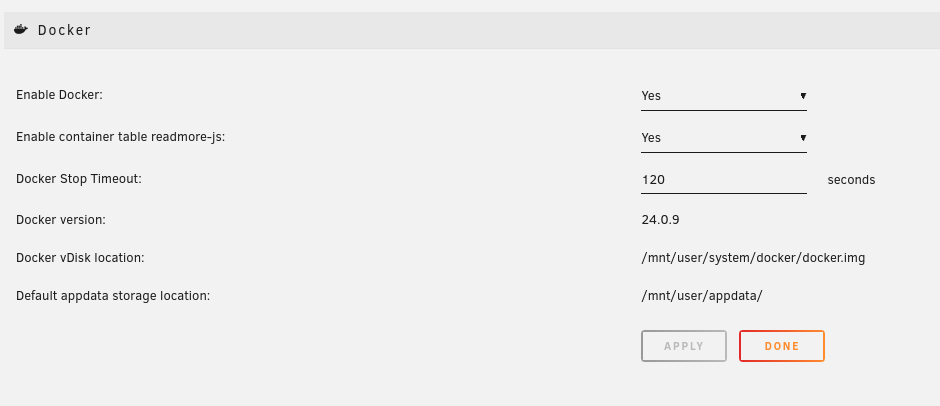
  1. I solved my issuse with Nextcloud and Immich not updating this way: Go to settings Select docker Change "Docker Stop Timeout:" to 120 seconds. Issue gone 🙂 (Please see update below screenshot) Unraid version 6.12.10 Update. It did only work once, sorry 😞 Today the plugin Fix Common Problems had a warning that my TRIM schedule was faulty, and that i needed to disable and then enable it to get it working correctly. I did that and docker update worked again. I'm not going to write solved this time 🙂 but i worked and I updated Nextcloud and Immich without any issues.
Account

Navigation

Search

Search

Configure browser push notifications

Chrome (Android)
  1. Tap the lock icon next to the address bar.
  2. Tap Permissions → Notifications.
  3. Adjust your preference.
Chrome (Desktop)
  1. Click the padlock icon in the address bar.
  2. Select Site settings.
  3. Find Notifications and adjust your preference.