





jsmj
Members
-
Joined
-
Last visited
-
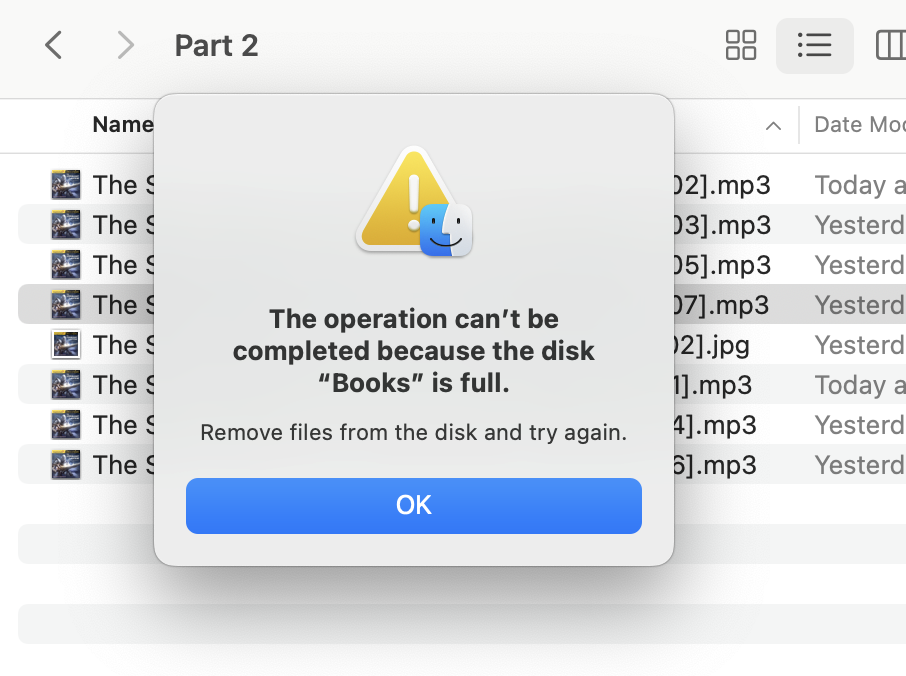
I've tried a couple ways. I'm trying to reformat the file names of a batch of 7 .mp3 files with: find . -iname "*.mp3" -exec rename '[02-0' 2 '{}' \; It worked for 3 of the files before spitting out the "No space left on device" for the other 4. On repeat runs of the command, I just get the "No space left on device" error without any further progress. But I also tried in macOS (over SMB I presume?) in Finder. Even just making a single change to a single file name generates this error:
-
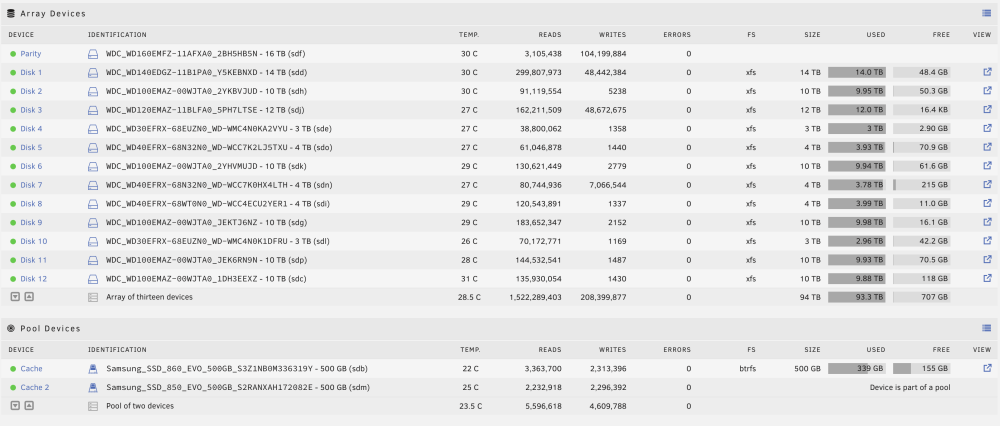
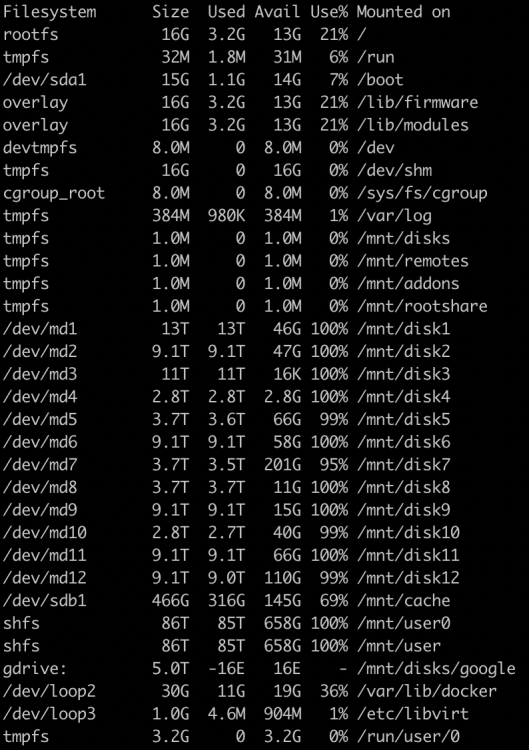
I ran a rename command, but got No space left on device However I believe I have enough space to get by on. Here are some screenshots and diagnostics are attache. I appreciate any insight. tower-diagnostics-20240121-0947.zip
-
Here are the results. Not sure if I should run xfs_repair or not? Phase 1 - find and verify superblock... - block cache size set to 1449928 entries Phase 2 - using internal log - zero log... zero_log: head block 1279253 tail block 1269441 ALERT: The filesystem has valuable metadata changes in a log which is being ignored because the -n option was used. Expect spurious inconsistencies which may be resolved by first mounting the filesystem to replay the log. - scan filesystem freespace and inode maps... agi unlinked bucket 58 is 29059834 in ag 10 (inode=21503896314) agf_freeblks 53026618, counted 53026614 in ag 6 agi unlinked bucket 15 is 391628815 in ag 13 (inode=28308916239) sb_ifree 11940, counted 13423 sb_fdblocks 151, counted 536381294 - found root inode chunk Phase 3 - for each AG... - scan (but don't clear) agi unlinked lists... - process known inodes and perform inode discovery... - agno = 0 - agno = 1 - agno = 2 - agno = 3 - agno = 4 - agno = 5 - agno = 6 - agno = 7 - agno = 8 - agno = 9 - agno = 10 - agno = 11 - agno = 12 - agno = 13 - agno = 14 - agno = 15 - process newly discovered inodes... Phase 4 - check for duplicate blocks... - setting up duplicate extent list... free space (6,26134123-26134124) only seen by one free space btree free space (6,26135323-26135324) only seen by one free space btree - check for inodes claiming duplicate blocks... - agno = 2 - agno = 1 - agno = 9 - agno = 3 - agno = 5 - agno = 0 - agno = 4 - agno = 8 - agno = 12 - agno = 10 - agno = 6 - agno = 11 - agno = 13 - agno = 14 - agno = 7 - agno = 15 No modify flag set, skipping phase 5 Phase 6 - check inode connectivity... - traversing filesystem ... - agno = 0 - agno = 1 would fix ftype mismatch (2/1) in directory/child inode 2167331754/19334723627 - agno = 2 - agno = 3 - agno = 4 - agno = 5 - agno = 6 - agno = 7 - agno = 8 - agno = 9 - agno = 10 - agno = 11 - agno = 12 - agno = 13 - agno = 14 - agno = 15 - traversal finished ... - moving disconnected inodes to lost+found ... disconnected inode 21503896314, would move to lost+found disconnected dir inode 21505459514, would move to lost+found disconnected inode 28308916239, would move to lost+found Phase 7 - verify link counts... would have reset inode 2167331754 nlinks from 79 to 78 would have reset inode 19334723627 nlinks from 1 to 2 would have reset inode 21503896314 nlinks from 0 to 1 would have reset inode 28308916239 nlinks from 0 to 1 No modify flag set, skipping filesystem flush and exiting. XFS_REPAIR Summary Thu Sep 30 10:10:12 2021 Phase Start End Duration Phase 1: 09/30 10:09:44 09/30 10:09:44 Phase 2: 09/30 10:09:44 09/30 10:09:47 3 seconds Phase 3: 09/30 10:09:47 09/30 10:10:08 21 seconds Phase 4: 09/30 10:10:08 09/30 10:10:08 Phase 5: Skipped Phase 6: 09/30 10:10:08 09/30 10:10:12 4 seconds Phase 7: 09/30 10:10:12 09/30 10:10:12 Total run time: 28 seconds
-
I've got an unmountable disk present that has persisted after reboots and cabling checks. It's a relatively new drive (in the past year). It began life as an easystore. I was low on space so I replaced a small drive while I was checking cabling, so there is a data rebuild going on if you notice that in my logs. Probably frowned upon, I know. Please let me know if you see anything in the logs relating to the unmountable disk. Thanks in advance tower-diagnostics-20210928-1219.zip

