



Skip to content
View in the app

A better way to browse. Learn more.

Unraid

A full-screen app on your home screen with push notifications, badges and more.

To install this app on iOS and iPadOS
  1. Tap the Share icon in Safari
  2. Scroll the menu and tap Add to Home Screen.
  3. Tap Add in the top-right corner.
To install this app on Android
  1. Tap the 3-dot menu (⋮) in the top-right corner of the browser.
  2. Tap Add to Home screen or Install app.
  3. Confirm by tapping Install.

scarecrowboat

Members
  • Joined

  • Last visited

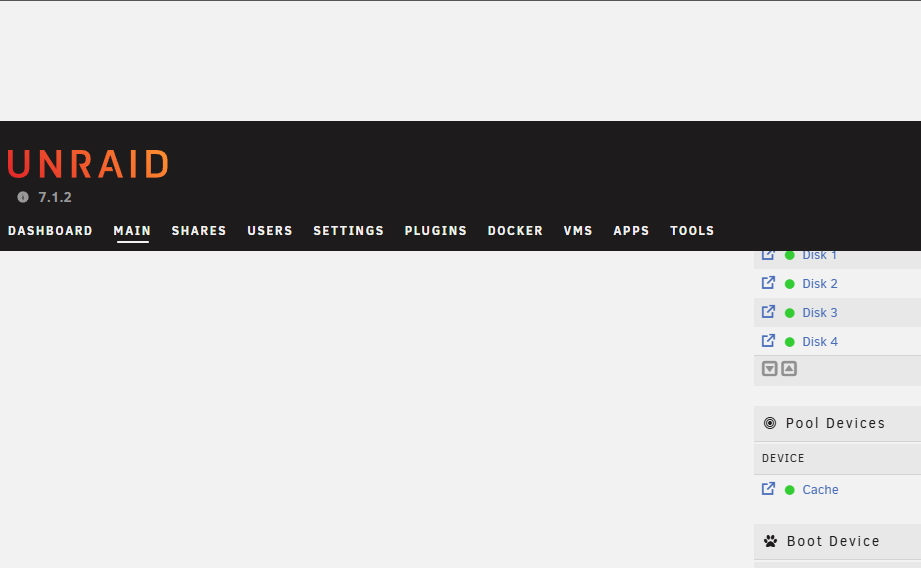
  1. I did some more testing, and the issue appears to have been an extension in Chrome. After disabling it, the banner appears at the top again like normal. I'm not sure why this extension would do that, but either way, all good now. Thanks for the help.
  2. Recently, I have had an issue with empty space above the UnRaid banner appearing on the web GUI. It pushes the banner down and covers the top of everything. Does anyone know how to fix this?
  3. I am having a similar issue after updating Unraid OS to the latest version. I tried reverting to the last OS version but still get ERR_CONNECTION_REFUSED when trying to get to the web GUI. Tried all the suggested fixes as well and deleted and reinstalled the container and still can't reach the web GUI.
Account

Navigation

Search

Search

Configure browser push notifications

Chrome (Android)
  1. Tap the lock icon next to the address bar.
  2. Tap Permissions → Notifications.
  3. Adjust your preference.
Chrome (Desktop)
  1. Click the padlock icon in the address bar.
  2. Select Site settings.
  3. Find Notifications and adjust your preference.