





Jimbow
Members
-
Joined
-
Last visited
-
Done, thanks and it worked. Thanks
-
Thanks @itimpi - it looks like array must be online to edit the shares. 😕
-
Bump
-
Massive thanks! What about the 2nd part on the encryption state? Cheers!
-
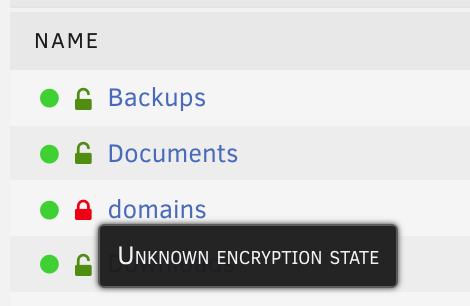
Hi everyone! I recently moved to a new NAS server moving all my drives over except my Cache drive as it was failing in the previous NAS. Here's what I'm seeing: I removed the Cache drive from the pool however still seeing "Prefer" in Cache Pool. I'm unable to change it as its greyed out. Any way to change that to "No"? "unknown encryption state Any help would be greatly appreciated, thanks everyone!


-
Anyone having issues in 6.6.6 and 6.6.7 regarding launching a docker container imported from dockerhub? When I try to launch the container to start it stops after 1sec. Here are the logs: Apr 16 14:08:03 Tower kernel: eth0: renamed from vethe02dce5 Apr 16 14:08:03 Tower kernel: device br0 entered promiscuous mode Apr 16 14:08:04 Tower kernel: device br0 left promiscuous mode Apr 16 14:08:04 Tower kernel: vethe02dce5: renamed from eth0 There are no other logs when launching the container. Note that using dockers NOT from dockerhub work ok.

