PvD
Members
-
Joined
-
Last visited
-
You need to change the tunnel view from „Basic“ to „Advanced“. The toggle is located between the „Active“ and „Autostart“ toggle in the top Right corner of the tunnel. After that you will find a delete tunnel button in the bottom right corner of the tunnel configuration.
-
You need to change the Tunnel view from „Basic“ to „Advanced“. The toggle is located Between the „Active“ and „Autostart“ toggle in the top Right corner of the Tunnel. After that you will find the Delete Tunnel button in the Bottom Right corner of the Tunnel configuration.
-
My current setup only features one Network Card with one Ethernet port.
-
Okay thank you for your help. Then I need to find a solution which doesn’t involve the WireGuard Firewall.
-
Yes I block the right IP. I want to block 192.168.0.114 (I tried other Ip addresses too, no difference). I think the 192.168.10.188 is the ip from your post earlier if I am not completely wrong(?). 192.168.0.1 is my Router 192.168.0.10 Unraid Server 192.168.0.114 IP to block
-
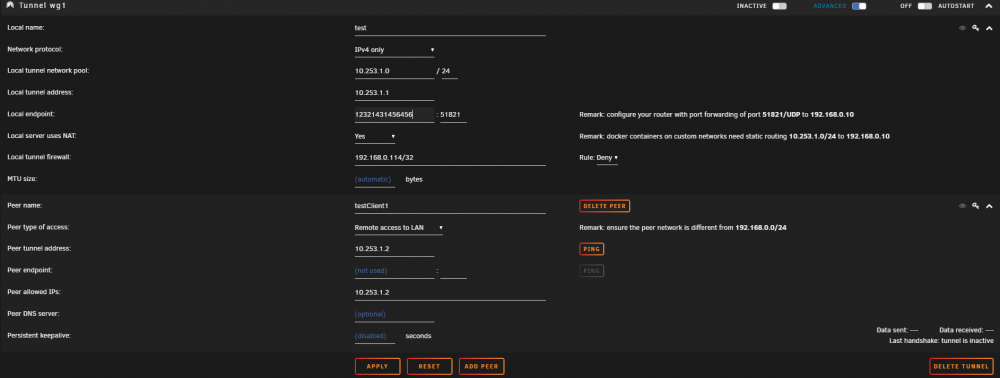
I made a short video which hopefully shows my problem. The Syslog shows the start of the tunnel, but the Dashboard shows "Inactive" as State und the Switch won't accept the new state. Is there a way to start a Tunnel with the help of a Console command or another log file with more information?
-
Thank you for your help. Attached is the Diagnostics Zip. pvd-unraid-diagnostics-20200729-2214.zip
-
I have the Problem that i can't activate a VPN tunnel if i add a IP under "Local tunnel firewall:" (Allow/Deny doesn't make a difference). If i leave this field clear, the tunnel starts as normal. I attached a Screenshot (The "IP" is obviously faked). Is this a known problem?