





strance4
Members
-
Joined
-
Last visited
-
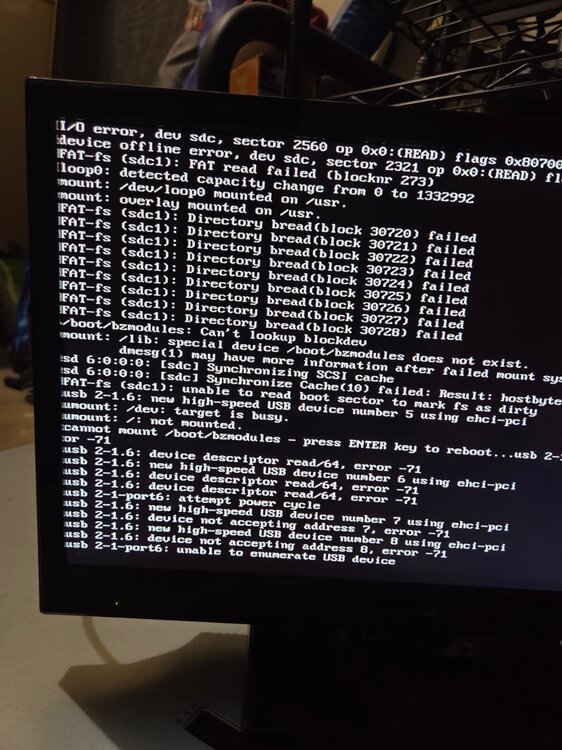
Hi guys, Looking for some help with this issue. i came home to my server at this screen. think it happened on the weekly server reset. i have tried to reboot and even try cleaning the USB with compress air. When i press enter it reboots and then when i go in the BIOS the USB is not there until i hard reset it comes back. i have a flask backup for 10 days ago and 2 new USB coming tomorrow but just want to see if there is anything i am missing.
-
I am working on a backup server but i only have 3 drives i it will be up in maybe 30 days i need get a couple more drives i have 36TB on 2 Drives and 90TB of total data so i got to get like 6-8 more 18tb drives so before i bring it online.
-
yea sorry for the confusion i dont want to remove the diable disk until i copy the data just in case i cant get the data back. i will do a rebuild with 2 new drives. thanks for all the help i send you a beer Trurl.
-
Ok once i finish copying the files i will use my spares and do a parity check.
-
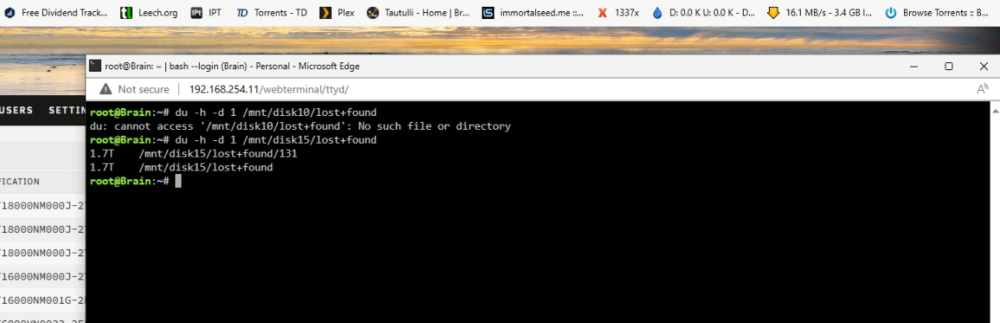
on disk 15 there is a lost and found folder with my files in it on DISK 10 the files are just there no lost and found folder. how do i get the drive to become enable again the are still disable.
-
root@Brain:~# du -h -d 1 /mnt/user/lost+found 1.8T /mnt/user/lost+found/131 1.8T /mnt/user/lost+found
-
Updated Diagnostics. brain-diagnostics-20240206-1044.zip
-
Update. I restart the server and the drive is mounted now but still disabled but i can see the contents. i plan on moving the 18TB from both drives on to another drive then i plan on reformatting them and give it a try again if not i will relace them with my back up drives. this should take 2-3 days to move all that data. Do you guys think this is a good plan or should i do something else? i dont want to restart and the data goes away again. Thank you guys so much you help out alot.
-
drive 10 Phase 1 - find and verify superblock... Phase 2 - using internal log - zero log... - scan filesystem freespace and inode maps... clearing needsrepair flag and regenerating metadata - found root inode chunk Phase 3 - for each AG... - scan and clear agi unlinked lists... - process known inodes and perform inode discovery... - agno = 0 bad CRC for inode 131 bad CRC for inode 135 bad CRC for inode 131, will rewrite cleared inode 131 bad CRC for inode 135, will rewrite cleared inode 135 - agno = 1 - agno = 2 - agno = 3 - agno = 4 - agno = 5 - agno = 6 - agno = 7 - agno = 8 - agno = 9 - agno = 10 - agno = 11 - agno = 12 - agno = 13 - agno = 14 - agno = 15 - agno = 16 - process newly discovered inodes... Phase 4 - check for duplicate blocks... - setting up duplicate extent list... - check for inodes claiming duplicate blocks... - agno = 0 - agno = 1 - agno = 2 - agno = 3 - agno = 12 - agno = 13 - agno = 4 - agno = 8 - agno = 7 - agno = 6 - agno = 11 - agno = 10 - agno = 14 - agno = 15 - agno = 9 - agno = 16 - agno = 5 Phase 5 - rebuild AG headers and trees... - reset superblock... Phase 6 - check inode connectivity... - resetting contents of realtime bitmap and summary inodes - traversing filesystem ... - traversal finished ... - moving disconnected inodes to lost+found ... Phase 7 - verify and correct link counts... Maximum metadata LSN (1:443386) is ahead of log (1:2). Format log to cycle 4. done
-
ok running drive 10 test will post then restart server and let you know.
-
drive 15 Phase 1 - find and verify superblock... Phase 2 - using internal log - zero log... - scan filesystem freespace and inode maps... clearing needsrepair flag and regenerating metadata - found root inode chunk Phase 3 - for each AG... - scan and clear agi unlinked lists... - process known inodes and perform inode discovery... - agno = 0 - agno = 1 - agno = 2 - agno = 3 - agno = 4 - agno = 5 - agno = 6 - agno = 7 - agno = 8 - agno = 9 - agno = 10 - agno = 11 - agno = 12 - agno = 13 - agno = 14 - agno = 15 - agno = 16 - process newly discovered inodes... Phase 4 - check for duplicate blocks... - setting up duplicate extent list... - check for inodes claiming duplicate blocks... - agno = 0 - agno = 1 - agno = 2 - agno = 3 - agno = 10 - agno = 13 - agno = 9 - agno = 8 - agno = 4 - agno = 11 - agno = 6 - agno = 12 - agno = 14 - agno = 15 - agno = 16 - agno = 5 - agno = 7 Phase 5 - rebuild AG headers and trees... - reset superblock... Phase 6 - check inode connectivity... - resetting contents of realtime bitmap and summary inodes - traversing filesystem ... - traversal finished ... - moving disconnected inodes to lost+found ... Phase 7 - verify and correct link counts... Maximum metadata LSN (1:130825) is ahead of log (1:2). Format log to cycle 4. done
-
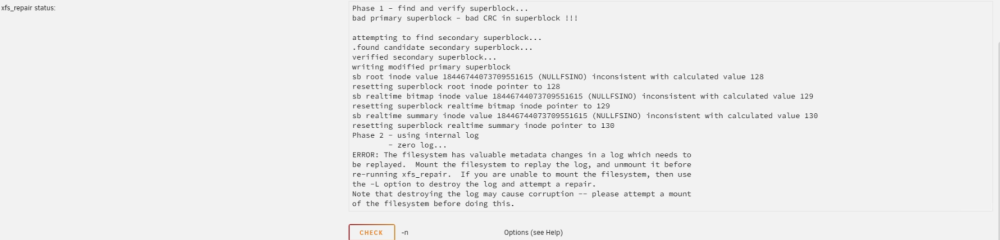
Drive 10 had the same results.
-
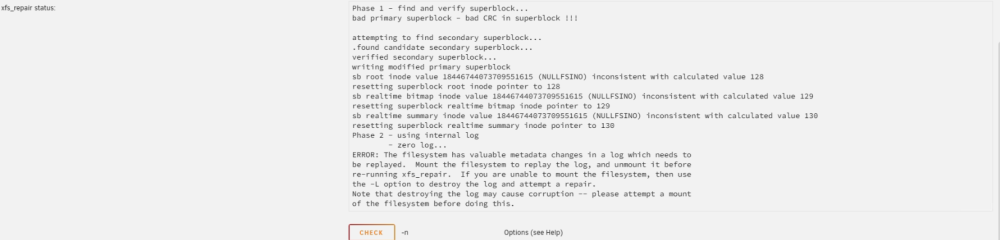
I Ran the test and the results for drive 15 below.
-
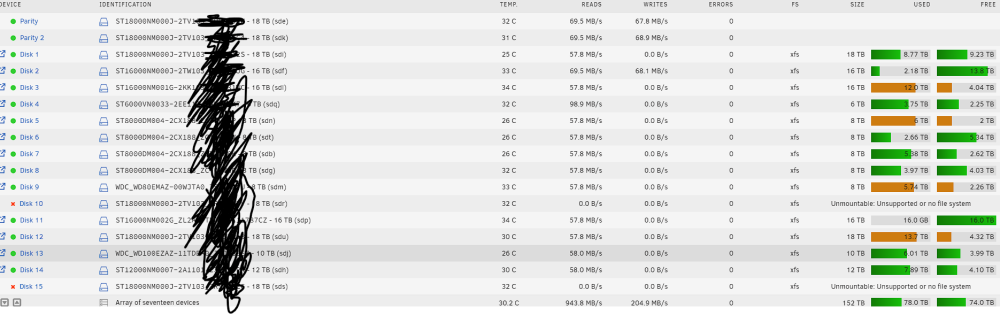
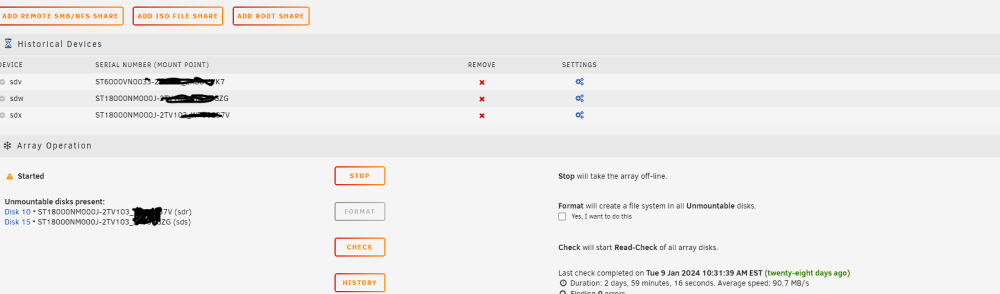
i dont know how to look for drive 10 and 15 in terminal if some one could let me know the command. After i reboot i am seeing disk unmountable until format bit i think if i format i will loose all that data.
-


