Hypner
Members
-
Joined
-
Last visited
-
How to Fix BTRFS Cache Pool Tree Errors (parent transid verify failed) If your BTRFS cache pool suddenly drops and you see it as unmountable because of metadata tree corruption, don’t panic. Slow down—rushing increases the risk of losing data. Here’s how you get things working again: First, stop the Array using the Unraid webGUI. Under Array Operation, enable Maintenance Mode, then start the array. Running in this mode loads disk drivers but doesn’t let Unraid try to mount the broken filesystem. Open up the Unraid Terminal. Figure out your cache drive identifier—it’ll look like /dev/sdX1 or maybe /dev/nvmeXnXp1. Now, run a non-destructive check. This checks for metadata problems without making changes: btrfs check /dev/sdX1If the check points out tree or parent transid mismatches, and that’s what’s stopping the filesystem from mounting, go ahead and run the repair. This part can take a while, so don’t interrupt it: btrfs check --repair /dev/sdX1When the repair finishes, go back to the Array Operations page, stop Maintenance Mode, and start the array normally. Your cache pool should mount again, with all your original data right where you left it. I rebooted to be safe. This worked in my case no guarentee it will work in yours.
-
Hi everyone, I recently performed an update on my server, and right after that, my Cache pool (a Samsung SSD 870, formatted as BTRFS) started showing as "Unmountable: unsupported or no file system." Since my Docker appdata lives on this drive, I haven't formatted anything. I started the array in Maintenance Mode, changed the file system type from auto back to BTRFS so the tool would appear, and ran a read-only btrfs check. Here is the output showing the free space tree errors: [1/8] checking log skipped (none written) [2/8] checking root items [3/8] checking extents [4/8] checking free space tree Space key logical 1048576 length 4194304 has no corresponding block group Space key logical 5242880 length 8388608 has no corresponding block group [5/8] checking fs roots [6/8] checking only csums items (without verifying data) [7/8] checking root refs [8/8] checking quota groups skipped (not enabled on this FS) Opening filesystem to check... Checking filesystem on /dev/sdn1 UUID: 925a6593-cd05-4d1b-a51e-6362c3d381ad found 470118817792 bytes used, error(s) found total csum bytes: 437582556 total tree bytes: 2232909824 total fs tree bytes: 1423835136 total extent tree bytes: 222789632 btree space waste bytes: 560886030 file data blocks allocated: 4158107447296 referenced 453169106944 I have attached my diagnostics zip file to this post as well. Could someone please advise on the safest command to repair this space cache issue so I can get my drive mounted again without losing my data? Thanks in advance for the help! keep-diagnostics-20260604-1240.zip
-
I have had the same issue for the past couple of years. Before I get into everything here are the plugins installed as well as Unraid Version etc. Unraid Version: 6.12.10 Installed Plugins: Appdata Backup, CA AutoUpdate Applications, CA Dynamix Unlimited Width, CA Mover Tuning, Community Applications, Dynamix Active Streams, Dynamix Cache Directories, Dynamix Day/Night, Dynamix S3 Sleep, Dynamix System Temperature, Fix Custom Problems, GUI Links, Nvidia Driver, rclone, Tips and Tricks, Unassigned Devices, Unassigned Devices Plus, User Scripts. Virtual Machines Wake on Lan. Hardware: Dell r720xd My server periodically puts all cpu threads at 99 percent and things are unresponsive for minutes at a time. This makes the GUI and my Plex server unresponsive during this time. Usually things will settle down and go back to normal eventually. This happens most often when I us Sonarr or Radarr to find content, nzbget does its thing and then content moves along, but when a lot of requests are thrown through either *arr application the server will eventually slow down to a crawl and then just stall completely. I usually can't navigate within Sonarr or Radarr and check on the GUI for Unraid and navigating there as well is either slow or goes nowhere. During this time if I am on the dashboard for Unraid I can see all of the CPU threads pinned at 99 percent. Eventually when things start working again the GUI for Unraid as well as any container is usable again until I go through making multiple requests to get more content where things just slow down again or completely freeze up. Hopefully someone can guide me in the right direction for a fix here. This server ran fine a little over a year ago. I have tried starting one container at a time to see if there is a particular container that is causing problems and honestly they can all be started without issue and run fine for sometime before a list gets pulled for either Sonarr and Radarr and then new content gets requested and things again can slow down again. Would love some help. tower-diagnostics-20240829-2130.zip
-
Apologies for the delay. Yes, a bad shutdown meaning I had to turn off the server as it was completely unresponsive and didn't allow me to stop the array. I have only recently changed the amount of cores dedicated to some containers as I didn't want some of them to completely use everything in the feat that this was causing the problem. Prior to these changes and me manually rebooting the server I had not changed the docker containers. I can run plex on its own without issue at all and for the most part sonarr but still run into it slowing things down to a crawl or completely freezing up the server at times.
-
Looking for some help and guidance here regarding my server. It once ran perfectly fine for years now but recently it had a bad shutdown and things have been going downhill since. If I run just plex on the server it runs fine with no issue and for the most part I can run Sonarr and NZBGET but the moment I either let a couple of seasons get grabbed and downloaded by Nzbget OR run Radarr and let a movie or two get grabbed the server can just completely freeze and stall. The Unraid GUI is unresponsive and plex usually slowly dies and the client will say the server cant be reached. IF I wait long enough the plex container will work again and the CPU usage will drop back down to below 5% usage and things will work for sometime until either *arr container or nzbget starts doing its thing. Attached is the diagnostics file. I haven't had an issue on the server for a couple of hours now so the diagnostics may not have anything telling in its most recent records but there was an issue or two during the day today as I allowed Sonarr to run and eventually Radarr which caused some issues around 11AM-12PM. Much appreciated from anyone looking through this. tower-diagnostics-20220912-2114.zip
-
Jul 26 09:11:59 Tower nginx: 2022/07/26 09:11:59 [error] 15106#15106: *270454 upstream timed out (110: Connection timed out) while reading response header from upstream, client: 192.168.1.205, server: , request: "POST /webGui/include/DashUpdate.php HTTP/1.1", upstream: "fastcgi://unix:/var/run/php5-fpm.sock", host: "192.168.1.245", referrer: "http://192.168.1.245/Dashboard" Jul 26 09:13:08 Tower nginx: 2022/07/26 09:13:08 [error] 15106#15106: *269111 upstream timed out (110: Connection timed out) while reading response header from upstream, client: 192.168.1.205, server: , request: "POST /plugins/dynamix.docker.manager/include/Events.php HTTP/1.1", upstream: "fastcgi://unix:/var/run/php5-fpm.sock", host: "192.168.1.245", referrer: "http://192.168.1.245/Dashboard" Jul 26 09:13:12 Tower nginx: 2022/07/26 09:13:12 [error] 15106#15106: *268454 upstream timed out (110: Connection timed out) while reading response header from upstream, client: 192.168.1.205, server: , request: "POST /webGui/include/DashUpdate.php HTTP/1.1", upstream: "fastcgi://unix:/var/run/php5-fpm.sock", host: "192.168.1.245", referrer: "http://192.168.1.245/Dashboard" Jul 26 09:13:43 Tower nginx: 2022/07/26 09:13:43 [error] 15106#15106: *270897 upstream timed out (110: Connection timed out) while reading response header from upstream, client: 192.168.1.205, server: , request: "POST /webGui/include/DashUpdate.php HTTP/1.1", upstream: "fastcgi://unix:/var/run/php5-fpm.sock", host: "192.168.1.245", referrer: "http://192.168.1.245/Dashboard" Jul 26 09:13:59 Tower nginx: 2022/07/26 09:13:59 [error] 15106#15106: *270454 upstream timed out (110: Connection timed out) while reading response header from upstream, client: 192.168.1.205, server: , request: "POST /webGui/include/DashUpdate.php HTTP/1.1", upstream: "fastcgi://unix:/var/run/php5-fpm.sock", host: "192.168.1.245", referrer: "http://192.168.1.245/Dashboard" Jul 26 09:14:15 Tower nginx: 2022/07/26 09:14:15 [error] 15106#15106: *271225 upstream timed out (110: Connection timed out) while reading response header from upstream, client: 192.168.1.205, server: , request: "POST /webGui/include/DashUpdate.php HTTP/1.1", upstream: "fastcgi://unix:/var/run/php5-fpm.sock", host: "192.168.1.245", referrer: "http://192.168.1.245/Dashboard" Jul 26 09:15:24 Tower nginx: 2022/07/26 09:15:24 [error] 15106#15106: *271500 upstream timed out (110: Connection timed out) while reading response header from upstream, client: 192.168.1.205, server: , request: "POST /webGui/include/DashUpdate.php HTTP/1.1", upstream: "fastcgi://unix:/var/run/php5-fpm.sock", host: "192.168.1.245", referrer: "http://192.168.1.245/Dashboard" Jul 26 09:15:40 Tower nginx: 2022/07/26 09:15:40 [error] 15106#15106: *271688 upstream timed out (110: Connection timed out) while reading response header from upstream, client: 192.168.1.205, server: , request: "POST /webGui/include/DashUpdate.php HTTP/1.1", upstream: "fastcgi://unix:/var/run/php5-fpm.sock", host: "192.168.1.245", referrer: "http://192.168.1.245/Dashboard" Jul 26 09:15:59 Tower nginx: 2022/07/26 09:15:59 [error] 15106#15106: *270454 upstream timed out (110: Connection timed out) while reading response header from upstream, client: 192.168.1.205, server: , request: "POST /webGui/include/DashUpdate.php HTTP/1.1", upstream: "fastcgi://unix:/var/run/php5-fpm.sock", host: "192.168.1.245", referrer: "http://192.168.1.245/Dashboard" Jul 26 09:16:15 Tower nginx: 2022/07/26 09:16:15 [error] 15106#15106: *271949 upstream timed out (110: Connection timed out) while reading response header from upstream, client: 192.168.1.205, server: , request: "POST /webGui/include/DashUpdate.php HTTP/1.1", upstream: "fastcgi://unix:/var/run/php5-fpm.sock", host: "192.168.1.245", referrer: "http://192.168.1.245/Dashboard" Jul 26 09:16:31 Tower nginx: 2022/07/26 09:16:31 [error] 15106#15106: *271225 upstream timed out (110: Connection timed out) while reading response header from upstream, client: 192.168.1.205, server: , request: "POST /webGui/include/DashUpdate.php HTTP/1.1", upstream: "fastcgi://unix:/var/run/php5-fpm.sock", host: "192.168.1.245", referrer: "http://192.168.1.245/Dashboard" Jul 26 09:17:40 Tower nginx: 2022/07/26 09:17:40 [error] 15106#15106: *271688 upstream timed out (110: Connection timed out) while reading response header from upstream, client: 192.168.1.205, server: , request: "POST /webGui/include/DashUpdate.php HTTP/1.1", upstream: "fastcgi://unix:/var/run/php5-fpm.sock", host: "192.168.1.245", referrer: "http://192.168.1.245/Dashboard" Jul 26 09:17:56 Tower nginx: 2022/07/26 09:17:56 [error] 15106#15106: *272496 upstream timed out (110: Connection timed out) while reading response header from upstream, client: 192.168.1.205, server: , request: "POST /webGui/include/DashUpdate.php HTTP/1.1", upstream: "fastcgi://unix:/var/run/php5-fpm.sock", host: "192.168.1.245", referrer: "http://192.168.1.245/Dashboard" Jul 26 09:18:15 Tower nginx: 2022/07/26 09:18:15 [error] 15106#15106: *270454 upstream timed out (110: Connection timed out) while reading response header from upstream, client: 192.168.1.205, server: , request: "POST /webGui/include/DashUpdate.php HTTP/1.1", upstream: "fastcgi://unix:/var/run/php5-fpm.sock", host: "192.168.1.245", referrer: "http://192.168.1.245/Dashboard" Jul 26 09:18:31 Tower nginx: 2022/07/26 09:18:31 [error] 15106#15106: *271225 upstream timed out (110: Connection timed out) while reading response header from upstream, client: 192.168.1.205, server: , request: "POST /webGui/include/DashUpdate.php HTTP/1.1", upstream: "fastcgi://unix:/var/run/php5-fpm.sock", host: "192.168.1.245", referrer: "http://192.168.1.245/Dashboard" Jul 26 09:18:46 Tower nginx: 2022/07/26 09:18:46 [error] 15106#15106: *271949 upstream timed out (110: Connection timed out) while reading response header from upstream, client: 192.168.1.205, server: , request: "POST /webGui/include/DashUpdate.php HTTP/1.1", upstream: "fastcgi://unix:/var/run/php5-fpm.sock", host: "192.168.1.245", referrer: "http://192.168.1.245/Dashboard" Jul 26 09:19:56 Tower nginx: 2022/07/26 09:19:56 [error] 15106#15106: *272496 upstream timed out (110: Connection timed out) while reading response header from upstream, client: 192.168.1.205, server: , request: "POST /webGui/include/DashUpdate.php HTTP/1.1", upstream: "fastcgi://unix:/var/run/php5-fpm.sock", host: "192.168.1.245", referrer: "http://192.168.1.245/Dashboard" Jul 26 09:20:12 Tower nginx: 2022/07/26 09:20:12 [error] 15106#15106: *273304 upstream timed out (110: Connection timed out) while reading response header from upstream, client: 192.168.1.205, server: , request: "POST /webGui/include/DashUpdate.php HTTP/1.1", upstream: "fastcgi://unix:/var/run/php5-fpm.sock", host: "192.168.1.245", referrer: "http://192.168.1.245/Dashboard" Jul 26 09:20:31 Tower nginx: 2022/07/26 09:20:31 [error] 15106#15106: *270454 upstream timed out (110: Connection timed out) while reading response header from upstream, client: 192.168.1.205, server: , request: "POST /webGui/include/DashUpdate.php HTTP/1.1", upstream: "fastcgi://unix:/var/run/php5-fpm.sock", host: "192.168.1.245", referrer: "http://192.168.1.245/Dashboard" Jul 26 09:20:46 Tower nginx: 2022/07/26 09:20:46 [error] 15106#15106: *271949 upstream timed out (110: Connection timed out) while reading response header from upstream, client: 192.168.1.205, server: , request: "POST /webGui/include/DashUpdate.php HTTP/1.1", upstream: "fastcgi://unix:/var/run/php5-fpm.sock", host: "192.168.1.245", referrer: "http://192.168.1.245/Dashboard" Jul 26 09:21:01 Tower nginx: 2022/07/26 09:21:01 [error] 15106#15106: *273762 upstream timed out (110: Connection timed out) while reading response header from upstream, client: 192.168.1.205, server: , request: "POST /webGui/include/DashUpdate.php HTTP/1.1", upstream: "fastcgi://unix:/var/run/php5-fpm.sock", host: "192.168.1.245", referrer: "http://192.168.1.245/Dashboard" This is typically what shows in my logs when my server just decides to become unresponsive.
-
Yeah so I have actually gotten past that container issue for the most part I actually reinstalled a couple of the containers a couple of times without any issue after my initial post. My biggest issue now is the unknowns around why my GUI just becomes unresponsive at times and I have a high CPU load that renders Plex and other containers useless.
-
Bumping this hoping to get some visibility and help. I thought that maybe certain containers were the issue with some of my sluggishness or the GUI freezing but after allowing Plex to run on its own and then running sonarr and radarr without nzbget the GUI just stalls and doesn't update. Plex eventually will die and the server sits pegged at above 50% without anything really going on. New diagnosis file attahed. tower-diagnostics-20220726-0813.zip
-
Sorry about that. See attached. tower-diagnostics-20220722-1409.zip
-
Recently my cache drive was full because of my appdata/plex installation. Since I had created a vastly too large docker.img last time 150gb I though what better time to save some space and figure out what is causing my problem (large PMS/Cache/Phot transcoder folder) but letting my server come back online while doing so. I went ahead an recreated my docker.img to a more reasonable 30gb size and started installation of each container from templates to bring things back online. Immediately something was off as each container would take forever and a day to install and then the template installation popup would at times not refresh and just sit there. I could open another tab to the same gui and there was the newly installed container (sonarr,radarr,etc). When looking at the version column I would see unknown instead of up to date or update available. I would click check for updates and sure enough they would all say Up to date. I moved on and then started noticing some incredibly slow processes for containers that ran normal prior. I then looked at logs while I experienced some of this and noticed errors stating nginx: 2022/07/22 13:12:56 [error] 10424#10424: *387138 upstream timed out (110: Connection timed out) while reading upstream, client: 192.168.1.205, server: , request: "GET /plugins/dynamix.docker.manager/include/CreateDocker.php?updateContainer=true&ct[]=tautulli HTTP/1.1", upstream: "fastcgi://unix:/var/run/php5-fpm.sock:", host: "192.168.1.111", referrer: "http://192.168.1.111/Docker" Eventually this would just be a wall of this error. Just trying to get my server back up and running as it was prior and looking for some help. Thanks in advance.
-
So I tried this and it worked great. I was confused at first as it actually showed the backup file in the restore tab and then when I left that tab and came back it was no longer and option to restore from. But clicking restore even without something showing still allowed me to backup from that file since the path was correct. Many thanks as things are back up and running.
-
Yes I still have the backup that I want and have located it. What do you mean re-load the plugin then? I actually did try and change the location which was fine but when I go back to the tab for restore appdata it still shows that there is nothing to choose from. The Restore button is not greyed out but it states " This will restore your appdata folder from /mnt/user/backups/undefined to /mnt/user/appdata/"
-
So I think I did something absolutely stupid. I ran a backup after my cache drive seemed to have been dying it ran fine but I had changed the backup path to something new as to not over write the last one completed back on 1/17. Well now doing so and replacing my cache drive with a new one I noticed that the restore appdata tab shows that there are no backup sets found. Please tell me there is a way to restore from my previously completed backup to this new cache drive. Thanks
-
I haven't had a struggle like this in some time with Unraid but while using my server plex became less and less stable last night. To the point where I decided to simply restart my server as I figured it would be a good time since there was an update for the NVidia driver. The reboot went fine and Unraid started back up. But when I went to start the array the array simply stalled would not start up and I decided to restart the server again. I tried starting the array in maintenance mode which worked. I moved on to stopping the array and starting it like normal. I am running a mount script for gdrive and started that to initiate my containers to start. This is what I encountered and result of that mount script running. 2.01.2022 07:55:17 INFO: Creating local folders. 22.01.2022 07:55:17 INFO: Creating MergerFS folders. 22.01.2022 07:55:17 INFO: *** Starting mount of remote gdrive_vfs 22.01.2022 07:55:17 INFO: Checking if this script is already running. 22.01.2022 07:55:17 INFO: Script not running - proceeding. 22.01.2022 07:55:17 INFO: *** Checking if online 22.01.2022 07:55:18 PASSED: *** Internet online 22.01.2022 07:55:18 INFO: Success gdrive_vfs remote is already mounted. 22.01.2022 07:55:18 INFO: Mergerfs not installed - installing now. 2022/01/22 07:56:15 INFO : vfs cache: cleaned: objects 13568 (was 13568) in use 0, to upload 0, uploading 0, total size 399.140Gi (was 399.140Gi) docker: Error response from daemon: open /var/lib/docker/containers/dac1a5ee9b9a8cb7da145119a4b71ad2c543672c0a43a63cb3d54bf09726ed91/.tmp-config.v2.json565736439: read-only file system. See 'docker run --help'. mv: cannot stat '/mnt/user/appdata/other/rclone/mergerfs/mergerfs': No such file or directory 22.01.2022 07:56:48 INFO: *sleeping for 5 seconds docker: Error response from daemon: read-only file system: unknown. time="2022-01-22T07:56:48-08:00" level=error msg="Error waiting for container: container a2d258183f0a4a769bb9bbf41dc2e1ffb8069a5fbcc00181d3ec9fd3215e9fce: driver \"btrfs\" failed to remove root filesystem: Recursively walking subvolumes for /var/lib/docker/btrfs/subvolumes failed: error walking subvolumes: readdirent: input/output error" 22.01.2022 07:56:53 ERROR: Mergerfs not installed successfully. Please check for errors. Exiting. rm: cannot remove '/mnt/user/appdata/other/rclone/remotes/gdrive_vfs/mount_running': Read-only file system Script Finished Jan 22, 2022 07:56.53 Additionally the system log Jan 22 07:54:58 Keep emhttpd: cmd: /usr/local/emhttp/plugins/user.scripts/showLog.php Mount script Jan 22 07:55:07 Keep emhttpd: cmd: /usr/local/emhttp/plugins/user.scripts/backgroundScript.sh /tmp/user.scripts/tmpScripts/Cleanup Script/script Jan 22 07:55:10 Keep emhttpd: cmd: /usr/local/emhttp/plugins/user.scripts/showLog.php Cleanup Script Jan 22 07:55:17 Keep emhttpd: cmd: /usr/local/emhttp/plugins/user.scripts/backgroundScript.sh /tmp/user.scripts/tmpScripts/Mount script/script Jan 22 07:55:19 Keep emhttpd: cmd: /usr/local/emhttp/plugins/user.scripts/showLog.php Mount script Jan 22 07:56:08 Keep nginx: 2022/01/22 07:56:08 [error] 9580#9580: *68623 upstream timed out (110: Connection timed out) while reading response header from upstream, client: 192.168.1.59, server: , request: "POST /plugins/community.applications/scripts/notices.php HTTP/1.1", upstream: "fastcgi://unix:/var/run/php5-fpm.sock", host: "192.168.1.174", referrer: "http://192.168.1.174/Settings/Userscripts" Jan 22 07:56:25 Keep nginx: 2022/01/22 07:56:25 [error] 9580#9580: *68651 upstream timed out (110: Connection timed out) while reading response header from upstream, client: 192.168.1.59, server: , request: "POST /plugins/community.applications/scripts/notices.php HTTP/1.1", upstream: "fastcgi://unix:/var/run/php5-fpm.sock", host: "192.168.1.174", referrer: "http://192.168.1.174/Tools/Syslog" Jan 22 07:56:47 Keep kernel: sd 1:0:12:0: [sdg] tag#18 UNKNOWN(0x2003) Result: hostbyte=0x00 driverbyte=0x08 cmd_age=0s Jan 22 07:56:47 Keep kernel: sd 1:0:12:0: [sdg] tag#18 Sense Key : 0x4 [current] Jan 22 07:56:47 Keep kernel: sd 1:0:12:0: [sdg] tag#18 ASC=0x44 ASCQ=0x0 Jan 22 07:56:47 Keep kernel: sd 1:0:12:0: [sdg] tag#18 CDB: opcode=0x2a 2a 00 00 00 00 c0 00 00 08 00 Jan 22 07:56:47 Keep kernel: blk_update_request: critical target error, dev sdg, sector 192 op 0x1:(WRITE) flags 0x3800 phys_seg 1 prio class 0 Jan 22 07:56:47 Keep kernel: blk_update_request: critical target error, dev sdg, sector 192 op 0x1:(WRITE) flags 0x3800 phys_seg 1 prio class 0 Jan 22 07:56:47 Keep kernel: BTRFS warning (device sdg1): lost page write due to IO error on /dev/sdg1 (-121) Jan 22 07:56:47 Keep kernel: BTRFS error (device sdg1): bdev /dev/sdg1 errs: wr 1, rd 0, flush 0, corrupt 0, gen 0 Jan 22 07:56:47 Keep kernel: BTRFS error (device sdg1): error writing primary super block to device 1 Jan 22 07:56:47 Keep kernel: BTRFS: error (device sdg1) in write_all_supers:3915: errno=-5 IO failure (1 errors while writing supers) Jan 22 07:56:47 Keep kernel: BTRFS info (device sdg1): forced readonly Jan 22 07:56:47 Keep kernel: BTRFS: error (device sdg1) in btrfs_sync_log:3221: errno=-5 IO failure Jan 22 07:56:47 Keep kernel: blk_update_request: I/O error, dev loop2, sector 128 op 0x1:(WRITE) flags 0x3800 phys_seg 1 prio class 0 Jan 22 07:56:47 Keep kernel: BTRFS warning (device loop2): lost page write due to IO error on /dev/loop2 (-5) Jan 22 07:56:47 Keep kernel: BTRFS error (device loop2): bdev /dev/loop2 errs: wr 1, rd 0, flush 0, corrupt 0, gen 0 Jan 22 07:56:47 Keep kernel: BTRFS error (device loop2): error writing primary super block to device 1 Jan 22 07:56:47 Keep kernel: BTRFS: error (device loop2) in write_all_supers:3915: errno=-5 IO failure (1 errors while writing supers) Jan 22 07:56:47 Keep kernel: BTRFS info (device loop2): forced readonly Jan 22 07:56:47 Keep kernel: BTRFS: error (device loop2) in btrfs_sync_log:3221: errno=-5 IO failure Jan 22 07:56:47 Keep kernel: BTRFS warning (device loop2): Skipping commit of aborted transaction. Jan 22 07:56:47 Keep kernel: BTRFS: error (device loop2) in cleanup_transaction:1942: errno=-5 IO failure Jan 22 07:56:47 Keep kernel: sd 1:0:12:0: [sdg] tag#19 UNKNOWN(0x2003) Result: hostbyte=0x00 driverbyte=0x08 cmd_age=0s Jan 22 07:56:47 Keep kernel: sd 1:0:12:0: [sdg] tag#19 Sense Key : 0x4 [current] Jan 22 07:56:47 Keep kernel: sd 1:0:12:0: [sdg] tag#19 ASC=0x44 ASCQ=0x0 Jan 22 07:56:47 Keep kernel: sd 1:0:12:0: [sdg] tag#19 CDB: opcode=0x28 28 00 00 f5 4a f0 00 00 20 00 Jan 22 07:56:47 Keep kernel: blk_update_request: critical target error, dev sdg, sector 16075504 op 0x0:(READ) flags 0x0 phys_seg 4 prio class 0 Jan 22 07:56:47 Keep kernel: BTRFS error (device sdg1): bdev /dev/sdg1 errs: wr 1, rd 1, flush 0, corrupt 0, gen 0 Jan 22 07:56:47 Keep kernel: BTRFS error (device sdg1): bdev /dev/sdg1 errs: wr 1, rd 2, flush 0, corrupt 0, gen 0 Jan 22 07:56:47 Keep kernel: BTRFS error (device sdg1): bdev /dev/sdg1 errs: wr 1, rd 3, flush 0, corrupt 0, gen 0 Jan 22 07:56:47 Keep kernel: BTRFS error (device sdg1): bdev /dev/sdg1 errs: wr 1, rd 4, flush 0, corrupt 0, gen 0 Jan 22 07:56:47 Keep kernel: BTRFS warning (device sdg1): direct IO failed ino 112218869 rw 0,0 sector 0xf54af8 len 0 err no 10 Jan 22 07:56:47 Keep kernel: BTRFS warning (device sdg1): direct IO failed ino 112218869 rw 0,0 sector 0xf54b00 len 0 err no 10 Jan 22 07:56:47 Keep kernel: BTRFS warning (device sdg1): direct IO failed ino 112218869 rw 0,0 sector 0xf54b08 len 0 err no 10 Jan 22 07:56:47 Keep kernel: BTRFS warning (device sdg1): direct IO failed ino 112218869 rw 0,0 sector 0xf54b10 len 0 err no 10 Jan 22 07:56:47 Keep kernel: blk_update_request: I/O error, dev loop2, sector 528608 op 0x0:(READ) flags 0x1000 phys_seg 3 prio class 0 Jan 22 07:56:47 Keep kernel: BTRFS error (device loop2): bdev /dev/loop2 errs: wr 1, rd 1, flush 0, corrupt 0, gen 0 Jan 22 07:56:47 Keep kernel: sd 1:0:12:0: [sdg] tag#16 UNKNOWN(0x2003) Result: hostbyte=0x00 driverbyte=0x08 cmd_age=0s Jan 22 07:56:47 Keep kernel: sd 1:0:12:0: [sdg] tag#16 Sense Key : 0x4 [current] Jan 22 07:56:47 Keep kernel: sd 1:0:12:0: [sdg] tag#16 ASC=0x44 ASCQ=0x0 Jan 22 07:56:47 Keep kernel: sd 1:0:12:0: [sdg] tag#16 CDB: opcode=0x28 28 00 00 f5 4b 30 00 00 20 00 Jan 22 07:56:47 Keep kernel: blk_update_request: critical target error, dev sdg, sector 16075568 op 0x0:(READ) flags 0x0 phys_seg 4 prio class 0 Jan 22 07:56:47 Keep kernel: BTRFS error (device sdg1): bdev /dev/sdg1 errs: wr 1, rd 5, flush 0, corrupt 0, gen 0 Jan 22 07:56:47 Keep kernel: BTRFS error (device sdg1): bdev /dev/sdg1 errs: wr 1, rd 6, flush 0, corrupt 0, gen 0 Jan 22 07:56:47 Keep kernel: BTRFS error (device sdg1): bdev /dev/sdg1 errs: wr 1, rd 7, flush 0, corrupt 0, gen 0 Jan 22 07:56:47 Keep kernel: BTRFS warning (device sdg1): direct IO failed ino 112218869 rw 0,0 sector 0xf54b38 len 0 err no 10 Jan 22 07:56:47 Keep kernel: BTRFS warning (device sdg1): direct IO failed ino 112218869 rw 0,0 sector 0xf54b40 len 0 err no 10 Jan 22 07:56:47 Keep kernel: BTRFS warning (device sdg1): direct IO failed ino 112218869 rw 0,0 sector 0xf54b48 len 0 err no 10 Jan 22 07:56:47 Keep kernel: BTRFS warning (device sdg1): direct IO failed ino 112218869 rw 0,0 sector 0xf54b50 len 0 err no 10 Jan 22 07:56:47 Keep kernel: blk_update_request: I/O error, dev loop2, sector 528672 op 0x0:(READ) flags 0x1000 phys_seg 3 prio class 0 Jan 22 07:56:47 Keep kernel: sd 1:0:12:0: [sdg] tag#17 UNKNOWN(0x2003) Result: hostbyte=0x00 driverbyte=0x08 cmd_age=0s Jan 22 07:56:47 Keep kernel: sd 1:0:12:0: [sdg] tag#17 Sense Key : 0x4 [current] Jan 22 07:56:47 Keep kernel: sd 1:0:12:0: [sdg] tag#17 ASC=0x44 ASCQ=0x0 Jan 22 07:56:47 Keep kernel: sd 1:0:12:0: [sdg] tag#17 CDB: opcode=0x28 28 00 00 f5 4b 10 00 00 20 00 Jan 22 07:56:47 Keep kernel: blk_update_request: critical target error, dev sdg, sector 16075536 op 0x0:(READ) flags 0x0 phys_seg 4 prio class 0 Jan 22 07:56:47 Keep kernel: BTRFS warning (device sdg1): direct IO failed ino 112218869 rw 0,0 sector 0xf54b18 len 0 err no 10 Jan 22 07:56:47 Keep kernel: BTRFS warning (device sdg1): direct IO failed ino 112218869 rw 0,0 sector 0xf54b20 len 0 err no 10 Jan 22 07:56:47 Keep kernel: BTRFS warning (device sdg1): direct IO failed ino 112218869 rw 0,0 sector 0xf54b30 len 0 err no 10 Jan 22 07:56:47 Keep kernel: BTRFS warning (device sdg1): direct IO failed ino 112218869 rw 0,0 sector 0xf54b28 len 0 err no 10 Jan 22 07:56:47 Keep kernel: blk_update_request: I/O error, dev loop2, sector 528640 op 0x0:(READ) flags 0x1000 phys_seg 3 prio class 0 Jan 22 07:56:47 Keep kernel: sd 1:0:12:0: [sdg] tag#18 UNKNOWN(0x2003) Result: hostbyte=0x00 driverbyte=0x08 cmd_age=0s Jan 22 07:56:47 Keep kernel: sd 1:0:12:0: [sdg] tag#18 Sense Key : 0x4 [current] Jan 22 07:56:47 Keep kernel: sd 1:0:12:0: [sdg] tag#18 ASC=0x44 ASCQ=0x0 Jan 22 07:56:47 Keep kernel: sd 1:0:12:0: [sdg] tag#18 CDB: opcode=0x28 28 00 00 f5 4b 70 00 00 20 00 Jan 22 07:56:47 Keep kernel: blk_update_request: critical target error, dev sdg, sector 16075632 op 0x0:(READ) flags 0x0 phys_seg 4 prio class 0 Jan 22 07:56:47 Keep kernel: BTRFS warning (device sdg1): direct IO failed ino 112218869 rw 0,0 sector 0xf54b78 len 0 err no 10 Jan 22 07:56:47 Keep kernel: BTRFS warning (device sdg1): direct IO failed ino 112218869 rw 0,0 sector 0xf54b80 len 0 err no 10 Jan 22 07:56:47 Keep kernel: BTRFS warning (device sdg1): direct IO failed ino 112218869 rw 0,0 sector 0xf54b90 len 0 err no 10 Jan 22 07:56:47 Keep kernel: BTRFS warning (device sdg1): direct IO failed ino 112218869 rw 0,0 sector 0xf54b88 len 0 err no 10 Jan 22 07:56:47 Keep kernel: sd 1:0:12:0: [sdg] tag#16 UNKNOWN(0x2003) Result: hostbyte=0x00 driverbyte=0x08 cmd_age=0s Jan 22 07:56:47 Keep kernel: sd 1:0:12:0: [sdg] tag#16 Sense Key : 0x4 [current] Jan 22 07:56:47 Keep kernel: sd 1:0:12:0: [sdg] tag#16 ASC=0x44 ASCQ=0x0 Jan 22 07:56:47 Keep kernel: sd 1:0:12:0: [sdg] tag#16 CDB: opcode=0x28 28 00 03 80 b9 a0 00 00 20 00 Jan 22 07:56:47 Keep kernel: BTRFS warning (device sdg1): direct IO failed ino 112218869 rw 0,0 sector 0x380b9a8 len 0 err no 10 Jan 22 07:56:47 Keep kernel: BTRFS warning (device sdg1): direct IO failed ino 112218869 rw 0,0 sector 0x380b9b0 len 0 err no 10 Jan 22 07:56:47 Keep kernel: BTRFS warning (device sdg1): direct IO failed ino 112218869 rw 0,0 sector 0x380b9c0 len 0 err no 10 Jan 22 07:56:47 Keep kernel: BTRFS warning (device sdg1): direct IO failed ino 112218869 rw 0,0 sector 0x380b9b8 len 0 err no 10 Jan 22 07:56:47 Keep kernel: sd 1:0:12:0: [sdg] tag#17 UNKNOWN(0x2003) Result: hostbyte=0x00 driverbyte=0x08 cmd_age=0s Jan 22 07:56:47 Keep kernel: sd 1:0:12:0: [sdg] tag#17 Sense Key : 0x4 [current] Jan 22 07:56:47 Keep kernel: sd 1:0:12:0: [sdg] tag#17 ASC=0x44 ASCQ=0x0 Jan 22 07:56:47 Keep kernel: sd 1:0:12:0: [sdg] tag#17 CDB: opcode=0x28 28 00 00 f5 4b 70 00 00 20 00 Jan 22 07:56:47 Keep kernel: BTRFS warning (device sdg1): direct IO failed ino 112218869 rw 0,0 sector 0xf54b78 len 0 err no 10 Jan 22 07:56:47 Keep kernel: BTRFS warning (device sdg1): direct IO failed ino 112218869 rw 0,0 sector 0xf54b80 len 0 err no 10 Jan 22 07:56:47 Keep kernel: BTRFS warning (device sdg1): direct IO failed ino 112218869 rw 0,0 sector 0xf54b88 len 0 err no 10 Jan 22 07:56:47 Keep kernel: BTRFS warning (device sdg1): direct IO failed ino 112218869 rw 0,0 sector 0xf54b90 len 0 err no 10 Jan 22 07:56:47 Keep kernel: sd 1:0:12:0: [sdg] tag#18 UNKNOWN(0x2003) Result: hostbyte=0x00 driverbyte=0x08 cmd_age=0s Jan 22 07:56:47 Keep kernel: sd 1:0:12:0: [sdg] tag#18 Sense Key : 0x4 [current] Jan 22 07:56:47 Keep kernel: sd 1:0:12:0: [sdg] tag#18 ASC=0x44 ASCQ=0x0 Jan 22 07:56:47 Keep kernel: sd 1:0:12:0: [sdg] tag#18 CDB: opcode=0x28 28 00 00 f5 4b 70 00 00 20 00 Jan 22 07:56:47 Keep kernel: BTRFS warning (device sdg1): direct IO failed ino 112218869 rw 0,0 sector 0xf54b78 len 0 err no 10 Jan 22 07:56:47 Keep kernel: BTRFS warning (device sdg1): direct IO failed ino 112218869 rw 0,0 sector 0xf54b88 len 0 err no 10 Jan 22 07:56:47 Keep kernel: BTRFS warning (device sdg1): direct IO failed ino 112218869 rw 0,0 sector 0xf54b80 len 0 err no 10 Jan 22 07:56:47 Keep kernel: BTRFS warning (device sdg1): direct IO failed ino 112218869 rw 0,0 sector 0xf54b90 len 0 err no 10 Jan 22 07:56:47 Keep kernel: sd 1:0:12:0: [sdg] tag#19 UNKNOWN(0x2003) Result: hostbyte=0x00 driverbyte=0x08 cmd_age=0s Jan 22 07:56:47 Keep kernel: sd 1:0:12:0: [sdg] tag#19 Sense Key : 0x4 [current] Jan 22 07:56:47 Keep kernel: sd 1:0:12:0: [sdg] tag#19 ASC=0x44 ASCQ=0x0 Jan 22 07:56:47 Keep kernel: sd 1:0:12:0: [sdg] tag#19 CDB: opcode=0x28 28 00 03 80 b9 a0 00 00 20 00 Jan 22 07:56:47 Keep kernel: BTRFS warning (device sdg1): direct IO failed ino 112218869 rw 0,0 sector 0x380b9a8 len 0 err no 10 Jan 22 07:56:47 Keep kernel: BTRFS warning (device sdg1): direct IO failed ino 112218869 rw 0,0 sector 0x380b9b0 len 0 err no 10 Jan 22 07:56:47 Keep kernel: BTRFS warning (device sdg1): direct IO failed ino 112218869 rw 0,0 sector 0x380b9b8 len 0 err no 10 Jan 22 07:56:47 Keep kernel: BTRFS warning (device sdg1): direct IO failed ino 112218869 rw 0,0 sector 0x380b9c0 len 0 err no 10 Jan 22 07:56:47 Keep kernel: sd 1:0:12:0: [sdg] tag#16 UNKNOWN(0x2003) Result: hostbyte=0x00 driverbyte=0x08 cmd_age=0s Jan 22 07:56:47 Keep kernel: sd 1:0:12:0: [sdg] tag#16 Sense Key : 0x4 [current] Jan 22 07:56:47 Keep kernel: sd 1:0:12:0: [sdg] tag#16 ASC=0x44 ASCQ=0x0 Jan 22 07:56:47 Keep kernel: sd 1:0:12:0: [sdg] tag#16 CDB: opcode=0x28 28 00 00 f5 4b 70 00 00 20 00 Jan 22 07:56:47 Keep kernel: BTRFS warning (device sdg1): direct IO failed ino 112218869 rw 0,0 sector 0xf54b78 len 0 err no 10 Jan 22 07:56:47 Keep kernel: BTRFS warning (device sdg1): direct IO failed ino 112218869 rw 0,0 sector 0xf54b80 len 0 err no 10 Jan 22 07:56:47 Keep kernel: BTRFS warning (device sdg1): direct IO failed ino 112218869 rw 0,0 sector 0xf54b88 len 0 err no 10 Jan 22 07:56:47 Keep kernel: BTRFS warning (device sdg1): direct IO failed ino 112218869 rw 0,0 sector 0xf54b90 len 0 err no 10 Jan 22 07:56:48 Keep kernel: BTRFS warning (device sdg1): direct IO failed ino 112218869 rw 0,0 sector 0xf54af8 len 0 err no 10 Jan 22 07:56:48 Keep kernel: BTRFS warning (device sdg1): direct IO failed ino 112218869 rw 0,0 sector 0xf54b00 len 0 err no 10 Jan 22 07:56:48 Keep kernel: BTRFS warning (device sdg1): direct IO failed ino 112218869 rw 0,0 sector 0xf54b08 len 0 err no 10 Jan 22 07:56:48 Keep kernel: BTRFS warning (device sdg1): direct IO failed ino 112218869 rw 0,0 sector 0xf54b10 len 0 err no 10 Jan 22 07:56:48 Keep kernel: BTRFS warning (device sdg1): direct IO failed ino 112218869 rw 0,0 sector 0xf54b38 len 0 err no 10 Jan 22 07:56:48 Keep kernel: BTRFS warning (device sdg1): direct IO failed ino 112218869 rw 0,0 sector 0xf54b40 len 0 err no 10 Jan 22 07:56:48 Keep kernel: BTRFS warning (device sdg1): direct IO failed ino 112218869 rw 0,0 sector 0xf54b48 len 0 err no 10 Jan 22 07:56:48 Keep kernel: BTRFS warning (device sdg1): direct IO failed ino 112218869 rw 0,0 sector 0xf54b50 len 0 err no 10 Jan 22 07:56:48 Keep kernel: BTRFS warning (device sdg1): direct IO failed ino 112218869 rw 0,0 sector 0xf54b18 len 0 err no 10 Jan 22 07:56:48 Keep kernel: BTRFS warning (device sdg1): direct IO failed ino 112218869 rw 0,0 sector 0xf54b20 len 0 err no 10 Jan 22 07:56:48 Keep kernel: BTRFS warning (device sdg1): direct IO failed ino 112218869 rw 0,0 sector 0xf54b28 len 0 err no 10 Jan 22 07:56:48 Keep kernel: BTRFS warning (device sdg1): direct IO failed ino 112218869 rw 0,0 sector 0xf54b30 len 0 err no 10 Jan 22 07:56:48 Keep kernel: BTRFS warning (device sdg1): direct IO failed ino 112218869 rw 0,0 sector 0xf54b78 len 0 err no 10 Jan 22 07:56:48 Keep kernel: BTRFS warning (device sdg1): direct IO failed ino 112218869 rw 0,0 sector 0xf54b80 len 0 err no 10 Jan 22 07:56:48 Keep kernel: BTRFS warning (device sdg1): direct IO failed ino 112218869 rw 0,0 sector 0xf54b88 len 0 err no 10 Jan 22 07:56:48 Keep kernel: BTRFS warning (device sdg1): direct IO failed ino 112218869 rw 0,0 sector 0xf54b90 len 0 err no 10 Jan 22 07:56:48 Keep kernel: BTRFS warning (device sdg1): direct IO failed ino 112218869 rw 0,0 sector 0x380b9a8 len 0 err no 10 Jan 22 07:56:48 Keep kernel: BTRFS warning (device sdg1): direct IO failed ino 112218869 rw 0,0 sector 0x380b9b0 len 0 err no 10 Jan 22 07:56:48 Keep kernel: BTRFS warning (device sdg1): direct IO failed ino 112218869 rw 0,0 sector 0x380b9b8 len 0 err no 10 Jan 22 07:56:48 Keep kernel: BTRFS warning (device sdg1): direct IO failed ino 112218869 rw 0,0 sector 0x380b9c0 len 0 err no 10 Jan 22 07:57:13 Keep kernel: print_req_error: 21 callbacks suppressed Jan 22 07:57:13 Keep kernel: blk_update_request: I/O error, dev loop2, sector 11710736 op 0x1:(WRITE) flags 0x100000 phys_seg 1 prio class 0 Jan 22 07:57:13 Keep kernel: btrfs_dev_stat_print_on_error: 62 callbacks suppressed Jan 22 07:57:13 Keep kernel: BTRFS error (device loop2): bdev /dev/loop2 errs: wr 2, rd 14, flush 0, corrupt 0, gen 0 Jan 22 07:57:13 Keep kernel: blk_update_request: I/O error, dev loop2, sector 11711056 op 0x1:(WRITE) flags 0x100000 phys_seg 1 prio class 0 Jan 22 07:57:13 Keep kernel: BTRFS error (device loop2): bdev /dev/loop2 errs: wr 3, rd 14, flush 0, corrupt 0, gen 0 Every error is related to device sdg1 which is my lone cache drive. Looking to get some direction on what to do next. Help would be greatly appreciated.
-
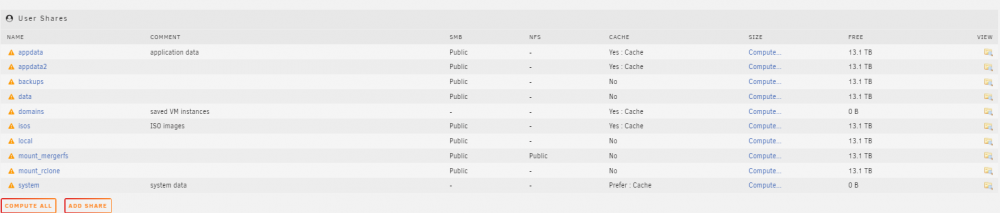
Here's the diagnostics. Additionally how my shares are setup. Please let me know if you need anything else. diagnostics-20210725-1102.zip