




Skip to content
View in the app

A better way to browse. Learn more.

Unraid

A full-screen app on your home screen with push notifications, badges and more.

To install this app on iOS and iPadOS
  1. Tap the Share icon in Safari
  2. Scroll the menu and tap Add to Home Screen.
  3. Tap Add in the top-right corner.
To install this app on Android
  1. Tap the 3-dot menu (⋮) in the top-right corner of the browser.
  2. Tap Add to Home screen or Install app.
  3. Confirm by tapping Install.

rich110

Members
  • Joined

  • Last visited

Everything posted by rich110

  1. That makes a lot of sense... 😳 Thanks for the quick reply and the support. R
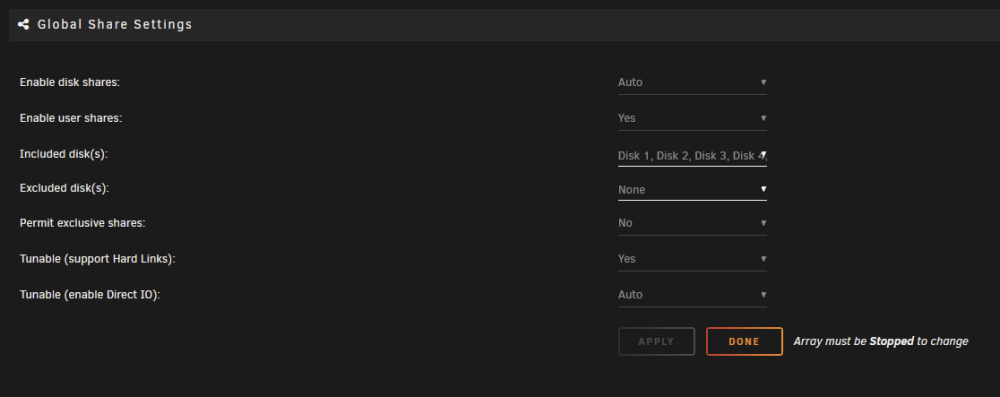
  2. Hi, I've had this error in my "Fix Common Problems" scan for quite some time. I can't see an obvious solution (despite searching) and it doesn't *seem* to impact my everyday server function so I've ignored up until now (I'm trying to square away any remaining niggles). I get the following error regarding Global Shares.... However, when I go to the Global Shares setting, you can see that there is no disks listed in "Exclude" and all the Array disks are listed in "Include"... Any ideas? Thanks in advance, R tower-diagnostics-20230902-1034.zip

Account

Navigation

Search

Search

Configure browser push notifications

Chrome (Android)
  1. Tap the lock icon next to the address bar.
  2. Tap Permissions → Notifications.
  3. Adjust your preference.
Chrome (Desktop)
  1. Click the padlock icon in the address bar.
  2. Select Site settings.
  3. Find Notifications and adjust your preference.
