





Steiner49er
Members
-
Joined
-
Last visited
-
In case anyone comes upon this topic in the future I was able to close the leak by adding --dns=(DNS of VPN service) to the Extra Parameters of the docker container.
-
I've been playing around with trying to get VPN working via the built-in VPN settings. I'm using Nord and I've extracted by private key, calculated my public key and know where to connect to, port, and public key for the nord server. I had all kinds of issues getting it going the 1st time, and decided to start over so I deleted the tunnel. I was testing with Firefox and I could not get it to connect to VPN no matter what I tried, after deleting the tunnel I couldn't connect to sites with the network set to bridge, but I could with it set to host. I eventually started over with Firefox, removed the docker, grabbed a fresh copy and it was working as expected. I then went back to the VPN settings and configured everything, the tunnel came up, I was getting bytes in and out. I set the network for Firefox to WG0 and was able to connect to the webUI, but it was extremely slow to type/click in the ui. I then went back out and switched back to Bridge and it was fine. I have no idea, but after causing a loop in the network which effectively locked me out of the web interface, and correcting it I Firefox is showing the IP of my VPN, however using dnsleaktest with either the standard or extendned tests I can see my ISP's ip address. Consulting an AI it suggests: # This forces the Firefox bridge to ONLY talk to the WireGuard interface iptables -A FORWARD -s 172.17.0.0/16 ! -o wg0 -j REJECT But frankly I don't think that's likely the right or best answer. Does anyone have any suggestions? I'm very suprised that there's not more setup guides for Nordlynx in Unraid unless I'm missing them, I see SpaceInvader has videos out for PIA. And Nord was a huge PIA to get keys out of, I don't know why they don't make that easy. My Nord sub is up in June of 27, should I be looking to switch (as a side question)?
-
A reboot seems to have resolved the log, and errors continuously increasing on the other disks, now I just need to find the steps to remove Disk 4. Thanks!
-
It appears that I've lost a data drive, which isn't terrible, but it's really odd that there's a ton of errors on both parity drives and Disk 1, 2, and 3 and they keep going up? I've attached my diagnostics if someone could offer sone advice? Ultimately I'd like to just remove Disk 4 (4TB drive) and maybe replace at a later time if I think I need to. Thanks everyone in advance! tower-diagnostics-20240504-1638.zip
-
Thank you very much for your help! I really appreciate the link you sent as well, that was exactly what I needed. The drive is rebuilt and healthy now. I've deleted some old 'stuff' from the drive/shares, and set minimum free space on the shares that get heavily used. Thank you again!
-
I was actually trying to resolve a merge issue with Veeam Agent for Windows by running a full backup, and my drive on the main PC is right at 2TB used... so yikes, I have some definite configuration issue going on here. I'll start the rebuild process (have to look up how to do that), and then it sounds like I need to set a minimum free space for my drives and then choose some different targets to overflow onto, if I'm using the right terminology?
-
Good morning everyone, I was running a full backup of my main PC to my Unraid server and woke up this morning to a disabled device. Looks like it has had a write error, but there's currently no SMART errors reported on the dashboard for it. Could someone please take a look at my diagnostics and let me know what my next step should be? The disk is full it seems from the backup and I'm not sure if I have a misconfiguration or some action I should take to free space, there's several other drives in the server that are open to use, but aren't I believe because of the way it's set to use them. Thank you for reading, and any advice you could provide! tower-diagnostics-20230126-0819.zip
-
Hmm, I missed the option... didn't see it I think, I would have checked that box.
-
Ah, I didn't spot it! Thank you!! Though in the end I suppose it didn't really matter. I ran a new config and I have all my shares back and the parity disks are syncing now. Thanks everyone!
-
I'm hoping I won't have to deal with that for a long time, but I'll be taking extra steps I think to try to mark what's what. So in looking at the drives, I can tell which ones were the parity drives, and which 3 WD's were the data drives, the 1.2-1.8TB SAS dries didn't have any data on them yet since I had just recently brought up the Dell server and thankfully nothing had hit those drives yet. With the parity drives though I can't tell which was parity 1 and which was parity 2, does that matter, is there a way for me to determine that? Unassigned devices plugin helps to see that clearly with the parity/data, but luckily the two WD drives are WD80EFAX drives, so easy to tell apart from the data drives which are all WD80EMAZ... however, if I make a new config, does the order of the data drives matter?? I'm really hoping to (of course) not lose any data/backups/pictures, etc.
-
Yes, both servers have (had?) RAID array controllers in them that connect the MB to the hot swap backplane. Both controllers though I had in HBA mode, so they pass through the disks directly, RAID functions are disabled in HBA mode, which may be a contributing factor here, but I think this is more a matter that the disks are identifying differently (with more information it seems?) than they were on the last controller.
-
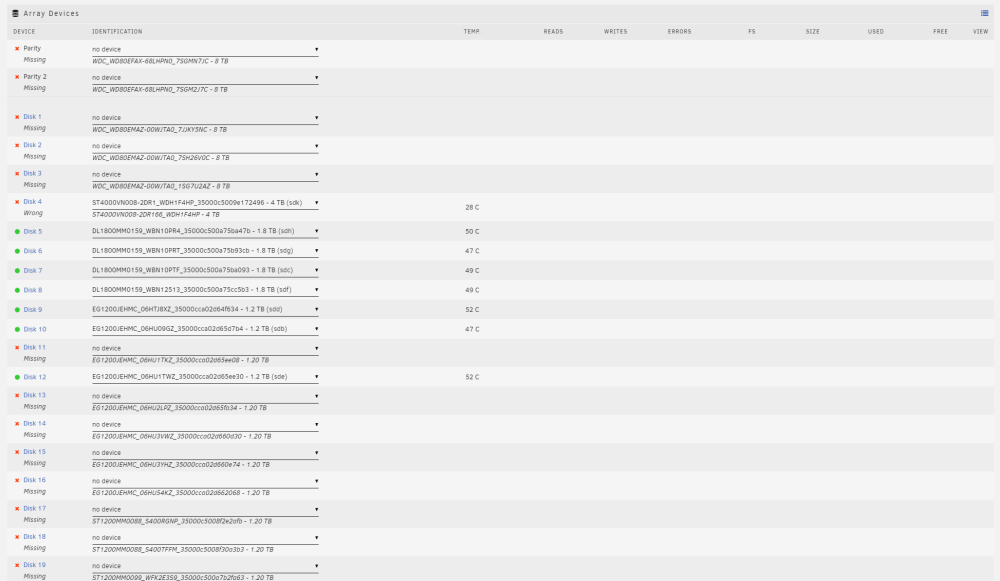
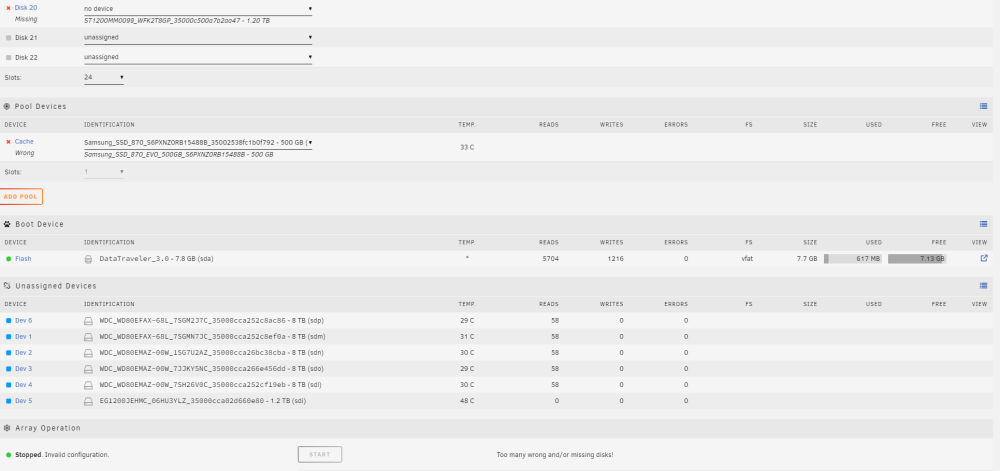
Sorry for the quick quoted reply, but I opened up the webui in Edge and it's populated, so I'm guessing some caching issue in Brave. Here's the Array/pool shots!
-
I'm going to have to reboot the server I guess, this happens once in a while, including on the old hardware as well, the drives are there but everything is blank.
-
Hmm... not that I know of on the daily array health report, is there somewhere I can look that it might be stored? I do have the server in My Servers if there's anything that may be there? Diagnostics attached. tower-diagnostics-20220911-1617.zip
-
Hi everyone, Sadly I had a server that just decided to up and stop powering on at all, out of warranty of course and I don't have the funds to buy components to swap out hardware to see what failed (most likely motherboard I think). I've swapped from the (dead) Dell R730XD server to an HP DL380 Gen8 server, but Unraid isn't able to automatically recognize the drives, or at least most of them. I can work out what some of them are, but when I do select that it says "Wrong" now instead of missing. For the ones that I can't identify, because I have several WD 8TB drives, what can I do? I had two WD 8TB parity drives, and data drives consisting of three WD 8TB drives, one Seagate 4TB drive, and several other 1.2-1.8 SAS drives, some of those 1.2's I couldn't move into the HP server as I was missing enough drive trays to move them all. I did try to search the forums but didn't come up with something similar, likely my fault in search terms I think! I do have the HP P420i array controller in HBA mode thanks to another post on the forums, so I should be set there, but I think due to the controller differences it's getting more(?) information from the drives and that doesn't match what it had previously.


