SIMWAZHERE
Members
-
Joined
-
Last visited
-
I had not tried that actually. I didn't even think of that. Before seeing your last post I went and removed the docker container, manually deleted all the files I could from the AppData folder (everything except a file called keypairs that I did not have permission to delete, whatever that is) and re set up the container from scratch and that now seems to be working. By working I mean that I am able to add and search for TV Series. I have come across a new issue however with my freshly set up Sonarr: every time I search for a show it finds the show but when it passes it over to Deluge it shows as having a size of 0 KiB and hence does not download. I figured it is not an issue with Deluge as when I manually add a download to Deluge it shows the correct size and therefore downloads properly. I have tried this both with the proxy entry on and off in Sonarr. Any ideas would be much appreciated. Cheers and thank you,
-
Hey so I was playing around again and thought it might be an issue with the configuration. So I deleted the perms.txt and it did not change anything. Then I looked in the config.xml and found the following: Info 8989 * 9898 False bad73d6232024031a2aa308184824df6 None master True BuiltIn I deleted the file and restarted the container and got the same result. I don't know much about what it means but "False" and "bad" seem to indicate there may be an issue. If anyone can shed any light on this it would be much appreciated. Cheers,
-
Thank you for your prompt reply and Happy New Year (not sure if it is New Year yet where you are but it is here) You are correct I do use Privoxy through binhex-delugevpn. I have restarted the Deluge Docker and the issue still persists. I have attached a screen recording of what happens to see if that helps. Any help is much appreciated. Cheers, Sonarr cannot add new series.mov Sonarr cannot add new series 480p.mov
-
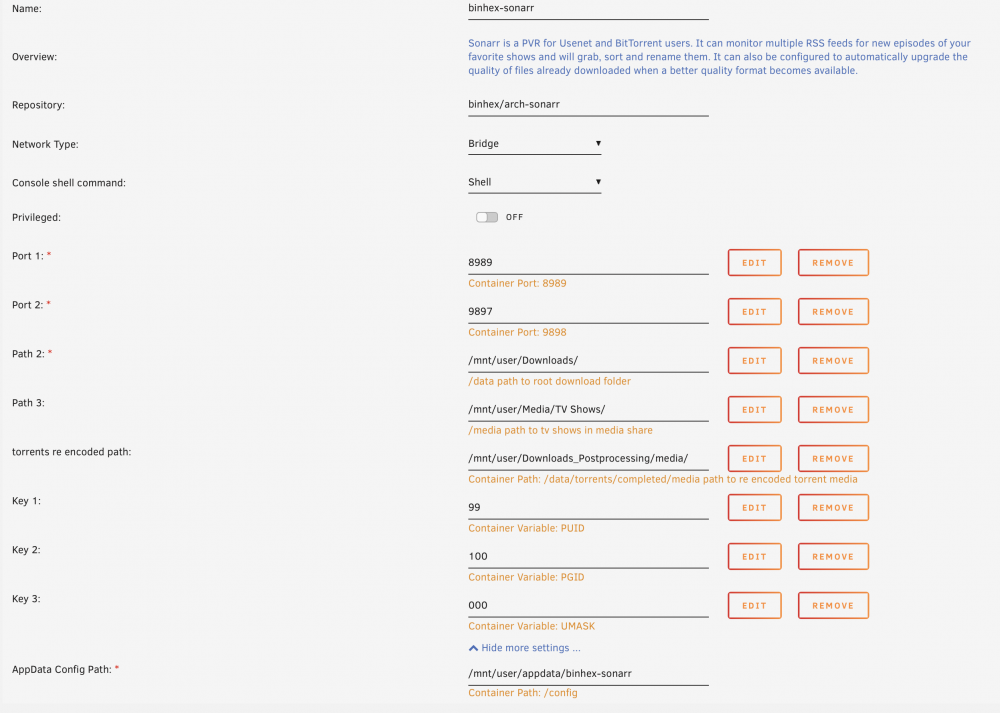
Hi, Wanted to start by saying, Binhex love your work and please keep up the good work. Full disclosure: I am very new to this whole server/unraid/docker thing but I have been fumbling my way through. I have been following SpaceInvaderOne's excellent guides and have set up my dockers to automatically re-encode video downloaded by Sonarr and Radarr. Everything was running great until the 21st December (as far as I can tell from my TV Shows folder's last edited date) when Sonarr suddenly stopped working. By stopped working I mean that I can still start the docker and load the webUI but I cannot add any new shows and the shows that are already added are not updated once the re-encoded video enters the watch folder. I noticed that the Append Label option in binhex-Deluge's CopyCompleted plugin turned itself off by itself so some files are being put into the Media Share and others into Media/TV Shows but even changing the watch folder in Sonarr did not cause any of the files to be recognised. I have already tried removing and re-adding the docker but the issue still persists. I have changed as many settings as I could find in an effort to fix this but still no luck. I have attached a screenshot of what the configuration looks like in the hope that it will help. I have been working on this for days and I am all out of ideas. I have probably messed up something really simple but I just don't know what it is. Any help would be much appreciated. Cheers,