





Emilio5639
Members
-
Joined
-
Last visited
Everything posted by Emilio5639
-
Thankyou for all of your help, do you think backing up the content, then removing the drive and then adding a new cache drive would rebuild from parity? For the files that were corrupted?
-
tower-diagnostics-20240911-1336.zip
-
It seemed to say it ran but the duration was 0 seconds, any thoughts on what is going on?
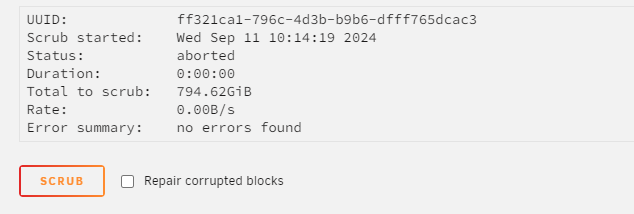
-
I dont see the scrub option.
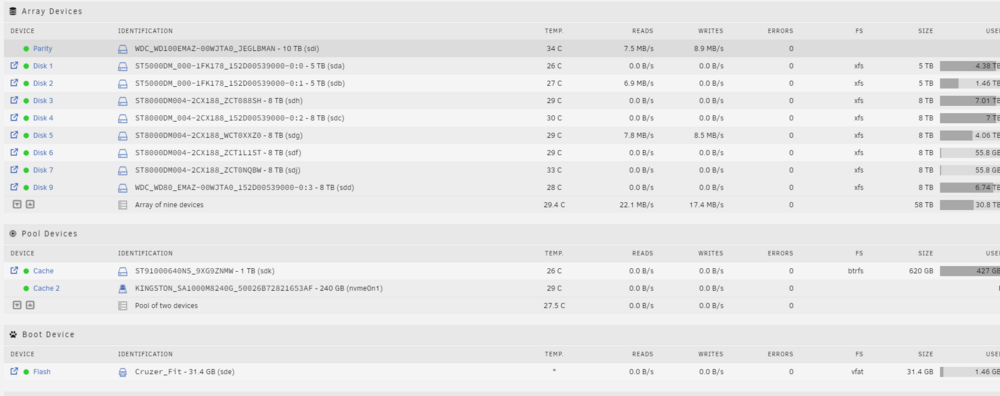
-
Is that just running a parity check?
-
For the unraid shares there XFS, and for the Cache drive there BTRFS.
-
I just moved, and I was thinking that I might have had a cache drive go bad. Mover doesn't want to move the files off, and when I view the contents of the drive, the item shows that there corrupt on a certain files, I was thinking would it be better to swap it with a new drive or do a parity check and have it fix those files? I tried copying over the files that open like pictures or zips, but there are some that don't, and the ones I do copy over, I delete them, but they look like they disappear but come right back when I refresh the window. Any idea on how to move forward?
-
I am running Unraid with Ryzen 7 2700X and under the Fix Common Problems It says I have: CPU possibly will not throttle down frequency at idle, then when I go to Tips and Tweaks I have: CPU Frequency Scaling Driver: * no driver * Governor: What should I do to get this resolved. Im new to Unraid so any help would be appreciated. Thanks Again
-
Here are all of the Scripts that I have set up. I went ahead and changed my folder to: Plex_Media RClone Mount Script: #!/bin/bash ###################### #### Mount Script #### ###################### ### Version 0.96.7 ### ###################### ####### EDIT ONLY THESE SETTINGS ####### # INSTRUCTIONS # 1. Change the name of the rclone remote and shares to match your setup # 2. NOTE: enter RcloneRemoteName WITHOUT ':' # 3. Optional: include custom command and bind mount settings # 4. Optional: include extra folders in mergerfs mount # REQUIRED SETTINGS RcloneRemoteName="gdrive_media_vfs" # Name of rclone remote mount WITHOUT ':'. NOTE: Choose your encrypted remote for sensitive data RcloneMountShare="/mnt/user/mount_Plex_Media" # where your rclone remote will be located without trailing slash e.g. /mnt/user/mount_rclone LocalFilesShare="/mnt/user/Plex_Media" # location of the local files and MountFolders you want to upload without trailing slash to rclone e.g. /mnt/user/local. Enter 'ignore' to disable MergerfsMountShare="/mnt/user/mount_mergerfs" # location without trailing slash e.g. /mnt/user/mount_mergerfs. Enter 'ignore' to disable DockerStart="plex binhex-sonarr radarr" # list of dockers, separated by space, to start once mergerfs mount verified. Remember to disable AUTOSTART for dockers added in docker settings page MountFolders=\{"downloads/complete,downloads/intermediate,downloads/seeds,movies,tv"\} # comma separated list of folders to create within the mount # Note: Again - remember to NOT use ':' in your remote name above # OPTIONAL SETTINGS # Add extra paths to mergerfs mount in addition to LocalFilesShare LocalFilesShare2="ignore" # without trailing slash e.g. /mnt/user/other__remote_mount/or_other_local_folder. Enter 'ignore' to disable LocalFilesShare3="ignore" LocalFilesShare4="ignore" # Add extra commands or filters Command1="--rc" Command2="" Command3="" Command4="" Command5="" Command6="" Command7="" Command8="" CreateBindMount="N" # Y/N. Choose whether to bind traffic to a particular network adapter RCloneMountIP="10.0.0.162" # My unraid IP is 172.30.12.2 so I create another similar IP address NetworkAdapter="eth0" # choose your network adapter. eth0 recommended VirtualIPNumber="2" # creates eth0:x e.g. eth0:1. I create a unique virtual IP addresses for each mount & upload so I can monitor and traffic shape for each of them ####### END SETTINGS ####### ############################################################################### ##### DO NOT EDIT ANYTHING BELOW UNLESS YOU KNOW WHAT YOU ARE DOING ####### ############################################################################### ####### Preparing mount location variables ####### RcloneMountLocation="$RcloneMountShare/$RcloneRemoteName" # Location for rclone mount LocalFilesLocation="$LocalFilesShare/$RcloneRemoteName" # Location for local files to be merged with rclone mount MergerFSMountLocation="$MergerfsMountShare/$RcloneRemoteName" # Rclone data folder location ####### create directories for rclone mount and mergerfs mounts ####### mkdir -p /mnt/user/appdata/other/rclone/remotes/$RcloneRemoteName #for script files if [[ $LocalFileShare == 'ignore' ]]; then echo "$(date "+%d.%m.%Y %T") INFO: Not creating local folders as requested." else echo "$(date "+%d.%m.%Y %T") INFO: Creating local folders." eval mkdir -p $LocalFilesLocation/"$MountFolders" fi mkdir -p $RcloneMountLocation mkdir -p $MergerFSMountLocation ####### Check if script is already running ####### echo "$(date "+%d.%m.%Y %T") INFO: *** Starting mount of remote ${RcloneRemoteName}" echo "$(date "+%d.%m.%Y %T") INFO: Checking if this script is already running." if [[ -f "/mnt/user/appdata/other/rclone/remotes/$RcloneRemoteName/mount_running" ]]; then echo "$(date "+%d.%m.%Y %T") INFO: Exiting script as already running." exit else echo "$(date "+%d.%m.%Y %T") INFO: Script not running - proceeding." touch /mnt/user/appdata/other/rclone/remotes/$RcloneRemoteName/mount_running fi ####### Checking have connectivity ####### echo "$(date "+%d.%m.%Y %T") INFO: *** Checking if online" ping -q -c2 google.com > /dev/null # -q quiet, -c number of pings to perform if [ $? -eq 0 ]; then # ping returns exit status 0 if successful echo "$(date "+%d.%m.%Y %T") PASSED: *** Internet online" else echo "$(date "+%d.%m.%Y %T") FAIL: *** No connectivity. Will try again on next run" rm /mnt/user/appdata/other/rclone/remotes/$RcloneRemoteName/mount_running exit fi ####### Create Rclone Mount ####### # Check If Rclone Mount Already Created if [[ -f "$RcloneMountLocation/mountcheck" ]]; then echo "$(date "+%d.%m.%Y %T") INFO: Success ${RcloneRemoteName} remote is already mounted." else echo "$(date "+%d.%m.%Y %T") INFO: Mount not running. Will now mount ${RcloneRemoteName} remote." # Creating mountcheck file in case it doesn't already exist echo "$(date "+%d.%m.%Y %T") INFO: Recreating mountcheck file for ${RcloneRemoteName} remote." touch mountcheck rclone copy mountcheck $RcloneRemoteName: -vv --no-traverse # Check bind option if [[ $CreateBindMount == 'Y' ]]; then echo "$(date "+%d.%m.%Y %T") INFO: *** Checking if IP address ${RCloneMountIP} already created for remote ${RcloneRemoteName}" ping -q -c2 $RCloneMountIP > /dev/null # -q quiet, -c number of pings to perform if [ $? -eq 0 ]; then # ping returns exit status 0 if successful echo "$(date "+%d.%m.%Y %T") INFO: *** IP address ${RCloneMountIP} already created for remote ${RcloneRemoteName}" else echo "$(date "+%d.%m.%Y %T") INFO: *** Creating IP address ${RCloneMountIP} for remote ${RcloneRemoteName}" ip addr add $RCloneMountIP/24 dev $NetworkAdapter label $NetworkAdapter:$VirtualIPNumber fi echo "$(date "+%d.%m.%Y %T") INFO: *** Created bind mount ${RCloneMountIP} for remote ${RcloneRemoteName}" else RCloneMountIP="" echo "$(date "+%d.%m.%Y %T") INFO: *** Creating mount for remote ${RcloneRemoteName}" fi # create rclone mount rclone mount \ --allow-other \ --buffer-size 256M \ --dir-cache-time 720h \ --drive-chunk-size 512M \ --log-level INFO \ --vfs-read-chunk-size 128M \ --vfs-read-chunk-size-limit off \ --vfs-cache-mode writes \ --bind=$RCloneMountIP \ $RcloneRemoteName: $RcloneMountLocation & # Check if Mount Successful echo "$(date "+%d.%m.%Y %T") INFO: sleeping for 5 seconds" # slight pause to give mount time to finalise sleep 5 echo "$(date "+%d.%m.%Y %T") INFO: continuing..." if [[ -f "$RcloneMountLocation/mountcheck" ]]; then echo "$(date "+%d.%m.%Y %T") INFO: Successful mount of ${RcloneRemoteName} mount." else echo "$(date "+%d.%m.%Y %T") CRITICAL: ${RcloneRemoteName} mount failed - please check for problems. Stopping dockers" docker stop $DockerStart rm /mnt/user/appdata/other/rclone/remotes/$RcloneRemoteName/mount_running exit fi fi ####### Start MergerFS Mount ####### if [[ $MergerfsMountShare == 'ignore' ]]; then echo "$(date "+%d.%m.%Y %T") INFO: Not creating mergerfs mount as requested." else if [[ -f "$MergerFSMountLocation/mountcheck" ]]; then echo "$(date "+%d.%m.%Y %T") INFO: Check successful, ${RcloneRemoteName} mergerfs mount in place." else # check if mergerfs already installed if [[ -f "/bin/mergerfs" ]]; then echo "$(date "+%d.%m.%Y %T") INFO: Mergerfs already installed, proceeding to create mergerfs mount" else # Build mergerfs binary echo "$(date "+%d.%m.%Y %T") INFO: Mergerfs not installed - installing now." mkdir -p /mnt/user/appdata/other/rclone/mergerfs docker run -v /mnt/user/appdata/other/rclone/mergerfs:/build --rm trapexit/mergerfs-static-build mv /mnt/user/appdata/other/rclone/mergerfs/mergerfs /bin # check if mergerfs install successful echo "$(date "+%d.%m.%Y %T") INFO: *sleeping for 5 seconds" sleep 5 if [[ -f "/bin/mergerfs" ]]; then echo "$(date "+%d.%m.%Y %T") INFO: Mergerfs installed successfully, proceeding to create mergerfs mount." else echo "$(date "+%d.%m.%Y %T") ERROR: Mergerfs not installed successfully. Please check for errors. Exiting." rm /mnt/user/appdata/other/rclone/remotes/$RcloneRemoteName/mount_running exit fi fi # Create mergerfs mount echo "$(date "+%d.%m.%Y %T") INFO: Creating ${RcloneRemoteName} mergerfs mount." # Extra Mergerfs folders if [[ $LocalFilesShare2 != 'ignore' ]]; then echo "$(date "+%d.%m.%Y %T") INFO: Adding ${LocalFilesShare2} to ${RcloneRemoteName} mergerfs mount." LocalFilesShare2=":$LocalFilesShare2" else LocalFilesShare2="" fi if [[ $LocalFilesShare3 != 'ignore' ]]; then echo "$(date "+%d.%m.%Y %T") INFO: Adding ${LocalFilesShare3} to ${RcloneRemoteName} mergerfs mount." LocalFilesShare3=":$LocalFilesShare3" else LocalFilesShare3="" fi if [[ $LocalFilesShare4 != 'ignore' ]]; then echo "$(date "+%d.%m.%Y %T") INFO: Adding ${LocalFilesShare4} to ${RcloneRemoteName} mergerfs mount." LocalFilesShare4=":$LocalFilesShare4" else LocalFilesShare4="" fi # make sure mergerfs mount point is empty mv $MergerFSMountLocation $LocalFilesLocation mkdir -p $MergerFSMountLocation # mergerfs mount command mergerfs $LocalFilesLocation:$RcloneMountLocation$LocalFilesShare2$LocalFilesShare3$LocalFilesShare4 $MergerFSMountLocation -o rw,async_read=false,use_ino,allow_other,func.getattr=newest,category.action=all,category.create=ff,cache.files=partial,dropcacheonclose=true # check if mergerfs mount successful echo "$(date "+%d.%m.%Y %T") INFO: Checking if ${RcloneRemoteName} mergerfs mount created." if [[ -f "$MergerFSMountLocation/mountcheck" ]]; then echo "$(date "+%d.%m.%Y %T") INFO: Check successful, ${RcloneRemoteName} mergerfs mount created." else echo "$(date "+%d.%m.%Y %T") CRITICAL: ${RcloneRemoteName} mergerfs mount failed. Stopping dockers." docker stop $DockerStart rm /mnt/user/appdata/other/rclone/remotes/$RcloneRemoteName/mount_running exit fi fi fi ####### Starting Dockers That Need Mergerfs Mount To Work Properly ####### # only start dockers once if [[ -f "/mnt/user/appdata/other/rclone/remotes/$RcloneRemoteName/dockers_started" ]]; then echo "$(date "+%d.%m.%Y %T") INFO: dockers already started." else touch /mnt/user/appdata/other/rclone/remotes/$RcloneRemoteName/dockers_started echo "$(date "+%d.%m.%Y %T") INFO: Starting dockers." docker start $DockerStart fi rm /mnt/user/appdata/other/rclone/remotes/$RcloneRemoteName/mount_running echo "$(date "+%d.%m.%Y %T") INFO: Script complete" exit RClone Upload Script: #!/bin/bash ###################### ### Upload Script #### ###################### ### Version 0.95.5 ### ###################### ####### EDIT ONLY THESE SETTINGS ####### # INSTRUCTIONS # 1. Edit the settings below to match your setup # 2. NOTE: enter RcloneRemoteName WITHOUT ':' # 3. Optional: Add additional commands or filters # 4. Optional: Use bind mount settings for potential traffic shaping/monitoring # 5. Optional: Use service accounts in your upload remote # 6. Optional: Use backup directory for rclone sync jobs # REQUIRED SETTINGS RcloneCommand="move" # choose your rclone command e.g. move, copy, sync RcloneRemoteName="gdrive_media_vfs" # Name of rclone remote mount WITHOUT ':'. RcloneUploadRemoteName="gdrive_upload_vfs" # If you have a second remote created for uploads put it here. Otherwise use the same remote as RcloneRemoteName. LocalFilesShare="/mnt/user/Plex_Media" # location of the local files without trailing slash you want to rclone to use RcloneMountShare="/mnt/user/mount_Plex_Media" # where your rclone mount is located without trailing slash e.g. /mnt/user/mount_rclone MinimumAge="15m" # sync files suffix ms|s|m|h|d|w|M|y ModSort="ascending" # "ascending" oldest files first, "descending" newest files first # Note: Again - remember to NOT use ':' in your remote name above # Bandwidth limits: specify the desired bandwidth in kBytes/s, or use a suffix b|k|M|G. Or 'off' or '0' for unlimited. The script uses --drive-stop-on-upload-limit which stops the script if the 750GB/day limit is achieved, so you no longer have to slow 'trickle' your files all day if you don't want to e.g. could just do an unlimited job overnight. BWLimit1Time="01:00" BWLimit1="off" BWLimit2Time="08:00" BWLimit2="15M" BWLimit3Time="16:00" BWLimit3="12M" # OPTIONAL SETTINGS # Add name to upload job JobName="_daily_upload" # Adds custom string to end of checker file. Useful if you're running multiple jobs against the same remote. # Add extra commands or filters Command1="--exclude downloads/**" Command2="" Command3="" Command4="" Command5="" Command6="" Command7="" Command8="" # Bind the mount to an IP address CreateBindMount="N" # Y/N. Choose whether or not to bind traffic to a network adapter. RCloneMountIP="10.0.0.62" # Choose IP to bind upload to. NetworkAdapter="eth0" # choose your network adapter. eth0 recommended. VirtualIPNumber="1" # creates eth0:x e.g. eth0:1. # Use Service Accounts. Instructions: https://github.com/xyou365/AutoRclone UseServiceAccountUpload="N" # Y/N. Choose whether to use Service Accounts. ServiceAccountDirectory="/mnt/user/appdata/other/rclone/service_accounts" # Path to your Service Account's .json files. ServiceAccountFile="sa_gdrive_upload" # Enter characters before counter in your json files e.g. for sa_gdrive_upload1.json -->sa_gdrive_upload100.json, enter "sa_gdrive_upload". CountServiceAccounts="15" # Integer number of service accounts to use. # Is this a backup job BackupJob="N" # Y/N. Syncs or Copies files from LocalFilesLocation to BackupRemoteLocation, rather than moving from LocalFilesLocation/RcloneRemoteName BackupRemoteLocation="backup" # choose location on mount for deleted sync files BackupRemoteDeletedLocation="backup_deleted" # choose location on mount for deleted sync files BackupRetention="90d" # How long to keep deleted sync files suffix ms|s|m|h|d|w|M|y ####### END SETTINGS ####### ############################################################################### ##### DO NOT EDIT BELOW THIS LINE UNLESS YOU KNOW WHAT YOU ARE DOING ##### ############################################################################### ####### Preparing mount location variables ####### if [[ $BackupJob == 'Y' ]]; then LocalFilesLocation="$LocalFilesShare" echo "$(date "+%d.%m.%Y %T") INFO: *** Backup selected. Files will be copied or synced from ${LocalFilesLocation} for ${RcloneUploadRemoteName} ***" else LocalFilesLocation="$LocalFilesShare/$RcloneRemoteName" echo "$(date "+%d.%m.%Y %T") INFO: *** Rclone move selected. Files will be moved from ${LocalFilesLocation} for ${RcloneUploadRemoteName} ***" fi RcloneMountLocation="$RcloneMountShare/$RcloneRemoteName" # Location of rclone mount ####### create directory for script files ####### mkdir -p /mnt/user/appdata/other/rclone/remotes/$RcloneUploadRemoteName #for script files ####### Check if script already running ########## echo "$(date "+%d.%m.%Y %T") INFO: *** Starting rclone_upload script for ${RcloneUploadRemoteName} ***" if [[ -f "/mnt/user/appdata/other/rclone/remotes/$RcloneUploadRemoteName/upload_running$JobName" ]]; then echo "$(date "+%d.%m.%Y %T") INFO: Exiting as script already running." exit else echo "$(date "+%d.%m.%Y %T") INFO: Script not running - proceeding." touch /mnt/user/appdata/other/rclone/remotes/$RcloneUploadRemoteName/upload_running$JobName fi ####### check if rclone installed ########## echo "$(date "+%d.%m.%Y %T") INFO: Checking if rclone installed successfully." if [[ -f "$RcloneMountLocation/mountcheck" ]]; then echo "$(date "+%d.%m.%Y %T") INFO: rclone installed successfully - proceeding with upload." else echo "$(date "+%d.%m.%Y %T") INFO: rclone not installed - will try again later." rm /mnt/user/appdata/other/rclone/remotes/$RcloneUploadRemoteName/upload_running$JobName exit fi ####### Rotating serviceaccount.json file if using Service Accounts ####### if [[ $UseServiceAccountUpload == 'Y' ]]; then cd /mnt/user/appdata/other/rclone/remotes/$RcloneUploadRemoteName/ CounterNumber=$(find -name 'counter*' | cut -c 11,12) CounterCheck="1" if [[ "$CounterNumber" -ge "$CounterCheck" ]];then echo "$(date "+%d.%m.%Y %T") INFO: Counter file found for ${RcloneUploadRemoteName}." else echo "$(date "+%d.%m.%Y %T") INFO: No counter file found for ${RcloneUploadRemoteName}. Creating counter_1." touch /mnt/user/appdata/other/rclone/remotes/$RcloneUploadRemoteName/counter_1 CounterNumber="1" fi ServiceAccount="--drive-service-account-file=$ServiceAccountDirectory/$ServiceAccountFile$CounterNumber.json" echo "$(date "+%d.%m.%Y %T") INFO: Adjusted service_account_file for upload remote ${RcloneUploadRemoteName} to ${ServiceAccountFile}${CounterNumber}.json based on counter ${CounterNumber}." else echo "$(date "+%d.%m.%Y %T") INFO: Uploading using upload remote ${RcloneUploadRemoteName}" ServiceAccount="" fi ####### Upload files ########## # Check bind option if [[ $CreateBindMount == 'Y' ]]; then echo "$(date "+%d.%m.%Y %T") INFO: *** Checking if IP address ${RCloneMountIP} already created for upload to remote ${RcloneUploadRemoteName}" ping -q -c2 $RCloneMountIP > /dev/null # -q quiet, -c number of pings to perform if [ $? -eq 0 ]; then # ping returns exit status 0 if successful echo "$(date "+%d.%m.%Y %T") INFO: *** IP address ${RCloneMountIP} already created for upload to remote ${RcloneUploadRemoteName}" else echo "$(date "+%d.%m.%Y %T") INFO: *** Creating IP address ${RCloneMountIP} for upload to remote ${RcloneUploadRemoteName}" ip addr add $RCloneMountIP/24 dev $NetworkAdapter label $NetworkAdapter:$VirtualIPNumber fi else RCloneMountIP="" fi # Remove --delete-empty-src-dirs if rclone sync or copy if [[ $RcloneCommand == 'move' ]]; then echo "$(date "+%d.%m.%Y %T") INFO: *** Using rclone move - will add --delete-empty-src-dirs to upload." DeleteEmpty="--delete-empty-src-dirs " else echo "$(date "+%d.%m.%Y %T") INFO: *** Not using rclone move - will remove --delete-empty-src-dirs to upload." DeleteEmpty="" fi # Check --backup-directory if [[ $BackupJob == 'Y' ]]; then echo "$(date "+%d.%m.%Y %T") INFO: *** Will backup to ${BackupRemoteLocation} and use ${BackupRemoteDeletedLocation} as --backup-directory with ${BackupRetention} retention for ${RcloneUploadRemoteName}." LocalFilesLocation="$LocalFilesShare" BackupDir="--backup-dir $RcloneUploadRemoteName:$BackupRemoteDeletedLocation" else BackupRemoteLocation="" BackupRemoteDeletedLocation="" BackupRetention="" BackupDir="" fi # process files rclone $RcloneCommand $LocalFilesLocation $RcloneUploadRemoteName:$BackupRemoteLocation $ServiceAccount $BackupDir \ --user-agent="$RcloneUploadRemoteName" \ -vv \ --buffer-size 512M \ --drive-chunk-size 512M \ --tpslimit 8 \ --checkers 8 \ --transfers 4 \ --order-by modtime,$ModSort \ --min-age $MinimumAge \ $Command1 $Command2 $Command3 $Command4 $Command5 $Command6 $Command7 $Command8 \ --exclude *fuse_hidden* \ --exclude *_HIDDEN \ --exclude .recycle** \ --exclude .Recycle.Bin/** \ --exclude *.backup~* \ --exclude *.partial~* \ --drive-stop-on-upload-limit \ --bwlimit "${BWLimit1Time},${BWLimit1} ${BWLimit2Time},${BWLimit2} ${BWLimit3Time},${BWLimit3}" \ --bind=$RCloneMountIP $DeleteEmpty # Delete old files from mount if [[ $BackupJob == 'Y' ]]; then echo "$(date "+%d.%m.%Y %T") INFO: *** Removing files older than ${BackupRetention} from $BackupRemoteLocation for ${RcloneUploadRemoteName}." rclone delete --min-age $BackupRetention $RcloneUploadRemoteName:$BackupRemoteDeletedLocation fi ####### Remove Control Files ########## # update counter and remove other control files if [[ $UseServiceAccountUpload == 'Y' ]]; then if [[ "$CounterNumber" == "$CountServiceAccounts" ]];then rm /mnt/user/appdata/other/rclone/remotes/$RcloneUploadRemoteName/counter_* touch /mnt/user/appdata/other/rclone/remotes/$RcloneUploadRemoteName/counter_1 echo "$(date "+%d.%m.%Y %T") INFO: Final counter used - resetting loop and created counter_1." else rm /mnt/user/appdata/other/rclone/remotes/$RcloneUploadRemoteName/counter_* CounterNumber=$((CounterNumber+1)) touch /mnt/user/appdata/other/rclone/remotes/$RcloneUploadRemoteName/counter_$CounterNumber echo "$(date "+%d.%m.%Y %T") INFO: Created counter_${CounterNumber} for next upload run." fi else echo "$(date "+%d.%m.%Y %T") INFO: Not utilising service accounts." fi # remove dummy file rm /mnt/user/appdata/other/rclone/remotes/$RcloneUploadRemoteName/upload_running$JobName echo "$(date "+%d.%m.%Y %T") INFO: Script complete" exit RClone Unmount: #!/bin/bash ####################### ### Cleanup Script #### ####################### #### Version 0.9.2 #### ####################### echo "$(date "+%d.%m.%Y %T") INFO: *** Starting rclone_cleanup script ***" ####### Cleanup Tracking Files ####### echo "$(date "+%d.%m.%Y %T") INFO: *** Removing Tracking Files ***" find /mnt/user/appdata/other/rclone/remotes -name dockers_started* -delete find /mnt/user/appdata/other/rclone/remotes -name mount_running* -delete find /mnt/user/appdata/other/rclone/remotes -name upload_running* -delete echo "$(date "+%d.%m.%Y %T") INFO: ***Finished Cleanup! ***" exit
-
Here is my mount Folder log: Script location: /tmp/user.scripts/tmpScripts/rclone mount/script Note that closing this window will abort the execution of this script 06.08.2020 13:26:53 INFO: Creating local folders. 06.08.2020 13:26:53 INFO: *** Starting mount of remote gdrive_media_vfs 06.08.2020 13:26:53 INFO: Checking if this script is already running. 06.08.2020 13:26:53 INFO: Script not running - proceeding. 06.08.2020 13:26:53 INFO: *** Checking if online 06.08.2020 13:26:54 PASSED: *** Internet online 06.08.2020 13:26:54 INFO: Mount not running. Will now mount gdrive_media_vfs remote. 06.08.2020 13:26:54 INFO: Recreating mountcheck file for gdrive_media_vfs remote. 2020/08/06 13:26:54 DEBUG : rclone: Version "v1.52.2" starting with parameters ["rcloneorig" "--config" "/boot/config/plugins/rclone/.rclone.conf" "copy" "mountcheck" "gdrive_media_vfs:" "-vv" "--no-traverse"] 2020/08/06 13:26:54 DEBUG : Using config file from "/boot/config/plugins/rclone/.rclone.conf" 2020/08/06 13:26:54 DEBUG : fs cache: renaming cache item "mountcheck" to be canonical "/" 2020/08/06 13:26:55 DEBUG : mountcheck: Modification times differ by -52.019083302s: 2020-08-06 13:26:54.305083302 -0700 PDT, 2020-08-06 20:26:02.286 +0000 UTC 2020/08/06 13:26:56 INFO : mountcheck: Copied (replaced existing) 2020/08/06 13:26:56 INFO : Transferred: 32 / 32 Bytes, 100%, 25 Bytes/s, ETA 0s Transferred: 1 / 1, 100% Elapsed time: 1.2s 2020/08/06 13:26:56 DEBUG : 7 go routines active 06.08.2020 13:26:56 INFO: *** Creating mount for remote gdrive_media_vfs 06.08.2020 13:26:56 INFO: sleeping for 5 seconds 06.08.2020 13:27:01 INFO: continuing... 06.08.2020 13:27:01 INFO: Successful mount of gdrive_media_vfs mount. 06.08.2020 13:27:01 INFO: Check successful, gdrive_media_vfs mergerfs mount in place. 06.08.2020 13:27:01 INFO: dockers already started. 06.08.2020 13:27:01 INFO: Script complete Upload Script: Script location: /tmp/user.scripts/tmpScripts/rclone upload/script Note that closing this window will abort the execution of this script 06.08.2020 13:28:05 INFO: *** Rclone move selected. Files will be moved from /mnt/user/Plex-Media/gdrive_media_vfs for gdrive_upload_vfs *** 06.08.2020 13:28:05 INFO: *** Starting rclone_upload script for gdrive_upload_vfs *** 06.08.2020 13:28:05 INFO: Script not running - proceeding. 06.08.2020 13:28:05 INFO: Checking if rclone installed successfully. 06.08.2020 13:28:05 INFO: rclone not installed - will try again later.
-
The one I downloaded was from the community apps and it was: rclone Waseh Backup, Cloud, Tools:Utilities, Plugins
-
I think I followed the guide pretty well, and I am receiving the following error in the Upload Script: rclone not installed - will try again later. Here is portion of the script that I am using: #!/bin/bash ###################### ### Upload Script #### ###################### ### Version 0.95.5 ### ###################### ####### EDIT ONLY THESE SETTINGS ####### # INSTRUCTIONS # 1. Edit the settings below to match your setup # 2. NOTE: enter RcloneRemoteName WITHOUT ':' # 3. Optional: Add additional commands or filters # 4. Optional: Use bind mount settings for potential traffic shaping/monitoring # 5. Optional: Use service accounts in your upload remote # 6. Optional: Use backup directory for rclone sync jobs # REQUIRED SETTINGS RcloneCommand="move" # choose your rclone command e.g. move, copy, sync RcloneRemoteName="gdrive_media_vfs" # Name of rclone remote mount WITHOUT ':'. RcloneUploadRemoteName="gdrive_upload_vfs" # If you have a second remote created for uploads put it here. Otherwise use the same remote as RcloneRemoteName. LocalFilesShare="/mnt/user/Plex-Media" # location of the local files without trailing slash you want to rclone to use RcloneMountShare="/mnt/user/mount_Plex-Media" # where your rclone mount is located without trailing slash e.g. /mnt/user/mount_rclone MinimumAge="15m" # sync files suffix ms|s|m|h|d|w|M|y ModSort="ascending" # "ascending" oldest files first, "descending" newest files first # Note: Again - remember to NOT use ':' in your remote name above # Bandwidth limits: specify the desired bandwidth in kBytes/s, or use a suffix b|k|M|G. Or 'off' or '0' for unlimited. The script uses --drive-stop-on-upload-limit which stops the script if the 750GB/day limit is achieved, so you no longer have to slow 'trickle' your files all day if you don't want to e.g. could just do an unlimited job overnight. BWLimit1Time="01:00" BWLimit1="off" BWLimit2Time="08:00" BWLimit2="15M" BWLimit3Time="16:00" BWLimit3="12M" # OPTIONAL SETTINGS # Add name to upload job JobName="_daily_upload" # Adds custom string to end of checker file. Useful if you're running multiple jobs against the same remote. # Add extra commands or filters Command1="--exclude downloads/**" Command2="" Command3="" Command4="" Command5="" Command6="" Command7="" Command8="" # Bind the mount to an IP address CreateBindMount="N" # Y/N. Choose whether or not to bind traffic to a network adapter. RCloneMountIP="10.0.0.62" # Choose IP to bind upload to. NetworkAdapter="eth0" # choose your network adapter. eth0 recommended. VirtualIPNumber="1" # creates eth0:x e.g. eth0:1. # Use Service Accounts. Instructions: https://github.com/xyou365/AutoRclone UseServiceAccountUpload="N" # Y/N. Choose whether to use Service Accounts. ServiceAccountDirectory="/mnt/user/appdata/other/rclone/service_accounts" # Path to your Service Account's .json files. ServiceAccountFile="sa_gdrive_upload" # Enter characters before counter in your json files e.g. for sa_gdrive_upload1.json -->sa_gdrive_upload100.json, enter "sa_gdrive_upload". CountServiceAccounts="15" # Integer number of service accounts to use. # Is this a backup job BackupJob="N" # Y/N. Syncs or Copies files from LocalFilesLocation to BackupRemoteLocation, rather than moving from LocalFilesLocation/RcloneRemoteName BackupRemoteLocation="backup" # choose location on mount for deleted sync files BackupRemoteDeletedLocation="backup_deleted" # choose location on mount for deleted sync files BackupRetention="90d" # How long to keep deleted sync files suffix ms|s|m|h|d|w|M|y ####### END SETTINGS ####### This is my first time setting something like this up, any help would be appreciated.
