channing
Members
-
Joined
-
Last visited
-
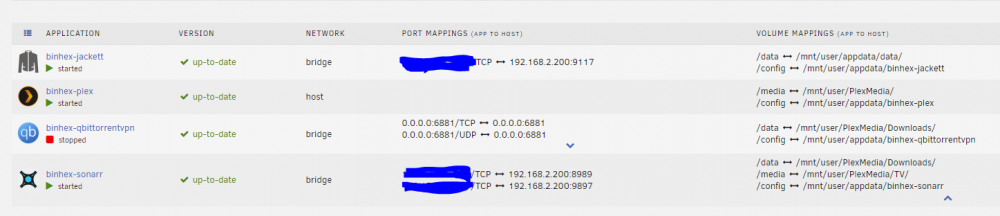
I don't intentionally have it configured to save to /config. But I've modified my save path to /data/completed (and it lives in /data/incomplete while downloading) I guess I don't understand how sonarr manages the file locations (while downloading/seeding and then moving to the TV media folder)
-
New to unraid. New to a server, but I think I've got it running. Running into a docker issue with Sonarr and Qbitorrent. Seems to be a volume mapping issue, but I can't figure out where the setting is. Docker settings I had the above set. But then both qbitorrent and sonarr are looking for the file to be in the config folder?! (qbitorrent file 'location' and sonarr error message above) maybe permissions? Also my qbitorrent causes all my CPUS to pin at 100% now and freeze my server until I stop the qbitorrent docker. Related?