





me160
Members
-
Joined
-
Last visited
Everything posted by me160
-
will updating to latest stable hinder the data rebuild or potentially cause data loss being its an invalid parity/array right now?
-
i recently decided to upgrade one of my drives (a 4tb one) with an older drive (8tb) i had replaced a while ago because it was getting read errors, turned out those read errors were just a bad cable and the drive was fine. and it sat on my shelf for a while,so i plugged it in, started preclearing it and then when i got time i shut the system down and physically swapped the drives. the system had been up for a little over a month before this, i followed the normal procedure of turning docker and vm services off and letting unraid do the data rebuild without anything accessing the array. however now it crashes during the rebuild, sometimes its right away and other times it gets almost done before crashing. ive attached my diagnostics from the last restart as of last night, and i have already followed the advice for Ryzen systems with c-states and memory, my memory is fine i had a previous problem with random crashing that ended up being my psu, and already ran a memtest for 24 hrs with no problems. the drive i replaced is the WD 4tb drive, and replaced it with an 8tb Seagate so all my data drives are 8tb now, both drives are attached, and my last hope now is to forget about changing that drive and go back to the 4tb and see if unraid stops crashing. any help would be great, although for the next 3 days, but i will try what i can or wait tilli get home to try anything physical with the system otfgserver-diagnostics-20220627-2138.zip
-
for anyone who is interested in this still, i figured out the problem. it turns out my power supply was either failing or i was drawing too low power from it for it to be able to do its job efficiently and supply stable power. i was using a corsair sfx-750, on a system that draws a max of like 250W (unable to determine the exact usage as my only number is from my ups that has my unraid server, anther system running pfsense, security cameras and 3 routers on it, and in unraid my ups reports an average usage of around 255w, with the highest i saw it at was about 300w) so i installed a smaller (again corsair as it was the only one i could get, and it is also a platinum 80+, and all the other sfx power supplies i could find were only bronze or silver) sfx-400 and the system has been up for 3 weeks, only turning off when i manually reboot or shut it down to do other things and haven't had any problems since swapping the power supply. if anyone else cares to know the science behind what i found out or if it could be useful to someone here it is, power supplies have efficiency curves as well as stability curves. the power supply is *most* efficient and stable at about 40-55% load, higher than that you only loose a few efficiency percent (on my particular one its 94% efficient at 45% load, its peak, and only drops to 92% efficient at 100%load), but efficiency isn't what im talking about here, its the stability curve. voltage regulators are a bit of silicon that take an unstable voltage and, wait for it, regulate it to a constant voltage that is generally very stable and has little or no fluctuations, it does this by effectively working like a light switch turning the power on and off very fast. they are very good at it when they are within their specified stability range, meaning there must be at least X amount of amperage being drawn for it to make stable, clean volts. if it gets too high of a draw it over heats and may fail, or it causes power "flickering" because the rate it turns on/off slows down to account for the current draw so you end up with a burst of high current and voltage, then it turns off and repeats till the load goes down or the reg. burns up. however, if there isn't *enough* load on a regulator i can also create voltage fluctuations, now this will be far less harmful as were talking as low as 0.1--0.2v or even lower depending on the rail voltage its on. but to a cpu or memory module a 0.2v difference where its voltage should be, say 3.3v, one second it could get 3.7v, then the next 3.1v and memory modules do not like that much voltage difference, they can accept that difference one decimal over (3.32v-3.28v for ex.). and if your power supply is like how mine was where i had a 750w power supply serving a 250w peak load, that's about a 30%load, witch in theory should be ok and if the server ran at peak all the time it probably would be, but i suspect it often dipped down to around 200w or lower witch would be in the 20%'s, and i believe most power supplies stability curve starts being stable enough for computers to be, well stable, at around 30-35% ish. now that I've lowered my power supply rating (by going to the 400w) ive increased my max load to just over 60% of the power supply instead of 30%, that should mean at the lowest my system runs i should still be at about the 40% load range. thats enough of that lecture on power supplies, if anyone wants more on this Ltt did a great video on it a while ago link here tl;dr: power supplies cause problems too, don't throw the biggest power supply available in your system. if any info above is incorrect (please don't tell me I'm totally wrong, I'm not i do have background with building electronics, not Shure why i didn't think about my power supply till now though) or if anyone has more data than i shared please correct me i like learning new things
-
hey, i haven't heard anything for a week, just wondering if anyone had any further ideas on whether this is a hardware problem or software or how to narrow it down to witch?
-
thats what i figured, as far as i can tell my cpu can handle the ram ive got at max frequency so i have set it to the max of the ram just to see if it does help.
-
ok, i let the memtest run overnight and it passed all tests 4 times with 0 errors. what would my next steps in diagnosing a problem be or could it just be the ram speed being set low causing problems
-
ok so i got around to trying to do a memtest, for some reason it wont let me boot into legacy mode, my motherboard just says the media is unbootable but it works just fine in uefi mode. did i forget to do something? i did however notice that when i upgraded my ram (from 32gb to 64gb) i guess i forgot to check whether the board set the speed correctly and it was trying to run 3200mhz ram at 2400mhz, as far as im aware that shouldn't be a problem as it wasn't overclocked just that id be loosing a bit of performance but please correct me if im wrong or if that could have been the problem
-
alright ill give it a try this weekend when i get back home, ive already done everything i could in the ryzen faq about setting it up and it didn't help except to make the crashes not quite as frequent, as well as updating to 9.10.0rc1, though i might also try updating to rc3 as well to try a newer kernel
-
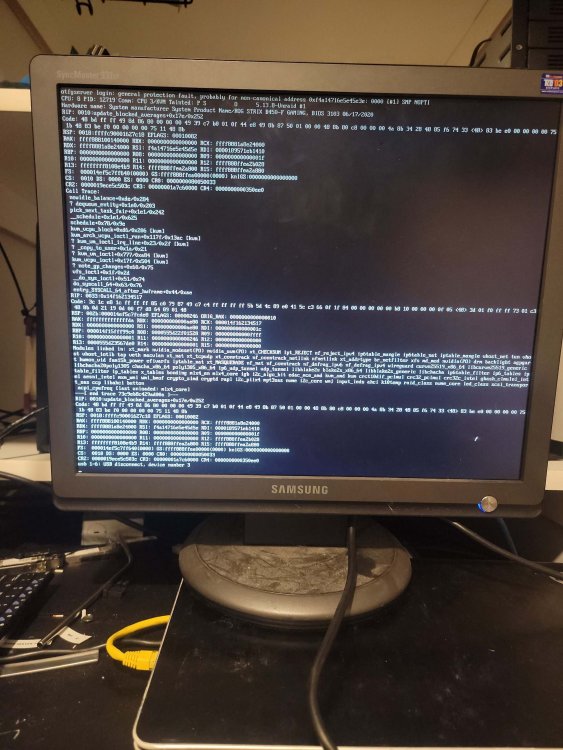
bit of a puzzler this, my system has been plagued by random crashes and various problems since i built it 4 years ago, from my understanding and previous posts its due to both my lack of proper setup or simply that im running on ryzen. that aside my system had been up for about a month with no issues till last week when it crashed, and unfortunately i am working out of town right now and cant access the hardware to check anything other than having a buddy hit the restart button and send a picture of the console display on my attached monitor when he gets around to it, but since that one crash it appears to crash immediately after rebooting and letting docker start a few containers, sometimes its up for a good hour. each crash seems a different cause but ive seen this one 3 times now (see attached picture), can anyone help me with this or atleast let me know if this is a hardware failure?
-
i figured out the issue, it was nfs was enabled and that was a suggestion in the other post linked, it has been running for a few days now with no problems. for some reason google didn't show me that post, hence why i made a new one
-
that's what i figured it was just with how many transfers and files being deleted, just wanted to make shure it wasn't a problem in unraid
-
I've been running into a few problems lately with unraid, I've got another thread on that (entire unraid server randomly crashes), got it figured out that its most likely my hardware so i am currently running 6.10.0rc1 and it has (for the most part) helped with random crashing (its crashing a lot less often) however i just stared re-transcoding my entire plex library (somewhere around 8600 movies/tv episodes) using tdarr, now tdarr is working great however my current problem is that tdarr crashes as well as a few of my other dockers and all file access within unraid and on the network because samba crashes, cant seem to find the offending error in the syslog. can someone help me if this is a problem with samba or just the fact im transferring so much data to/from the server its overloading samba and once the library finishes transcoding it wont do it anymore. tldr: samba keeps crashing in unraid 6.10.0rc1, not shure if problem with samba or due to the large amount of transfers while transcoding plex library. diagnostics while samba is not working attached otfgserver-diagnostics-20211029-2214.zip
-
if your syslog server is mirroring to flash the file will be under flash/log and simply called syslog.
-
damn...i was fearing it might be hardware at this point. thanks for the help anyway!
-
*update* it has crashed again, and then crashed just a few hours after, i can upload current diagnostics after reboot, and syslog of latest crash, first was lost. i believe the crash report(s) end at ln1724 of the syslogsyslog otfgserver-diagnostics-20211023-2026.zip
-
thanks for the suggestion to upgrade to 6.10-rc1, so far it seems to have done the trick. it went through a parity sync with no problems and i think even a few hours faster than it used to and has stayed up for 2 days straight. hopefully this has fixed all the random crashing too, not just the crashing during parity sync
-
so disabling the c-states in the mobo doesn't seem have done anything (atleast not preventing the crash that happend at 3am), i have the syslog from the last boot, it ends at line 29736, where it continues to when i rebooted it because the terminal wouldnt collect diagnostics. i will also attach the diagnostics i just collected after i rebooted, hopefully it helps someone help me figure this out. syslog otfgserver-diagnostics-20211020-0724.zip
-
thanks for the reply! i have just changed the c-states in my motherboard and hopefully that solves this! i have also enabled the syslog mirroring to usb so i can hopefully get a complete syslog if it continues to randomly crash
-
my unraid install keeps crashing randomly, and it seems for a different reason each time. i have noticed it seems to be happening in the middle of parity checks, but also crashes at other times. i have been running the tail command on the syslog via putty on a separate computer to try and capture the crash because it usually fully crashes and even the console doesn't respond to get a diagnostics file. i will attach the most recent crash as far as i could capture from the telnet tail crash5.log

