





me160
Members
-
Joined
-
Last visited
Everything posted by me160
-
i think i figured it it out...i did a dumb thing, when i formatted and put the new partition on my 8tb drive i just added for my security camera system i formatted it as ntfs, my old drive was xfs. i formatted it to xfs and the errors appear to have stopped....i will do a restart but unraid is currently in the middle of a parity check so i will wait till its done. the only other ntfs drive i have is a small ssd used for update backups and. but this error did start showing up like 24hrs after the new drive was put in....not quite shure how it being ntfs and a brand new disk caused the problem....but maby it was something when i did while mounting it in the vm, or copying files over to it
-
i woke up this morning to find my log being spammed with a few error messages, one i figured out (it was dynamix system info spamming a message, i believe it was just due to not restarting unraid after it updated, either way i don't use the plugin so i uninstalled it, that error stopped.) but the other one was quite puzzling and from googling it seems to be a hard drive related issue. Feb 12 04:07:02 otfgserver kernel: docker0: port 1(veth172e216) entered forwarding state Feb 12 04:07:02 otfgserver CA Backup/Restore: done! Feb 12 04:07:03 otfgserver avahi-daemon[12132]: Joining mDNS multicast group on interface veth172e216.IPv6 with address fe80::3cea:3aff:fea1:54b. Feb 12 04:07:03 otfgserver avahi-daemon[12132]: New relevant interface veth172e216.IPv6 for mDNS. Feb 12 04:07:03 otfgserver avahi-daemon[12132]: Registering new address record for fe80::3cea:3aff:fea1:54b on veth172e216.*. Feb 12 04:07:04 otfgserver CA Backup/Restore: Starting PlexMediaServer... (try #1) Feb 12 04:07:06 otfgserver CA Backup/Restore: done! Feb 12 04:07:06 otfgserver ntfs-3g[28431]: ntfs_mst_post_read_fixup_warn: magic: 0x361ed4da size: 4096 usa_ofs: 11910 usa_count: 19358: Invalid argument Feb 12 04:07:06 otfgserver ntfs-3g[28431]: Corrupt index block signature: vcn 83 inode 7288 Feb 12 04:07:06 otfgserver ntfs-3g[28431]: ntfs_mst_post_read_fixup_warn: magic: 0x361ed4da size: 4096 usa_ofs: 11910 usa_count: 19358: Invalid argument Feb 12 04:07:06 otfgserver ntfs-3g[28431]: Corrupt index block signature: vcn 83 inode 7288 Feb 12 04:07:06 otfgserver ntfs-3g[28431]: ntfs_mst_post_read_fixup_warn: magic: 0x361ed4da size: 4096 usa_ofs: 11910 usa_count: 19358: Invalid argument Feb 12 04:07:06 otfgserver ntfs-3g[28431]: Corrupt index block signature: vcn 83 inode 7288 Feb 12 04:07:06 otfgserver ntfs-3g[28431]: ntfs_mst_post_read_fixup_warn: magic: 0x361ed4da size: 4096 usa_ofs: 11910 usa_count: 19358: Invalid argument Feb 12 04:07:06 otfgserver ntfs-3g[28431]: Corrupt index block signature: vcn 83 inode 7288 Feb 12 04:07:06 otfgserver ntfs-3g[28431]: ntfs_mst_post_read_fixup_warn: magic: 0x361ed4da size: 4096 usa_ofs: 11910 usa_count: 19358: Invalid argument Feb 12 04:07:06 otfgserver ntfs-3g[28431]: Corrupt index block signature: vcn 83 inode 7288 this is when it first appears in the syslog. and repeats with the odd line being Feb 12 04:07:06 otfgserver ntfs-3g[28431]: ntfs_mst_post_read_fixup_warn: magic: 0x361ed4da size: 4096 usa_ofs: 11910 usa_count: 19358: Invalid argument Feb 12 04:07:06 otfgserver ntfs-3g[28431]: Corrupt index block signature: vcn 83 inode 7288 Feb 12 04:07:06 otfgserver ntfs-3g[28431]: ntfs_mst_post_read_fixup_warn: magic: 0x00000000 size: 1024 usa_ofs: 0 usa_count: 0: Invalid argument Feb 12 04:07:06 otfgserver ntfs-3g[28431]: Record 10651 has no FILE magic (0x0) Feb 12 04:07:06 otfgserver ntfs-3g[28431]: ntfs_mst_post_read_fixup_warn: magic: 0x00000000 size: 1024 usa_ofs: 0 usa_count: 0: Invalid argument Feb 12 04:07:06 otfgserver ntfs-3g[28431]: Record 10651 has no FILE magic (0x0) i can upload my entire syslog file, but it is quite large (and verry long) due to these errors spamming a few times a second. the only thing it could be is this weekend i was takling my security cameras and plugged a new (ADDED, not swapped) 8tb serveilance hdd in to use for the security camera footage and was playing around with new software, and had it mounted into an ubuntu vm to run the desktop version of shinobi, as well as i had the older docker version of shinobi (ive been using this for a couple years now, didnt change anything other than telling it to use the new drive instead of the old one) both these drives are mounted using the unassigned devices plugin and not in any way connected to the array. unraid tells me everything is fine with the system, and a fix common problem scan also turns up nothing. otfgserver-diagnostics-20230212-1440.zip
-
that would be nice, for kicks i ran another manual backup and it didn't have any errors this time....seems to be an intermittent problem, but i did notice other people seem to have this issue
-
yes, i did mention it. all my docker containers stop during backup, and in the log it verified it was stopped, as well as i checked the gui in unraid in the docker tab, and yes all the dockers were stopped
-
ive got an issue, i updated to v3 about a month ago (i think? its been a few weeks at least) but just noticed 2 days ago it started giving me errors. i looked into it this morning and following this thread it was a file being edited while it was backing up....but it didn't say witch file(s). [10.02.2023 04:01:02] Separate archives disabled! Saving into one file. [10.02.2023 04:01:02] Backing Up /usr/bin/tar: .: file changed as we read it [10.02.2023 04:03:56] tar creation/extraction failed! [10.02.2023 04:03:56] Verifying Backup [10.02.2023 04:06:57] done i have daily backups at 4am, auto update at 2:30am. weird thing is it failed backup friday, but succeeded saturday, then fail again this morning (sunday). i enabled separate files for each docker (just noticed it reading through this thread...omg thanks for adding this!) and ran a manual backup, watched the logs and now it output the files it errored. [12.02.2023 10:59:49] Backing Up: PlexMediaServer /usr/bin/tar: PlexMediaServer/Library/Application Support/Plex Media Server/Plug-in Support/Databases: file changed as we read it /usr/bin/tar: PlexMediaServer/Library/Application Support/Plex Media Server/Plug-in Support: file changed as we read it /usr/bin/tar: PlexMediaServer/Library/Application Support/Plex Media Server: file changed as we read it /usr/bin/tar: PlexMediaServer/Library/Application Support: file changed as we read it /usr/bin/tar: PlexMediaServer/Library: file changed as we read it /usr/bin/tar: PlexMediaServer: file changed as we read it [12.02.2023 11:01:51] tar creation/extraction failed! [12.02.2023 11:01:51] Verifying Backup PlexMediaServer no idea why this is happening as i read in this thread its usually due to the docker app still running while updating, but i have the plugin shut down all dockers during backup and update, and during the manual backup this morning i also verified plex was not running by opening a second tab and checking docker page to find every one of my dockers was stopped i will attach both logs aswell. hope someone could help, or point me in the right direction as i don't believe anything is accessing any of the appdata files other than the dockers backup.log backup.log
-
update again, i think ive solved the problem, it was either the motherboard or cpu....im leaning towards the motherboard but i wont know for shure witch it was as i just went the full send method and swapped both mobo and cpu at the same time for 2 reasons, 1 i didn't really want to have to take the system apart twice or more figuring it out, and the last 3 times i changed the mother board (first was due to incompatibility with something, i don't remember what. the second was a motherboard that refused to boot to the usb after a bios update, and the third was just to add more functionality by adding nvme drives for cache drives instead of 2.5 ssds) i only changed the motherboard, not the cpu, and since i put this system on ryzen nearly 3 years ago now i upgraded the cpu after a year, but it only got the one i took out of my gaming rig when i upgraded it. so i figured it would probably be best to just put both a brand new cpu and mobo in at the same time to save time at the expense of not knowing witch part was bad. i will find out next week if it actually was the cpu/mobo or just a fluke it happened to finish the parity sync this time seeing as it got above 90% in safe mode on the old cpu/mobo before crashing.
-
aright, got another update annoyingly it got above 90% in safe mode before unraid crashed so i updated to 6.11.0-rc5, let it go overnight and it also appeared to crash...but not....there was no drive activity and i couldn't access the web ui, but the monitor i have attached didn't have any call trace on it, and if i tapped my keyboard the whatever button i pressed displayed on the bottom line (though i think it may be a bug or they removed the ability to enter commands this way as i cannot log in or enter any commands from this console, just see if it crashes basically) after rebooting i had a look in the logs and it looked like the network driver crashed, but took down the unraid api and somehow canceled the parity sync. im trying to do another sync now and will likely pick up a new cpu and motherboard and start with my motherboard. edit: if anyone is curious here is what i found in the log right before i got up and force restarted it Sep 17 22:58:54 otfgserver webGUI: Successful login user root from 192.168.1.197 Sep 17 23:00:01 otfgserver root: Parity Check / rebuild in progress. Not running mover Sep 18 00:00:01 otfgserver root: Parity Check / rebuild in progress. Not running mover Sep 18 00:18:50 otfgserver kernel: ------------[ cut here ]------------ Sep 18 00:18:50 otfgserver kernel: NETDEV WATCHDOG: eth1 (mlx4_core): transmit queue 5 timed out Sep 18 00:18:50 otfgserver kernel: WARNING: CPU: 6 PID: 0 at net/sched/sch_generic.c:529 dev_watchdog+0x145/0x1b3 Sep 18 00:18:50 otfgserver kernel: Modules linked in: md_mod hwmon_vid fam15h_power efivarfs iptable_nat xt_MASQUERADE nf_nat nf_conntrack nf_defrag_ipv6 nf_defrag_ipv4 wireguard curve25519_x86_64 libcurve25519_generic libchacha20poly1305 chacha_x86_64 poly1305_x86_64 ip6_udp_tunnel udp_tunnel libchacha ip6table_filter ip6_tables iptable_filter ip_tables x_tables bridge 8021q garp mrp stp llc bonding tls ipv6 mlx4_en mlx4_core igb i2c_algo_bit nvidia_drm(PO) nvidia_modeset(PO) nvidia(PO) drm_kms_helper drm kvm_amd kvm crct10dif_pclmul crc32_pclmul crc32c_intel ghash_clmulni_intel wmi_bmof mxm_wmi aesni_intel crypto_simd asus_wmi_sensors cryptd mpt3sas backlight nvme i2c_piix4 syscopyarea rapl sysfillrect raid_class ahci sysimgblt input_leds k10temp ccp scsi_transport_sas i2c_core joydev nvme_core fb_sys_fops led_class libahci tpm_crb tpm_tis tpm_tis_core tpm wmi button acpi_cpufreq unix [last unloaded: mlx4_core] Sep 18 00:18:50 otfgserver kernel: CPU: 6 PID: 0 Comm: swapper/6 Tainted: P S O 5.19.7-Unraid #1 Sep 18 00:18:50 otfgserver kernel: Hardware name: System manufacturer System Product Name/ROG STRIX B450-F GAMING, BIOS 4901 07/25/2022 Sep 18 00:18:50 otfgserver kernel: RIP: 0010:dev_watchdog+0x145/0x1b3 Sep 18 00:18:50 otfgserver kernel: Code: 27 a6 00 00 75 26 4c 89 ef c6 05 c8 27 a6 00 01 e8 1c 3a fb ff 44 89 f1 4c 89 ee 48 c7 c7 ef 6f f4 81 48 89 c2 e8 a4 2b 0b 00 <0f> 0b 4c 89 ef e8 1c fe ff ff 48 8b 83 88 fc ff ff 4c 89 ef 44 89 Sep 18 00:18:50 otfgserver kernel: RSP: 0018:ffffc90000360eb0 EFLAGS: 00010282 Sep 18 00:18:50 otfgserver kernel: RAX: 0000000000000000 RBX: ffff8881a6ac0448 RCX: 0000000000000027 Sep 18 00:18:50 otfgserver kernel: RDX: 0000000000000103 RSI: ffffffff81ec80bf RDI: 00000000ffffffff Sep 18 00:18:50 otfgserver kernel: RBP: 0000000000000005 R08: 0000000000000000 R09: ffffffff826413f0 Sep 18 00:18:50 otfgserver kernel: R10: 00003fffffffffff R11: 736e617274203a29 R12: ffff8881a6ac039c Sep 18 00:18:50 otfgserver kernel: R13: ffff8881a6ac0000 R14: 0000000000000005 R15: ffffffff8171a7d5 Sep 18 00:18:50 otfgserver kernel: FS: 0000000000000000(0000) GS:ffff888ffe980000(0000) knlGS:0000000000000000 Sep 18 00:18:50 otfgserver kernel: CS: 0010 DS: 0000 ES: 0000 CR0: 0000000080050033 Sep 18 00:18:50 otfgserver kernel: CR2: 000014d8abc4f710 CR3: 000000000500a000 CR4: 0000000000350ee0 Sep 18 00:18:50 otfgserver kernel: Call Trace: Sep 18 00:18:50 otfgserver kernel: <IRQ> Sep 18 00:18:50 otfgserver kernel: ? netif_tx_lock+0x1e/0x1e Sep 18 00:18:50 otfgserver kernel: call_timer_fn+0x6f/0x10d Sep 18 00:18:50 otfgserver kernel: __run_timers+0x144/0x184 Sep 18 00:18:50 otfgserver kernel: ? timerqueue_add+0x6a/0x76 Sep 18 00:18:50 otfgserver kernel: ? enqueue_hrtimer+0x77/0x82 Sep 18 00:18:50 otfgserver kernel: run_timer_softirq+0x2b/0x43 Sep 18 00:18:50 otfgserver kernel: __do_softirq+0x129/0x288 Sep 18 00:18:50 otfgserver kernel: __irq_exit_rcu+0x79/0xb8 Sep 18 00:18:50 otfgserver kernel: sysvec_apic_timer_interrupt+0x85/0xa6 Sep 18 00:18:50 otfgserver kernel: </IRQ> Sep 18 00:18:50 otfgserver kernel: <TASK> Sep 18 00:18:50 otfgserver kernel: asm_sysvec_apic_timer_interrupt+0x16/0x20 Sep 18 00:18:50 otfgserver kernel: RIP: 0010:native_safe_halt+0x7/0xc Sep 18 00:18:50 otfgserver kernel: Code: 48 8b 00 a8 08 74 0b 65 81 25 ae f4 82 7e ff ff ff 7f 5b e9 28 57 21 00 e8 d5 52 86 ff f4 e9 1d 57 21 00 e8 ca 52 86 ff fb f4 <e9> 11 57 21 00 0f 1f 44 00 00 53 e8 7f 57 ff ff 31 ff 89 c6 e8 06 Sep 18 00:18:50 otfgserver kernel: RSP: 0018:ffffc9000017fe58 EFLAGS: 00000246 Sep 18 00:18:50 otfgserver kernel: RAX: 0000000000004000 RBX: 0000000000000001 RCX: 00000000008ea5fb Sep 18 00:18:50 otfgserver kernel: RDX: ffff888ffe980000 RSI: ffff888100f8ac00 RDI: ffff888100f8ac64 Sep 18 00:18:50 otfgserver kernel: RBP: ffff888100f8ac64 R08: 0000000000000002 R09: 0000000000000002 Sep 18 00:18:50 otfgserver kernel: R10: 0000000000000020 R11: 00000000000003e1 R12: ffff8881078a5800 Sep 18 00:18:50 otfgserver kernel: R13: ffffffff82118680 R14: ffffffff82118700 R15: 0000000000000000 Sep 18 00:18:50 otfgserver kernel: ? native_safe_halt+0x5/0xc Sep 18 00:18:50 otfgserver kernel: arch_safe_halt+0x5/0xb Sep 18 00:18:50 otfgserver kernel: acpi_idle_do_entry+0x2a/0x43 Sep 18 00:18:50 otfgserver kernel: acpi_idle_enter+0xbe/0xd2 Sep 18 00:18:50 otfgserver kernel: cpuidle_enter_state+0xc7/0x1e4 Sep 18 00:18:50 otfgserver kernel: cpuidle_enter+0x2a/0x38 Sep 18 00:18:50 otfgserver kernel: do_idle+0x187/0x1f5 Sep 18 00:18:50 otfgserver kernel: cpu_startup_entry+0x1d/0x1f Sep 18 00:18:50 otfgserver kernel: start_secondary+0xeb/0xeb Sep 18 00:18:50 otfgserver kernel: secondary_startup_64_no_verify+0xce/0xdb Sep 18 00:18:50 otfgserver kernel: </TASK> Sep 18 00:18:50 otfgserver kernel: ---[ end trace 0000000000000000 ]--- Sep 18 00:18:50 otfgserver kernel: mlx4_en: eth1: TX timeout on queue: 5, QP: 0x20d, CQ: 0x8d, Cons: 0x4047, Prod: 0x4079 Sep 18 00:19:27 otfgserver kernel: rcu: INFO: rcu_preempt detected stalls on CPUs/tasks: Sep 18 00:19:27 otfgserver kernel: nvme nvme0: I/O 27 QID 0 timeout, completion polled Sep 18 06:54:35 otfgserver kernel: Linux version 5.19.7-Unraid (root@Develop) (gcc (GCC) 12.2.0, GNU ld version 2.39-slack151) #1 SMP PREEMPT_DYNAMIC Fri Sep 9 09:52:54 PDT 2022 Sep 18 06:54:35 otfgserver kernel: Command line: BOOT_IMAGE=/bzimage initrd=/bzroot
-
update, memtest finished, with a pass and 0 errors. im going to boot unraid in safe mode and try that, if it fails im going to try updating, and failing that i will pickup a new motherboard and cpu tomorrow morning, as the only other ones i have that are current and i haven't already taken out of the server due to problems is in my gaming pc and i really don't feel like taking it apart. and try replacing one of them, or maybe just go with both.
-
ok, ill do a memtest again although i just did one 2 months ago. i will check back in when its done
-
another update, i just tried updating my bios, then did the sync again, didnt even get to 1% before it froze, then unraid crashed.....heres what came up in the log i had open while it was going on Sep 15 22:49:05 otfgserver kernel: general protection fault, probably for non-canonical address 0x1d388306bd964902: 0000 [#1] SMP NOPTI Sep 15 22:49:05 otfgserver kernel: CPU: 8 PID: 16965 Comm: unraidd0 Tainted: P S O 5.15.46-Unraid #1 Sep 15 22:49:05 otfgserver kernel: Hardware name: System manufacturer System Product Name/ROG STRIX B450-F GAMING, BIOS 4901 07/25/2022 Sep 15 22:49:05 otfgserver kernel: RIP: 0010:dd_insert_requests+0xd8/0x26a Sep 15 22:49:05 otfgserver kernel: Code: 84 24 82 00 00 00 66 c1 e8 0d 83 e0 07 8b 1c 85 a0 6b e4 81 48 8b 85 00 01 00 00 65 48 03 05 76 fe c4 7e 48 89 de 48 c1 e6 05 <48> ff 04 30 49 c7 44 24 40 01 00 00 00 4c 89 f6 4c 89 ef e8 df f3 Sep 15 22:49:05 otfgserver kernel: RSP: 0018:ffffc9000309fcb8 EFLAGS: 00010212 Sep 15 22:49:05 otfgserver kernel: RAX: 1d388306bd9648e2 RBX: 0000000000000001 RCX: 0000000000000000 Sep 15 22:49:05 otfgserver kernel: RDX: ffffc9000309fcd0 RSI: 0000000000000020 RDI: ffff8881011aa920 Sep 15 22:49:05 otfgserver kernel: RBP: ffff8881011aa800 R08: 0000000000000000 R09: ffff888176f2ab20 Sep 15 22:49:05 otfgserver kernel: R10: ffff888176f2ab18 R11: 0000000000000069 R12: ffff88814f654d48 Sep 15 22:49:05 otfgserver kernel: R13: ffff8881055bb0c0 R14: ffff88814f654d00 R15: ffff888103050c00 Sep 15 22:49:05 otfgserver kernel: FS: 0000000000000000(0000) GS:ffff888ffea00000(0000) knlGS:0000000000000000 Sep 15 22:49:05 otfgserver kernel: CS: 0010 DS: 0000 ES: 0000 CR0: 0000000080050033 Sep 15 22:49:05 otfgserver kernel: CR2: 0000000000465d38 CR3: 000000016cb98000 CR4: 0000000000350ee0 Sep 15 22:49:05 otfgserver kernel: Call Trace: Sep 15 22:49:05 otfgserver kernel: <TASK> Sep 15 22:49:05 otfgserver kernel: blk_mq_sched_insert_requests+0x60/0xd9 Sep 15 22:49:05 otfgserver kernel: blk_mq_flush_plug_list+0xfb/0x12c Sep 15 22:49:05 otfgserver kernel: blk_finish_plug+0x1f/0x2c Sep 15 22:49:05 otfgserver kernel: unraidd+0x11ed/0x1237 [md_mod] Sep 15 22:49:05 otfgserver kernel: ? md_thread+0x103/0x12a [md_mod] Sep 15 22:49:05 otfgserver kernel: ? rmw5_write_data+0x17d/0x17d [md_mod] Sep 15 22:49:05 otfgserver kernel: md_thread+0x103/0x12a [md_mod] Sep 15 22:49:05 otfgserver kernel: ? init_wait_entry+0x29/0x29 Sep 15 22:49:05 otfgserver kernel: ? md_seq_show+0x6c8/0x6c8 [md_mod] Sep 15 22:49:05 otfgserver kernel: kthread+0xde/0xe3 Sep 15 22:49:05 otfgserver kernel: ? set_kthread_struct+0x32/0x32 Sep 15 22:49:05 otfgserver kernel: ret_from_fork+0x22/0x30 Sep 15 22:49:05 otfgserver kernel: </TASK> Sep 15 22:49:05 otfgserver kernel: Modules linked in: md_mod nvidia(PO) drm backlight hwmon_vid fam15h_power efivarfs iptable_nat xt_MASQUERADE nf_nat nf_conntrack nf_defrag_ipv6 nf_defrag_ipv4 wireguard curve25519_x86_64 libcurve25519_generic libchacha20poly1305 chacha_x86_64 poly1305_x86_64 ip6_udp_tunnel udp_tunnel libchacha ip6table_filter ip6_tables iptable_filter ip_tables x_tables bonding mlx4_en mlx4_core igb i2c_algo_bit mpt3sas edac_mce_amd kvm_amd kvm wmi_bmof mxm_wmi crct10dif_pclmul crc32_pclmul crc32c_intel ghash_clmulni_intel aesni_intel crypto_simd cryptd rapl k10temp i2c_piix4 ccp raid_class scsi_transport_sas nvme i2c_core ahci input_leds led_class tpm_crb libahci tpm_tis nvme_core tpm_tis_core tpm wmi button acpi_cpufreq [last unloaded: mlx4_core] Sep 15 22:49:05 otfgserver kernel: ---[ end trace dbf8fa5a1995ce22 ]--- Sep 15 22:49:05 otfgserver kernel: RIP: 0010:dd_insert_requests+0xd8/0x26a Sep 15 22:49:05 otfgserver kernel: Code: 84 24 82 00 00 00 66 c1 e8 0d 83 e0 07 8b 1c 85 a0 6b e4 81 48 8b 85 00 01 00 00 65 48 03 05 76 fe c4 7e 48 89 de 48 c1 e6 05 <48> ff 04 30 49 c7 44 24 40 01 00 00 00 4c 89 f6 4c 89 ef e8 df f3 Sep 15 22:49:05 otfgserver kernel: RSP: 0018:ffffc9000309fcb8 EFLAGS: 00010212 Sep 15 22:49:05 otfgserver kernel: RAX: 1d388306bd9648e2 RBX: 0000000000000001 RCX: 0000000000000000 Sep 15 22:49:05 otfgserver kernel: RDX: ffffc9000309fcd0 RSI: 0000000000000020 RDI: ffff8881011aa920 Sep 15 22:49:05 otfgserver kernel: RBP: ffff8881011aa800 R08: 0000000000000000 R09: ffff888176f2ab20 Sep 15 22:49:05 otfgserver kernel: R10: ffff888176f2ab18 R11: 0000000000000069 R12: ffff88814f654d48 Sep 15 22:49:05 otfgserver kernel: R13: ffff8881055bb0c0 R14: ffff88814f654d00 R15: ffff888103050c00 Sep 15 22:49:05 otfgserver kernel: FS: 0000000000000000(0000) GS:ffff888ffea00000(0000) knlGS:0000000000000000 Sep 15 22:49:05 otfgserver kernel: CS: 0010 DS: 0000 ES: 0000 CR0: 0000000080050033 Sep 15 22:49:05 otfgserver kernel: CR2: 0000000000465d38 CR3: 000000016cb98000 CR4: 0000000000350ee0 Sep 15 22:49:05 otfgserver kernel: general protection fault, probably for non-canonical address 0x1d388306bd96491a: 0000 [#2] SMP NOPTI Sep 15 22:49:05 otfgserver kernel: CPU: 8 PID: 55 Comm: ksoftirqd/8 Tainted: P S D O 5.15.46-Unraid #1 Sep 15 22:49:05 otfgserver kernel: Hardware name: System manufacturer System Product Name/ROG STRIX B450-F GAMING, BIOS 4901 07/25/2022 Sep 15 22:49:05 otfgserver kernel: RIP: 0010:dd_finish_request+0x42/0x48 Sep 15 22:49:05 otfgserver kernel: Code: 50 08 66 8b 87 ca 00 00 00 66 c1 e8 0d 83 e0 07 8b 04 85 a0 6b e4 81 48 8b 92 00 01 00 00 65 48 03 15 12 0f c5 7e 48 c1 e0 05 <48> ff 44 02 18 c3 0f 1f 44 00 00 48 8b 47 70 48 8b 40 08 48 8b 78 Sep 15 22:49:05 otfgserver kernel: RSP: 0018:ffffc9000039bde8 EFLAGS: 00010212 Sep 15 22:49:05 otfgserver kernel: RAX: 0000000000000020 RBX: ffff8881055bb0c0 RCX: 000000000be9d7b9 Sep 15 22:49:05 otfgserver kernel: RDX: 1d388306bd9648e2 RSI: 00000001000cebf3 RDI: ffff88814f654600 Sep 15 22:49:05 otfgserver kernel: RBP: ffff88814f654600 R08: 00000000000000c7 R09: ffffc9000039bd30 Sep 15 22:49:05 otfgserver kernel: R10: ffff88816a20f000 R11: ffff88816a20f000 R12: ffffe8ffff80c080 Sep 15 22:49:05 otfgserver kernel: R13: ffff888103050c00 R14: ffff88810464b000 R15: 0000000000000004 Sep 15 22:49:05 otfgserver kernel: FS: 0000000000000000(0000) GS:ffff888ffea00000(0000) knlGS:0000000000000000 Sep 15 22:49:05 otfgserver kernel: CS: 0010 DS: 0000 ES: 0000 CR0: 0000000080050033 Sep 15 22:49:05 otfgserver kernel: CR2: 0000000000465d38 CR3: 000000016cb98000 CR4: 0000000000350ee0 Sep 15 22:49:05 otfgserver kernel: Call Trace: Sep 15 22:49:05 otfgserver kernel: <TASK> Sep 15 22:49:05 otfgserver kernel: blk_mq_free_request+0x39/0xf2 Sep 15 22:49:05 otfgserver kernel: scsi_end_request+0x9c/0xdf Sep 15 22:49:05 otfgserver kernel: scsi_io_completion+0x151/0x3f0 Sep 15 22:49:05 otfgserver kernel: blk_complete_reqs+0x35/0x3c Sep 15 22:49:05 otfgserver kernel: __do_softirq+0xef/0x218 Sep 15 22:49:05 otfgserver kernel: ? smpboot_register_percpu_thread+0xb7/0xb7 Sep 15 22:49:05 otfgserver kernel: run_ksoftirqd+0x1c/0x2b Sep 15 22:49:05 otfgserver kernel: smpboot_thread_fn+0x128/0x13c Sep 15 22:49:05 otfgserver kernel: kthread+0xde/0xe3 Sep 15 22:49:05 otfgserver kernel: ? set_kthread_struct+0x32/0x32 Sep 15 22:49:05 otfgserver kernel: ret_from_fork+0x22/0x30 Sep 15 22:49:05 otfgserver kernel: </TASK> Sep 15 22:49:05 otfgserver kernel: Modules linked in: md_mod nvidia(PO) drm backlight hwmon_vid fam15h_power efivarfs iptable_nat xt_MASQUERADE nf_nat nf_conntrack nf_defrag_ipv6 nf_defrag_ipv4 wireguard curve25519_x86_64 libcurve25519_generic libchacha20poly1305 chacha_x86_64 poly1305_x86_64 ip6_udp_tunnel udp_tunnel libchacha ip6table_filter ip6_tables iptable_filter ip_tables x_tables bonding mlx4_en mlx4_core igb i2c_algo_bit mpt3sas edac_mce_amd kvm_amd kvm wmi_bmof mxm_wmi crct10dif_pclmul crc32_pclmul crc32c_intel ghash_clmulni_intel aesni_intel crypto_simd cryptd rapl k10temp i2c_piix4 ccp raid_class scsi_transport_sas nvme i2c_core ahci input_leds led_class tpm_crb libahci tpm_tis nvme_core tpm_tis_core tpm wmi button acpi_cpufreq [last unloaded: mlx4_core] Sep 15 22:49:05 otfgserver kernel: ---[ end trace dbf8fa5a1995ce23 ]--- Sep 15 22:49:05 otfgserver kernel: RIP: 0010:dd_insert_requests+0xd8/0x26a Sep 15 22:49:05 otfgserver kernel: Code: 84 24 82 00 00 00 66 c1 e8 0d 83 e0 07 8b 1c 85 a0 6b e4 81 48 8b 85 00 01 00 00 65 48 03 05 76 fe c4 7e 48 89 de 48 c1 e6 05 <48> ff 04 30 49 c7 44 24 40 01 00 00 00 4c 89 f6 4c 89 ef e8 df f3 Sep 15 22:49:05 otfgserver kernel: RSP: 0018:ffffc9000309fcb8 EFLAGS: 00010212 Sep 15 22:49:05 otfgserver kernel: RAX: 1d388306bd9648e2 RBX: 0000000000000001 RCX: 0000000000000000 Sep 15 22:49:05 otfgserver kernel: RDX: ffffc9000309fcd0 RSI: 0000000000000020 RDI: ffff8881011aa920 Sep 15 22:49:05 otfgserver kernel: RBP: ffff8881011aa800 R08: 0000000000000000 R09: ffff888176f2ab20 Sep 15 22:49:05 otfgserver kernel: R10: ffff888176f2ab18 R11: 0000000000000069 R12: ffff88814f654d48 Sep 15 22:49:05 otfgserver kernel: R13: ffff8881055bb0c0 R14: ffff88814f654d00 R15: ffff888103050c00 Sep 15 22:49:05 otfgserver kernel: FS: 0000000000000000(0000) GS:ffff888ffea00000(0000) knlGS:0000000000000000 Sep 15 22:49:05 otfgserver kernel: CS: 0010 DS: 0000 ES: 0000 CR0: 0000000080050033 Sep 15 22:49:05 otfgserver kernel: CR2: 0000000000465d38 CR3: 000000016cb98000 CR4: 0000000000350ee0 it also appears to be the same problem ting causing the crash....but i cannot find any reason for it to be crashing. the system literally finished a parity check 24h before this happened, and there's nothing in the smart data for either drive saying there's bad sectors, or even any read errors. as far as i know, seagate drives never have a 0 read error rate in smart data, but a wd drive should always be 0, and anything else suggests drive failure. so if anyone can suggest anything that would be great, as im starting to get frustrated.
-
an update here, i got home to find unraid had crashed, the monitor i have attached did have a crash log displayed but the top was cut off and it was only displaying half of it, i checked the syslog but the last entry in it before i restarted it was that it was doing parity check, and not running mover. after restarting the sync and leting it run it got to 6%, and froze again. this was in the log Sep 15 17:59:44 otfgserver kernel: ------------[ cut here ]------------ Sep 15 17:59:44 otfgserver kernel: kernel BUG at include/linux/scatterlist.h:95! Sep 15 17:59:44 otfgserver kernel: invalid opcode: 0000 [#1] SMP NOPTI Sep 15 17:59:44 otfgserver kernel: CPU: 8 PID: 17872 Comm: unraidd0 Tainted: P S O 5.15.46-Unraid #1 Sep 15 17:59:44 otfgserver kernel: Hardware name: System manufacturer System Product Name/ROG STRIX B450-F GAMING, BIOS 4801 03/02/2022 Sep 15 17:59:44 otfgserver kernel: RIP: 0010:__blk_rq_map_sg+0x25d/0x31e Sep 15 17:59:44 otfgserver kernel: Code: e8 34 8a 02 00 8b 34 24 8b 54 24 04 44 8b 4c 24 08 8b 4c 24 0c 44 8b 54 24 10 48 89 03 48 8b 38 83 e7 03 f6 44 24 18 03 74 02 <0f> 0b 48 0b 7c 24 18 89 50 0c 41 01 d1 29 d1 ff c6 48 89 38 8b 7c Sep 15 17:59:44 otfgserver kernel: RSP: 0018:ffffc900031d79b8 EFLAGS: 00010202 Sep 15 17:59:44 otfgserver kernel: RAX: ffff888121fb6da0 RBX: ffffc900031d7a58 RCX: 0000000072eeb49c Sep 15 17:59:44 otfgserver kernel: RDX: 0000000000010000 RSI: 0000000000000000 RDI: 0000000000000000 Sep 15 17:59:44 otfgserver kernel: RBP: ffffc900031d7a48 R08: 0000000000000030 R09: 0000000000000000 Sep 15 17:59:44 otfgserver kernel: R10: 000000003faea498 R11: f8a11a16f4e11a12 R12: 000000000000002e Sep 15 17:59:44 otfgserver kernel: R13: ffff888154352a00 R14: ffff8881079bf1c0 R15: ffff88816cc95ef0 Sep 15 17:59:44 otfgserver kernel: FS: 0000000000000000(0000) GS:ffff888ffea00000(0000) knlGS:0000000000000000 Sep 15 17:59:44 otfgserver kernel: CS: 0010 DS: 0000 ES: 0000 CR0: 0000000080050033 Sep 15 17:59:44 otfgserver kernel: CR2: 0000000000466428 CR3: 000000000520a000 CR4: 0000000000350ee0 Sep 15 17:59:44 otfgserver kernel: Call Trace: Sep 15 17:59:44 otfgserver kernel: <TASK> Sep 15 17:59:44 otfgserver kernel: scsi_alloc_sgtables+0xe9/0x2b9 Sep 15 17:59:44 otfgserver kernel: sd_init_command+0x46e/0x934 Sep 15 17:59:44 otfgserver kernel: ? scsi_init_command+0x111/0x143 Sep 15 17:59:44 otfgserver kernel: scsi_queue_rq+0x41a/0x6db Sep 15 17:59:44 otfgserver kernel: blk_mq_dispatch_rq_list+0x2a7/0x4da Sep 15 17:59:44 otfgserver kernel: blk_mq_do_dispatch_sched+0x267/0x2f0 Sep 15 17:59:44 otfgserver kernel: ? ll_new_hw_segment+0x27/0x7c Sep 15 17:59:44 otfgserver kernel: __blk_mq_sched_dispatch_requests+0xcb/0x11a Sep 15 17:59:44 otfgserver kernel: blk_mq_sched_dispatch_requests+0x2f/0x52 Sep 15 17:59:44 otfgserver kernel: __blk_mq_run_hw_queue+0x50/0x76 Sep 15 17:59:44 otfgserver kernel: __blk_mq_delay_run_hw_queue+0x4d/0x108 Sep 15 17:59:44 otfgserver kernel: blk_mq_sched_insert_requests+0xa2/0xd9 Sep 15 17:59:44 otfgserver kernel: blk_mq_flush_plug_list+0xfb/0x12c Sep 15 17:59:44 otfgserver kernel: blk_finish_plug+0x1f/0x2c Sep 15 17:59:44 otfgserver kernel: unraidd+0x11ed/0x1237 [md_mod] Sep 15 17:59:44 otfgserver kernel: ? md_thread+0x103/0x12a [md_mod] Sep 15 17:59:44 otfgserver kernel: ? rmw5_write_data+0x17d/0x17d [md_mod] Sep 15 17:59:44 otfgserver kernel: md_thread+0x103/0x12a [md_mod] Sep 15 17:59:44 otfgserver kernel: ? init_wait_entry+0x29/0x29 Sep 15 17:59:44 otfgserver kernel: ? md_seq_show+0x6c8/0x6c8 [md_mod] Sep 15 17:59:44 otfgserver kernel: kthread+0xde/0xe3 Sep 15 17:59:44 otfgserver kernel: ? set_kthread_struct+0x32/0x32 Sep 15 17:59:44 otfgserver kernel: ret_from_fork+0x22/0x30 Sep 15 17:59:44 otfgserver kernel: </TASK> Sep 15 17:59:44 otfgserver kernel: Modules linked in: md_mod nvidia(PO) drm backlight hwmon_vid fam15h_power efivarfs iptable_nat xt_MASQUERADE nf_nat nf_conntrack nf_defrag_ipv6 nf_defrag_ipv4 wireguard curve25519_x86_64 libcurve25519_generic libchacha20poly1305 chacha_x86_64 poly1305_x86_64 ip6_udp_tunnel udp_tunnel libchacha ip6table_filter ip6_tables iptable_filter ip_tables x_tables bonding mlx4_en mlx4_core igb i2c_algo_bit edac_mce_amd kvm_amd kvm crct10dif_pclmul crc32_pclmul crc32c_intel ghash_clmulni_intel wmi_bmof mxm_wmi aesni_intel crypto_simd cryptd rapl mpt3sas ccp k10temp i2c_piix4 nvme raid_class scsi_transport_sas ahci i2c_core input_leds nvme_core led_class libahci wmi button acpi_cpufreq [last unloaded: mlx4_core] Sep 15 17:59:44 otfgserver kernel: ---[ end trace 3d5684d826b8a431 ]--- Sep 15 17:59:44 otfgserver kernel: RIP: 0010:__blk_rq_map_sg+0x25d/0x31e Sep 15 17:59:44 otfgserver kernel: Code: e8 34 8a 02 00 8b 34 24 8b 54 24 04 44 8b 4c 24 08 8b 4c 24 0c 44 8b 54 24 10 48 89 03 48 8b 38 83 e7 03 f6 44 24 18 03 74 02 <0f> 0b 48 0b 7c 24 18 89 50 0c 41 01 d1 29 d1 ff c6 48 89 38 8b 7c Sep 15 17:59:44 otfgserver kernel: RSP: 0018:ffffc900031d79b8 EFLAGS: 00010202 Sep 15 17:59:44 otfgserver kernel: RAX: ffff888121fb6da0 RBX: ffffc900031d7a58 RCX: 0000000072eeb49c Sep 15 17:59:44 otfgserver kernel: RDX: 0000000000010000 RSI: 0000000000000000 RDI: 0000000000000000 Sep 15 17:59:44 otfgserver kernel: RBP: ffffc900031d7a48 R08: 0000000000000030 R09: 0000000000000000 Sep 15 17:59:44 otfgserver kernel: R10: 000000003faea498 R11: f8a11a16f4e11a12 R12: 000000000000002e Sep 15 17:59:44 otfgserver kernel: R13: ffff888154352a00 R14: ffff8881079bf1c0 R15: ffff88816cc95ef0 Sep 15 17:59:44 otfgserver kernel: FS: 0000000000000000(0000) GS:ffff888ffea00000(0000) knlGS:0000000000000000 Sep 15 17:59:44 otfgserver kernel: CS: 0010 DS: 0000 ES: 0000 CR0: 0000000080050033 Sep 15 17:59:44 otfgserver kernel: CR2: 0000000000466428 CR3: 00000001bd2d8000 CR4: 0000000000350ee0 Sep 15 18:00:01 otfgserver root: Parity Check / rebuild in progress. Not running mover anyone got any ideas? i have not seen any messages about any drives being read-only, and tbh i cant even find the one posted edit from 3 hours later, it froze yet again with an identical crash log, this time i saw right before the crash log it says Sep 15 20:30:04 otfgserver kernel: general protection fault, probably for non-canonical address 0xb2aa5fe9a394d4c9: 0000 [#1] SMP NOPTI
-
It was going to be replacing a drive that was being used in unassigned devices, as a standalone for backups of appdata. But to clarify, i DID NOT put the drive in while the system was on, i only removed the fan controller while power was on....and accidentally unplugged all my spinning drives
-
I wasnt even touching the drives under power, simply removing the fan controller before i did the restart just to be quicker about it.....i dont even know why i decided to not shut it down to do anything because i normaly do, and not to defend myself on this, but i could have added the ssd under power (not a good idea, as proven by this messup, but could have) as it was going to be replacing a mechanical drive i had unnasigned and using to store appdata backups,and i was just going to leave both drives in till i decided to buy a another large capacity drive for the array to swap the mechanical drive out.
-
as i was short on time getting ready this morning, i just took that drive unraid reported being read only and chucked it in my dock and checked the read only status, windows says the drive is not read only, however looking at that message it looks like there's a section of the drive that is read-only and windows isnt picking it up, only unraid does when it tries to write whatever is already there. the system had crashed overnight, my monitor hooked up did have the crash trace on it but it only said it was a "generic protection fault crash". either way, i will get it syncing again. edit: i had a look through the syslog, as i did enable it to log to usb, i found about 30 min before the system crashed there were a lot of lines of this i also note, that sdg drive appears to be my cctv storage drive, witch it shouldn't have been writing to at all as the docker that handles the cctv was off and nothing else uses that drive
-
tl;dr at bottom. can someone please help he figure this out....i was working in the case of my server removing a fan controller that quit working and plugging the fans directly into the motherboard, i starting pulling the fan cables out (note: they were just crammed into a corner, not under anything) and i happened to have the web gui open as i was going to be restarting the server to add an ssd and set the fan profiles to 100%speed 100%of the time. well no sooner than i stick a finger into the case the web gui starts spamming notifications that the one ssd right beside where all the fan wires are is somehow missing....i stop what im doing and look in the webgui and it looks like it is defiantly there....little green dot beside it and there's read/write activity and 0 errors...so i carry on pulling the fan controller out, here's the big oops, i accidentally pull the wrong molex plug off and power all 8 spinning drives off, i quickly plug it back in (side note, pretty shure the only one that was doing anything was an unassigned one i have storing cctv footage)....but the unraid gui doesn't say anything, all drives are still online, no errors on any of them so i think cool nothing happened. fan controller is out, fans are plugged into the motherboard, i do a restart and install the new ssd and set fans to 100%, continue to unraid....and suddenly both 1 of my parity drives and a data drive are both disabled and the ssd, but also no problems with them, 0 errors in smart data, drives both show up and are assigned but disabled. after some googling and seeing other people with this problem i found 2 possible solutions, 1 filesystem check, and 2, remove drives from array and re add them. i start with the first, no luck does nothing to the data drive, so i move on to the second option hoping to god i dont accidentally delete all the data on the drive. it appears to work and i start a parity sync (with both docker and vms off, but not in maintenance mode), i carry on with my evening waiting for it to finish, check on it an hour later to find the system crashed.....ok, weird restart and retry the parity sync, it got about 5% before it just stopped syncing....all drives had a 0mb read/write speed and the stats were reporting a 5kb/s rate of rebuild, i didnt think to check the log but i restarted the server as pause/cancel buttons didn't do anything. after the restart i tried again, this time in maintenance mode, and i went to bed. got up and it got stuck again at 1.5%, same thing, but new thing, all drive were spun down except the parity drive. it did the same thing twice more throughout the day with the only way to restart it was to restart the server. when i got back home from work i actually checked the logs and saw it had logged a kernel panic and crash in the log but unraid hadn't crashed, but it seems to somehow be part of or taking out the parity sync. in any case ive uploaded the diagnostics, i dont quite get why its crashing on a parity sync now when it was just running for over over a month doing a parity check once a week, every week. tl;dr: was removing a fan controler and somehow had ssd (cache) disconnect but not disconnect, after fan controler was removed i restarted unraid to install another ssd and change fan settings in bios. got back into unraid and both a parity disk and data drive, as well as ssd marked disabled, but no errors, or anything wrong in smart data. tried to check/fix filesystem, this did diddly squat, so i moved onto removing drives from array and re-assigning them to where they were and doing a parity sync. this was working (after the fearful moment when unraid thought they were new drives and i thought "oh s**t...did i just accidentally wipe those drives..."), but it keeps freezing after a few percent and the only way to cancel/stop it is to reboot the server, after a few times and i get back home i check logs to find there was atleast 2 kernel panics and the second time is when parity sync freezes. both kernel panics apear to be the same. attached diagnostics are from right now as its running, and unraid itself is responsive (just not the parity sync). if someone could suggest a reason for this happening im all ears, but things to note, system has been stable and running for over a month prior (including weekly parity checks), i have done multiple memtests only a few months ago and it passed every time, system is fully updated to current stable release (6.10.03) and both docker and vms were disabled for all the sync since i pulled the fan controller and had to do this. i will try to answer any more questions if you have them otfgserver-diagnostics-20220914-2007.zip
-
hey just wondering if anyone has or could come up with a script or a way to get notifications for unassigned drive utilization. so im using the unassigned devices/plus plugin to mount 2 drives (one to store update and vm backups, and one for my shinobi docker to store the camera recordings to instead of filling up my array), that's all working good, however my shinobi likes to just "forget" about files its written and then fills up the drive, that itself isn't a problem as i can go into the cli and delete the files. what is a problem is unraid doesn't seem to be able to send me a notification (i have pushbullet enabled for all notifications except plugin and docker updates, witch happen automatically at night during backup) when the drive gets to 70% (witch is my global default). so is there a way within unraid or the unassigned devices plugin or if someone has or could make a script (either for unraid via the user scripts, or the unasigned devices plugin) that could do this, as currently the only way i ever find out the drive is full is when i have to go into shinobi to look at the cameras and find the last time it recorded a file was a week ago sorry for the long explanation in advance, but im a believer that details always help
-
I have an update, after i posted my last message here i decided id to a bios update on my motherboard, i was hesitant to do yhis as the last time i had to update a bios it ended up causing unraid to not boot at all and basically bricked my unraid usb drive (not entirely shure how that happend...) And i had to buy a new motherboard. Anyway, after i updated the bios i went through my bios settings because apparently on this board it doesnt always save bios settings when updating. And changed a few things there (boot order, enabling resizable bar, and enabling visualization witch i was shure i turned on before because i run vms, and disabling some of the secure/fastboot options for windows) got back into unraid and started a rebuild and low and behold it finished a rebuild this morning......im not quite shure how updating my bios changed anything as my understanding is it just handles device discovery and a sort of system self test before handing everything over to the OS.....but it seems to have solved my rebuild problem.......now does anyone know why the physical console monitor i have attached no longer has a login prompt? Its only been like that since i updated, did they remove that cli function in this version for some reason?
-
ill be honest, in the 4 years ive had this install (and 3-4 hardware changes, all ryzen since the first) the only time it was stable for more than a month or 2 was with the first set of hardware, and that was an amd fx series cpu, as soon as i upgraded to ryzen ive had problems.....im thinking i might just make the investment and go intel, but i like the power efficiency of amd and ive noticed the new 12th gen intel still isnt 100% compatible with the current unraid kernel...and no i don't have anything overclocked on the system
-
ok got an update here, memtest passed with 0 errors so i booted back to unraid and tried a rebuild again, this time it froze rather than crashing.....not shure if that bettor or worse? the log im uploading is the one from that freeze, it looks like it recovered from it at around 11:00am, but when i checked the system at 4pm it was not responding. the webgui wouldn't load (got page not found in chrome) and the console weirdly didn't have any signs of a crash and was responding to keyboard input, however it didnt have the login command where it normally finishes booting then last line says "otfgserver login:" or something to that effect it was just a blinking cursor, and it did the same when i rebooted it syslog-1656773310
-
i was gona do that anyway, but was gona wait to see if there was something i could do within unraid, but ill do a memtest now and report back when it finishes ps. i ran a memtest about 2 months ago and it came out clean, so i think this one will too but who can tell till its done right?
-
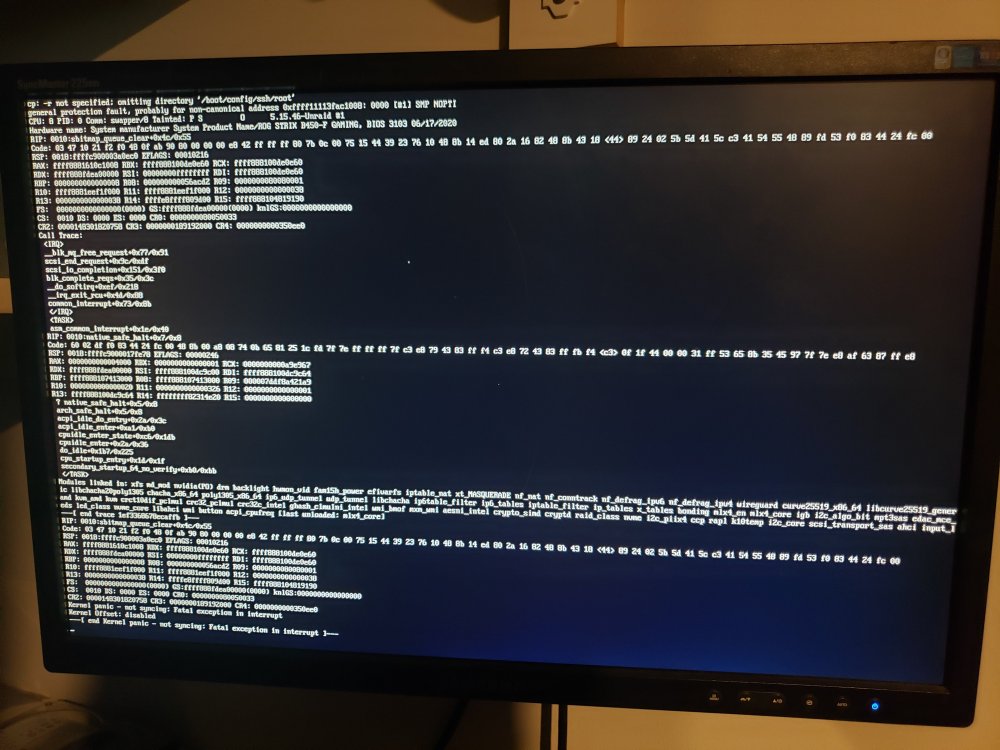
update. it crashed again, and again there's nothing in the syslog. ill upload anyway, along with a picture of the console log...unfortunately the top of the log is cut off witch is a shame as it probably has what caused the crash in it, but the console wont scroll up so here's what I've got hope this can help a bit more? syslog
-
i thought that was weird too. this is the first time I've noticed that it hasn't logged the traces. when it crashes again (if it crashes again...) illl grab the current syslog and see if it has any insight *edit* the only thing i can see different is beside the status in the bottom corner is it says "starting libvertwol....." even though ive got vm's turned off
-
I've looked at my syslog quite a lot and i will say again there wasn't anything in it that indicated a start of a crash or any errors, just messages every hour or so saying its not running mover due to parity check/rebuild. i also cleared the syslog as it apparently had been continuing to log for a few weeks without being cleared. i also have another script that's supposed to save each syslog from boot to shutdown/crash to a separate file i still have that one, but like i said it doesn't appear to have any info, it also only starts once the gui starts (at least until i realized and fixed that by adding it to the go file last night). i will upload the current one aswell as it includes boot file ending with 415 is from yesterday from gui load to crash, and 595 is todays boot up syslog-1656641415 syslog-1656684595
-
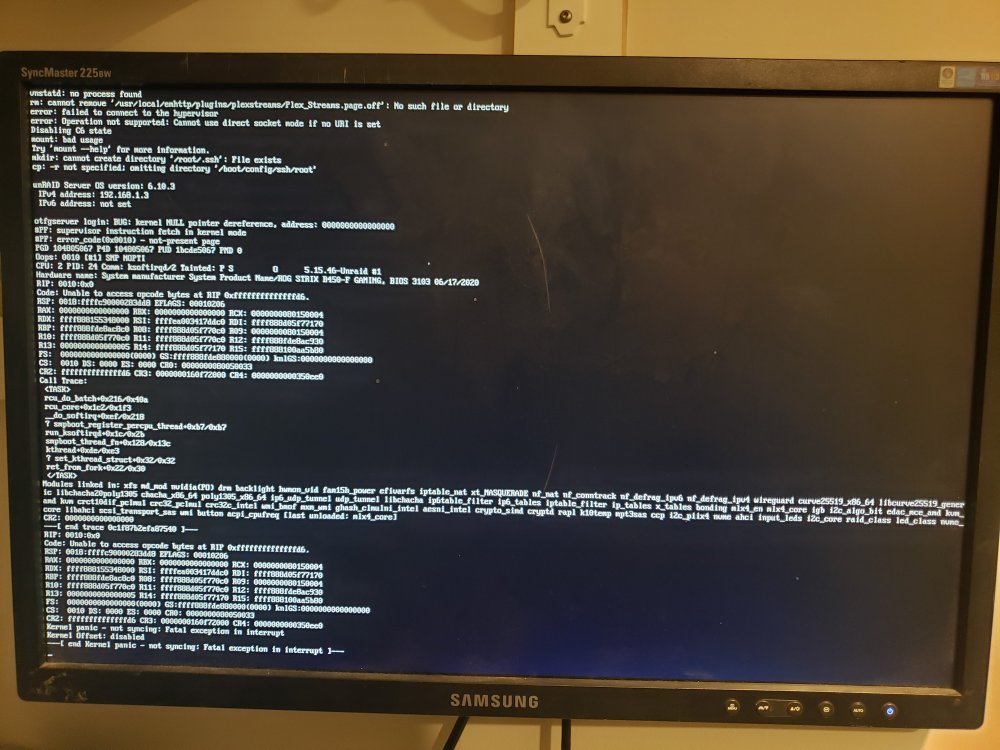
i just got back in town last night, updated unraid and let it rebuild again. i apparently had syslog mirroring already on so when i got up this morning and it had crashed again i did check it, but it didnt show anything more than normal operating messages the last hour before it crashed were just "not running mover due to parity check/rebuild" and stuff like that. i did take a picture of my monitor hooked up to the server so here's the crash log it was displaying. hope this helps some, if not i will upload the syslog and the message on screen next time it crashes
-
i figured that i would still have to do a rebuild but updating shouldn't cause any data loss right?


