Jurak
Members
-
Joined
-
Last visited
Everything posted by Jurak
-
This is a friend of mines server. His docker container keeps filling up. I have verified that all of his docker containers are mapped correctly but its still happening. I know im missing something. His diagnostics file is attached. Thanks matrix-diagnostics-20211116-0615.zip
-
They have responded in that feature request with some questions if you havent already been notified of this already. lol
-
I look forward to the new release when it comes. Thanks for all you do on this. It has really reduced the size of my library by over 30tb in size.
-
They have unfortunately closed my feature request already stating not enough information and as something they wont support. but here is the link maybe coming from you as the developer you might get more traction with it. https://github.com/Sonarr/Sonarr/issues/4744#issuecomment-965854296
-
So this is just a feature request. Add the ability for sonarr and radarr to notify Unmanic of new files to convert. I have already added this as a feature request in sonarr. It would be nice to have as my library has already been scanned and everything converted to have sonarr and radarr notify unmanic of new files instead of it just scanning every few hours for new files. My library is very large and it takes a long time for it to scan everything.
-
No I dont
-
Thank you for your help I appreciate it. Array started and share are back and the rebuild has started again. Hopefully i dont lose power again. Last time i rebooted all the shares were showing but then disappeared. So if that happens again I will get diag again and post it. But at this time its working again. Thank you again for your help.
-
Thanks so after running that im good to restart the array and start the rebuild?
-
Ok power came back up. Ran the check file system on disk 7 and got this. ERROR: The filesystem has valuable metadata changes in a log which needs to be replayed. Mount the filesystem to replay the log, and unmount it before re-running xfs_repair. If you are unable to mount the filesystem, then use the -L option to destroy the log and attempt a repair. Note that destroying the log may cause corruption -- please attempt a mount of the filesystem before doing this. How to i replay the log?
-
When my power comes back up do I need to start and wait for the parity to finish or just start it in maintenance mode and run the file system check?
-
And my power just went out. I am not having any luck with my server the past few days. ---Sent from my Moto Razer 5g
-
Also just noticed that the drive that is being rebuilt and currently emulated not being emulated as the data on that drive is missing. It was being emulated before and the data was available then I put the new drive in then parity drive rebuild started and now that data is missing.
-
So most of my shares have disappeared. This all started when a drive failed i have replaced it but shares are missing and dockers having issues communicating or unable to perform their normal jobs. Diagnostics attached. Diagnostics.zip
-
I just got the same errors again. I will get the syslog again later as im working but if any one knows why this keeps happening it would be great to figure that out.
-
Yay that fixed it. As always squid you are amazing. Thanks for the fast replies.
-
syslogThanks Here is that log.
-
I am getting the below errors on my server. It shows up in the main page and many more showing in the dashboard for some of my drives. Some pages do load but unable to click on anything. Other pages do load and part of the options on the page are clickable. Due to this getting diagnostics is one of the parts that is not clickable. I have booted up into safe mode and getting the same problems and errors. I have tried different browsers and have cleared my cache and cookies on each of them. Following another thread it stated to delete or rename the config/smart-one.cfg, I have tried that and still getting this issue. Any help would be appreciated. This shows up on the main tab. Warning: syntax error, unexpected '"' in /boot/config/smart-one.cfg on line 3 in /usr/local/emhttp/plugins/dynamix/include/CustomMerge.php on line 20 Warning: Invalid argument supplied for foreach() in /usr/local/emhttp/plugins/dynamix/include/CustomMerge.php on line 21 This shows up on the dashboard. Warning: syntax error, unexpected '"' in /boot/config/smart-one.cfg on line 3 in /usr/local/emhttp/plugins/dynamix/include/CustomMerge.php on line 20 Warning: Invalid argument supplied for foreach() in /usr/local/emhttp/plugins/dynamix/include/CustomMerge.php on line 21 Parityactive30 Chealthy- Warning: Use of undefined constant disk - assumed 'disk' (this will throw an Error in a future version of PHP) in /usr/local/emhttp/plugins/dynamix/include/DashUpdate.php on line 132 Warning: Illegal string offset 'type' in /usr/local/emhttp/plugins/dynamix/include/DashUpdate.php on line 132 Disk 1active29 Chealthy87% Warning: Use of undefined constant disk - assumed 'disk' (this will throw an Error in a future version of PHP) in /usr/local/emhttp/plugins/dynamix/include/DashUpdate.php on line 132 Warning: Illegal string offset 'type' in /usr/local/emhttp/plugins/dynamix/include/DashUpdate.php on line 132 Disk 2active30 Chealthy88% Warning: Use of undefined constant disk - assumed 'disk' (this will throw an Error in a future version of PHP) in /usr/local/emhttp/plugins/dynamix/include/DashUpdate.php on line 132 Warning: Illegal string offset 'type' in /usr/local/emhttp/plugins/dynamix/include/DashUpdate.php on line 132 Disk 3active29 Chealthy83% Warning: Use of undefined constant disk - assumed 'disk' (this will throw an Error in a future version of PHP) in /usr/local/emhttp/plugins/dynamix/include/DashUpdate.php on line 132 Warning: Illegal string offset 'type' in /usr/local/emhttp/plugins/dynamix/include/DashUpdate.php on line 132 Disk 4active28 Chealthy88% Warning: Use of undefined constant disk - assumed 'disk' (this will throw an Error in a future version of PHP) in /usr/local/emhttp/plugins/dynamix/include/DashUpdate.php on line 132 Warning: Illegal string offset 'type' in /usr/local/emhttp/plugins/dynamix/include/DashUpdate.php on line 132 Disk 5active27 Cerror86% Warning: Use of undefined constant disk - assumed 'disk' (this will throw an Error in a future version of PHP) in /usr/local/emhttp/plugins/dynamix/include/DashUpdate.php on line 132 Warning: Illegal string offset 'type' in /usr/local/emhttp/plugins/dynamix/include/DashUpdate.php on line 132 Disk 6active30 Cerror78% Warning: Use of undefined constant disk - assumed 'disk' (this will throw an Error in a future version of PHP) in /usr/local/emhttp/plugins/dynamix/include/DashUpdate.php on line 132 Warning: Illegal string offset 'type' in /usr/local/emhttp/plugins/dynamix/include/DashUpdate.php on line 132 Disk 7active25 Chealthy78% Warning: Use of undefined constant disk - assumed 'disk' (this will throw an Error in a future version of PHP) in /usr/local/emhttp/plugins/dynamix/include/DashUpdate.php on line 132 Warning: Illegal string offset 'type' in /usr/local/emhttp/plugins/dynamix/include/DashUpdate.php on line 132 Disk 8active29 Chealthy80% Warning: Use of undefined constant disk - assumed 'disk' (this will throw an Error in a future version of PHP) in /usr/local/emhttp/plugins/dynamix/include/DashUpdate.php on line 132 Warning: Illegal string offset 'type' in /usr/local/emhttp/plugins/dynamix/include/DashUpdate.php on line 132 Disk 10active28 Cerror67% Warning: Use of undefined constant disk - assumed 'disk' (this will throw an Error in a future version of PHP) in /usr/local/emhttp/plugins/dynamix/include/DashUpdate.php on line 132 Warning: Illegal string offset 'type' in /usr/local/emhttp/plugins/dynamix/include/DashUpdate.php on line 132 Disk 12active28 Chealthy76% Warning: Use of undefined constant disk - assumed 'disk' (this will throw an Error in a future version of PHP) in /usr/local/emhttp/plugins/dynamix/include/DashUpdate.php on line 132 Warning: Illegal string offset 'type' in /usr/local/emhttp/plugins/dynamix/include/DashUpdate.php on line 132 Disk 13active28 Chealthy56% Warning: Use of undefined constant disk - assumed 'disk' (this will throw an Error in a future version of PHP) in /usr/local/emhttp/plugins/dynamix/include/DashUpdate.php on line 132 Warning: Illegal string offset 'type' in /usr/local/emhttp/plugins/dynamix/include/DashUpdate.php on line 132 Disk 14active29 Chealthy56% Warning: Use of undefined constant disk - assumed 'disk' (this will throw an Error in a future version of PHP) in /usr/local/emhttp/plugins/dynamix/include/DashUpdate.php on line 132 Warning: Illegal string offset 'type' in /usr/local/emhttp/plugins/dynamix/include/DashUpdate.php on line 132 Disk 18active27 Chealthy83% Warning: Use of undefined constant disk - assumed 'disk' (this will throw an Error in a future version of PHP) in /usr/local/emhttp/plugins/dynamix/include/DashUpdate.php on line 132 Warning: Illegal string offset 'type' in /usr/local/emhttp/plugins/dynamix/include/DashUpdate.php on line 132 Disk 19active31 Chealthy87% Warning: Use of undefined constant disk - assumed 'disk' (this will throw an Error in a future version of PHP) in /usr/local/emhttp/plugins/dynamix/include/DashUpdate.php on line 132 Warning: Illegal string offset 'type' in /usr/local/emhttp/plugins/dynamix/include/DashUpdate.php on line 132 Disk 20active27 Chealthy82% Warning: Use of undefined constant disk - assumed 'disk' (this will throw an Error in a future version of PHP) in /usr/local/emhttp/plugins/dynamix/include/DashUpdate.php on line 132 Warning: Illegal string offset 'type' in /usr/local/emhttp/plugins/dynamix/include/DashUpdate.php on line 132 Appdatacache2.44 GB used of 120 GB (2.0 %) DEVICESTATUSTEMPSMARTUTILIZATION Warning: syntax error, unexpected '"' in /boot/config/smart-one.cfg on line 3 in /usr/local/emhttp/plugins/dynamix/include/CustomMerge.php on line 20 Warning: Invalid argument supplied for foreach() in /usr/local/emhttp/plugins/dynamix/include/CustomMerge.php on line 21 Appdatacacheactive29 Chealthy2% Warning: Use of undefined constant disk - assumed 'disk' (this will throw an Error in a future version of PHP) in /usr/local/emhttp/plugins/dynamix/include/DashUpdate.php on line 132 Warning: Illegal string offset 'type' in /usr/local/emhttp/plugins/dynamix/include/DashUpdate.php on line 132 0000
-
Ok after uninstalling and reinstalling the docker multiple times it is now working.
-
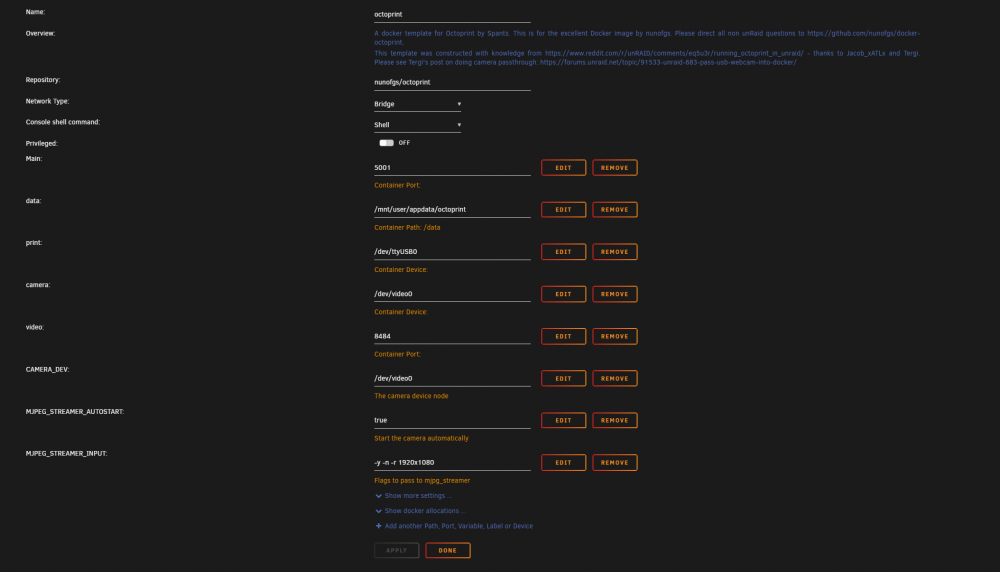
Below is a snapshot of my container config. The light does turn on on the webcam but no image when i test the stream.
-
I have followed every forum I can find to try to get my webcam to work. Any help would be appreciated. Please let me know of there are any screen shots or anything you need from me to help. I can see that the Webcam is recognized by UnRaid. Thanks in advance.
-
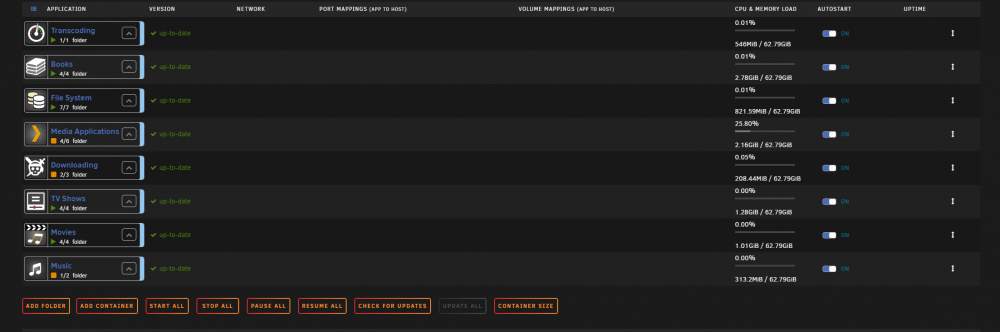
Never mind i figured it out and its now displaying the way it was before.
-
So a few minutes ago this started happening with the docker folders. Image below. I have uninstalled the plugin and reinstalled it and it just stays like this. Let me know if there is any other info you need to help me with this.
-
Yes i have had a couple since this started. The web gui become faulty to the point that i cant do anything. The array become non responsive. But i think i have fixed it. It looks like the USB that UnRaid lives on become corrupt. Once I created a new OS USB everything is now working Fine so far. It has been 12 hours since have done that and the parity is running and the array is running fine. So far.
-
So is there any thing in the diagnostics that i uploaded that would point to anything software or hardware related so i can narrow this down? No there is no software related things that i have changed lately.
-
Its a 1000watt power supply and no hardware changes in many months.