Johan1111
Members
-
Joined
-
Last visited
Everything posted by Johan1111
-
Hello there is any way to show the temps of the cpu currently doesn't show any reading. tower-diagnostics-20200204-0147.zip
-
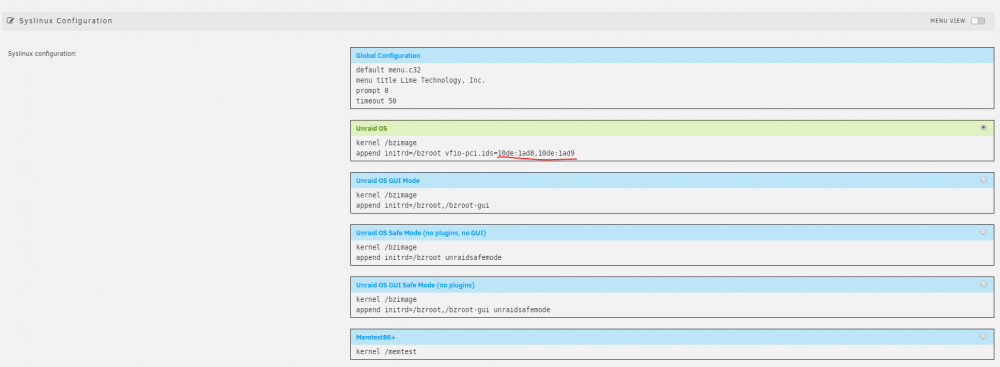
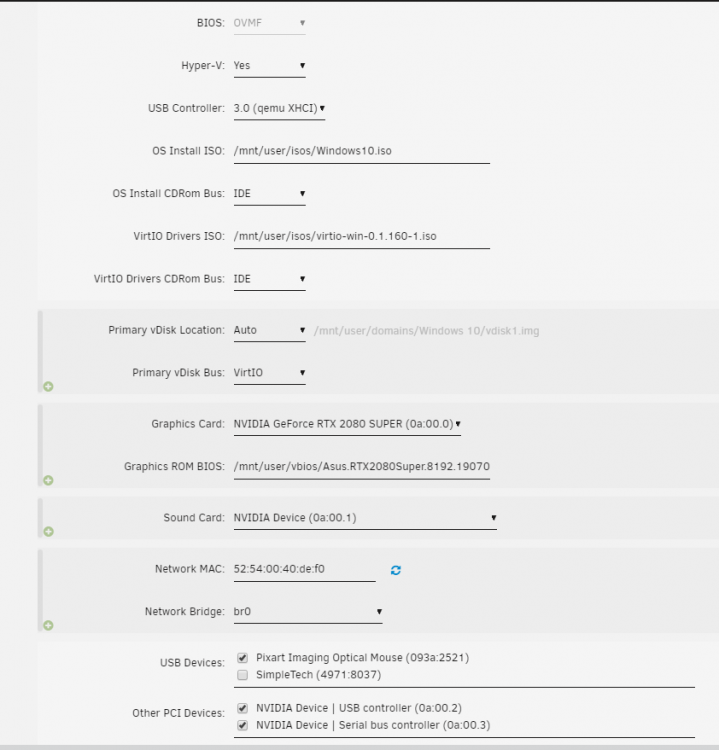
Hello Everyone for those who has ASUS ROG Strix GeForce RTX 2080 Super here it's the vbios i've modified to work with gpu passthrough just de-attach the type-c usb controller and the Serial bus controller from the unraid boot by looking at your GPU IOMMU group onto TOOLS > System Devices. Asus.RTX2080Super.8192.190709_dump.rom and then go to your Flash device settings and add those GPU IOMMU ID's to de-attach them from the unraid boot MAIN > Click on Flash Boot Device > Scroll down and add them to the Unraid OS separed by comma append initrd=/bzroot vfio-pci.ids=XXXX:XXXX,XXXX:XXXX click on apply, done and reboot IMPORTANT NOTE: don't forget to pass the nvidia HDMI sound card as well, otherwise will not work. here is my xml of my win 10 vm if you need it windows10_2080super_passthrough.xml