




Skip to content
View in the app

A better way to browse. Learn more.

Unraid

A full-screen app on your home screen with push notifications, badges and more.

To install this app on iOS and iPadOS
  1. Tap the Share icon in Safari
  2. Scroll the menu and tap Add to Home Screen.
  3. Tap Add in the top-right corner.
To install this app on Android
  1. Tap the 3-dot menu (⋮) in the top-right corner of the browser.
  2. Tap Add to Home screen or Install app.
  3. Confirm by tapping Install.

Robin AK

Members
  • Joined

  • Last visited

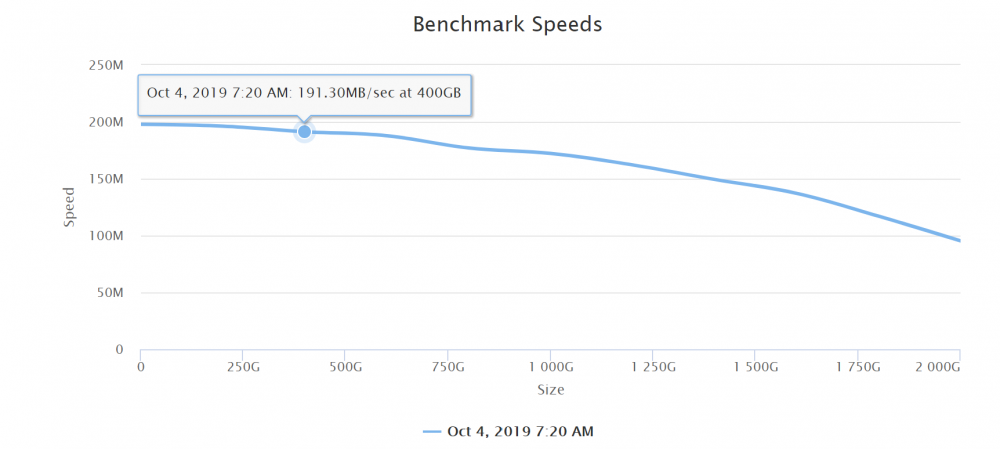
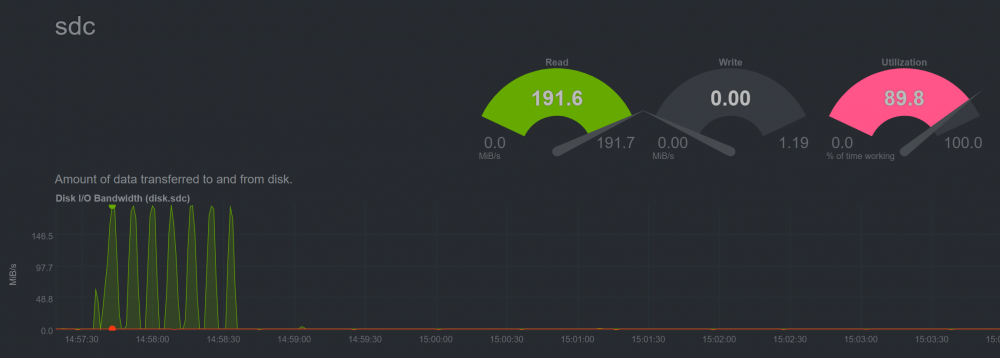
  1. Hello, just signed up to say thanks and share my config. I was having similar issues with slow write speeds, around 25 MB/s but on benchmarks it peaks around 200 MB/s Now with disk cache enabled peaks around 190 MB/s both read and write, without using the cache drive and with turbo write enabled. sdparm --set=WCE /dev/sdb From NetData running in a docker container, before the read and write was at 100% utilization. Im using a DELL PERC H330 controller (even updated the firmware from unraid), tested both RAID (Physical disk mode) and HBA mode without any difference. With 4x Dell / Seagate model: ST2000NM0018
Account

Navigation

Search

Search

Configure browser push notifications

Chrome (Android)
  1. Tap the lock icon next to the address bar.
  2. Tap Permissions → Notifications.
  3. Adjust your preference.
Chrome (Desktop)
  1. Click the padlock icon in the address bar.
  2. Select Site settings.
  3. Find Notifications and adjust your preference.