





mrtrilby
Members
-
Joined
-
Last visited
-
Thank you, this worked perfectly!
-
I've had a 6.11.5 server running for a long time. Then I left for a month, and while I was gone, the docker image somehow filled up. I increased the size of the docker image file to 40GB, but the docker images mostly won't start, logs show different disk issues. However, everything seems to be running fine, except for most dockers. A few sample error messages provided below. Please advise on what to do..? [cont-init ] 54-db-upgrade.sh: executing... [cont-init ] 54-db-upgrade.sh: terminated successfully. [cont-init ] 55-nginx-proxy-manager.sh: executing... [cont-init ] 55-nginx-proxy-manager.sh: sed: write error [cont-init ] 55-nginx-proxy-manager.sh: terminated with error 4. 024-10-07 7:14:39 0 [ERROR] mariadbd: Error writing file './ddl_recovery.log' (Errcode: 28 "No space left on device") 2024-10-07 7:14:39 0 [ERROR] Aborting 2024-10-07 7:14:39 0 [ERROR] mariadbd: Error on close of '(null)' (Errcode: 9 "Bad file descriptor") 2024-10-07 06:48:42-07:00 [Note] [Entrypoint]: Entrypoint script for MariaDB Server 1:11.3.2+maria~ubu2204 started. 2024-10-07 06:48:46-07:00 [Note] [Entrypoint]: MariaDB upgrade not required 2024-10-07 07:09:27-07:00 [Note] [Entrypoint]: Entrypoint script for MariaDB Server 1:11.3.2+maria~ubu2204 started. 2024-10-07 07:09:27-07:00 [Note] [Entrypoint]: MariaDB upgrade not required 2024-10-07 07:14:35-07:00 [Note] [Entrypoint]: Entrypoint script for MariaDB Server 1:11.3.2+maria~ubu2204 started. 2024-10-07 07:14:39-07:00 [Note] [Entrypoint]: MariaDB upgrade not required tower-diagnostics-20241007-1722.zip
-
Ok, so I found the file vfio-pci.cfg under the config folder on the USB flash drive. It contained a line starting with BIND=, followed by these IDs that I listed above. I just deleted that file, and the server booted fine. I have a copy of that file just in case, but it seems no new file with the same name has been created. I'm assuming this binds the GPUs to certain IDs? Anyway, my VM with GPU passthrough is working like before, and server is thankfully doing fine.
-
Thank you, that was absolutely the case..
-
My USB flash died last week, but I got the server up again. However, in order to split IOMMU groups to enable sound in my VM, I enabled ACS override for downstream according to SpaceInvader One's excellent video from about 16:00. I believe this is what I had to enable previously in order to get sound working. However, the server will no longer boot. It starts from the USB, and then stops after the lines I have printed below: vfio-pci 0000:01:00.0 vgaarb: changed VGA decodes: olddecodes=io+mem,decodes=io+mem:owns=none vfio-pci 000:0b:00.0 vgaarb: changed VGA decodes: olddecodes=io+mem,decodes=io+mem:owns=io+mem I took the USB drive to another computer, edited syslinux.cfg and removed the acs override option that I added, but the issue is the same... Anyone able to shed light on this?
-
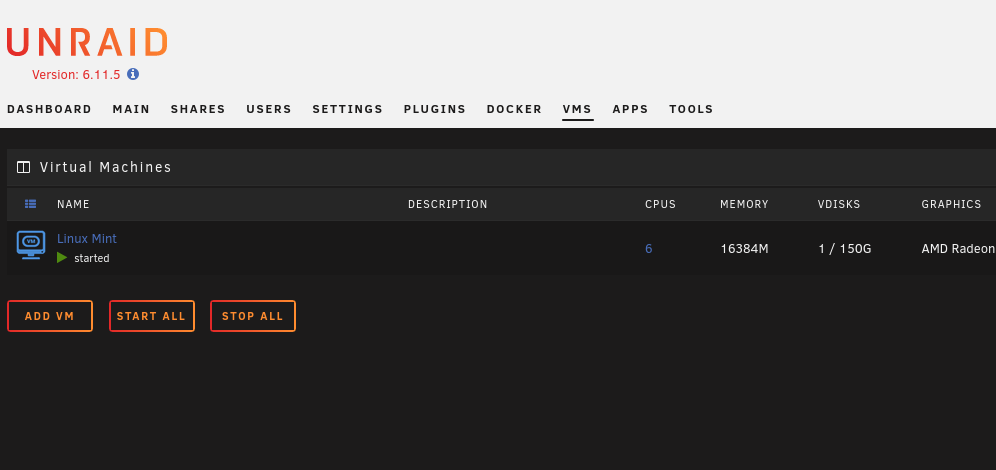
After my USB flash ended up dying a week ago, I reinstalled 6.11.5. Thanks to the forums here, I managed to get things running again, but I have a couple of issues. For example, on the VMs tab, I can see the Virtual Machine that I recreated, but there are no other options to add USB devices to the VM like I did previously. Before, I could locate attached USB devices from a dropdown list and choose Attach, to attach it to the currently running VM. Why is this no longer visible below the list of VMs? This is the same in any browser.
-
Good to know, thanks!
-
You were right about me using Firefox. Tried from another computer, different browser, no problem at all! Parity is rebuilding. Thank you so much for your help!
-
I tried that, but it says the configuration is stale, and the array won't start. I've tried setting New config in Tools, but it doesn't seem to help. What to do then..?
-
Thank you, that is very helpful! One of them is indeed bigger, so thank you so much for pointing out those details. I'll run the correcting parity check. I had a stressful day in many regards, not even counting the death of my Unraid server, and at least the help I received today eased the pain. Thanks to all, hopefully it'll be up again soon!
-
That said, following the guidance, I cannot determine which of the 2 disks was the parity drive, since I can mount both disks, following either of the 2 options given in the documentation. How can I find out which is the data disk and which is the parity..?
-
I have to commend Lime Tech here, I already received the new license key!
-
Thanks for reply. The credentials work for logging in to the forums and to the Connect page, so I doubt they are incorrect..? Thanks for the manual alternative, I've filled out the form. Not so happy to potentially have to wait up to 4 days... Hopefully they can make it happen faster.
-
Hi. Please help with how I can replace the flash key. Following the way to do it I get issues with login. On the Unraid server I am asked to use another client because "Unfortunately Firefox in Unraid's OS GUI mode causes issues with the webGUI communicating with this pop-up windows. Please use an alternative client to access the Unraid webGUI to interact with your account." If I do it from another machine, the login simply doesn't work, it just sends me back to login after supplying the credentials.
-
Hi. I wake up to a dead USB drive that had Unraid OS on it. I have run flash backup many times from the My Servers page (now rebranded to Unraid Connect..?) but there is no backup to be found there now. Isn't the online My Servers supposed to store your last flash backup? If not, what's the point of it..? So what do I do now..?

