




Skip to content
View in the app

A better way to browse. Learn more.

Unraid

A full-screen app on your home screen with push notifications, badges and more.

To install this app on iOS and iPadOS
  1. Tap the Share icon in Safari
  2. Scroll the menu and tap Add to Home Screen.
  3. Tap Add in the top-right corner.
To install this app on Android
  1. Tap the 3-dot menu (⋮) in the top-right corner of the browser.
  2. Tap Add to Home screen or Install app.
  3. Confirm by tapping Install.

streetsurfer

Members
  • Joined

  • Last visited

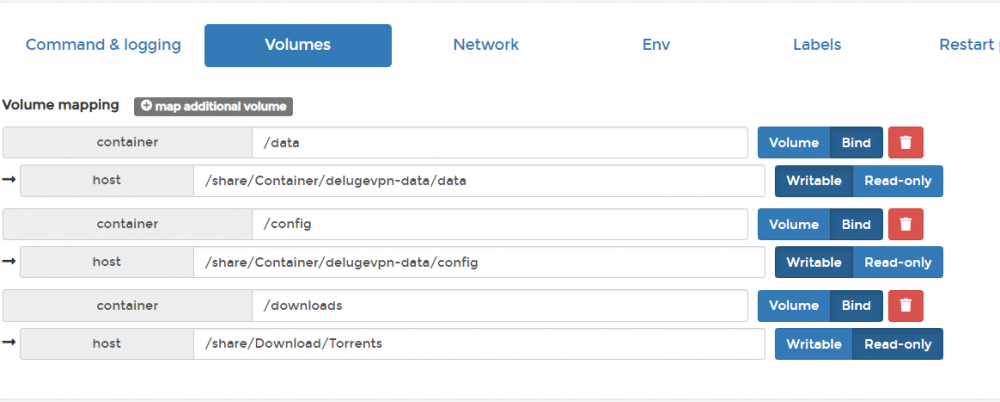
  1. That was super stupid, must have misclicked and the colors werent helping! THANKS!!!! needed that second look. lol THe system is using "portainer" docker container manager
  2. streetsurfer changed their profile photo
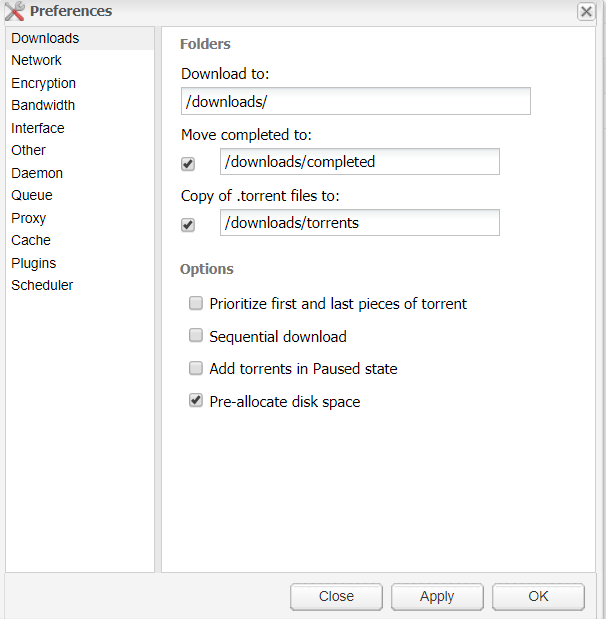
  3. Having some issues with getting files downloaded. Seems like its having folder permissions?? its showing free allocated space on the bottom right of deluge. So it seems like its connected to the volume map properly. PUID and PGID set to 1000 for dockuser and dockgroup
Account

Navigation

Search

Search

Configure browser push notifications

Chrome (Android)
  1. Tap the lock icon next to the address bar.
  2. Tap Permissions → Notifications.
  3. Adjust your preference.
Chrome (Desktop)
  1. Click the padlock icon in the address bar.
  2. Select Site settings.
  3. Find Notifications and adjust your preference.