





weezzer008
Members
-
Joined
-
Last visited
Everything posted by weezzer008
-
Doing that now.... Thank you for all your help! it is truly appreciated!
-
Ok, so I found the bad stick of RAM and now am running with the remaining good 3 sticks (12GB). However now I still have the problem of my cache pool being either read-only or full. It is not reporting as full and I'm unsure of how to get it out of this state. Balances fail due to being read-only and the docker service "failed to start" even after deleting the docker.img and rebooting. Any ideas where to go from here? htpc-diagnostics-20220302-0855.zip
-
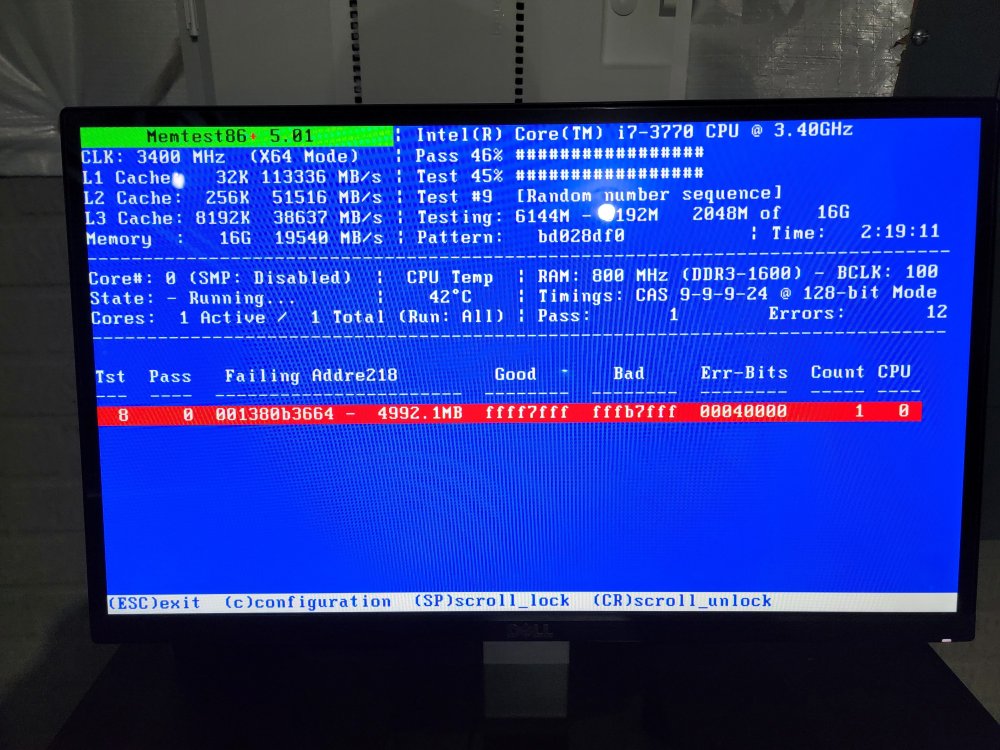
Ok so already encountered some errors. Is there a way to determine which stick out of 4 this error is on? and is as simple as removing the bad ram and rebooting?
-
Running Memtest now. Will run for the rest of the day and report back. Thank you for your quick response JorgeB.
-
A couple days ago I started having issues with my Docker containers not working properly. I saw on the dashboard that Memory “Log” was at 100%. I rebooted and it resolved the issues for a while but it quickly returned. I looked online and found some people who have had luck deleting the docker image file and recreating. I tried that too but it didn’t help. I saw other posts stating to “re-balance” the cache pool but when I try to, it says my cache is “read-only” or full. I also saw that error. My cache seems to be reporting that it is not full but perhaps this is not the case? I have two SSD’s in a cache pool, 1.) Samsung 250GB and 2.) OCZ 128GB. I think my issue is somewhere in the cache but I’m not sure. Is anyone able to help? Diagnostic attached. htpc-diagnostics-20220228-1201.zip
