




Skip to content
View in the app

A better way to browse. Learn more.

Unraid

A full-screen app on your home screen with push notifications, badges and more.

To install this app on iOS and iPadOS
  1. Tap the Share icon in Safari
  2. Scroll the menu and tap Add to Home Screen.
  3. Tap Add in the top-right corner.
To install this app on Android
  1. Tap the 3-dot menu (⋮) in the top-right corner of the browser.
  2. Tap Add to Home screen or Install app.
  3. Confirm by tapping Install.

josto

Members
  • Joined

  • Last visited

  1. josto replied to GTP's topic in General Support
    Got it. Thanks a lot for your help!
  2. josto replied to GTP's topic in General Support
    Crap.. I was away for a couple days, and just got the error messages on my Telegram. Well, I guess I'm gonna buy a new disk then. By the way, what should I have done differently? Could I have saved the disk?
  3. josto replied to GTP's topic in General Support
    Of course. Sorry I forgot. Here it goes, thanks so much! tower-diagnostics-20230313-1904.zip
  4. josto replied to GTP's topic in General Support
    Things got worse, the disk is now disabled. Does this means it is broken and I need to replace it?

  5. josto replied to GTP's topic in General Support
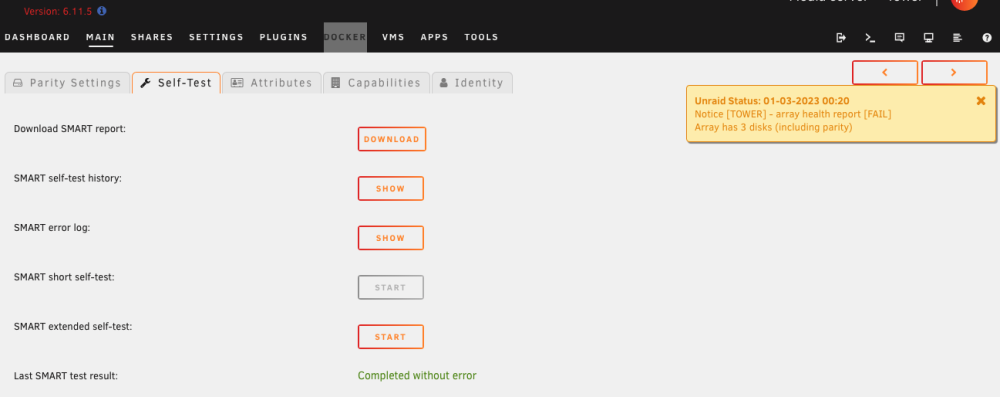
    That's good to know, thanks. I ran the extended SMART Test, it completed without errors. Still, there appeared the notification "Array health report (FAIL)". Isn't that contradictory, what am I missing here? I'll attach the result if you could help me understand it. Thanks tower-smart-20230228-1844.zip
  6. josto started following Disk read Error
  7. josto replied to GTP's topic in General Support
    I have a Disk Error and I think it might be due to an unclean shutdown. So the parity-disk shows errors, but still it has green dot in front and the last parity check completed finding 0 errors. But if I click on "Disk Log Information" I get error messages. How should I fix this? Thank you very much for any help! P.S. I attach the log file tower-diagnostics-20230228-1749.zip

Account

Navigation

Search

Search

Configure browser push notifications

Chrome (Android)
  1. Tap the lock icon next to the address bar.
  2. Tap Permissions → Notifications.
  3. Adjust your preference.
Chrome (Desktop)
  1. Click the padlock icon in the address bar.
  2. Select Site settings.
  3. Find Notifications and adjust your preference.