





ajguerre
Members
-
Joined
-
Last visited
-
Hi @yayitazale, I have 2 Coral TPU USB installed in UNRAID. Do I need to install the Coral Drivers in UNRAID or that is just for PCI/M.2 TPUs? Also, how do I passthrough the USB TPUs to the Frigate Docker in UNRAID? Thanks for your help!
-
Hi @JorgeB After countless hours of troubleshooting, I found the culprit! I have a Ryzen Threadripper 3990X and I read somewhere that the "Global C-States Control" setting in the BIOS should be disabled. Well, that is WRONG. If I disable it, then I get extremely slow parity sync speeds (2-4 MB/s!!!!). If I enable the "Global C-States Control" setting in the BIOS, then I go back to my usual parity sync speed of 280 MB/s!!! I think this should be tested and published somewhere for anyone else having this issue! Happy holidays!
-
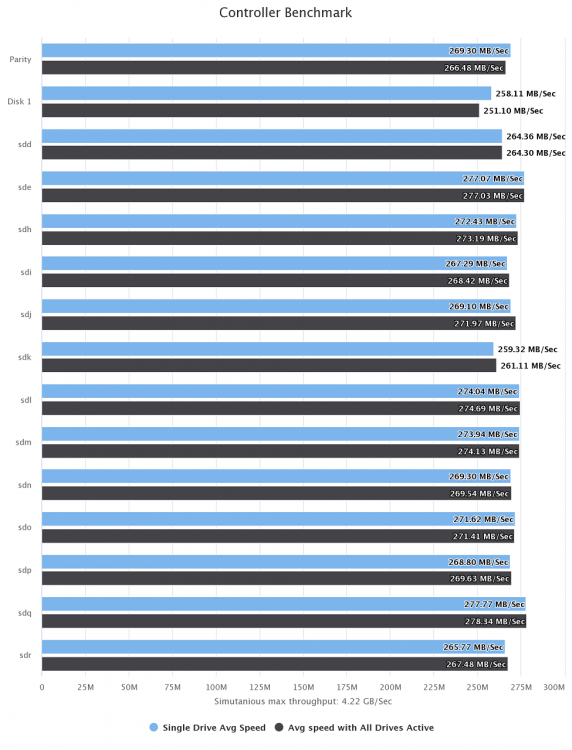
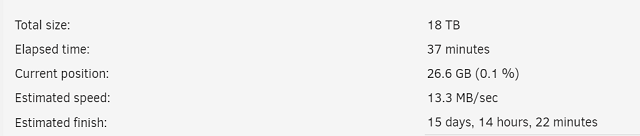
thanks @JorgeB I ran diskspeed and it all looks perfect: Still, when I try to do a new installation the parity sync is extremely slow: I'm at a lost here. I did a full clean installation of unRAID and still the same slow parity sync speeds. Any clues are extremely appreciated!
-
Hi guys, I just finished doing a new installation and I'm getting extremely slow parity sync speeds (~2.0MB/s). Attached please find the diagnostics files. Any help is greatly appreciated it. Best regards. server-diagnostics-20211220-0202.zip

