





- Annoyance
I'm not sure why mcelog is error-ing out. Nor why a machine check event logs to dmesg on an AMD system... As you can see here, the SGC Unriad box eventual hits a machine check event. mcelogs error about a module to use even thought this module is available and in use seen via tools system drivers. ?is there a different mcelog command to see the system error???
this system was up longer than a week and then error-ed with a machine check event...
I find that any amd system with a processor from zen 1 - zen 3 system when attempting to use mcelog received error unsupported processor. use module xyz...
This is Continue off a few forum post. From system error to FCP post to nerd tools post for mcelog to general support and now this bug report as something doesn't seem right here.
A reboot seems to fix all issues, except that mcelog still errors out with unsupported processor...
... Can't seem to find old FCP suport forum post that needs to be updated ...
22 hours ago, bmartino1 said:So my friend's system today started to randomly do this error. FCP says machine event. So I decided to run diagnostic.
Rebooted the server and had a server fault kernel panic. Boot to safe mode success, fix mod changes and rebooted system to normal boot and its up no errors...
Not sure what setting changed or issues with a system staying up on an AMD platform that is causing this issue.
My friend also has 3 unraid licenses and Mutiple Computer type systems, but done't have a forum account...
This machine is called SGC names from star trek.
There seems to be a problem with this kernal module driver...
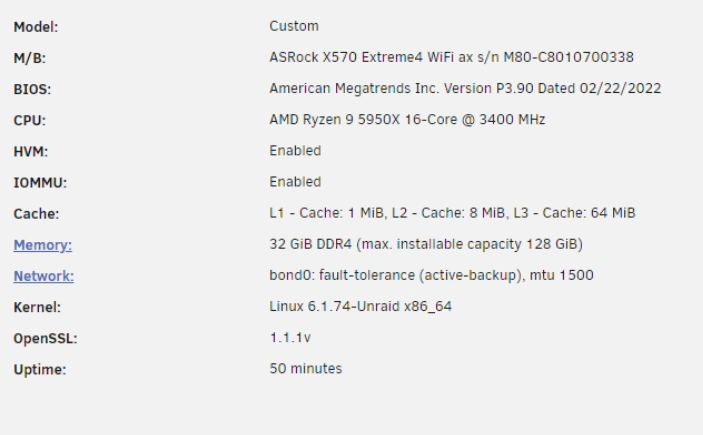
Unirad 6.12.8 > system drivers:

but terminal shows error:

Thoughts ideas?
after_reboot_all_systems_go_-_sgc-diagnostics-20240326-1658.zip 191.46 kB · 0 downloads sgc-diagnostics-20240326-1157.zip 181.73 kB · 0 downloads

