sp33dy905
Members
-
Joined
Everything posted by sp33dy905
-
Nevermind.... I found it. Management Access -> Scroll down a bit until you see the SSH settings.
-
Hello, is there a way for the SSH Daemon to auto start on boot, and to keep the port instead of reverting back to default? I've already enabled the SSH Service but every reboot it doesn't autostart and the port goes back to 22. Thanks.
-
Ah, didn't even know a new guide released. I guess my google-fu really sucks from time to time. Thanks for that. I'll try it out once I get the additional parts.
-
Hello all! I'm in the process of buying upgrade parts for my server and I just have a question. I currently use a 1050 ti for Plex transcoding and will be using the 12/13th gen Intel for QSV. Since I have the NVIDIA Driver installed for the transcoding, if I wanted to reuse the GPU for VMs, would I just: 1. Stop the Plex container and switch the Visible Devices from NVIDIA to Intel's iGPU. 2. Uninstall the NVIDIA Driver. 3. Restart the system. Is there anything particular that I'm missing? Thanks.
-
Thanks for your insight. Hopefully when the stable release of 6.10 is out, it's all fixed. I guess it's time to play the waiting game lmao.
-
So, just by skimming through this thread, for stability I should go for 10th gen for now, or wait hopefully for a couple of weeks in order for 12th gen to stabilize? I want to upgrade my hardware, so I can start storing h265/4k content on my server. Would 12th gen Intel even work on 6.9.2?
-
Hello again, So I did some testing on my end, and I got it to work, here's what I've found/learned: 1. It'll still work on smb encrypt 2. To do test deletions, it has to be a file that is already on the share for at least 15-20 mins. (Which is probably why I thought I couldn't get it to work in the first place) Thanks again.
-
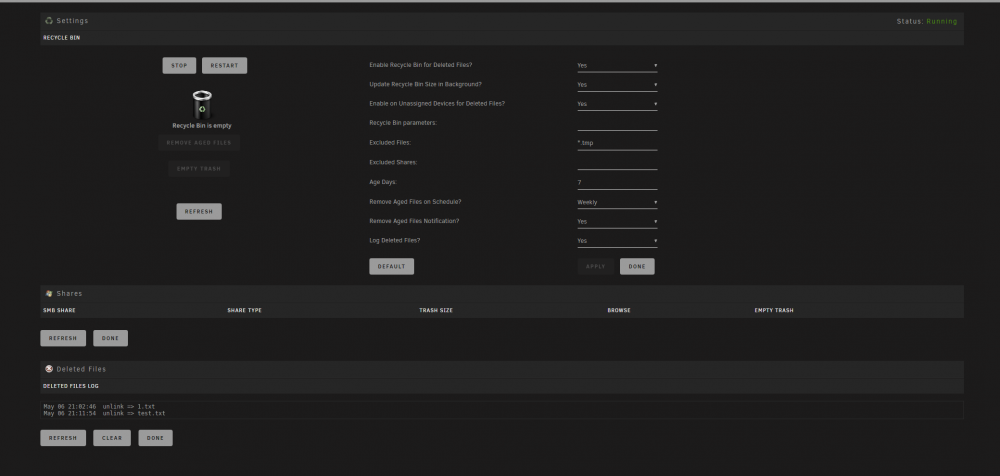
Evening all, I'm having trouble getting this plugin to work. The Recycling bin folder isn't created on any of my shares (I thought it would be a permission case, but when i checked one of my public shares (i.e My Media share) it still wasn't created), thus files that I'm doing a test delete isn't being saved/created on there. I've checked the settings, and it looks to be fine from what I see. I tried to create the actual folder itself (mkdir //tower/share/.Recycle.Bin), but i think it's being recognized as a regular folder, so it still wouldn't save any deletes there. Here is my current settings: I'll also attach the diagnostics, so it'll be easier for you guys to determine what i'm missing or screwed up on. Any help would be appreciated. Thanks. bigboi-diagnostics-20200506-2113.zip