





sp33dy905
Members
-
Joined
-
One of my VMs isn't an EFI (SeaBIOS), thus it doesn't have a valid nvram to backup, however if I ever need to restore it, it appears it won't restore because it doesn't have nvram? Is there a reason why it's persistent on having nvram, even though it wouldn't have it in the first place?
-
Thanks for this, I noticed on my docker network settings I never had Gateway setup in the first place for one of my VLANS. Either way, after setting one, and disabling bonding (wasn't really being used anyway), and now my Plex container works again. I indeed Profit, thanks.
-
I somewhat have the same issue as yours, but it appears that 7.2.5 broke my docker networking. I had my Plex in a VLAN meant for external access, and for some reason it was no longer accessible through there. Of course if i set the network setting back to bridge, it's accessible, however I would really like it set to a custom IP.
-
Well it looks like I need to wait a bit longer. Hard drive arrived with a big dent. I guess I reminded myself to just buy drives in person instead of online. Return to Newegg here we go.
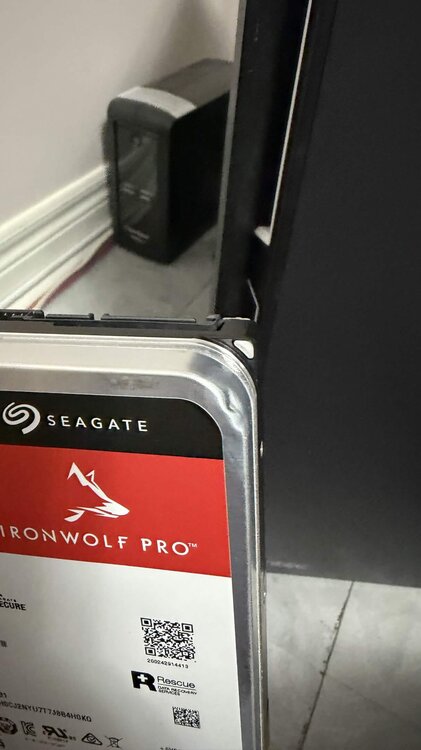
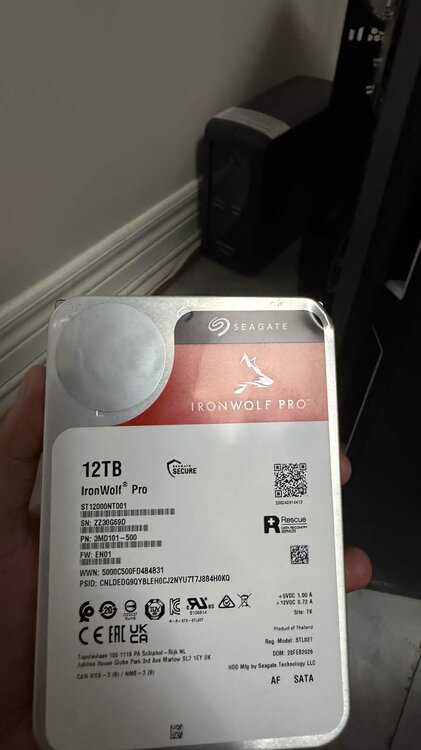
-
Scratch that, looks like there a SpaceInvaderOne video for this situation, I will refer to it once its time for the replacement.
-
Hmm okay, the only reason why I've ran the 2nd check was that I remember seeing threads that another one should be ran until parity is properly synced up (no errors). Maybe I'm misremembering. This current check I'm running is almost completed (95%), I'll let that finish. The replacement drive is out for delivery though, so I'll get that swapped once I can, it is bigger than the failed drive, I was able to grab it practically the same price. Help me understand this though, since Unraid hasn't disabled the drive yet (thankfully), I should be able to just follow the upgrading capacity steps from Unraid's documentation (https://docs.unraid.net/unraid-os/using-unraid-to/manage-storage/array/replacing-disks-in-array/) or should I just perform the "Preparing drive replacement" steps? My gut tells me it's the latter due to the SMART errors.
-
Hello all, I have a drive that's reporting SMART errors. I do have a replacement on the way however the server hung up not too long ago and I had to perform a hard reboot. It did perform a party check after the crash and found an error which corrected. I am performing another correcting parity check and it appears that it found probably that same error which corrected. Now I am aware that the drive causing the SMART errors is probably causing this Parity errors to occur, which I do plan on getting replaced soon hopefully today (I'm at the mercy of the courier), however should I run a final non correcting check prior to replacing the drive? I do have file integrity plugin installed, and it found 1 corruption on the drive, however it's just a recent Plex docker backup that I'm not 100% concerned about as last week's backup still exists (I am still running the hash check so hopefully it remains the same). Update: File hash found another corrupted file, however it's just a Proxmox backup that I'm not too worried about, as that also gets backed up to Cloud. bigboi-diagnostics-20260407-0730.zip
-
Update: It crashed again, so I removed the lone 32GB stick, and right now just running the x2 16gb sticks. So far stable, time will tell. It did perform a parity check and found a few errors, I would assume its the unclean shutdowns that's been happening. I will probably run another one to ensure it's all good.
-
This was happening before 7.2, and it's not really happening every day for me, so I don't think it would be an OS issue. I did do some memory tweakings, I set the speed to 2933mhz, as my memory setup is kinda weird right now (1x32GB, and 2x16), memtest86 had no errors on 1 pass, and updated the bios as well. The best probable cause is to most likely just remove the other 32gb, but with the current market not being the greatest, i dont want to spend $200+ for a single stick of 32gb, and want to keep the "64gb of RAM" setup right now. Right now it's just to wait and see. If there's another crash, ill try just removing the lone 32gb stick.
-
Huh, that's a troubleshooting step i've not heard before, but if it comes to that I'll try it, will probably have to stop half of my containers though. Lowkey wished i spent the money for a workstation motherboard for ECC support but that's for a future upgrade. I believe that my BIOS is also not on the latest, so will also try that first if memtest doesn't come up with something. Might as well try all troubleshooting steps. Thanks for your suggestions so far, really appreaciate.
-
Well that didn't take long, as it just crashed again, I don't even think it was running anything intensive anyway. I am running a proper memtest, but was able to grab remote Syslogs, and grabbed a snippet on when it crashed. Based on what I can decipher, it appears to be hardware issue. I did just double check, and XMP is off, and everything else in BIOS is auto. Still, I really hope it's not the RAM, but let's see what Memtest86 says. crash.log
-
Hello, I've noticed that ever since I had to remove a bad RAM stick earlier in September due to BTRFS errors, I've noticed that the server has started to freeze/hang like once a month now. This can be resolved by doing a hard reboot but with the increase in server freezing i'm starting to get worried. I'm hopeful that the server is just being starved out of memory and all I need to do is buy a RAM stick (hopefully prices get better lol). I've also done a quick and dirty live memory testing with the plugin, but it did not error out right away. Obviously I will need to do a proper testing with memtest86, but I will do that once I get the chance. Any other things I could also check? I've also done VM/Docker CPU pinning to ensure that it doesn't lock up the CPU. bigboi-diagnostics-20251201-1254.zip
-
Hi, just wanted to say that this still works, I was able to setup a container to pass through here for Game Server port forwarding with ease. I was hoping that I could still set a custom IP on the game server container however it looks like it's not supported. I can probably still get away with something similar by setting it on the Unraid server itself.
-
Update. Swapped the cache pool, recopied the files directly to the pool. All dockers seem to be working for now. Had a bit of a kerfuffle when trying to delete the duplicates. Hopefully it's stable for the week.
-
Alright, I'm still not done the testing but it appears that ram stick 3 has issues. I can probably run in a 1x32GB and 2x16GB configuration, will not be ideal, but i can still get 64GB of RAM for the time being while I source another 32GB stick. I will probably still do a drive replacement however, since it's already been shipped from Amazon and it'll arrive in a few hours, might as well get that out of the way and to ensure that BTRFS doesn't go corrupt again. Any tips for a new BTRFS pool would be great. Appreciate the assistance though, I was hoping the RAM would last a lot longer but I guess it being online 24/7 doesn't really help it that much...


