





PeteAsking
Members
-
Joined
-
Last visited
Everything posted by PeteAsking
-
Hi @tehg Can you try this? Delete the 2 new volumes (log and run) you added and instead under extra parameters (use advanced view) edit it to this: --memory=8G --tmpfs /unifi/log --tmpfs /unifi/run
-
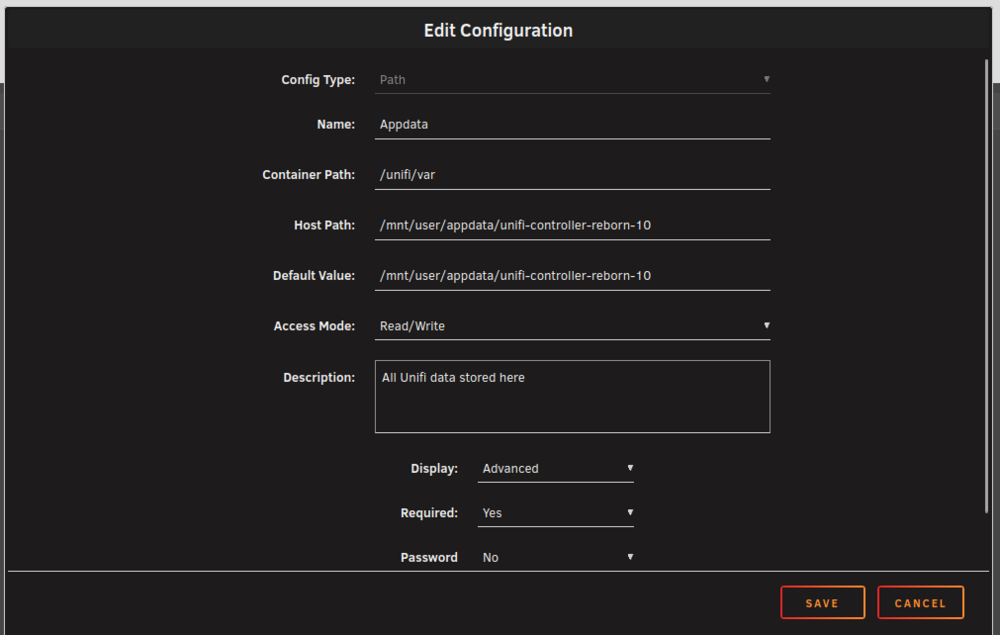
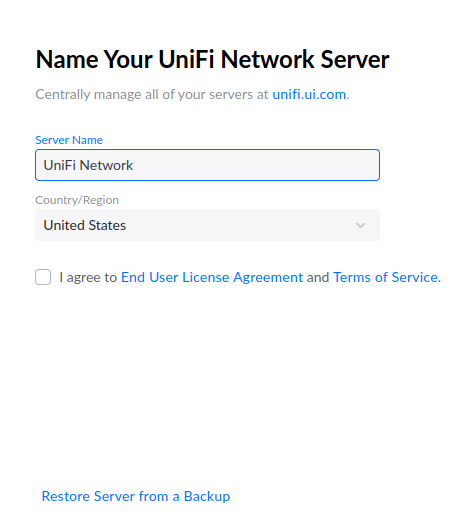
Testing for version 10 needed (see below). Version 10 introduces some changes that will require manual intervention for users to upgrade from a 9x release to 10x for this docker. There are 2 methods you can use to upgrade. Method 1: In place upgrade. Method 2: Backup of settings of current running docker, and redeploy of docker to a new location. Both these methods are described below. Method 1 has the advantage of being easier and quicker, but may require restore from an archive/backup if something goes wrong. Method 2 will leave your current running docker alone but requires additional work to create a second unifi docker, and both cannot run/be started at the same time. Both methods would be supported so simply choose what works better for you (non critical systems probably method 1, systems for no downtime method 2 probably). Method1: Confirm that the DHCP server on your network is functional. This is required for readoption of unifi devices. Edit the unifi-controller-reborn docker. The following changes are required: Step 1: Repository. Change this tag to a appropriate tag eg: 11notes/unifi:10-unraid (note this tag is rolling in this example so dont use this if you cannot experience any downtime ever) Step 2: Enable advanced view Step 3: under extra parameters modify them to be this: --memory=8G --tmpfs /unifi/log:exec,uid=99,gid=100 --tmpfs /unifi/run:exec,uid=99,gid=100 Click apply to finish and allow new image to be pulled. Wait 10 minutes for adoption to occur after logging into the web interface via browser or phone. Method 2: Confirm that the DHCP server on your network is functional. This is required for readoption of unifi devices. Step 1: Take backup of running container via system - backups. Choose "settings only" (you could chose a time period like 7 days but this was not tested). Step 2: NB: STOP container in Unraid (very important) and go to apps and search for unifi reborn app. Click install. Step 3: If you install the app without making any changes at this stage, it will deploy over your current app. You must modify these settings before installing: a) Turn on advanced view and give the docker a slightly different name such as appending '-10' on the end: b) Under more settings modify the volume to write data to a different place than your current unraid docker: NOTE THIS IS CRITICAL, if you fail to do this your current docker will get modified! Note below how I have changed the path to include '-10' on the end: Step 4: You will now need to go to the web UI and restore the backup you created in step 1. Click restore from backup: Once it restores, it should stop the container. Unraid does not start it again, you will manually have to start it after 2 minutes or so. Wait till its stopped, then start it again and it will be restored. It can take 5 minutes to start up after a restore. Dont forget to set autostart on the appropriate container when done. If anyone can test the above (ie take a backup) and report back if it worked or broke for you that would be great. Kind regards P





-
Hello, Currently unraid can only mount volumes with docker eg: docker run -v '/mnt/user/appdata/unifi-controller-reborn/':'/unifi/run':'rw' However I need to be able to mount tempfs eg: docker run --mount type=tmpfs,dst=<mount-path> from: https://docs.docker.com/engine/storage/tmpfs/#syntax The inability for unraid to be unable to do this means that files that do not need to persist must now be stored on the array which can be undesirable, and complicates security of read only images. This was discussed in github issue here: https://github.com/11notes/docker-unifi/issues/33 Proposal: Add gui method to create tempfs mounts as per dockers documentation so that both GUI and community apps XML can support this method. This would allow me to take advantage of this feature and no longer store unneeded files in the docker appdata area. Kind regards P
-
Tags are not ready yet, you will be notified on this thread when they are ready for testing.
-
you have a port conflict and the issue will keep coming back until you one day resolve it properly.
-
Check there are no port conflicts by stopping all other dockers and then starting only this one.
-
It probably just didnt alert you to a problem before. Nothing more.
-
9.5.21-unraid considered stable for home users.
-
This would have nothing to do with the unifi side as clients decide when to roam, you should investigate the energy socket device, reboot it update firmware or so on.
-
Take a look on page 1 for versions that are best suited for your deployment.
-
I have actually never set it up this way. Hopefully someone else has and can advise you.
-
I dont have remote management enabled either. Probably you didnt change the connection on the mobile app to just ip address and was using an old profile via their servers.
-
I use the official ios app without issue provided by unifi.
-
That is ofd because I checked the xml and it states “<ExtraParams>--memory=8G</ExtraParams>” So unclear why your is 4gb
-
Answered many many times in this thread. Update your inform ip in the settings.
-
9.4.19 supported.
-
I believe 9.4.19 has not caused any problems for anyone, if this is the case I will update this to be the latest version for people to use later. Let me know if this is not the case. P
-
Tnx for the update
-
No this image is tested under unraid only. The tags without -unraid appended are for other kinds of boxes.
-
Same issue as the other guy. Looks like you assigned 4gb to the docker image for some reason and overrode the default amount
-
Its hard for me to know what happens if the database kept crashing and ooming due to lack of memory and what this has done to the integrity of the database. Hopefully you can restore a working version and apply 8gb as per the deployment xml and it will work correctly going forward. The 8gb requirement has come up many times in this thread and every time people who have reduced it have created problems for themselves. Once its damaged there is not a lot I can do to repair it.
-
The docker requires 8gb to function properly as certain times the database maintenance temporarily uses more ram for a short period.
-
What do you mean by ‘increased to 4k’?
-
Unable to recreate issue. Works for me. Assuming it is specific to you and no longer investigating. Create a new VM and install a browser like edge/firefox without changing any settings at all and retest if you want to investigate further.
-
Upgrade to 9.3.43-unraid is now supported for all users.




