





exdox77
Members
-
Joined
-
Last visited
-
I am at a loss here. I created a share in Unraid. I can access the share with the username and password given from my computer with no issues. I typed the same IP address, username, and password in Protect and I keep getting Failed to connect to server. Has anyone been successful connect Protect to Unraid for backup? I see a bunch of stuff around Synology but not much around Unraid. To add, the username and password have no special characters or uppercase, everything is lowercase.
-
I just had the same issue. Updated the plugins and boom, upgrade working. Weird issue.
-
nevermind, during this whole process the usb drive got corrupt!!! replaced and now doing the sync again.
-
@JorgeB quick question. i started the array back up the other day and it started the parity sync just fine. everything was working up until yesterday when everything went offline and i wasnt even able to SSH into the server or access the webui. the array seem to be offline as well, but I see disk activity. I will pull the diagnostics in a bit and upload them. But wanted to get this out here to see if you knew something off the top.
-
alright, i kind of figured that was the case. now we wait for it to rebuild, sigh.... thank you.
-
ah. makes sense. what would be the recommended solution? replace the parity drive first with one of the newer ones and then replace the drives?
-
hive-diagnostics-20240530-1242.zip Are you suggesting to remove any existing partitions from the new drives? I did clear the drives from unassigned devices. Attached is the diagnostics file.
-
I am trying to replace two drives in the array. sdm is the parity drive. sdi and sdj are the new drives replacing two others that i have already taken out. when i go to array operation i get a message stating disk in parity slow is not biggest. but the disk is exact same disk as the two new ones. they were spares. i have already cleared the drives. do i need to format the drive before adding it to the array?
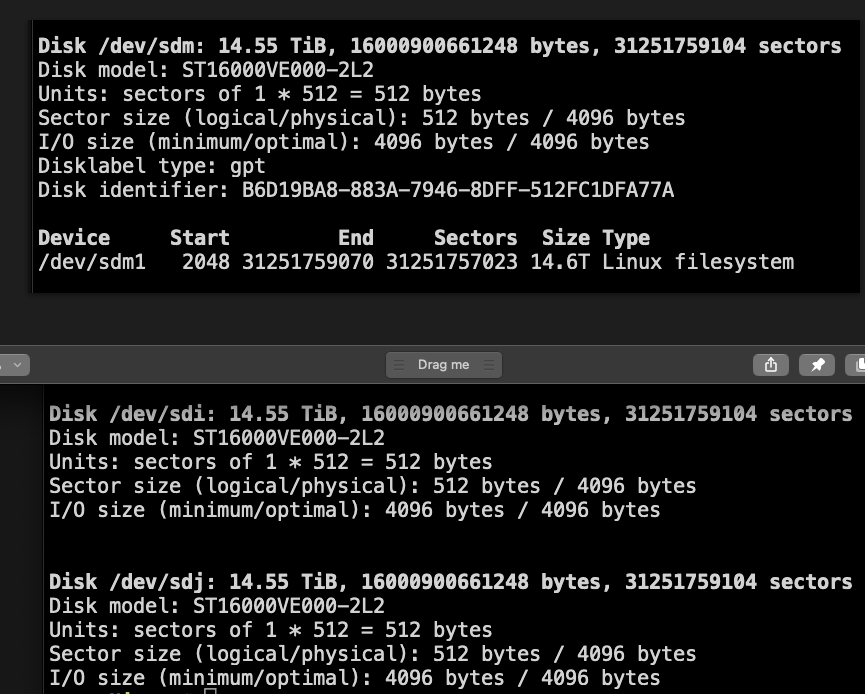
-
OMG you are a godsend!!! I was panicking for a minute!!!!!
-
I accidentally selected the wrong preserve settings and lost my array config. I did not back up manually since I am connected to Unraid Connect. Is there a way to go back in Connect to get a config from a previous day? Is there a way to restore the previous settings for the array? I have an image of the array prior to this happening, but it says all data will be lost if the array is started.
-
Thank you everyone for your support. I purchased new memory yesterday, went with Corsair with the same advertised specs. Ensure the MB was configured correctly and did one last memtest last night. Everything passed with flying colors and Unraid seems to be running great.
-
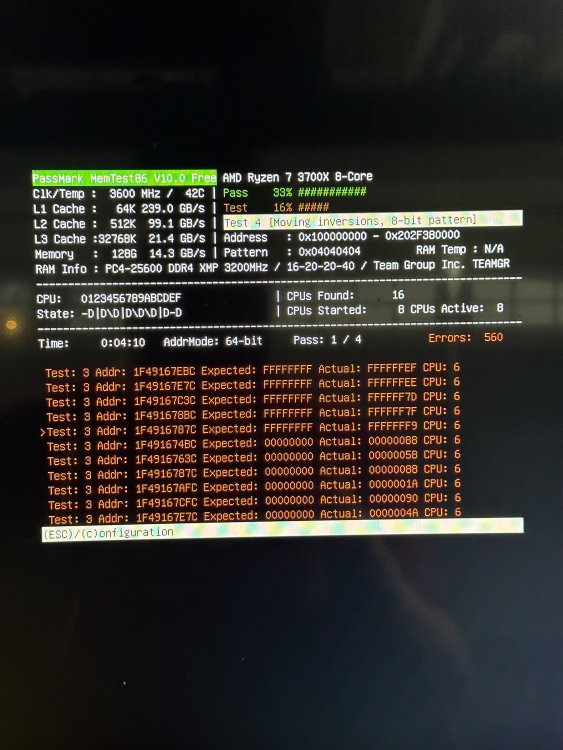
No OC on this board. It runs stock config. Memory test failed out because of too many errors.
-
No OC settings have ever been enabled. The system has been running for years without issues with no changes to the BIOS. The memtest failed out because of too many errors. Running memtest on the new memory now.
-
@trurl initial results do not look good. Looks like I will be ordering some memory.
-
I have not. If the USB drive is failing, could this cause these issues?

