




Skip to content
View in the app

A better way to browse. Learn more.

Unraid

A full-screen app on your home screen with push notifications, badges and more.

To install this app on iOS and iPadOS
  1. Tap the Share icon in Safari
  2. Scroll the menu and tap Add to Home Screen.
  3. Tap Add in the top-right corner.
To install this app on Android
  1. Tap the 3-dot menu (⋮) in the top-right corner of the browser.
  2. Tap Add to Home screen or Install app.
  3. Confirm by tapping Install.

blackf0rk

Members
  • Joined

  • Last visited

Everything posted by blackf0rk

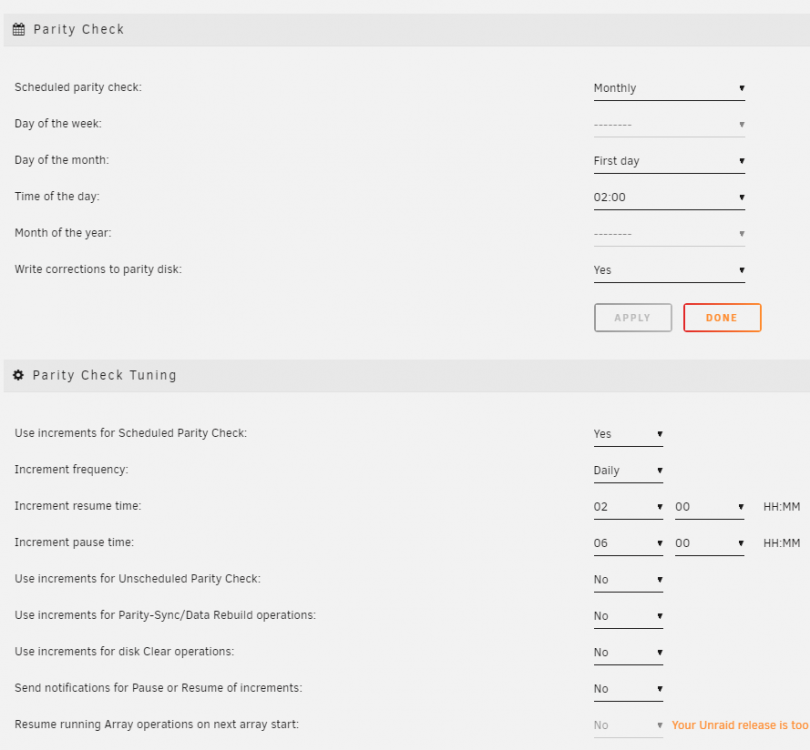
  1. Reporting on some unexpected behavior. Unraid version 6.8.3 Parity Check Tuning version 2021.01.19 See screenshot for my settings. What happened Parity check started early this morning as it was the 1st of the month. However, it's now 9am and the check is still going. I would've expected it to be paused. This is the first time I've noticed this happening. Since my initial installation of the plugin, I haven't changed its settings. I've always had it set up this way and it's been fine.
Account

Navigation

Search

Search

Configure browser push notifications

Chrome (Android)
  1. Tap the lock icon next to the address bar.
  2. Tap Permissions → Notifications.
  3. Adjust your preference.
Chrome (Desktop)
  1. Click the padlock icon in the address bar.
  2. Select Site settings.
  3. Find Notifications and adjust your preference.