





Jeff in Indy
Members
-
Joined
-
Last visited
Everything posted by Jeff in Indy
-
I restored from a quite old copy of Plex, seems to work OK. The rebuild should be complete late tonight, but I won't have time to work on the pool til probably Monday. I'll update when I get to it.
-
The pool or the entire thing?
-
Yeah, back in May I had a bad memory stick and replaced the memory.
-
Yes. I copied a file from my desktop's Downloads folder to my Data share. Probably.
-
The database isn't corrupt, that's why I restored from a backup that worked. But when I restored it, now I'm being told that it's read only.
-
It's "temp". I'm not sure why it's there, but it's emply.
-
This CAME from a backup. Then I tried it again. Same message.
-
So now I'm back to this non-stop message: Starting Plex Media Server. Error: Unable to set up server: sqlite3_statement_backend::loadOne: attempt to write a readonly database (N4soci10soci_errorE) Stopping Plex Media Server. kill: usage: kill [-s sigspec | -n signum | -sigspec] pid | jobspec ... or kill -l [sigspec]
-
OK, I tried the Maxell cards, no difference. I then pulled every drive out, and reset all the cables. I think there was a MOLEX splitter that had come loose. Now all drives are showing up, and my disc 7 and parity 2 are being rebuilt, and I have the non-Maxell cards in and running. So after ALL that, I'm back to square one: My Plex database won't run because of a read only error. I'm going to set a Minimum Free Space for my cache when my rebuild is complete. Squid asked if my cache is read only. I never got an answer to that since my system went belly up. Does anyone see anything of interest here? kaokulk-diagnostics-20220630-2322.zip
-
I reset the cards, no luck. Later today, I'll try seeing if Maxell cards fix it, if not, I'll recheck all the cables.
-
Diags included. Also a screenshot during boot, showing "SATA link down". Not sure why it's showing that. kaokulk-diagnostics-20220630-0831.zip
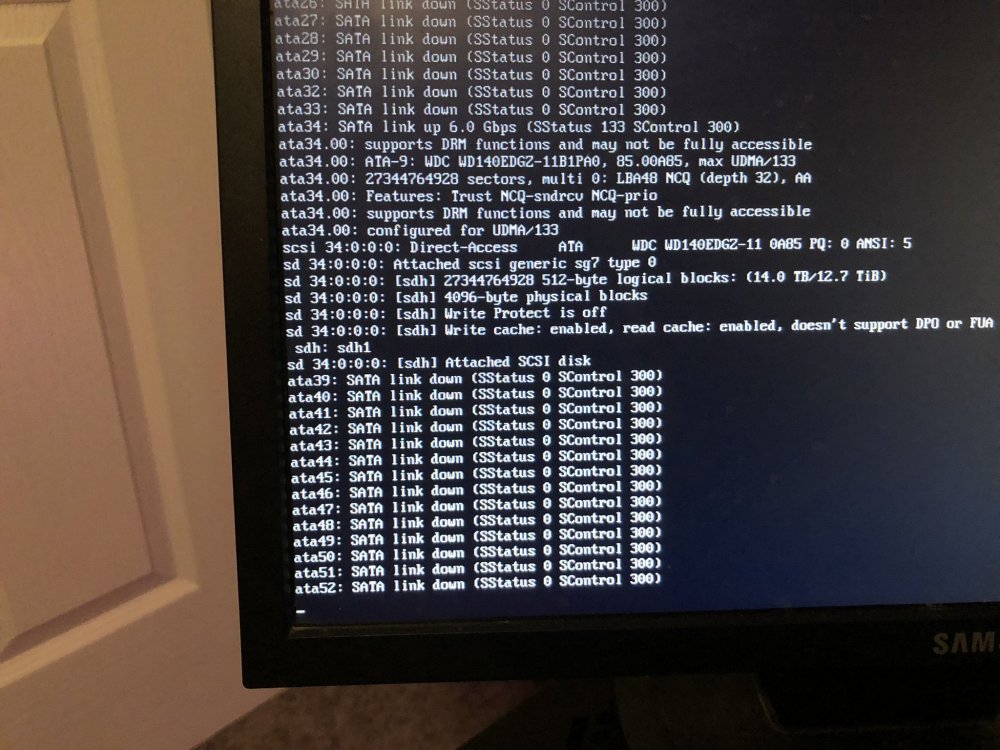
-
So frustrated right now… so I get 2 new SATA cards (mentioned above). Take the old Maxell cards out, put new ones in, hook everything up. Start it up, and the 2 drives that were out of sync don’t show up at all, as well as a third drive. Shut down, replace the SATA cables for those 3 drives. Start it back up, now FOUR drives are missing. They don’t seem to be on the same card, ones even in the motherboard. Aaaaack…
-
By the way, here's what I got: FebSmart PCIE3.0 to 4-Ports 6Gbps SATA 3.0 Expansion Card for PCs, Servers, NAS, MAC Pros-Plug and Play on Windows, MAC OS, Linux System-ASMedia ASM1064 Non-Raid PCIE 3.0 SATA Controller (FS-S4-Pro) https://www.amazon.com/gp/product/B097R6MQBT/ref=ppx_yo_dt_b_asin_title_o00_s00?ie=UTF8&psc=1
-
Well, I wondered, since only 1 of those drives use the Marvell card. The other is on the motherboard directly (disc 7, the first one to get out of sync). I figured that maybe the Marvell cards were somehow screwing up other SATA connections, since I didn't know anything about the Marvell problem, and was too much in a panic to do so. I'll wait until the card comes in and replace it, then rebuild disc 7 and Parity 2 from the working parity drive.
-
I've ordered a new card, and it will be here tomorrow. I had (as far as I know) a working Disc 7 that I was rebuilding when my second parity disc went down. Do I assume that Disc 7 is trash, and rebuild it from my working parity, or should I assume disc 7 is OK, and rebuild parity from that? My guess is the safer bet is to rebuild 7 from the working parity drive.
-
So I should shut down the server, and order a new controller?
-
I'm now flying without a net, and I'm not sure what to do next. I have 2 drives that are out of sync. Any help would be greatly appreciated.
-
I was looking for that setting, when my server became unresponsive on my desktop. My phone was still showing it working, so I rebooted my desktop. Now one of my parity drives is showing it's invalid, and my rebuild of disc 7 has changed to a Read-Check, and has paused. Where do I go from here? Now I'm afraid to do anything. kaokulk-diagnostics-20220628-1600.zip
-
Well Squid, you tell me. (After moving some files from the cache, I rebooted, and disc 7 came up as invalid. I stopped the array, "removed" disc 7, restarted, stopped, "re-added" disc 7, and it is rebuilding as we speak. So you'll see disc 7 as Invalid in the log.) kaokulk-diagnostics-20220628-1402.zip
-
I overflowed my cache yesterday, and once again, the Plex database got corrupted. At least I'm getting good at restoring from an old database. So I copied over an older copy, but the UI wouldn't load. I go into the Log, and see these lines over and over... Starting Plex Media Server. Error: Unable to set up server: sqlite3_statement_backend::loadOne: attempt to write a readonly database (N4soci10soci_errorE) Stopping Plex Media Server. kill: usage: kill [-s sigspec | -n signum | -sigspec] pid | jobspec ... or kill -l [sigspec] How do I enable writing to the database? I hadn't come across this before...
-
Is there a way to get a listing (xml, cvs, xls, txt) of files that are currently on my server? I usually only search for file names, and Krusader search takes forever, and I'd like to know if the unthinkable happens and I lose files on a drive what files I actually lost. Something like the DOS command "dir *.* /s > files.txt" (Which doesn't seem to work properly from my Windows machine, I've tried)
-
Update: I moved the docker.img file, and restarted Docker. Then reinstalled the apps, all that seems to work fine. If anyone notices anything else in the file, please let me know.
-
One problem solved, another arises. Memory replaced, ran the Mem test, 1 complete pass, no errors (I would run it longer, but I need it up and running by morning). I was looking at the 2 drives that kept messing up (2 and 4), and noticed that those 2 drives were using the same SATA power cord (!!!!!) So I replaced it with another cable. I'm hoping that helps with the ATA errors. It's up and running, and Parity is starting to rebuild. However, I've got 2 problems, I believe related: 1) The server monitor is showing the following error: BTRFS: error (device loop2) in btrfs_finish_ordered_io:2736: errno=-5 IO failure 2) I can't get Docker to start I have attached a diagnostic dump, after booting I turned off Docker, then turned it back on. It didn't start, but I got the BTRFS message again. I have a diag dump from initial boot, if you need it. kaokulk-diagnostics-20220524-1931 Restarting Docker.zip
-
Still on 0th pass on memory test, 134 errors 18 minutes into it. Well, crap. Ordered new memory, going to pick it up this afternoon. Thanks for the advice. I've tried replacing data cable on #2, so IO guess I'll try to see if I can find another power cable to use.
-
My system ran for a year without any major hitches, now it seems the problems are non-stop... After my recent debacle, I finally got the system back on track and rebuilding the Parity discs. Today (2 days later), I was told my log was full and needed to be rebooted. I dumped the diagnostics and rebooted the machine. Question #1 - Why is my log full after 2 days? After running diagnostics, I rebooted the machine. I was told that discs 2 and 4 had errors on them in Fix Problems. I went into Maintenance mode, and ran xfs_repair on Disc 2, first checking then fixing. Ran it again, had to fix it again. Question #2: Is this normal? Ran it on Disc 4, no errors. Rebooted to see if errors appear on the server monitor, and I was told again that Disc 4 had issues, and to run xfs_repair (again). I did, it found no errors, but I told it to fix it anyway. Rebooted again, the error has not reappeared. Question #3: Is this showing a larger issue? I'm guessing not, but I really want to get everything fixed. The server is up and restarting the parity rebuild. I DO have an error on the server monitor: BTRFS: error (device loop2) in btrfs_finish_ordered_io:2736: errno=-5 IO failure Question #4: What should I do with this? How do I check it? I'm including the initial log full diagnostic. I have a clean diag after I rebooted the first time, as well as screenshots of the server monitor each time I rebooted, if any of that would help. kaokulk-diagnostics-20220524-0953.zip

