





Jeff in Indy
Members
-
Joined
-
Last visited
Everything posted by Jeff in Indy
-
I CANNOT get the array to stop. When I do, it keeps saying "Retry unmounting disc share(s)..." in the status bar. I have rebooted several times, and each time it won't stop the array properly. Is there a way to boot into UnRaid without starting the array?
-
No, I get that. I was just clarifying that none of the files that are emulated are of any importance to me.
-
I guess I didn't realize what you were talking about. So, assuming there is nothing of value on the Parity drives, I just reintroduce the 2 drives as New Config, and let the parity rebuild?
-
It's still moving data, but when it's done I'm not sure it will tell the whole story. My apologies, the story is scattered throughout the thread. When it's done, I'll post diagnostics, but in the meantime, here's the synopsis: Drive 2 and 8 are unmountable. I've been assured that the drives are fine, there is another issue. When I did an xfs_repair on the emulalted drive 2, I had 2.2TB that were moved into lost+found. JorgeB suggested I could reassign the UUID of physical drive 2 and add it to Unassigned Devices, and I might possibly have more intact files that I could move over to another drive or computer. That's what I'm doing now. I also, prior to that, moved the emulated files from Drive 8 over to a good drive. So when this move completes, here what I will have: Physical drive 2 will be empty, its files moved to another good drive. Emulated drive 2 will still show files on it, as it has no idea that I'm secretly having relationships with the physical drive ;-). Whatever files it thinks I need on drive 2, I don't. Physical drive 8 will probably still have files on it, but I don't need them, because... Emulated drive 8 will have already moved those files over. So, both drives will either be empty, or have files I don't care about. The emulated drives will also either be empty, or have files I don't care about. I will post diags when it completes. It says 3 1/2 hours, but its estimates has been less than stellar so far...
-
I am using MC to move all of the data from the physical hard drives onto another disc in the array. So here's where I will be when it is done, I need steps to proceed after this: The hard drives will be empty (not zeroed, just empty). The parity will still have the data from those 2 drives replicated on them, but that data is not needed - all that data has been moved. I'm sure part of the instructions will be to let the parity rebuild to reflect the moved files, but how do I get the drives back to mountable - format it? And in what order do I need to do these steps?
-
Well, I KNOW I've got a lost+found in option 1. Using option 2 sounds better, as it MAY help eliminate some or all of the lost+found, or in the worst case, I'm no better off. Are the drives "X"ed out because it has lost parity? I mean, will rebuilding parity help with making the drives usable again? I feel like there's something fundamental about the whole thing I'm just not understanding...
-
It took a while to get it right, but I got Disc 2 in UD and it LOOKS like the data is OK, but I can't figure out how to check the disc or copy the files. I can live with the 2.2TB in lost+found. I just want to be able to get the discs to not be disabled. Do I need to wipe the drives and rebuild?
-
About half the time I am unable to shut down the array. The status bar displays "Array Stopping - Retry unmounting disk share(s)..." Any tips on troubleshooting why this is happening?
-
I'll try that. How can I tell why the disks are unmountable? What should I try? I don't particularly care about Disc 8, it's only 4TB and I've got the space. But I don't want to keep using Disc2 (10TB) if there's a physical problem with the drive...
-
My lost+found folder is 2.2TB... OK, so now what do I do? Both drives are still listed as disabled. I'm not sure where to go. kaokulk-diagnostics-20220519-1955.zip
-
To be clear, "follow through" is to run it WITHOUT "-n"?
-
I hadn't had time to work on this for a while, but today Disc 2 became unmountable. I shut down the server, and tried replacing the SATA data cables on both drives. I started it up, went to Maintenance mode, and ran the Check Filesystem Status. Disc 8's results are unremarkable, nothing to report. Disc 2's results are nearly 6,600 lines long, errors everywhere. How should I proceed? I have 2 parity drives, so I could rebuild if I need to. Drive 8 (my smallest drive, 4TB) is currently empty, but I haven't zeroed it out. kaokulk-diagnostics-20220519-1955.zip
-
I swapped out the data cables a couple of days ago. Can you give it one more lookover? And yes, I realize that Disc 8 now has a problem. I returned from a trip to find that it has died. I'll be replacing it soon. Hopefully that's the only one. kaokulk-diagnostics-20220508-1657.zip
-
Replaced the data cable, need to figure out how to replace the other one. kaokulk-diagnostics-20220506-1055.zip
-
Duh. Of course. My brain is thinking there has been something wrong with the parity, and that it's creating a new parity. Thanks for pointing out the obvious that I didn't see...
-
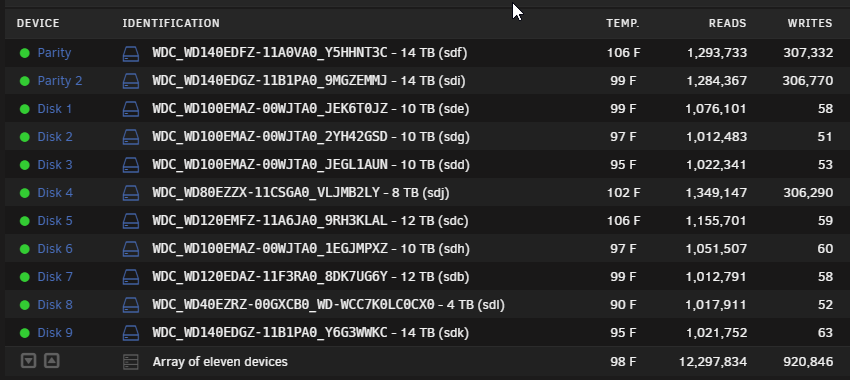
Well, that I figured. I find it interesting that the byte count is almost identical to the Parity drives, as if it's completely re-writing the disc.
-
OK, it's been almost 10 hours. The Parity was zooming along, now it has slowed down quite a bit. kaokulk-diagnostics-20220505-1712.zip
-
OK, the same two drives have had their power cables swapped. Diag attached. Interesting thing: during the parity check, 3 drives are doing an awful lot of writing: the 2 parity drives, and for some reason, disc 4 (now sdj). kaokulk-diagnostics-20220505-0722.zip
-
So I swapped the data cables for Disc 1 and 2 (sde and sdg, respectively) and all seems to be working well. The files are appearing as normal, and I started a new parity check. Here is the new log. Let me know if you think something is amiss. kaokulk-diagnostics-20220504-1949.zip
-
OK, I'll try that later today. One more thing I noticed, in case it makes a difference.. It is showing as normal on the Main tab. When I click on the folder icon on the right to see the files, it says: No listing: Too many files I'm worried that means a corrupted file system.
-
kaokulk-diagnostics-20220503-1829.zip
-
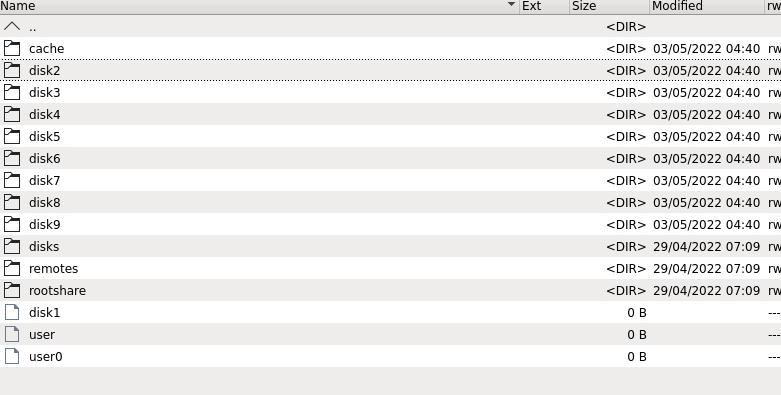
After a small problem with one of my disks, I followed the suggestions listed there. I then started a Parity Check. It is taking much longer than usual (usually takes anywhere from 1-11 days, it's been 4 days and it's at 5.7%, and has an estimated 55 days remaining. It's reporting 853,000+ Sync errors detected. Today I started Plex to watch a show, and it couldn't find any of the shows I chose. Looking at the share in Windows, it only showed 2 TV show folders in that share. Perusing the drives using Krusader, I can see the TV folder in several drives, and see many series in them. However, when I look at the DISKS folder, disk1 is not showing as a folder, it is showing as an unknown file type with 0 bytes. How should I proceed?
-
Appreciate all the help, and I'll look into the system share. Here's the results of the scan with verbose turned on. Would I just run it again without the "-n" to fix any problems? Not sure where to go now... Disk 1 Check Results.txt
-
Well, my post was more general, but OK, here it is... diagnostics-20220425-1344.zip
-
So a couple of weeks ago, I received a message that Disk 1 had errors. I looked, and it had 128 errors overnight. I wasn't too concerned (maybe I should be). I have the option to ignore all errors of this kind on disk 1, or that warning about the 128 errors will continue to show in Fix Problems. I want to be warned if I continue to have problems on disk 1, but I do NOT want to constantly see this error that has already occurred. Is there any way I can clear THIS error, but continue to receive errors on this disk in the future?
