Varean
Members
-
Joined
-
Last visited
Everything posted by Varean
-
So, I've been getting an alert from my Unraid for the last day and a half about the Parity drive showing an error, and now the parity drive was disabled, I stopped the array, but in reading the diagnostic files I can't figure out why unraid disabled the disk. I'll post the SMART results, not sure what else to look at. ST8000VN004-2M2101_WKD03SFK-20210919-2306 parity (sdh) - DISK_DSBL.txt
-
I'm trying to set up a new Peer in Unraid, but after I name the peer and generate both keys I try to hit 'Apply' and nothing happens, if I leave the page and go back the entry I created is gone. Anyone else see this kind of issue?
-
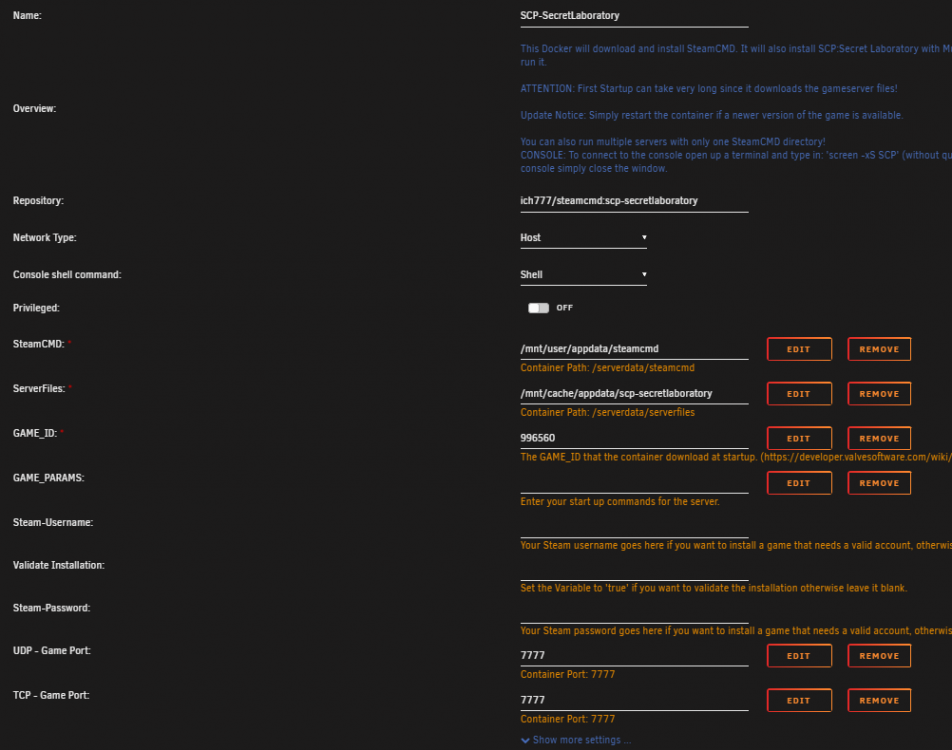
Hey Ich777, promise this is my last question (for a long while). On the info page in CA (hit the little i icon) it says to connect to the console, open a terminal and type 'screen -xS SCP' When I click on the SCP icon on my docker page and hit 'Console' and type that in, I get 'There is no screen to be attached matching SCP' When I try and run it on the unraid terminal, I just get -bash: screen: command not found. Am I doing something wrong?
-
A "Cron" job is just basically a scheduled Task in Linux, like "Perform X command at Y date and time" But yes, I personally use it to keep a backup of all my Dockers in the AppData directory, but if you just specifically wanted 7dtd you could exclude everything else. I also agree with @ich777, I use it to back the entire thing up once a week, and it deletes the old backup every week as well, but the way its worded it sounds like just overwrites the old one, but the CA Backup thread would provide clarity on it.
-
I personally use a plugin called CA Backup/Restore Appdata. It'll allow you to backup the entire Appdata share (or only specific apps). You can't do just individual files with it tho, but you can schedule it. Other than that some people might suggest setting up a cron job or a different Plugin, it's just what I found to work for me.
-
It's not a source game, everyone assumes you're running it under a windows machine so they say "Appdata/roaming" and its a file called "Config_gameplay.txt" but all I can find under appdata/scp-secretlaboratory is ConfigTemplates. I was trying to view the /mnt/cache directory, but I can't figure out how to view it. I also can't use a console on it, when I use 'screen -xS SCP' it tells me 'There is no screen to be attached matching SCP' On the SCP Steam help page, there is a guide for configuring SCP with SteamCMD, it shows a screenshot of the directory which I can pull up, but it shows the a file called 'LocalAdmin.exe' and in my directory LocalAdmin has no extension, and when adding an exe to it, Windows won't run it. EDIT: I want to say that I was able to get the configuration files working for me so now I can configure the server for admin, the solution was this, as this might be a good thing to add to the Docker app by default 1. Go to the directory you installed the docker to (In my case /mnt/cache/appdata/scp-secretlaboratory) and create a folder called 'Config' 2. With the docker app stopped, edit it and under GAME_PARAMS put the argument '--config Config' (This tells the game when it runs to look for config files in the previously created folder) 3. Run the Docker App and let it run for a minute or two, and check the Config folder, you should have a handful of txt files (like config_gameplay.txt) listed. Now you should be able to make any changes to the config files you want, just make sure to restart the docker app after any changes.
-
That actually worked perfectly, not sure what setting I had messed with, could've been an issue with my router back then. Maybe you could also help me with this, where do I go to edit the server config files?
-
So when I first got the docker installed, it worked fine when connecting to my internal server IP and port. But when trying to connect via my external ip and port it would say "Disconnected - The specified host is not available". Since trying to troubleshoot, it now says that for both instances, and when I try to read the log for the docker, the window scrolls with the log but after a bit both it and the tab I have open for my unraid server stops responding.
-
Hi, I am trying to set up the SCP: Secret Laboratory as a docker, but I am having trouble getting the ports to forward from my router, and I just want to make sure it isn't an issue with the docker container. I left basically everything default in the container and let it sit overnight to download the game. Reading the log it does set my Server IP equal to my public IP address, there is a line about IPV6, which I have IPV6 disabled on my router Maybe that might be the issue? After multiple reboots I just can't get the port to show open, and I'm not sure if that is related to the fact that it can't see a service running from my server IP on that port.