Latos
Members
-
Joined
-
Last visited
Everything posted by Latos
-
I did also verify that the Windows Client is now seeing 200MB/s to the NVMe drive now that Exclusive access is configured correctly.
-
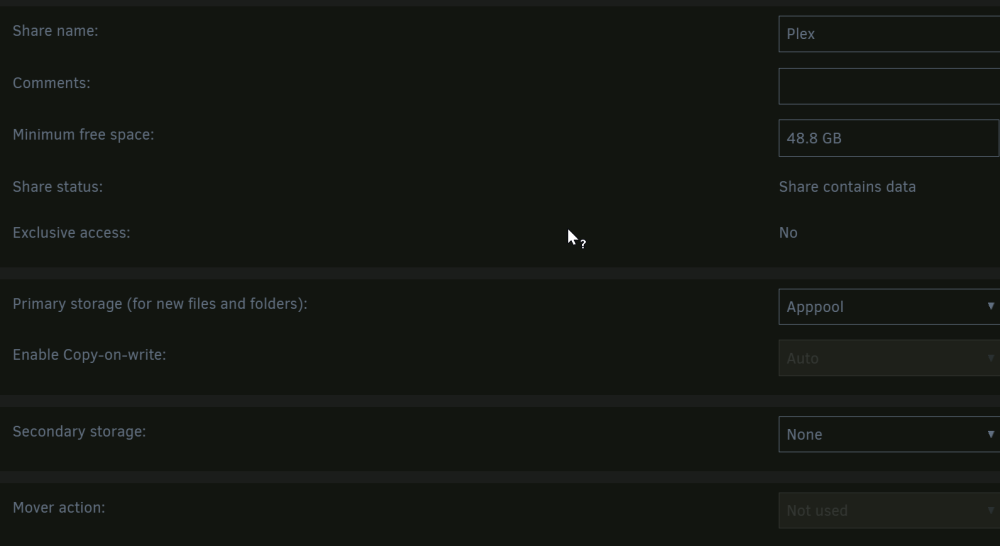
From LinuxClient 1 mounted the Plex share via SMB. Noticed that my Plex share was not Exclusive because the NFS export was enabled, I did not realize that was a requirement. Running FIO looks much better now: Trying from Linux Client 2, since we should now be able to saturate the 1GB link. So it seems that the issue is when not having Exclusive shares enabled. So this is fine for data that writes directly to cache pools, as I have no issues running exclusive shares. But for actual write cache for the array that mover runs on, is there a way to improve the performance there or is something else I have bottlenecking that cache? For example, I've been planning on running a Pool of 2 SSDs striped for improving write performance to the array and then having the mover run at night, is it possible to get better than the 50MB/s-90MB/s writes that I was seeing without exclusive shares?



-
There may be something on the networking side of the Windows machine causing problems, but I get good iPerf results from the Linux Clients to Unraid and still see low throughput when using Fio or DD to write to the shares when mounted via NFS. I would expect that if the issue was between Unraid and the switch that the issues with iPerf would be consistent across all clients.
-
Hey Jorge, The realtek NIC is only on my MyPC. On Unraid its an Intel 82599ES, this is also the NIC type on Linux Client 1. I did try disabling bridging just for testing, as I had seen another post about that, but no change to the observed perf.
-
Some other things I wanted to mention. The Array and ArrayCache are all attached to an Adaptec HBA. TurboWrite is not enabled, DirectIO is Enabled, I am going to try enabling Exclusive Shares since the Apppool does not write to the array ever, it should benefit from the Exclusive Share (I think). I also spoke to someone I know with a bit more networking experience who mentioned that iPerf from Windows to Linux can be buggy, and to try adding parrallel streams. Once I add 4 or more streams the iPerf does eventually hit the 250MB/s mark that I was expecting being that its a 2.5Gb NIC. Also for reference some File Explorer transfer benchmarks: Write Perf from Windows to the Array 50MB/s Read Perf from the Array to Windows 90MB/s Write Perf from Windows to NVMe Cache: 90MB/s Read Perf from NVMe Cache 230MB/s
-
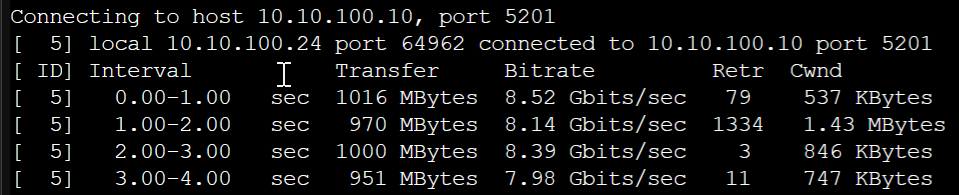
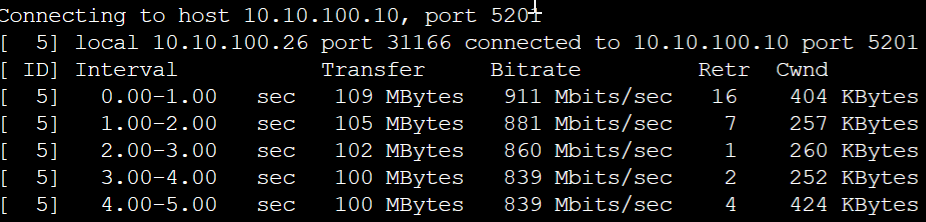
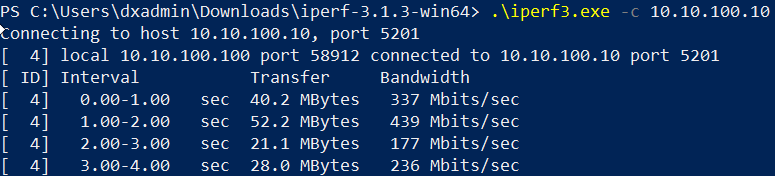
Hello Everyone, I have been investigating issues with my Unraid server and poor write performance for some time, and after many searches through the forum decided I would make a thread to see if anyone else has any other ideas. Issue From a variety of clients write performance is at best 50% of what I would expect it to be, regardless of client (Windows/Linux) or Protocol (SMB/NFS). Environment Unraid - i3 - 9100 - 64 GB DDR4 ECC - Array: A mix of 8 - 16tb HDDs from a mix of vendors - ArrayCache (writecache): A single 3TB SAS HDD just for saving on parity overhead when writing - NVME Cache (apppool): WD Blue SN570 500GB (just for Plex, but have been using for testing throughput) - Connected by 10Gb DAC to Switch MyPC - Connected by 2.5Gb (Realtek) to Switch - I can provide specs if relevant Linux Client 1 - Dell 3630 - OS: Proxmox - Connected by 10Gb DAC to Switch Linux Client 2 - Lenovo M720Q - OS: Proxmox - Connected by 1Gb NIC to Switch Switch -QSW-M2116P-2T2S-US Troubleshooting For the sake of ruling out the Array and ArrayCache I am just looking at Performance over the network to the NVME Cache which should be capable of some reasonable perf, I don't have screenshots from my earlier testing of the Array and ArrayCache and currently I have a script running thats keeping those disks busy so I will circle back around to those. I started by doing some FIO Checks to see the local disk speed on Unraid with the mayadata/fio app. Using this command to write to the cache directly : fio --name=fiotest --filename=/mnt/apppool/writetest --size=1Gb --rw=randread --bs=8K --direct=1 --numjobs=2 --io engine=libaio --iodepth=32 --group_reporting --runtime=60 NVME Cache: IPerf3 from the 3 Clients: LinuxClient1: LinuxClient2: WindowsClient: This is the one that confuses me. Despite a 2.5Gb NIC the perf to Unraid (and to the other two clients) is all over the place and quite low, however only in one direction, which I have read is an issue with Realtek NICs. But this is obviously a network issue. So I have taken this client out of the testing, as the other two clients are at least connecting to each other and to Unraid at full link speed via Iperf. So what I would expect from here is that since the Disk is capable of 976MiB/s to 1178 MiB/s that I should be able to fully saturate a 1GB write, or at least get 2-3Gbps of write performance if I write to this disk via NFS from the client with the 10Gb NIC. So I used NFS to mount the NVMe drive with the following in /etc/fstab 10.10.100.10:/mnt/user/Plex /plex nfs defaults,nofail 0 0 and just to verify that the share /mnt/user/Plex is using only the cache: So from the NFS Mount on LinuxClient1 I do an ls in the directory /plex and it takes quite a while to return anything the first time, which I find sort of odd as there isn't much in the directory. Then I use the following command to test write perf: time dd if=/dev/zero of=/plex/testfile bs=16k count=128k and I'm seeing an output of 60MB/s (ish) from both Linux Clients. This does not feel like anywhere what we should expect from this based on iPerf and FIO. Is there something that I am missing or am I just ignorant of the expected perf via NFS/SMB? Thanks in advance for any help. EDIT: Decided to also run a FIO from the Linux Clients. The Perf seems to jump all over the place. On Client 2 one run had 50MB/s and another time it was in the Kbps range. Client 1 had 1 good run at 300MB/s and then followed up with the screenshot below. Is this maybe the SSD cache or something? From Client 1: From Client 2:




-
Looks like that worked, rebooted and so far no issues. Thank you!
-
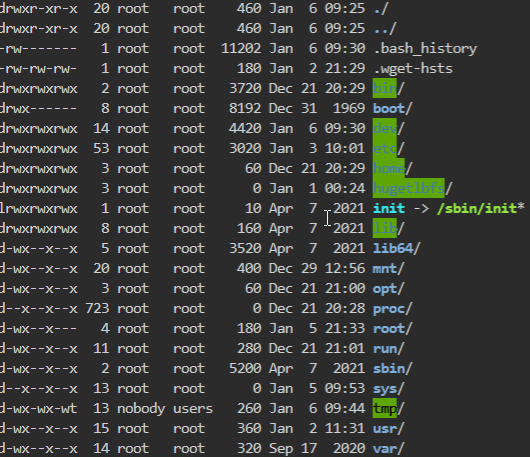
While trying to change some permissions I attmpted to run chmod -r 777 ./ on the directory I was in, but evidently I ran it against the root directory / I stopped it as soon as I noticed what I had done, but it was too late. Any good options to remedy this or I am stuck with wiping my USB and starting over? If I need to wipe my USB and start over, is there a good way to backup config?